
Fine-Tuning vs. Prompting: Practical Pros and Cons
This comprehensive guide explains the key differences between fine-tuning and prompting for customizing AI models. We break down when to use each approach, covering practical considerations like costs, implementation difficulty, performance requirements, and maintenance needs. You'll learn through clear examples and decision frameworks how to choose the right method for your specific use case, whether you're a beginner experimenting with AI or a business implementing production solutions. The article includes real-world scenarios, cost comparisons, and step-by-step guidance to help you make informed decisions about AI customization strategies.



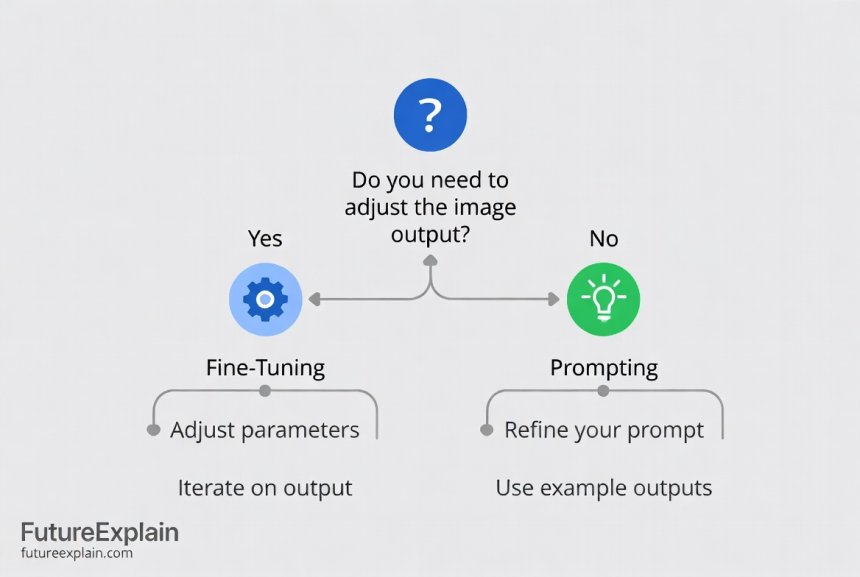
Fine-Tuning vs. Prompting: Practical Pros and Cons
When working with AI models like ChatGPT, Claude, or other large language models, you often face a critical decision: should you customize the model through fine-tuning, or can you achieve your goals through clever prompting? This choice isn't just technical—it affects your costs, development time, maintenance burden, and final results. In this comprehensive guide, we'll break down both approaches in simple terms, compare their practical pros and cons, and provide clear frameworks to help you choose the right path for your specific needs.
Think of prompting as giving clear instructions to a very capable assistant, while fine-tuning is more like specialized training to create a custom expert. Both have their place, but understanding when to use each can save you significant time, money, and frustration. Whether you're a business owner, developer, or AI enthusiast, this guide will give you the practical knowledge to make informed decisions about AI customization.
What Are Prompting and Fine-Tuning?
Before we compare these approaches, let's establish clear definitions that anyone can understand, even without a technical background.
Understanding Prompting
Prompting is the process of carefully crafting the input you give to an AI model to get the desired output. It's like learning how to ask questions in a way that gets the best answers. When you use prompt engineering techniques, you're not changing the AI itself—you're becoming better at communicating with it.
Key characteristics of prompting:
- You work with the model as it exists
- No technical changes to the AI system
- Results depend on how you phrase your requests
- Immediate testing and iteration
- Usually no additional costs beyond standard API usage
Understanding Fine-Tuning
Fine-tuning involves taking a pre-trained AI model and giving it additional training on your specific data to adapt it to your particular use case. This actually changes the model's internal weights and behavior. It's like taking a general doctor and giving them specialized training in a specific medical field.
Key characteristics of fine-tuning:
- You create a modified version of the original model
- Requires technical setup and training data
- The model learns patterns from your specific examples
- One-time setup cost with ongoing hosting expenses
- Creates a specialized model tuned for your needs
The Core Differences: A Side-by-Side Comparison
Let's look at how these approaches differ across several important dimensions. This comparison will help you understand which factors matter most for your situation.
Implementation Complexity
Prompting: Low to moderate complexity. Anyone can start prompting immediately through chat interfaces. Advanced prompting techniques require learning but no programming. You can implement complex chain-of-thought approaches without technical skills.
Fine-Tuning: High complexity. Requires technical knowledge, data preparation, and understanding of training processes. You'll need to handle data formatting, training configuration, and model evaluation. For production systems, you might need MLOps practices.
Cost Structure
Prompting: Pay-as-you-go. Costs scale directly with usage. No upfront investment beyond time spent on prompt development. Predictable costs based on token usage. This aligns well with cost optimization strategies for variable workloads.
Fine-Tuning: Higher fixed costs. Training costs (one-time), hosting costs (ongoing), and potentially GPU rental costs. More economical at high volumes where per-query costs matter. Requires budgeting for both development and operations.
Performance and Quality
Prompting: Limited by the base model's capabilities. You can guide but not fundamentally change how the model thinks. Consistency can be challenging with complex tasks. Quality depends heavily on prompt design skill.
Fine-Tuning: Can achieve higher specialization and consistency for specific tasks. The model internalizes patterns from your data. Better handling of domain-specific terminology and formats. Potentially reduces the need for complex prompting.
Maintenance and Updates
Prompting: Easy to update and iterate. Change prompts instantly. Adapt quickly to new requirements or discovered issues. No technical debt from model versions.
Fine-Tuning: More complex maintenance. Model updates require retraining. Version management needed. Must track which model version produces which results. Consider model versioning strategies for production systems.
Speed and Latency
Prompting: Uses existing optimized infrastructure. Generally fast response times. No additional processing beyond the standard model inference.
Fine-Tuning: May have similar or slightly higher latency depending on hosting. Custom models might not benefit from the same optimizations as widely-used base models.
Data Requirements
Prompting: No training data needed. You provide examples in the prompt itself (few-shot learning) or craft instructions (zero-shot).
Fine-Tuning: Requires substantial, high-quality training data. Typically hundreds to thousands of examples. Data quality significantly impacts results. You might consider synthetic data generation if real examples are limited.
When to Choose Prompting: Ideal Use Cases
Prompting should be your first approach in most situations. It's faster to implement, easier to change, and often sufficient for many applications. Here are scenarios where prompting shines.
General Knowledge and Creative Tasks
For tasks that don't require specialized knowledge, prompting is usually sufficient. This includes creative writing, general Q&A, brainstorming, and content generation on broad topics. The base models are already excellent at these tasks, and careful prompting can extract their full potential.
Rapid Prototyping and Exploration
When you're exploring what's possible or building a prototype, prompting lets you iterate quickly without technical overhead. You can test multiple approaches, gather feedback, and refine your requirements before committing to more complex solutions.
Low-Volume or Variable Usage
If your application has unpredictable or low usage patterns, prompting's pay-as-you-go cost model is more economical. You don't pay for idle capacity or upfront training costs. This is ideal for small business applications with fluctuating needs.
Tasks Requiring Flexibility
For applications where requirements change frequently or you need to handle diverse inputs, prompting offers the flexibility to adapt quickly. You can modify prompts on the fly without retraining models.
Limited Technical Resources
If you don't have machine learning expertise or dedicated engineering resources, prompting is accessible through tools like no-code AI platforms. Many businesses achieve impressive results with sophisticated prompting alone.
When to Choose Fine-Tuning: Ideal Use Cases
Fine-tuning becomes necessary when prompting reaches its limits. These are situations where the investment in customization delivers clear, measurable benefits.
Consistent Output Formatting Requirements
When you need the AI to consistently produce outputs in specific formats (JSON, XML, specialized templates), fine-tuning can teach the model these patterns more reliably than prompting. This is valuable for integration with other systems.
Domain-Specific Language and Terminology
For technical fields, legal documents, medical information, or other specialized domains with unique vocabulary, fine-tuning helps the model understand and use terminology correctly. The model learns from examples in your domain.
High-Volume Production Applications
At scale, the cost savings from fine-tuning can be substantial. If you're processing thousands or millions of requests, a fine-tuned model that requires simpler prompts can reduce both latency and cost per query.
Consistency and Reliability Requirements
For applications where consistency is critical (customer service responses, document processing, quality control), fine-tuning reduces variability. The model internalizes the desired patterns rather than relying on prompt guidance each time.
Proprietary Knowledge Integration
When you need the AI to leverage proprietary information, internal documentation, or unique data sources, fine-tuning can incorporate this knowledge directly into the model's weights. This goes beyond what's possible with RAG approaches alone.
Cost Analysis: Breaking Down the Numbers
Understanding the financial implications is crucial for making informed decisions. Let's examine the cost structures of both approaches with realistic examples.
Prompting Cost Structure
With prompting, you typically pay per token (word piece) for both input and output. For example, using GPT-4 might cost $0.03 per 1K tokens for input and $0.06 per 1K tokens for output. A typical business email generation (200 tokens output) might cost less than $0.02 per email.
For a business sending 1,000 personalized emails per month:
- Cost: ~$20 per month
- No upfront costs
- Variable with usage
- No technical infrastructure needed
Fine-Tuning Cost Structure
Fine-tuning involves multiple cost components:
- Training data preparation (time/cost)
- Model training compute costs
- Hosting/inference costs
- Maintenance and updates
For the same email generation task with fine-tuning:
- Data preparation: 40 hours at $50/hour = $2,000
- Training: $100-500 depending on model size
- Monthly hosting: $200-1,000
- Total first-year cost: $4,400-9,000+
- Cost per email at 1,000/month: $0.37-0.75 (first year)
The break-even point depends on volume. At 10,000 emails/month, fine-tuning becomes more economical.
Hidden Costs and Considerations
Both approaches have hidden costs:
Prompting hidden costs:
- Prompt development and optimization time
- Testing and quality assurance
- Monitoring for hallucinations or quality drift
Fine-tuning hidden costs:
- Data collection, cleaning, and labeling
- Model evaluation and testing
- Infrastructure management
- Version control and rollback capabilities
Practical Decision Framework
Use this step-by-step framework to decide between fine-tuning and prompting for your specific project.
Step 1: Define Your Success Criteria
Start by clearly defining what success looks like. Consider:
- Accuracy requirements (90%? 99%?)
- Response time constraints
- Cost per query targets
- Development timeline
- Available budget
Step 2: Assess Your Data Situation
Evaluate what data you have available:
- Do you have hundreds of high-quality examples?
- Is your data labeled or can it be easily labeled?
- Does it represent the full range of inputs you'll encounter?
- How frequently does your data change or expand?
Step 3: Test with Prompting First
Always start with prompting. Use prompt engineering best practices to see how far you can get. Document the results, limitations, and where prompting falls short.
Step 4: Evaluate the Gaps
Identify specific areas where prompting isn't sufficient:
- Inconsistent formatting
- Failure to understand domain terms
- Insufficient context retention
- Cost at scale
- Speed limitations
Step 5: Consider Hybrid Approaches
Often, the best solution combines both approaches:
- Fine-tune for core competency, prompt for flexibility
- Use prompting to handle edge cases
- Implement RAG systems with prompting interfaces
- Create specialized models for common tasks, use prompting for rare ones
Real-World Case Studies
Let's examine how different organizations made this decision and their results.
Case Study 1: E-commerce Product Descriptions
Company: Medium-sized online retailer
Challenge: Generate compelling product descriptions for 5,000+ products
Initial approach: Prompting with product specifications
Results: Good quality but inconsistent tone and formatting
Solution: Fine-tuned on 500 example descriptions
Outcome: 80% reduction in editing time, consistent brand voice
Case Study 2: Customer Support Triage
Company: SaaS business
Challenge: Route support tickets to appropriate teams
Initial approach: Complex prompting system
Results: 70% accuracy, high latency due to long prompts
Solution: Fine-tuned small model specifically for classification
Outcome: 95% accuracy, 10x faster, 60% lower cost per query
Case Study 3: Legal Document Analysis
Organization: Law firm
Challenge: Extract specific clauses from contracts
Initial approach: Fine-tuning attempt
Results: Limited by small dataset (50 examples)
Solution: Sophisticated prompting with document parsing
Outcome: Achieved requirements without fine-tuning costs
Technical Implementation Overview
For those considering implementation, here's what each approach involves technically.
Prompting Implementation Steps
- Define your task clearly
- Create initial prompt templates
- Test with varied inputs
- Refine based on results
- Implement in your application
- Set up monitoring and feedback loops
Tools you might use: ChatGPT interface, API calls with Python/JavaScript, LangChain for complex workflows.
Fine-Tuning Implementation Steps
- Collect and prepare training data
- Choose base model and fine-tuning method
- Set up training environment
- Train and evaluate model
- Deploy to production
- Monitor performance and retrain as needed
Tools you might use: Hugging Face Transformers, OpenAI Fine-tuning API, cloud GPU services, MLOps platforms.
Common Pitfalls and How to Avoid Them
Both approaches have common mistakes that beginners make. Here's how to avoid them.
Prompting Pitfalls
Over-engineering prompts: Creating overly complex prompts that are hard to maintain. Solution: Start simple, add complexity only as needed.
Ignoring context windows: Not considering how much information the model can process. Solution: Be mindful of token limits and structure information efficiently.
Assuming consistency: Expecting identical outputs from similar prompts. Solution: Implement validation and have fallback mechanisms.
Fine-Tuning Pitfalls
Insufficient data: Training with too few examples. Solution: Start with at least 100-500 high-quality examples per task type.
Data leakage: Test data contaminating training data. Solution: Maintain strict separation between training, validation, and test sets.
Overfitting: Model memorizing training data instead of learning patterns. Solution: Use validation metrics to detect overfitting, employ regularization techniques.
Ignoring baseline: Not comparing against prompted base model. Solution: Always benchmark against well-prompted base model to ensure fine-tuning adds value.
Future Trends and Considerations
The landscape of model customization is evolving rapidly. Here's what to watch for in the coming months and years.
Improved Prompting Capabilities
New models are becoming better at following instructions with less prompting complexity. Techniques like chain-of-thought reasoning are being built into models, reducing the need for explicit prompting.
More Accessible Fine-Tuning
Tools are emerging that make fine-tuning more accessible to non-experts. No-code fine-tuning platforms and automated model optimization are reducing the technical barriers.
Parameter-Efficient Fine-Tuning
Methods like LoRA (Low-Rank Adaptation) allow fine-tuning with far fewer parameters, reducing costs and computational requirements while maintaining performance.
Hybrid Approaches Becoming Standard
The distinction between prompting and fine-tuning is blurring as systems combine both approaches seamlessly. Expect more tools that automatically choose the right approach for each task.
Actionable Recommendations
Based on everything we've covered, here are my concrete recommendations for different types of users.
For Beginners and Small Businesses
- Start exclusively with prompting
- Master basic prompt engineering
- Only consider fine-tuning if you hit clear, measurable limitations
- Use hosted fine-tuning services if needed (lower barrier than self-hosted)
- Budget 3-6 months of prompting experience before considering fine-tuning
For Medium-Sized Businesses
- Establish prompting as your default approach
- Create a prompt library and best practices document
- Identify 1-2 high-value use cases for fine-tuning experimentation
- Start with small-scale fine-tuning pilots before major commitments
- Implement monitoring to track when prompting becomes inefficient
For Developers and Technical Teams
- Build prompting frameworks before fine-tuning infrastructure
- Implement A/B testing to compare approaches objectively
- Develop data collection pipelines early (even if not immediately used)
- Stay current with open-source model options that might change the equation
- Consider cost optimization as a key decision factor
Conclusion
The choice between fine-tuning and prompting isn't about finding the "best" approach universally, but rather identifying the right tool for your specific situation. Prompting offers accessibility, flexibility, and low upfront costs, making it ideal for exploration, prototyping, and many production applications. Fine-tuning provides specialization, consistency, and potential cost savings at scale, but requires more investment in data, expertise, and infrastructure.
Remember that this isn't a binary choice. Many successful AI applications use both approaches in combination—fine-tuning for core competencies where consistency matters, and prompting for flexibility and handling edge cases. As you gain experience, you'll develop intuition for when each approach makes sense, and you might find that your needs evolve from one to the other over time.
The most important step is to start somewhere. Begin with prompting, measure your results, identify limitations, and then make informed decisions about whether fine-tuning would address those limitations effectively. With the frameworks and comparisons provided in this guide, you're equipped to make those decisions confidently and build AI applications that deliver real value.
Further Reading
Share
What's Your Reaction?
 Like
423
Like
423
 Dislike
12
Dislike
12
 Love
156
Love
156
 Funny
45
Funny
45
 Angry
8
Angry
8
 Sad
3
Sad
3
 Wow
89
Wow
89

















Any thoughts on how AI-assisted coding tools (GitHub Copilot) fit into this framework?
Great question! Coding tools: Base models = general programming assistance. Fine-tuning = company-specific patterns, internal APIs, proprietary frameworks. Most companies use the base tools (prompting via comments/context). Larger orgs fine-tuning for their codebase. See our <a href="/code-writing-with-ai-copilots-assistants-and-tools-compared">AI coding tools article</a>.
The hidden costs section is crucial. We underestimated prompt development time by 3x. Now we budget properly.
How does this apply to image generation models? Same principles?
Similar principles but different specifics. For image models: Prompting = style words, negative prompts, reference images. Fine-tuning = Dreambooth, LoRA, textual inversion. The cost/benefit analysis still applies: prompting for exploration/variety, fine-tuning for consistent brand style. Check our <a href="/top-image-generation-tools-in-2024-a-practical-guide">image generation tools guide</a>.
We're using this article as a framework for our AI strategy meeting next week. The decision flowchart will be printed for everyone.
What about maintenance costs for fine-tuned models? How often do they need retraining?
Retraining frequency depends on: 1) Data drift (how quickly your domain changes), 2) Model performance degradation, 3) New requirements. Typically every 3-6 months for stable domains, more often for fast-changing ones. Budget 20-30% of initial training cost for maintenance.
As a non-technical person, I found this surprisingly accessible. The analogies (doctor specialization) really helped. More articles like this please!