
Using LangChain and Tooling for Real Apps (Beginner)
This beginner's guide demystifies LangChain, a powerful framework for building applications with large language models (LLMs). We break down what LangChain is in simple terms and walk you through its core concepts like prompts, models, chains, agents, and memory. You'll learn how to set up your development environment and follow a step-by-step tutorial to build your first AI app—a document Q&A assistant. We cover practical topics like connecting to external data and APIs, managing conversation history, and basic debugging. Finally, we explore ways to turn your prototype into a shareable application and discuss responsible development practices, empowering you to create useful AI tools without needing to be an expert.


Using LangChain and Tooling for Real Apps (Beginner)
Have you ever used a chatbot like ChatGPT and thought, “This is amazing, but I wish it could read my documents or connect to my calendar”? You’re not alone. Many people want to build custom AI tools but get stuck trying to connect the powerful brain of a large language model (LLM) to useful data and actions. The gap between a clever chatbot and a practical application can feel huge.
That’s where LangChain comes in. Think of it as a construction kit for AI apps. It provides the standardized “blocks”—like prompts, memory, and tools—and a clear way to snap them together, so you don't have to build everything from scratch. It handles the complex wiring, letting you focus on what you want your app to do.
In this guide, we’ll walk through using LangChain step-by-step. You’ll learn the core ideas, set up a simple development environment, and build a real, working application. No advanced computer science degree is required—just a willingness to learn and follow along. By the end, you’ll understand how to give an AI model new capabilities and create something uniquely useful for you.
What is LangChain? A Simple Explanation
At its heart, LangChain is a framework, which is just a fancy word for a set of tools and rules that make building a certain type of software easier. Specifically, it’s designed for creating applications powered by large language models (LLMs).
An LLM, like OpenAI’s GPT-4 or Google’s Gemini, is incredibly knowledgeable and can generate human-like text. However, by itself, it has critical limitations for building apps:
- It has no memory of past conversations beyond a very short window.
- It cannot take actions like searching the web, calculating, or reading your files.
- Its knowledge is static—it only knows what it was trained on and can’t access new or private information.
LangChain solves these problems by providing a structured way to combine an LLM with other components. It’s the “glue” that connects the AI’s intelligence to a world of data and functionality. If you're still getting familiar with how these AI models work, our guide on Open-Source LLMs: Which Model Should You Choose? is a great primer on the different “brains” you can use.
Who is LangChain for? Originally popular with developers, its concepts and the rise of no-code/low-code platforms are making it accessible to a much wider audience. Business analysts, marketers, entrepreneurs, and curious students can use it to prototype ideas and automate workflows. Understanding LangChain is a powerful step in the skills you should learn to stay relevant in the AI era.
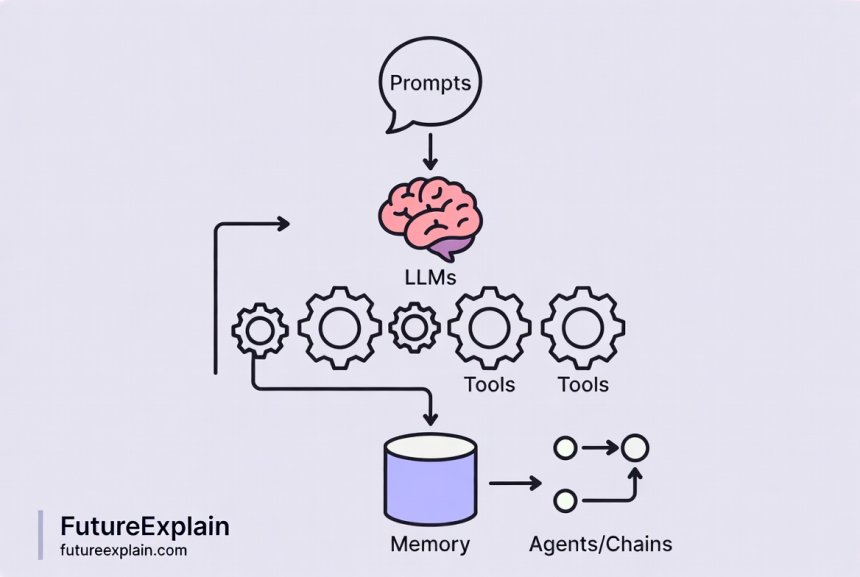
Core Concepts of LangChain: The Building Blocks
Before we start building, let’s understand the key pieces of the LangChain toolkit. Don’t worry about memorizing them; think of this as learning the names of the tools in a workshop.
1. Components: The Parts in Your Kit
Models (LLMs & Chat Models): This is the AI engine. LangChain provides a standard interface to work with dozens of models from OpenAI, Anthropic, Google, and open-source projects, so you can switch between them easily.
Prompts: These are the instructions you give the model. LangChain helps you manage and optimize these instructions using templates, which saves time and improves consistency. For deeper techniques on crafting these instructions, see our article on Prompt Engineering Best Practices.
Tools: These are the abilities you give your AI. A tool can be a Google Search API, a calculator, a function that reads a database, or even a function you write yourself to send an email.
Vector Stores & Retrievers: This is how you give your AI a long-term memory or knowledge base. Text is converted into numerical representations (vectors) and stored. The AI can then quickly search through this store to find relevant information. Learn the basics of this technology in our guide to Embeddings and Vector Databases.
2. Chains & Agents: The Assembly Instructions
Chains: A chain is a sequence of predefined steps. For example, a simple chain might be: 1. Take a user question, 2. Format it into a prompt, 3. Send it to the LLM, 4. Return the answer. Chains are predictable and great for straightforward tasks.
Agents: An agent is more advanced. Instead of a fixed sequence, you give the AI a set of tools and a goal. The AI (the agent) then decides for itself which tool to use, in what order, to accomplish the goal. It’s like having an AI project manager that can dynamically plan its work.
3. Memory: Remembering the Conversation
By default, LLMs are stateless—each request is independent. LangChain’s memory modules allow your application to remember previous parts of a conversation. This could be as simple as remembering the last few messages or as complex as summarizing the entire conversation history to save space.
Setting Up Your Development Environment
Now, let’s get your computer ready to build. We’ll use Python, the most common language for AI development, but we’ll keep it simple.
- Install Python: If you don’t have Python installed, go to python.org and download the latest version (3.9 or above). During installation, make sure to check the box that says “Add Python to PATH.”
- Create a Project Folder: Create a new folder on your desktop named “my_first_ai_app”.
- Open a Terminal/Command Prompt: Navigate to your new folder.
- Set Up a Virtual Environment (Recommended): This keeps the packages for this project separate from others on your computer. In your terminal, inside the project folder, run:
python -m venv venvThen activate it:- Windows:
venv\Scripts\activate - Mac/Linux:
source venv/bin/activate
(venv)appear at the start of your command line. - Windows:
- Install LangChain and Dependencies: With the environment active, run:
pip install langchain langchain-openai python-dotenvThis installs the core LangChain library, the official integration for OpenAI’s models, and a helper to manage API keys securely. - Get an API Key: For this tutorial, we’ll use OpenAI’s models. Go to platform.openai.com/api-keys, create an account if needed, and generate a new API key. Treat this key like a password and never share it or commit it to public code.
- Create a .env File: In your project folder, create a new text file named
.env. Open it and add your key like this:OPENAI_API_KEY="your-actual-key-here"
You’re all set! Your digital workshop is ready.
Building Your First App: A Document Q&A Assistant
Let’s build a practical application: an assistant that can answer questions about a document you provide. This is a common use case for businesses and students alike.
Project Goal: We will create a Python script that loads a text document (like a PDF or a website), allows us to ask questions about its content in plain English, and gives us accurate answers pulled from the text.
Step 1: The Basic Script and Environment
First, let’s create the main file and load our secret API key.
- In your project folder, create a new file called
doc_qa.py. - Open it in a text editor (like Notepad++, VS Code, or even a basic one).
- Add the following code:
# doc_qa.py - Our Document Question Answering Assistant

from dotenv import load_dotenv

import os


# 1. Load the API key from our .env file

load_dotenv()

openai_api_key = os.getenv("OPENAI_API_KEY")


print("Environment setup complete. API key loaded.")
Run it from your terminal (make sure your virtual environment is active) with: python doc_qa.py. If you see the success message, your environment is working.
Step 2: Loading and Preparing a Document
LangChain has helpers called “document loaders” for many file types. Let’s load a simple text file. Create a file named my_document.txt in your project folder and paste a few paragraphs of text (e.g., from a Wikipedia article or a blog post).
Now, update your doc_qa.py file:
# ... (previous imports)

from langchain_community.document_loaders import TextLoader

from langchain.text_splitter import RecursiveCharacterTextSplitter


# 2. Load the document

loader = TextLoader("my_document.txt")

documents = loader.load()

print(f"Loaded a document with {len(documents)} page(s).")


# 3. Split the text into manageable chunks

# LLMs have limits on how much text they can process at once.

text_splitter = RecursiveCharacterTextSplitter(chunk_size=1000, chunk_overlap=200)

split_docs = text_splitter.split_documents(documents)

print(f"Split into {len(split_docs)} chunks.")
This code loads your text and splits it into smaller, overlapping pieces. This is crucial because it allows the AI to find relevant information within large documents.

Step 3: Creating a Searchable Knowledge Base
We need to store these text chunks in a way the AI can search efficiently. We’ll use a vector store, as mentioned in the core concepts.
Update your script again:
# ... (previous imports)

from langchain_openai import OpenAIEmbeddings

from langchain_community.vectorstores import Chroma


# 4. Create embeddings and a vector store

embeddings = OpenAIEmbeddings(openai_api_key=openai_api_key)


# 'Chroma' is a simple, local vector database perfect for learning.

vectorstore = Chroma.from_documents(documents=split_docs, embedding=embeddings)

print("Knowledge base (vector store) created successfully.")
This step converts each text chunk into a numerical vector (an embedding) and stores them all in a local database called Chroma. The AI can now compare the meaning of your question to the meaning of every text chunk to find the most relevant ones.
Step 4: Asking Questions and Getting Answers
Now for the magic. We’ll create a “chain” that retrieves relevant text and asks the LLM to formulate an answer.
# ... (previous imports)

from langchain_openai import ChatOpenAI

from langchain.chains import RetrievalQA


# 5. Set up the LLM we want to use

llm = ChatOpenAI(openai_api_key=openai_api_key, model_name="gpt-3.5-turbo", temperature=0)


# 6. Create the Question-Answering Chain

qa_chain = RetrievalQA.from_chain_type(

    llm=llm,

    chain_type="stuff", # A simple method for passing context to the LLM

    retriever=vectorstore.as_retriever()

)


print("\\nAssistant is ready! Type 'quit' to exit.")

while True:

    query = input("\\nYour question: ")

    if query.lower() == 'quit':

        break

    result = qa_chain.invoke({"query": query})

    print(f"Answer: {result['result']}")
Run the script: python doc_qa.py. After a moment of processing, you’ll be prompted to ask a question about the content of your my_document.txt file. Try it! The AI will search its knowledge base (your document) and generate an answer.
You’ve just built a Retrieval-Augmented Generation (RAG) system! For a deeper dive into this powerful pattern, check out our article Retrieval-Augmented Generation (RAG) Explained Simply.
Connecting to the Real World: Tools and APIs
A document Q&A tool is useful, but LangChain truly shines when you connect the AI to live data and services. This is done through Tools.
A Tool in LangChain is essentially a function with a clear name and description that an AI agent can decide to use. Let’s create a simple one.
Example: A Weather Tool
We’ll create a mock tool that “gets the weather.” In a real app, this would connect to a live API like OpenWeatherMap.
Create a new file called agent_tools.py:
# agent_tools.py - Creating a simple agent with a custom tool

from langchain.agents import tool

from langchain.agents import AgentExecutor, create_openai_tools_agent

from langchain_openai import ChatOpenAI

from langchain.prompts import ChatPromptTemplate, MessagesPlaceholder

import os

from dotenv import load_dotenv


load_dotenv()


# 1. Define a custom tool

@tool

def get_weather(city: str) -> str:

    """Fetches the current weather for a given city."""

    # This is a mock function. In reality, you'd call an API here.

    weather_data = {

        "London": "12°C and rainy",

        "Paris": "18°C and sunny",

        "Tokyo": "22°C and cloudy"

    }

    return f"The weather in {city} is {weather_data.get(city, 'unknown')}."


# 2. Set up the LLM and prompt

llm = ChatOpenAI(model="gpt-3.5-turbo", temperature=0)

tools = [get_weather] # List of tools the agent can use


prompt = ChatPromptTemplate.from_messages([

    ("system", "You are a helpful assistant. Use the tools available to you."),

    ("user", "{input}"),

    MessagesPlaceholder(variable_name="agent_scratchpad"),

])


# 3. Create the agent

agent = create_openai_tools_agent(llm, tools, prompt)

agent_executor = AgentExecutor(agent=agent, tools=tools, verbose=True)


# 4. Run it!

result = agent_executor.invoke({"input": "What is the weather like in Paris and London?"})

print(result["output"])
Run this script. You’ll see the agent’s “thought process” (because verbose=True) as it decides to use the get_weather tool for each city and then combines the results into a final answer. You can imagine replacing the mock function with real API calls for search, databases, email, or any other service. This is the foundation of creating powerful, intelligent automation systems.
Memory and Debugging
Adding Conversation Memory
To make a chat-like application, you need memory. LangChain provides easy-to-use memory classes. Let’s add simple conversational memory to a basic chain.
# memory_example.py

from langchain_openai import ChatOpenAI

from langchain.memory import ConversationBufferMemory

from langchain.chains import ConversationChain


llm = ChatOpenAI(model="gpt-3.5-turbo", temperature=0)

memory = ConversationBufferMemory() # Stores the entire conversation in a buffer

conversation = ConversationChain(llm=llm, memory=memory, verbose=True)


print(conversation.predict(input="Hi, my name is Alex."))

print(conversation.predict(input="What is my name?")) # It remembers!
The ConversationBufferMemory keeps the raw history. For longer conversations, you might use ConversationSummaryMemory which asks the LLM to summarize the chat periodically to save space.
Basic Debugging Tips
When your chain or agent doesn’t work as expected, here’s how to start debugging:
- Set
verbose=True: This is the single most helpful thing. It prints the agent’s thoughts or the chain’s intermediate steps to the console. - Check your prompts: Use simple, clear instructions. Test the prompt directly in ChatGPT’s interface first to see if it works.
- Inspect your data: Print the loaded documents (
print(documents[0].page_content)) or the retrieved text chunks to ensure they contain the information you expect. - Start small: Get a tiny example working perfectly before adding complexity.
From Prototype to Real Application
Your working Python script is a prototype. To turn it into a “real app” others can use, you need an interface and a way to deploy it.
Adding a Simple Interface:
- Web Interface (Simple): Use Gradio or Streamlit. These are Python libraries that let you create a web UI with just a few lines of code. You can wrap your LangChain chain in a function and connect it to a text box and a button.
- Chatbot Interface: You can integrate your LangChain backend with messaging platforms or use frameworks to build a custom chat widget.
Deployment Considerations:
- API Keys are Secrets: Never hardcode them. Use environment variables (like our
.envfile) or secret management services provided by hosting platforms. - Cost Management: LLM API calls cost money. For a public app, you need to implement usage limits, caching, and monitoring to control costs. Our guide on Cost Optimization for AI covers this in detail.
- Choosing a Host: You can deploy Python web apps on services like Railway, Render, Fly.io, or more traditional VPS providers. Many offer easy deployment from a GitHub repository.
Responsible Development and Best Practices
As you build more powerful tools, responsibility is key.
- Understand Limitations: LLMs can “hallucinate” (make up information). A RAG system reduces this by grounding answers in your data, but it’s not foolproof. Always implement techniques for mitigating hallucinations.
- Privacy & Security: Be extremely careful with the data you feed into your app, especially when using third-party APIs. Don’t process sensitive personal information without proper safeguards. Consider privacy-preserving AI techniques for sensitive use cases.
- Transparency: If users are interacting with an AI, make it clear to them. Let them know the AI’s capabilities and limitations.
- Start with Human-in-the-Loop: For critical applications (e.g., medical or legal advice), design the system so a human reviews the AI’s output before action is taken. This aligns with principles of human plus AI collaboration.
Conclusion and Next Steps
You’ve taken a significant leap. You now understand that LangChain isn’t magic, but a practical framework for assembling AI components. You’ve built a working application that can answer questions from custom data and learned how to give an AI agent tools to interact with the world.
Where to go from here?
- Experiment: Try using different document types (PDFs, websites with
UnstructuredURLLoader). Connect a real API as a tool. - Explore Templates: The LangChain Templates GitHub repository has numerous pre-built examples for different use cases.
- Learn More Advanced Patterns: Look into “Agent Tools” more deeply, or explore using LangChain with open-source LLMs you can run locally for more privacy and cost control.
- Build Something for Yourself: The best way to learn is to solve your own problem. Automate a research task, summarize your meeting notes, or create a custom study assistant.
The barrier to creating intelligent applications is lower than ever. With tools like LangChain, you can be the one building the future, one helpful AI assistant at a time.
Further Reading
- Building a Simple AI Chatbot Without Coding – Explore no-code approaches to similar goals.
- AI-Assisted Customer Support Workflows: From Bots to Humans – See LangChain-like concepts applied in a business context.
- No-Code AI Product Ideas You Can Build This Month – Get inspiration for your next project.
Share
What's Your Reaction?
 Like
1850
Like
1850
 Dislike
12
Dislike
12
 Love
420
Love
420
 Funny
85
Funny
85
 Angry
5
Angry
5
 Sad
2
Sad
2
 Wow
310
Wow
310


















I appreciate the focus on responsible development. So many AI tutorials ignore the ethical implications. This made me think about how to build my tools responsibly from day one.
This article helped me fix a bug in my existing LangChain project. I was using the wrong type of memory and couldn't figure out why my chatbot kept forgetting context.
The part about "giving the AI new capabilities" really resonated. I never thought of it that way before—I'm not just using AI, I'm extending what it can do.
I wish there was a video version of this tutorial. Some of the setup steps would be easier to follow visually.
Thanks for the feedback, Michael! We're considering creating video tutorials for some of our more popular articles. In the meantime, check the LangChain official YouTube channel—they have some great beginner walkthroughs that complement this article.
As someone transitioning from a non-tech career, articles like this make AI development feel accessible. Thank you for not assuming I know all the jargon.
After reading this, I went back to your RAG article and it made so much more sense. These interconnected tutorials are really effective for learning.