
Creating Tutorials: Teaching Non-Technical Users About AI
This comprehensive guide teaches you how to create effective AI tutorials for non-technical users. Learn the 'AI Tutorial Pyramid' framework for structuring content, cognitive science principles for reducing mental load, and practical templates for different tutorial formats. Discover how to identify and address common AI misconceptions, assess tutorial effectiveness, and make AI education accessible to everyone. Includes worked examples of transforming technical content into beginner-friendly tutorials, plus templates you can use immediately.

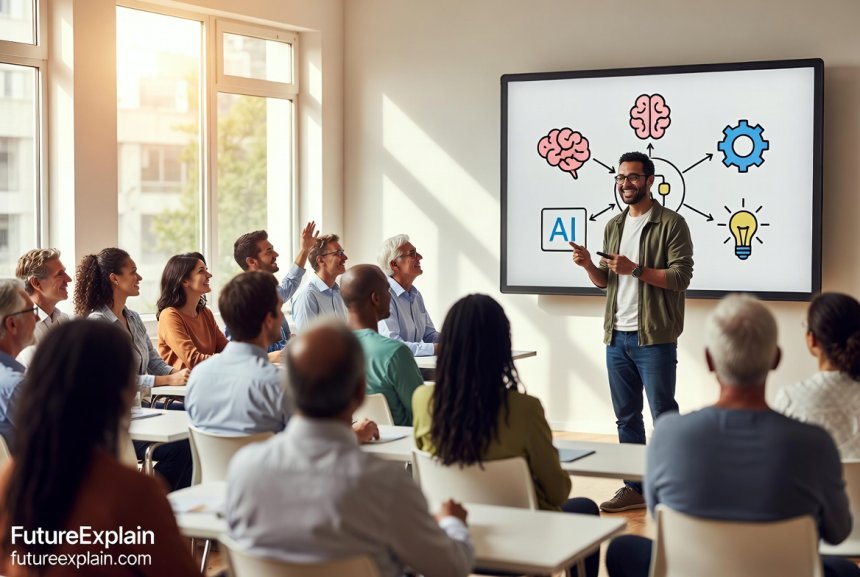
Creating Tutorials: Teaching Non-Technical Users About AI
Teaching artificial intelligence to non-technical users is both an art and a science. As AI becomes increasingly integrated into our daily lives and workplaces, the ability to explain these concepts clearly to beginners has never been more important. Whether you're creating tutorials for colleagues, students, clients, or a general audience, this guide provides a comprehensive framework for designing effective AI education materials that anyone can understand.
Good AI tutorials do more than just transfer information—they build confidence, reduce anxiety around new technology, and empower people to use AI tools effectively in their work and personal lives. The challenge is bridging the gap between complex technical concepts and practical, understandable explanations.
Why Traditional Technical Explanations Fail with Beginners
Before we dive into how to create effective tutorials, let's understand why standard technical explanations often fail with non-technical audiences:
- Cognitive overload: Too many new concepts introduced at once overwhelm working memory
- Jargon barrier: Terms like "neural networks," "embeddings," or "transformer architecture" have no meaning to beginners
- Abstract concepts: AI involves invisible processes that are hard to visualize
- Anxiety factor: Many people feel intimidated by technology they don't understand
- Relevance gap: Explanations don't connect to the learner's existing knowledge or needs
Effective AI tutorials address these barriers systematically. As you learn in our guide on how to start learning AI without a technical background, the right approach can make complex topics accessible to everyone.
The AI Tutorial Pyramid: A Four-Level Framework
Based on cognitive science and educational research, I've developed the "AI Tutorial Pyramid"—a structured approach to teaching AI concepts that respects how beginners learn best. This framework ensures you cover all necessary aspects without overwhelming your audience.
Level 1: Foundation (Concrete Examples)
Start with what people already know and can observe directly. At this level, you're building mental hooks for new concepts by connecting them to familiar experiences.
Effective techniques for Level 1:
- Analogy-based explanations: Compare AI to familiar processes ("AI is like a very fast, very thorough research assistant")
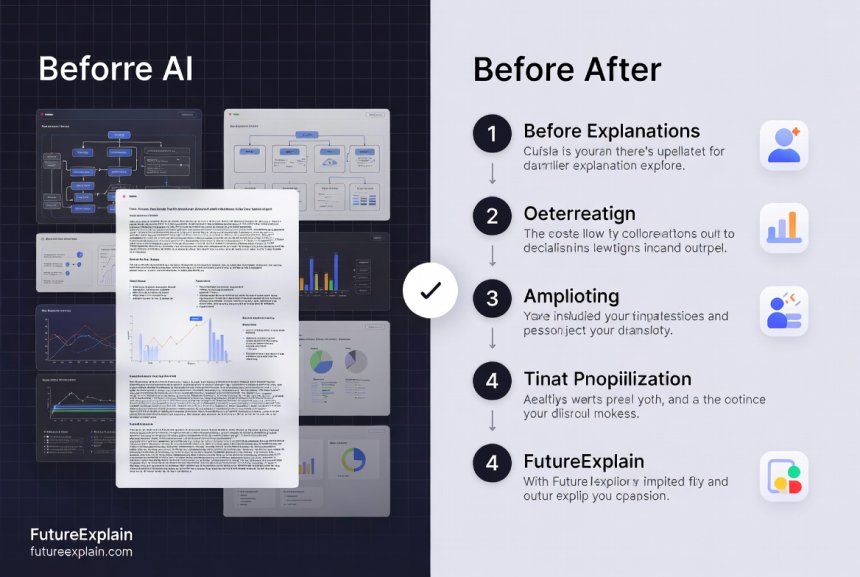
- Before/after demonstrations: Show what problems AI solves ("Here's how we used to do this task, here's how AI helps now")
- Everyday examples: Point to AI people already use without realizing it (recommendation systems, spam filters, voice assistants)
- Visual metaphors: Use simple diagrams that represent complex processes
For example, when explaining machine learning, you might say: "Imagine teaching a child to recognize cats. You show them many pictures of cats, pointing out common features like whiskers, pointy ears, and tails. Eventually, the child learns to identify cats even in pictures they've never seen before. Machine learning works similarly—we show computers many examples so they can learn patterns."
Level 2: Mechanism (How It Works Simply)
Once learners have concrete examples to anchor the concept, you can introduce how it works—but keep it at the highest, most simplified level.
Key principles for Level 2:
- One-degree abstractions: Only explain what's necessary for the current task or understanding
- Progressive disclosure: Reveal complexity in layers, not all at once
- Functional explanations: Focus on what it does rather than how it's built
- Error-friendly framing: Explain that mistakes are part of how AI learns and improves
This is where you might introduce basic concepts like training data, patterns, and predictions—but always through the lens of the examples from Level 1. You can explore more about how these systems work in our article on how machine learning works explained simply.
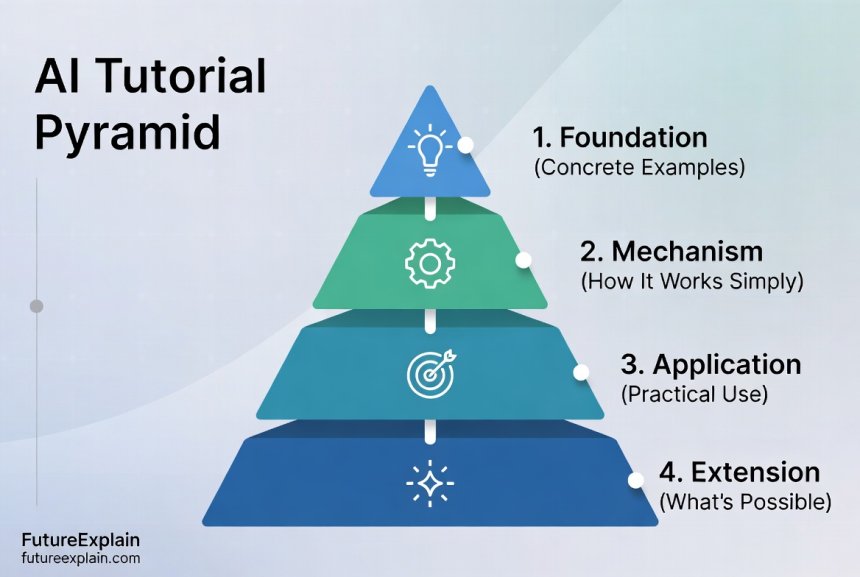
Level 3: Application (Practical Use)
Now that learners understand what AI is and basically how it works, show them how to use it. This level is about hands-on, practical application.
Effective application teaching:
- Task-based learning: Structure tutorials around specific tasks users want to accomplish
- Scaffolded practice: Start with highly guided exercises, gradually reducing support
- Real-world projects: Use examples relevant to the learner's context (work, personal life, hobbies)
- Mistake anticipation: Proactively address common errors and misunderstandings
For instance, if teaching about AI writing tools, don't just explain what they are—walk through creating an actual email, blog post, or report using the tool. Show the exact steps, including how to formulate effective prompts and evaluate the output.
Level 4: Extension (What's Possible)
The final level expands learners' understanding of what they can do with their new knowledge and skills.
Extension techniques:
- Creative applications: Show unconventional or advanced uses of the tools
- Integration scenarios: Demonstrate how AI fits into larger workflows
- Future possibilities: Discuss how this knowledge prepares them for emerging developments
- Community connection: Point to resources for continued learning and support
This framework ensures your tutorials have both breadth and depth while managing cognitive load effectively. Each level builds on the previous one, creating a solid foundation for understanding.
Cognitive Load Management in AI Tutorials
Cognitive load theory explains that working memory has limited capacity. When teaching complex topics like AI, managing this cognitive load is crucial for effective learning. Here are specific strategies tailored to AI education:
Reduce Extraneous Load (Unnecessary Complexity)
Extraneous load comes from how information is presented, not the content itself. Reduce it by:
- Simplifying interfaces: When showing AI tools, focus only on the features needed for the tutorial
- Chunking information: Break concepts into manageable pieces (7±2 items at a time)
- Consistent formatting: Use the same structure for similar concepts throughout your tutorial
- Eliminating distractions: Remove unnecessary details, options, or visual elements
Manage Intrinsic Load (Inherent Complexity)
Intrinsic load comes from the difficulty of the material itself. Manage it by:
- Prerequisite checking: Ensure learners have necessary foundational knowledge first
- Progressive complexity: Introduce simpler versions of concepts before full complexity
- Dual coding: Present information both verbally and visually
- Worked examples: Show complete examples before asking learners to solve problems
Optimize Germane Load (Learning Processing)
Germane load is the mental effort devoted to actually learning. Optimize it by:
- Active learning prompts: Include questions, exercises, and reflection points
- Metacognitive questions: Ask learners to think about their own thinking
- Connection building: Explicitly link new concepts to existing knowledge
- Spaced repetition: Revisit key concepts at increasing intervals
These cognitive load management techniques are especially important when teaching AI because the concepts are inherently abstract and complex. By designing your tutorials with these principles in mind, you make learning more efficient and effective.
Templates for Different AI Tutorial Formats
Different learning objectives require different tutorial structures. Here are templates for the most common AI tutorial formats, complete with placeholders you can adapt for your specific content.
Template 1: Conceptual Explanation Tutorial
Use this template when teaching what an AI concept is (like "machine learning" or "neural networks").
Structure:
- Hook: Start with a problem the concept solves or a familiar example
- Simple definition: One-sentence explanation in plain language
- Analogy: Compare to something familiar ("It's like...")
- Key characteristics: 3-5 distinguishing features in bullet points
- Real-world example: Show where people encounter this in daily life
- Common misconceptions: Address what it's NOT or how it's misunderstood
- Why it matters: Connect to reader's interests or needs
Template 2: Tool Tutorial (Step-by-Step)
Use this when teaching how to use a specific AI tool (like ChatGPT, Midjourney, or an automation platform).
Structure:
- Tool purpose: What problems does this tool solve?
- Before you begin: Prerequisites, accounts needed, basic setup
- Interface tour: Quick overview of main areas (screenshot with labels)
- Basic workflow: Complete one simple task from start to finish
- Common tasks: 3-5 additional things users will want to do
- Pro tips: Efficiency shortcuts and best practices
- Troubleshooting: Common problems and how to fix them
- Next steps: Where to go from here
Template 3: Project-Based Tutorial
Use this when teaching through a complete project (like "Create a chatbot" or "Automate email responses").
Structure:
- Project overview: What you'll build and what skills you'll learn
- Final result preview: Show what the completed project looks like
- Planning phase: Breaking down the project into steps
- Step-by-step implementation: Each phase with clear instructions
- Testing and refinement: How to check if it works and improve it
- Variations and extensions: How to adapt for different needs
- Project completion checklist: Ensure everything works correctly
These templates provide structure while remaining flexible enough for different AI topics. You can find more practical implementation guidance in our automation how-to guides section.
Identifying and Addressing Common AI Misconceptions
Non-technical users often bring misconceptions about AI to learning situations. Effective tutorials proactively identify and address these. Here are the most common misconceptions and how to counter them in your tutorials:
Misconception 1: "AI Understands Like Humans Do"
What beginners think: AI has consciousness, intentions, or understanding.
How to address it: Explain that AI recognizes patterns in data but doesn't "understand" in the human sense. Use analogies like: "AI is like a very sophisticated pattern-matching machine, not a thinking being." Show examples where AI makes mistakes that reveal its lack of understanding.
Misconception 2: "AI Is Always Objective"
What beginners think: Because it's a computer, AI is neutral and unbiased.
How to address it: Explain that AI learns from human-created data, which contains human biases. Provide concrete examples of bias in AI systems. Discuss the importance of checking AI outputs rather than accepting them uncritically. Our article on ethical AI explained covers this in more depth.
Misconception 3: "AI Will Replace All Human Jobs"
What beginners think: AI is an existential threat to employment.
How to address it: Present a balanced view: AI automates tasks, not entire jobs. Discuss how AI is a tool that augments human capabilities. Share examples of new jobs being created by AI. Focus on skills that complement AI rather than compete with it.
Misconception 4: "More Data Always Means Better AI"
What beginners think: The quality of data doesn't matter as much as the quantity.
How to address it: Explain the "garbage in, garbage out" principle. Show examples where biased or poor-quality data leads to poor AI performance. Emphasize that thoughtful data selection is more important than massive data collection.
By anticipating and addressing these misconceptions directly, you prevent confusion and build more accurate mental models from the beginning.
Accessibility in AI Tutorials
Accessibility means ensuring your tutorials can be used by people with diverse abilities and learning preferences. For AI tutorials, this includes both technical accessibility and cognitive accessibility.
Technical Accessibility Considerations
- Screen reader compatibility: Proper HTML structure, alt text for images, descriptive link text
- Color contrast: Sufficient contrast between text and background
- Keyboard navigation: All interactive elements accessible via keyboard
- Captions and transcripts: For video and audio content
- Responsive design: Works on mobile devices and different screen sizes
Cognitive Accessibility Strategies
- Plain language: Short sentences, common words, active voice
- Multiple representations: Present concepts in different formats (text, diagrams, examples)
- Consistent structure: Predictable organization helps with processing
- Progress indicators: Show how much content remains
- Flexible pacing: Allow learners to control the speed of presentation
- Reduced distractions: Minimal visual clutter, focused content
Cultural and Contextual Accessibility
- Culturally relevant examples: Use examples that resonate with diverse audiences
- Multiple context applications: Show how concepts apply in different settings
- Avoiding assumptions: Don't assume prior knowledge or specific cultural references
- Inclusive language: Gender-neutral, respectful terminology
Accessible tutorials aren't just better for people with disabilities—they're better for all learners. Clear, well-structured content benefits everyone.
Assessing Tutorial Effectiveness
How do you know if your AI tutorial is actually working? Assessment should be built into the tutorial design process. Here are methods for evaluating effectiveness with non-technical audiences:
Formative Assessment (During Learning)
These assessments help you adjust your teaching in real-time:
- Checkpoint questions: Short questions after key concepts to check understanding
- Think-aloud protocols: Ask learners to verbalize their thought process
- Confidence ratings: "On a scale of 1-5, how confident are you about..."
- Muddiest point: "What's still confusing or unclear?"
Summative Assessment (After Learning)
These assess overall learning outcomes:
- Performance tasks: Can learners apply the knowledge to new situations?
- Concept mapping: Ask learners to create diagrams showing relationships between concepts
- Transfer tasks: Apply learning to a slightly different context
- Self-assessment: Learners evaluate their own understanding and skills
Long-Term Effectiveness Measures
These assess lasting impact:
- Retention checks: Follow up after a week, month, or longer
- Application tracking: Are learners actually using what they learned?
- Confidence growth: Has anxiety decreased and confidence increased?
- Further learning: Are learners pursuing additional AI education?
Effective assessment doesn't just measure learning—it enhances it by providing feedback and reinforcing key concepts.
Worked Example: Transforming Technical Content
Let's see the AI Tutorial Pyramid in action with a concrete example. We'll transform a technical explanation of "neural networks" into a beginner-friendly tutorial.
Original Technical Explanation:
"A neural network is a computational model inspired by biological neural networks. It consists of interconnected nodes (neurons) organized in layers: an input layer, one or more hidden layers, and an output layer. Each connection has a weight that is adjusted during training via backpropagation to minimize a loss function through gradient descent optimization."
Transformed Beginner Tutorial:
Level 1: Foundation (Concrete Example)
"Have you ever played the game 'Telephone' where a message gets passed through a chain of people? Each person slightly changes the message based on what they think they heard. A neural network works similarly—information passes through layers of 'nodes' (like people in the chain), with each layer making slight adjustments to get closer to the right answer."
Level 2: Mechanism (How It Works Simply)
"Imagine teaching a child to recognize animals. You show pictures and say 'this is a cat' or 'this is a dog.' The child's brain makes connections between features (whiskers, ears, tails) and animal names. A neural network learns similarly: it looks for patterns in data and strengthens connections between related pieces of information."
Level 3: Application (Practical Use)
"Let's use a simple neural network tool to sort photos of cats and dogs. First, we upload labeled pictures. The tool analyzes features like ear shape and nose size. We train it by telling it when it's right or wrong. After training, it can sort new photos with good accuracy. Try this free tool: [link to beginner-friendly platform]."
Level 4: Extension (What's Possible)
"Now that you understand basic neural networks, you can explore how they power voice assistants (recognizing speech patterns), recommendation systems (spotting what you might like), and even medical diagnosis tools (finding patterns in medical images). Each application uses the same basic pattern-learning principle, just applied to different types of data."
This transformation makes the concept accessible while maintaining accuracy. The technical details aren't wrong—they're just presented in a different order and with different emphasis.
Tools and Resources for Tutorial Creators
Creating effective AI tutorials requires the right tools. Here are categories of tools that can help, from planning to delivery:
Planning and Design Tools
- Mind mapping software: For organizing concepts and connections
- Storyboarding tools: For planning tutorial flow and visuals
- Learning objective builders: For defining clear outcomes
- Persona creators: For understanding your target audience
Content Creation Tools
- Screenshot and annotation tools: For capturing and explaining interfaces
- Screen recording software: For creating video tutorials
- Diagram creators: For visualizing concepts and processes
- Interactive content platforms: For creating exercises and assessments
AI-Specific Teaching Tools
- Sandbox environments: Safe spaces for experimenting with AI tools
- Visualization libraries: For showing how AI algorithms work
- Simplified AI interfaces: Tools with beginner-friendly versions
- Example datasets: Clean, understandable data for teaching
Assessment and Feedback Tools
- Quiz platforms: For checking understanding
- Analytics tools: For tracking engagement and learning
- Feedback collection systems: For gathering learner input
- A/B testing platforms: For comparing different tutorial approaches
The right tools can make tutorial creation more efficient and effective. However, remember that tools support good pedagogy—they don't replace it. The most important tool is your understanding of how people learn.
Common Pitfalls and How to Avoid Them
Even experienced educators can stumble when teaching AI to beginners. Here are common pitfalls and strategies to avoid them:
Pitfall 1: Assuming Prior Knowledge
The problem: Using terms like "API," "algorithm," or "dataset" without explanation.
The solution: Create a glossary of terms, explain concepts when first introduced, or use more familiar language. When you must use technical terms, immediately follow them with simple explanations in parentheses.
Pitfall 2: Too Much Theory, Not Enough Practice
The problem: Spending all the time explaining how AI works without letting learners use it.
The solution: Follow the 70/30 rule: 70% hands-on practice, 30% explanation. Start with practical applications, then explain the theory behind them as needed.
Pitfall 3: Ignoring Emotional Responses
The problem: Not addressing anxiety, frustration, or overwhelm that learners experience.
The solution: Acknowledge these emotions openly. Normalize the learning curve. Include encouragement and celebrate small successes. Create a low-stakes learning environment.
Pitfall 4: One-Size-Fits-All Approach
The problem: Using the same examples and approaches for all audiences.
The solution: Customize tutorials for specific audiences. Business professionals need different examples than artists or retirees. Research your audience's context and tailor content accordingly.
Pitfall 5: Not Teaching Critical Evaluation
The problem: Presenting AI outputs as always correct or reliable.
The solution: Teach learners to critically evaluate AI outputs. Show examples of AI mistakes. Discuss limitations and appropriate use cases. Include exercises where learners identify and correct AI errors.
Avoiding these pitfalls requires mindfulness and iteration. The best tutorial creators continuously refine their approach based on learner feedback and outcomes.
Building a Tutorial Series: Scaling Your Teaching
Once you've mastered individual tutorials, you can create comprehensive learning paths through series of connected tutorials. Here's how to structure an effective AI tutorial series for non-technical learners:
Series Structure Principles
- Progressive complexity: Each tutorial builds on previous ones
- Spiral curriculum: Revisit concepts at increasing depth
- Clear learning pathway: Obvious progression from beginner to advanced
- Multiple entry points: Learners can join at different skill levels
- Cumulative projects: Each tutorial contributes to a larger final project
Sample AI Learning Pathway
Here's an example of a 6-part tutorial series for complete beginners:
- Part 1: What is AI? Everyday examples and simple explanations
- Part 2: Talking to AI: Introduction to prompt engineering basics
- Part 3: AI for Writing: Using tools for emails, documents, and content
- Part 4: AI for Images: Creating and editing visuals with AI
- Part 5: Automating Tasks: Simple workflows with AI assistance
- Part 6: Responsible AI Use: Ethics, limitations, and best practices
Each part should take 30-60 minutes to complete and include hands-on practice. The series culminates in a capstone project where learners apply all skills to a personal or professional task.
Series Maintenance
AI evolves rapidly, so tutorial series need regular updates:
- Quarterly reviews: Check for outdated information or tools
- Tool updates: Update screenshots and instructions when interfaces change
- Example refreshes: Replace dated examples with current ones
- Feedback integration: Incorporate learner suggestions
- Trend monitoring: Add content about emerging AI applications
A well-maintained tutorial series becomes a valuable resource that learners can return to again and again as their skills grow.
Conclusion: The Impact of Effective AI Education
Creating effective AI tutorials for non-technical users is more than a technical skill—it's a form of empowerment. When you teach AI clearly and accessibly, you're not just transferring information; you're building digital literacy, reducing technological anxiety, and opening doors to new opportunities.
The frameworks, templates, and strategies in this guide provide a foundation, but the most important element is empathy—truly understanding your learners' perspectives, challenges, and goals. The best AI tutorials meet people where they are and guide them gently into new understanding.
As AI continues to transform our world, the ability to explain it clearly becomes increasingly valuable. Whether you're teaching colleagues, creating public content, or developing training materials, your work bridges the gap between complex technology and human understanding. That bridge enables people to use AI confidently, critically, and creatively in their lives and work.
Remember that teaching AI effectively is an iterative process. Start with the frameworks here, create your tutorials, gather feedback, and refine. With each iteration, you'll become more skilled at making the complex accessible and the intimidating approachable.
Your tutorials have the power to demystify AI, build confidence, and empower people to participate in our increasingly AI-enabled world. That's a worthy goal for any educator or content creator.
Further Reading
- How to Start Learning AI Without a Technical Background - More guidance for beginners starting their AI learning journey
- AI for Accessibility: Making Content Inclusive - Additional strategies for creating accessible educational materials
- How to Use AI Responsibly (Beginner Safety Guide) - Important considerations for teaching ethical AI use
By applying the principles in this guide, you can create AI tutorials that truly meet non-technical learners where they are and guide them to new understanding and capability. The future of AI education depends on creators like you who can bridge the gap between technical complexity and human understanding.
Share
What's Your Reaction?
 Like
1240
Like
1240
 Dislike
12
Dislike
12
 Love
380
Love
380
 Funny
45
Funny
45
 Angry
8
Angry
8
 Sad
5
Sad
5
 Wow
210
Wow
210

















This article has transformed how I approach creating documentation at my tech company. The empathy-first approach makes so much sense. We've been too focused on technical accuracy and not enough on learner experience.
I've been teaching AI to artists, and they learn differently than business professionals. The one-size-fits-all pitfall is real. I'd love more specific guidance on tailoring for creative vs. analytical learners.
Audrey, great point! For artists: Start with visual examples (AI art generation), emphasize creative exploration, focus on "what if" questions, use metaphor-rich language. For analytical learners: Start with problem-solving examples, emphasize efficiency gains, focus on "how to" steps, use precise language. Same concepts, different entry points.
The section on tools and resources is comprehensive, but as a beginner tutorial creator myself, I'm overwhelmed by options. What would you recommend as the absolute minimum toolkit to get started?
Minimum viable toolkit: 1) Screenshot tool (built into your OS works fine), 2) A writing app you're comfortable with, 3) A simple diagram maker (even Google Drawings), 4) A way to collect feedback (Google Forms). Start with these, add tools only when you hit clear limitations. Don't let tool acquisition delay creating!
The templates are helpful, but I'd love downloadable versions I could print and fill out. Any chance those could be provided as resources?
Amelia, that's a fantastic idea! While I can't provide direct downloads here, I'll note this for future resource development. In the meantime, you can create your own using the structures in the article – they're designed to be easy to adapt to any note-taking format.
I'm implementing AI training at my company, and the "spiral curriculum" concept is exactly what we need. People need to revisit concepts as they gain experience. Linear progression doesn't work for complex topics like AI.
The cultural accessibility point about avoiding assumptions is crucial. I work with international teams, and examples that work in one culture often don't resonate in another. More guidance on culturally neutral examples would be helpful.
Marcus, you've identified a real challenge. For culturally neutral examples, I focus on universal human experiences: communication (writing emails), problem-solving (planning a trip), creativity (designing a logo), organization (sorting information). These translate across cultures better than culture-specific references like sports or local celebrities.