
Using AI to Generate Video Scripts and Storyboards
This guide provides a clear, beginner-friendly introduction to using artificial intelligence for video planning. You'll learn how AI tools can help generate engaging video scripts and visual storyboards, significantly speeding up the pre-production process. We cover the fundamental concepts of how these AI models work, compare popular tools like ChatGPT, Pictory, and Runway ML, and provide practical, step-by-step workflows you can follow. The article also addresses important considerations like maintaining creative control, ethical use of AI, and how to effectively combine AI suggestions with human creativity for the best results. Whether you're a marketer, educator, or content creator, this guide will help you leverage AI to bring your video ideas to life more efficiently.


Using AI to Generate Video Scripts and Storyboards
Creating a video can feel overwhelming. Between writing a script, planning shots, and designing a storyboard, the planning stage alone consumes hours, even for short projects. But what if you could get a helpful assistant for this process? This is where artificial intelligence is changing the game for creators, marketers, educators, and businesses of all sizes.
AI tools for video scripting and storyboarding don't replace your creativity. Instead, they act as powerful collaborators. They can help you overcome writer's block, generate visual ideas quickly, and structure your narrative, freeing you to focus on the core message and polish. In this beginner-friendly guide, we'll demystify how these AI tools work, explore the best options available, and walk you through practical steps to integrate them into your workflow.
Why Use AI for Video Pre-Production?
Before diving into the "how," let's understand the "why." The pre-production phase—scripting, storyboarding, and planning—is critical for a successful video. It's also notoriously time-consuming. AI addresses several key pain points:
- Speed and Efficiency: AI can generate a first draft of a script or a basic storyboard in minutes, not hours. This allows you to iterate on ideas rapidly.
- Overcoming Creative Blocks: Stuck on how to start your explainer video or what scene comes next? AI can provide multiple creative options to spark your imagination.
- Consistency and Structure: AI models are trained on vast amounts of data, helping ensure your script follows a logical narrative arc and your storyboard maintains visual consistency.
- Cost-Effectiveness for Small Teams: Not every project has the budget for a dedicated scriptwriter and storyboard artist. AI tools make professional-level planning accessible.
Think of AI as an instant brainstorming partner. You provide the seed of an idea, and the AI helps it grow into a structured plan. For more on how AI is transforming creative fields, check out our article on AI vs Human Creativity.
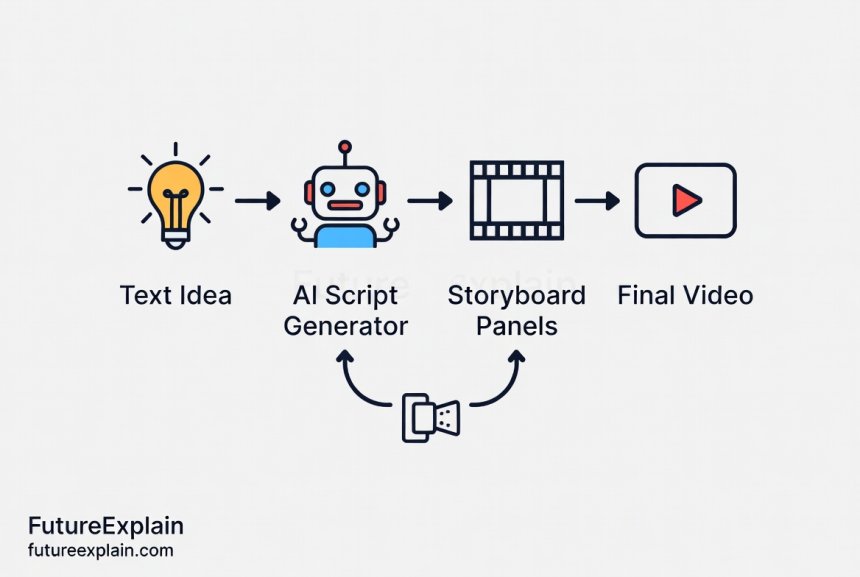
How Do AI Script and Storyboard Generators Work?
The magic behind these tools is based on advanced machine learning models, primarily large language models (LLMs) for text and generative AI models for images.
AI for Script Writing: The Language Model Engine
AI script generators, like those powered by models such as OpenAI's GPT-4, Google's Gemini, or Anthropic's Claude, are essentially super-powered text predictors. They have been trained on a massive corpus of text from the internet, including books, articles, screenplays, and video transcripts.
When you give them a prompt like "Write a 60-second script for a TikTok ad about eco-friendly water bottles," the model analyzes your request. It breaks down the key elements: format (60-second script), platform (TikTok), genre (ad), and subject (eco-friendly water bottles). It then draws on its training to predict the most likely sequence of words that would fulfill that request, generating dialogue, scene descriptions, and even suggested camera angles or on-screen text.
These models understand narrative structures, character roles, and persuasive language, allowing them to create coherent and engaging first drafts. To learn more about the foundation of this technology, you can read our guide on How Machine Learning Works.
AI for Storyboard Generation: From Text to Visuals
AI storyboard generation is a two-step process that often combines language and image models.
First, a language model interprets the script or a scene description. It identifies key visual elements: characters, actions, settings, and moods. For example, from the line "A person happily drinks from a water bottle in a sunny park," the AI extracts: character (person), action (drinking happily), prop (water bottle), setting (sunny park).
Second, an image-generation model (like Stable Diffusion, DALL-E 3, or Midjourney) takes these extracted elements and creates a visual representation. Modern tools can generate consistent characters across multiple panels and maintain a uniform artistic style, which was a major challenge just a year ago. For a deeper look at the image models powering this, see Understanding Diffusion Models.
Top AI Tools for Video Planning: A 2024 Comparison
Choosing the right tool depends on your needs, budget, and technical comfort. Here’s a breakdown of leading platforms, categorized by their primary strength.
1. AI-Powered Scriptwriting Assistants
These tools focus primarily on the written narrative and structure of your video.
- ChatGPT/Claude/Gemini (The Generalists): These versatile LLMs are excellent starting points. You can craft detailed prompts to generate scripts, dialogue, and shot lists. Best for: Brainstorming, drafting initial script ideas, and writers who want maximum flexibility. Tip: Be specific in your prompts. Instead of "write a script," try "Write a friendly, conversational 90-second YouTube intro script for a beginner gardening channel, focusing on three easy spring vegetables."
- Jasper (Formerly Jarvis): Tailored for marketing content, Jasper offers templates specifically for video scripts, including YouTube descriptions, Facebook video ads, and explainer scripts. Best for: Marketers and businesses needing ad-focused, conversion-oriented scripts quickly.
- Copy.ai: Similar to Jasper, it provides a suite of templates, including "Video Script" and "Storyboard," which can help structure both text and visual planning in a linked manner. Best for: Small business owners and social media managers who want template-driven simplicity.
2. Integrated Script-to-Storyboard Platforms
These are more specialized tools that handle the entire pipeline from text to visual planning.
- Pictory: A standout for turning text (like a blog post or script) directly into a video. Its key feature for pre-production is the ability to create a visual storyboard automatically from your script, pulling in relevant stock footage and images for each scene. Best for: Content creators, bloggers, and educators who want to go from idea to storyboard to final video in one platform.
- Runway ML: While famous for its generative video features, Runway's AI magic tools can also be used for pre-production. You can generate concept images and visuals for storyboards using text prompts, offering high creative control over the style. Best for: Creative professionals, filmmakers, and artists who want highly stylized and unique visual concepts for their storyboards.
- Storyboarder by Wonder Unit: This free, open-source tool isn't AI-native but can be powerfully combined with AI. You can quickly sketch panels and use AI image generators (via plugins or manual process) to fill in detailed scenes, making it a great hybrid workflow. Best for: Indie filmmakers and animators on a budget who enjoy a hands-on, customizable approach.
3. Specialized AI Storyboard Generators
These focus almost exclusively on creating the visual storyboard.
- Boords: A traditional storyboard software that has integrated AI features. You can generate images for your storyboard panels directly within the app using text descriptions, ensuring all visuals live in one organized place. Best for: Teams and agencies that need collaboration features alongside AI generation.
- MakeStoryboard: This tool is built from the ground up for AI storyboarding. You input your script, and it automatically suggests scene breaks and generates images for each panel. It often provides multiple visual options per scene. Best for: Quickly visualizing scripts and exploring different visual directions for each scene.
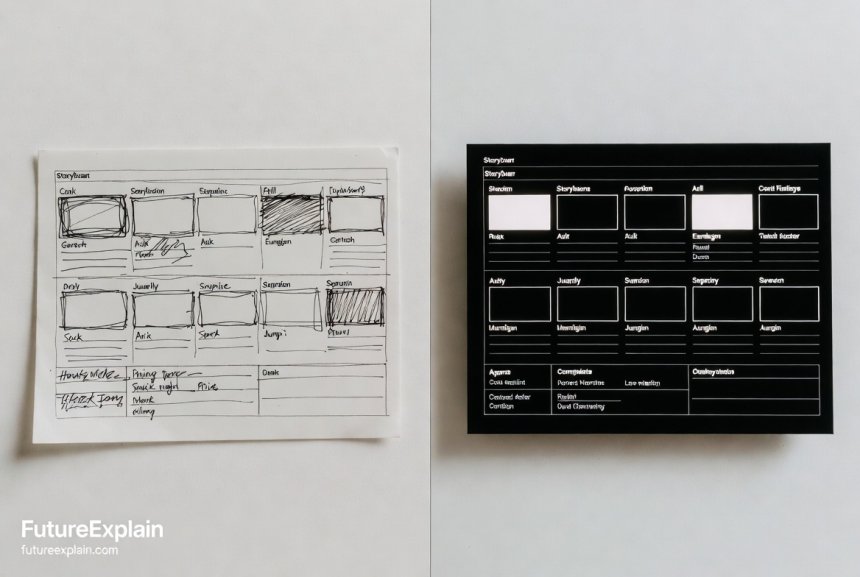
Your Step-by-Step Workflow: From Idea to AI Storyboard
Let's walk through a practical example. Imagine you're creating a 2-minute "How-to" video for your website on "Setting Up a Home Office."
Step 1: Define Your Core Idea and Brief
Start by clarifying the goal before you touch any AI tool. Ask yourself:
- Goal: What should the viewer learn or feel? (Learn 5 key steps for an ergonomic home office.)
- Audience: Who is watching? (Remote workers new to working from home.)
- Platform & Length: Where will it live and how long? (Website/YouTube, 2 minutes.)
- Key Messages: What are the 3-5 essential points? (Chair height, monitor position, lighting, organization, breaks.)
This brief becomes your guiding light and the source material for your AI prompts.
Step 2: Generate the Script First Draft with AI
Open your chosen AI writing tool (e.g., ChatGPT). Input a detailed prompt based on your brief:
"Act as a professional video scriptwriter. Write a clear and engaging 2-minute explainer video script for beginners. Topic: '5 Essential Tips for Setting Up Your First Home Office.' The tone should be helpful and encouraging. Include a friendly host speaking directly to the camera. Structure it with a brief intro, five clear tips with simple demonstrations, and a short conclusion. For each tip, write the host's dialogue and a brief description of the visual action on screen (e.g., 'Host points to a diagram of desk height')."
Review the AI's output. It will give you a solid structure, but you must now edit. Inject your brand voice, correct any factual inaccuracies (AI might guess at ergonomic guidelines), and tighten the dialogue to sound natural.
Step 3: Break the Script into Scenes for Storyboarding
Take your polished script and divide it into individual shots or scenes. Each scene should represent one key action or idea. For our example:
- Scene 1: Host intro in a messy home space.
- Scene 2: Diagram showing correct chair height.
- Scene 3: Host demonstrating monitor arm adjustment.
- Scene 4: Time-lapse of improving lighting.
- Scene 5: etc.
Write a simple, visual description for each scene. This is what you'll feed to the image AI.
Step 4: Generate Storyboard Images with AI
Open your AI storyboard tool or image generator. For each scene description, create a prompt. Be descriptive about style: "Photorealistic image, friendly woman in her 30s pointing to a simple animated diagram of a desk and chair. Diagram shows arrows for adjustable height. Style: clean, bright, corporate training video. Background is a blurry modern office."
Generate several options for key scenes. The goal is not to create final video footage but to plan the shot composition, framing, and visual flow.
Step 5: Assemble, Review, and Annotate
Place your generated images in order using a tool like Boords, Canva, or even PowerPoint. Add the corresponding script lines below each panel. Now, review the visual story:
- Does the flow make sense?
- Are the visual perspectives varied (wide shot, close-up)?
- Is the key information clear in each frame?
Add annotations for motion, camera moves (e.g., "zoom in on diagram"), or sound effects. You now have a complete, visual plan to share with collaborators or to guide your filming.
Best Practices and Pitfalls to Avoid
To get the best results from AI, follow these guidelines:
- You Are the Director: AI is a tool, not an autopilot. Use its outputs as a first draft or a suggestion box. Your human judgment on storytelling, emotion, and brand alignment is irreplaceable.
- The Power of the Prompt: Success with AI hinges on clear, detailed prompting. Specify length, tone, target audience, visual style, and key elements. Iterate on your prompts; if the first result isn't right, refine your description.
- Fact-Check Relentlessly: AI is prone to "hallucination"—making up plausible-sounding facts. Always verify technical information, data, and specific instructions generated by the AI.
- Embrace Hybrid Creation: Combine AI generation with your own assets. Use an AI-generated storyboard as a base, then replace key panels with quick sketches or photos of your actual location and props.
- Consider Ethical Use and Copyright: Be aware of the source of training data for AI models. For commercial projects, understand the licensing terms of the AI-generated images and text. When possible, use tools that respect creator opt-outs or have licensed their training data. Our article on Ethics of AI-Generated Media dives deeper into this.
The Future of AI in Video Pre-Production
The technology is evolving rapidly. Soon, we can expect:
- Full Video Generation from Scripts: Tools that can produce a rough animated or live-action-style video directly from a text script, complete with basic voiceovers and scene transitions.
- Emotion and Engagement Prediction: AI that analyzes your script and storyboard to predict audience engagement levels and suggest edits for maximum impact.
- Personalized Storyboarding: AI that can adapt the visual style of a storyboard to match your past projects or a specific director's known preferences.
These advancements will make video planning faster and more data-informed, but the visionary creative direction will remain a profoundly human skill.
Conclusion: Your Creative Partner, Amplified
AI for video scripts and storyboards is not about removing the creator from the process. It's about removing the friction. By handling the heavy lifting of initial drafting and visualization, AI gives you back the most valuable resource: time. Time to refine the story, perfect the performance, and inject unique creativity that no algorithm can replicate.
Start by experimenting with a free tool on a small project. Learn the art of prompting. See how the AI's ideas can complement your own. You might find that this new collaborator helps you bring more stories to the screen than you ever thought possible.
Further Reading
- AI Video Generation: From Text to Motion in 2024 - The next step after planning your video.
- Prompt Engineering Best Practices for Better Outputs - Master the skill of guiding AI.
- Building an AI-Powered Content Workflow - See how AI integrates into a broader creative process.
Share
What's Your Reaction?
 Like
1420
Like
1420
 Dislike
12
Dislike
12
 Love
305
Love
305
 Funny
45
Funny
45
 Angry
5
Angry
5
 Sad
2
Sad
2
 Wow
210
Wow
210













The link to the prompt engineering article is clutch. Mastering prompts is 80% of getting great results from these tools. This whole series is incredibly practical.
I shared this with my entire content team. We're implementing the "Step 1: Define Your Brief" as a mandatory step before anyone touches an AI tool. Discipline is key.
The comparison between traditional and AI storyboarding really hit home. The speed at which you can iterate on visual ideas now is just unreal.
This workflow is a perfect example of intelligent automation. You're automating the creative bottleneck. Fantastic read.
I'm curious about the copyright of AI-generated storyboard images. If I use them in a commercial project pitch, do I own them?
Uriah, it depends entirely on the tool's terms of service. Most commercial AI image tools grant you a license to use the outputs, even commercially. But you must check each one. They are generally not "copyrightable" in the traditional sense, but you have usage rights.
Has the author used any of these tools for longer-form content, like a 10-minute documentary? Does the process scale, or does it break down?
Great question, Tobias. It scales, but the approach changes. For a 10-minute doc, you'd use AI to outline the narrative arc and generate storyboards for key scenes or complex visual explanations, not every single shot. It becomes more about planning the major visual beats and complex sequences rather than a panel-by-panel breakdown of the entire runtime.