
AI-Powered UX: Designing with Intelligent Features
This comprehensive guide explains how to design user experiences with artificial intelligence features. Learn what AI-powered UX really means, discover practical frameworks for integrating intelligence into interfaces, and understand when AI features add genuine value versus just being flashy technology. We cover the complete design process from identifying opportunities to prototyping, testing, and ethical implementation. With real-world examples from products you use daily and step-by-step guidance for non-technical designers, this article provides everything you need to start creating intelligent, adaptive user experiences that solve real problems while maintaining human-centered design principles.


AI-Powered UX: Designing with Intelligent Features
When you use Netflix's personalized recommendations, interact with a smart chatbot, or receive exactly the search results you needed, you're experiencing AI-powered user experience design. But what does it really mean to design with artificial intelligence, and how can you incorporate intelligent features into your own projects—even without a technical background?
AI-powered UX goes beyond just adding machine learning to interfaces. It's about creating experiences that adapt, personalize, and anticipate user needs in ways that feel intuitive and helpful. In this comprehensive guide, we'll break down exactly how to approach intelligent UX design, provide practical frameworks you can use immediately, and help you avoid common pitfalls that turn promising AI features into frustrating user experiences.
What Exactly Is AI-Powered UX Design?
At its core, AI-powered UX design is the practice of creating user interfaces and experiences that leverage artificial intelligence to become more adaptive, personalized, and efficient. Unlike traditional static interfaces, AI-enhanced designs can learn from user behavior, predict needs, and adjust in real-time.
Think about the difference between a regular search function and Google's search. A basic search looks for exact matches; Google's AI-powered search understands context, learns from billions of queries, and even anticipates what you might be looking for based on partial information. This intelligence transforms a simple utility into a powerful tool that feels almost psychic in its accuracy.
According to research from the Nielsen Norman Group, effective AI UX design follows three key principles: transparency (users understand what the AI is doing), control (users can override or adjust AI decisions), and predictability (AI behavior follows understandable patterns). These principles form the foundation of trustworthy intelligent interfaces.
The AI UX Design Framework: A Practical Approach
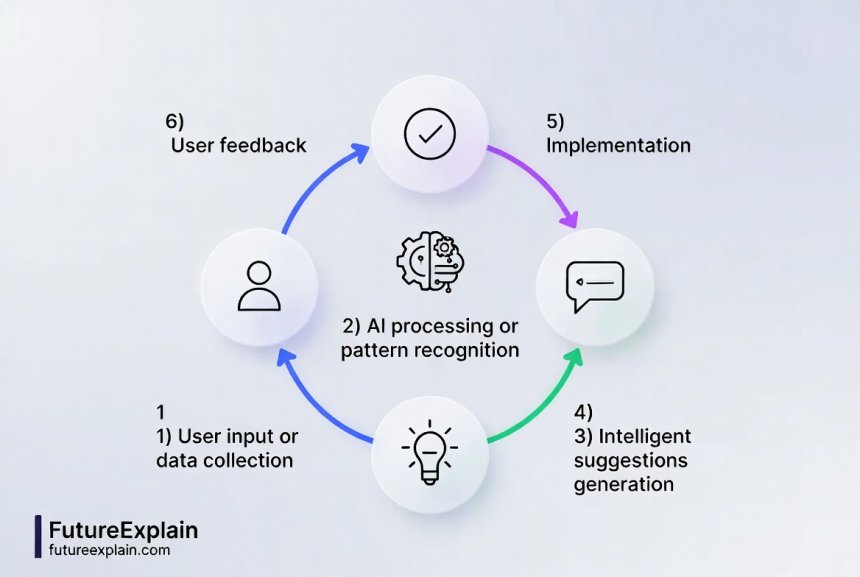
Designing with AI doesn't require you to become a machine learning expert. Instead, you need a framework for thinking about where intelligence can genuinely enhance the user experience. Here's a practical four-step approach:
1. Identify Intelligence Opportunities
Start by mapping user pain points where AI could help. Look for patterns in these areas:
- Repetitive decisions: Where do users make the same choices repeatedly? (Like categorizing emails)
- Information overload: Where are users overwhelmed by options or data? (Like product catalogs)
- Prediction needs: Where would anticipating next steps save time? (Like travel planning)
- Personalization gaps: Where do one-size-fits-all solutions fail? (Like learning platforms)
For example, Spotify identified that users spent too much time searching for music and created Discover Weekly—an AI-powered playlist that learns from listening habits to recommend new music each week.
2. Define the AI's Role Clearly
AI should augment human capabilities, not replace human judgment in areas requiring empathy, ethics, or creativity. Google's People + AI Guidebook recommends defining exactly what the AI will do and what humans will do. Create clear boundaries:
- AI handles: Pattern recognition, data processing, repetitive tasks, calculations
- Humans handle: Final decisions, ethical judgments, creative direction, empathy-based interactions
3. Design for Trust and Understanding
Users need to understand why an AI made a particular recommendation or decision. This is where good UX design becomes crucial. Techniques include:
- Explainable AI patterns: Show brief reasoning ("Recommended because you watched...")
- Confidence indicators: Visual cues showing how certain the AI is
- Override options: Always allow users to say "no" easily
- Learning feedback: Let users correct the AI ("Not helpful" buttons)
Real-World Examples of Successful AI-Powered UX
Let's examine how leading companies implement intelligent features in ways that genuinely enhance user experience:
Duolingo's Adaptive Learning Path
Language learning app Duolingo uses AI to create personalized learning paths. Instead of forcing all users through the same sequence, their AI analyzes:
- Which concepts you struggle with
- How quickly you learn different material
- When you're most likely to forget information
- Your personal goals and available time
The AI then adjusts lesson difficulty, review frequency, and content presentation. The UX design makes this intelligence visible through progress indicators, confidence scores, and clear explanations of why certain review activities appear. This approach has helped Duolingo maintain exceptionally high engagement rates compared to traditional language learning methods.
Grammarly's Writing Assistance
Grammarly's entire value proposition is AI-powered UX. Their design successfully makes complex natural language processing accessible through:
- Context-aware suggestions: The AI understands whether you're writing an email, report, or social post
- Confidence-based highlighting: Different colors indicate suggestion certainty
- Educational explanations: Click any suggestion to learn why it was made
- Personal style adaptation: The AI learns your writing patterns over time
What makes Grammarly's UX particularly effective is how it balances automation with user control. You can accept all suggestions with one click, review each individually, or ignore categories entirely—all while understanding what the AI is doing and why.
Google Maps' Predictive Features
Google Maps demonstrates sophisticated AI UX through features like:
- Departure time predictions: Suggests when to leave based on historical and real-time traffic
- Destination prediction: Often knows where you're going before you type it
- Route optimization: Considers multiple factors beyond just distance
The UX design makes these intelligent features feel helpful rather than intrusive through careful timing and clear value communication. The "time to leave" notification appears with enough lead time to be useful, and the destination prediction only surfaces when it's highly confident.
The AI UX Design Process: Step-by-Step
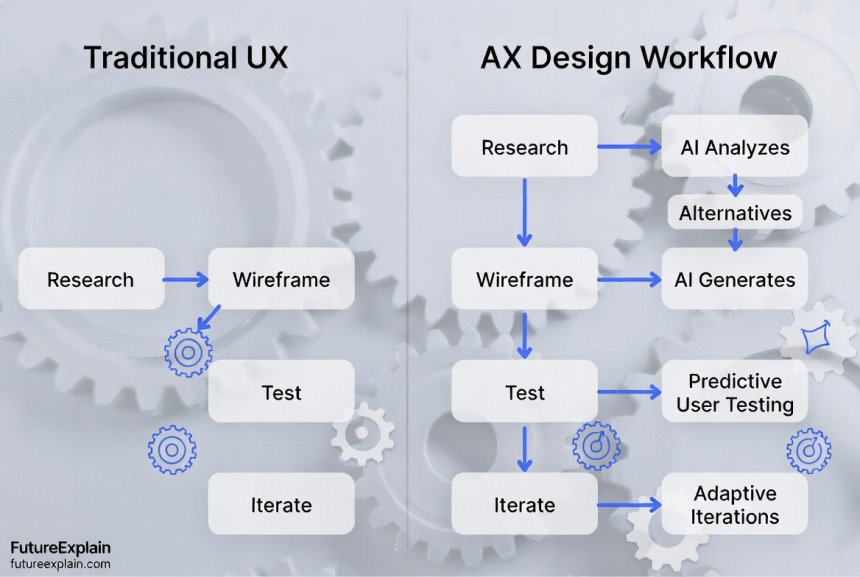
Here's a practical workflow for incorporating AI features into your design process, even if you're not technically building the AI systems yourself:
Phase 1: Discovery and Opportunity Mapping
Begin with traditional UX research methods, but add an AI lens. During user interviews and observation, specifically watch for:
- Cognitive overload moments: Where do users pause, hesitate, or express frustration with complexity?
- Repetition patterns: What tasks do users perform identically multiple times?
- Information seeking behaviors: Where do users search for answers or make comparisons?
- Personal preference variations: How do different users approach the same task differently?
Create an "AI Opportunity Matrix" that maps user pain points against AI capability categories (prediction, personalization, automation, etc.). This helps prioritize which intelligence features will deliver the most user value.
Phase 2: Conceptual Design with Intelligence
At this stage, focus on how the AI feature will feel to users, not how it will be built. Create:
- AI behavior scenarios: Describe how the AI should react in different situations
- User control specifications: Define exactly how users can adjust or override AI decisions
- Transparency requirements: Determine what explanations users will need
- Error state designs: Plan for when the AI is uncertain or wrong
Pro tip: Use the "Wizard of Oz" testing method early on. Have a human simulate the AI's behavior while users interact with your prototype. This helps validate intelligence concepts before any technical development.
Phase 3: Prototyping and Testing Intelligent Features
Testing AI features presents unique challenges since the system's behavior changes over time. Here's how to adapt your testing approach:
- Test learning curves: How quickly do users understand what the AI can do?
- Evaluate trust building: Do users become more confident with the AI over multiple sessions?
- Measure frustration thresholds: How many mistakes will users tolerate before abandoning the feature?
- Assess value perception: Do users feel the AI saves them time or improves outcomes?
Consider creating "AI behavior scripts" for testing—simulated sequences of how the AI would respond in different scenarios. This allows you to test intelligent features even before they're fully built.
Essential Design Patterns for AI-Powered Interfaces
Based on analysis of successful AI implementations across hundreds of applications, several design patterns consistently emerge. Here are the most valuable ones to incorporate:
The Progressive Disclosure Pattern
Don't overwhelm users with all AI capabilities at once. Instead, introduce features gradually:
- First interaction: Show basic functionality with optional "try smart features"
- Early usage: Introduce one intelligent feature at a time with clear value explanation
- Established usage: Offer advanced AI options as users demonstrate proficiency
This pattern respects learning curves and prevents feature overload. Adobe's Creative Cloud applications use this approach beautifully with their "Sensei" AI features.
The Explainable Recommendation Pattern
Never present AI suggestions without context. Always include:
- Reasoning indicators: "Based on your past purchases" or "Similar users liked"
- Confidence visualizations: Percentage matches, star ratings, or color coding
- Alternative options: "Not quite right? Try these instead" with different criteria
Amazon's recommendation system, while powerful, often fails this pattern by not explaining why particular products are suggested, leading to user skepticism.
The Reversible Automation Pattern
Any action the AI takes automatically should be easily reversible:
- Clear undo options: One-click reversal of AI actions
- Temporary application: "Try this adjustment" with preview before committing
- Step-by-step acceptance: Batch AI suggestions that users can accept individually or collectively
Gmail's smart reply suggestions follow this pattern perfectly—you can use them with one click, type your own response, or ignore them entirely.
Common Pitfalls and How to Avoid Them
Many AI UX projects fail because of predictable mistakes. Here are the most common pitfalls and how to steer clear:
Pitfall 1: The "Because We Can" Syndrome
Adding AI features just because the technology exists, not because users need them. Solution: Always start with user problems, not AI capabilities. Use your opportunity matrix to validate that each intelligent feature solves a genuine pain point.
Pitfall 2: The Black Box Problem
AI that makes decisions users don't understand. Solution: Build explanation features from the beginning, not as an afterthought. Conduct regular "explainability tests" where you ask users to interpret why the AI made specific suggestions.
Pitfall 3: Over-Automation
Removing too much human control, making users feel powerless. Solution: Implement the human-in-the-loop principle—keep users involved in key decisions, especially those with significant consequences.
Pitfall 4: Creepy Personalization
AI that knows too much, triggering privacy concerns. Solution: Be transparent about data usage, provide clear privacy controls, and consider implementing privacy-preserving AI techniques where appropriate.
Ethical Considerations in AI-Powered UX
Designing with intelligence brings significant ethical responsibilities. As highlighted in our guide to ethical AI, several key considerations must guide your design decisions:
Bias Detection and Mitigation
AI systems can inadvertently amplify human biases. Your UX design should include:
- Bias testing protocols: Regularly test with diverse user groups
- Fairness indicators: Monitor for disproportionate outcomes across user segments
- Bias reporting mechanisms: Easy ways for users to report biased behavior
Transparency and Consent
Users should understand what data trains the AI and how it's used. Best practices include:
- Clear data usage explanations: Simple language about what's collected and why
- Granular consent options: Allow opting out of specific AI features
- Data access and correction: Let users see and adjust data influencing their experience
Accountability and Recourse
When AI makes mistakes, there must be clear paths to resolution. Design for:
- Appeal processes: Ways to challenge AI decisions
- Human escalation paths: Access to human support when needed
- Error correction systems: Mechanisms to fix AI mistakes and prevent repetition
Tools and Platforms for AI UX Design
You don't need to build AI systems from scratch to design intelligent experiences. Here are accessible tools for different aspects of the process:
Prototyping Tools with AI Features
- Figma with AI plugins: Generate UI elements, suggest layouts, analyze accessibility
- Adobe Firefly in XD: AI-generated images and design elements for mockups
- Uizard Autodesigner: Transform sketches or text descriptions into prototypes
User Research Enhancement
- UserTesting with AI analysis: Automated insight extraction from user sessions
- Dovetail with AI tagging: Pattern recognition across qualitative data
- Maze predictive testing: AI that suggests what to test based on your designs
No-Code AI Integration Platforms
For prototyping functional AI features without coding:
- Bubble with AI plugins: Add ChatGPT, image generation, or recommendation engines
- Glide with AI integration: Connect spreadsheets to AI services for smart apps
- Adalo with AI components: Pre-built intelligent UI elements
Measuring Success: Metrics for AI-Powered UX
Traditional UX metrics don't fully capture AI feature performance. Add these specialized measurements:
Adoption and Engagement Metrics
- AI feature adoption rate: Percentage of users who try intelligent features
- Return usage rate: How often users come back to AI features
- Automation acceptance rate: How often users accept versus override AI suggestions
Effectiveness and Accuracy Metrics
- Task completion improvement: How much faster/easier tasks become with AI help
- Suggestion relevance score: User ratings of AI recommendation usefulness
- Error rate and recovery: How often the AI makes mistakes and how easily users recover
Trust and Understanding Metrics
- Explanation comprehension: Can users accurately explain why the AI made suggestions?
- Confidence progression: Do users become more confident with AI over time?
- Control satisfaction: Do users feel appropriately in control of AI features?
Getting Started: Your First AI-Powered UX Project
Ready to design your first intelligent feature? Follow this beginner-friendly approach:
Start Small with Low-Risk Enhancements
Choose a non-critical feature where AI could provide modest improvements. Good starter projects include:
- Smart defaults: AI that suggests likely starting values
- Predictive search: Anticipating what users might search for
- Simple categorization: Automatically tagging or organizing content
Use Existing AI Services
Leverage pre-built AI capabilities through APIs. Services like:
- OpenAI for text analysis and generation
- Google Cloud AI for vision and language
- Azure Cognitive Services for diverse AI capabilities
require minimal technical setup and let you focus on the UX design rather than AI development.
Prototype, Test, Iterate
Follow this simplified process:
- Create a basic prototype of your current interface
- Add one AI-enhanced feature using simulated behavior
- Test with 5-8 users, focusing on comprehension and value perception
- Refine based on feedback, particularly around explanations and controls
- Implement using no-code tools or collaborate with developers
The Future of AI-Powered UX
As AI technology evolves, so will UX design practices. Emerging trends to watch include:
Multimodal Interfaces
Combining voice, gesture, and contextual awareness for more natural interactions, as discussed in our article on multimodal AI.
Adaptive Privacy
AI that understands privacy preferences contextually, adjusting data collection and usage based on situation and user comfort.
Collaborative Intelligence
Systems where multiple AIs and humans work together seamlessly, each contributing their unique strengths.
Conclusion: Designing with Intelligence, Not Just Technology
AI-powered UX design represents a fundamental shift from creating static interfaces to designing adaptive experiences. The most successful implementations don't just add AI technology—they thoughtfully integrate intelligence to solve real user problems while maintaining transparency, control, and trust.
Remember that the goal isn't to make interfaces "smarter" in a technical sense, but to make them more helpful, efficient, and intuitive for humans. By starting with user needs, designing for understanding, and maintaining ethical standards, you can create AI-powered experiences that feel less like interacting with technology and more like working with a thoughtful partner.
The journey into AI-powered UX begins with a single intelligent feature designed well. Start small, learn continuously, and always keep the human experience at the center of your design decisions.
Further Reading
Share
What's Your Reaction?
 Like
1540
Like
1540
 Dislike
85
Dislike
85
 Love
420
Love
420
 Funny
185
Funny
185
 Angry
35
Angry
35
 Sad
25
Sad
25
 Wow
310
Wow
310















I just presented the AI UX framework from this article to my team, and they loved it. We're now using it to evaluate all feature requests. It's amazing how having clear criteria changes the conversation from 'should we add AI?' to 'how would AI help users?'
The future trends section got me thinking about multimodal interfaces. We're so focused on screen-based interactions, but AI enables voice, gesture, and context awareness. Time to expand our design thinking beyond rectangles.
Thanks for the Wizard of Oz testing resources! We ran our first test yesterday, and it revealed assumptions we didn't know we had. Users expected the AI to handle scenarios we hadn't even considered.
We've been tracking the new metrics for two weeks now, and the 'explanation comprehension' scores are revealing. Users don't understand why our AI makes certain recommendations, even though we thought the explanations were clear. Back to the drawing board!
For developers reading this: the design patterns mentioned (progressive disclosure, explainable recommendations, reversible automation) translate directly to component libraries. We're now building these as reusable components for our design system.
That's fantastic! Having these as reusable components would accelerate AI feature development across products. Are you documenting these patterns somewhere other teams could reference?
Update on my earlier question about bias testing: We implemented the simple monitoring approach suggested in the reply, and already caught a potential issue in our recommendation algorithm. Small teams can absolutely do ethical AI design with the right frameworks!