
Launching an AI Side Project: Minimal Viable Product (MVP)
This comprehensive guide walks you through launching your first AI side project by building a Minimal Viable Product (MVP). Learn what makes AI projects different, how to validate your idea before coding, choose the right technical approach (no-code vs custom development), and launch effectively. Includes practical frameworks, cost breakdowns, common pitfalls to avoid, and step-by-step instructions for both technical and non-technical creators. Whether you want to solve a personal problem, test a business idea, or build your AI portfolio, this guide provides the clear roadmap you need to go from idea to working AI product.


Launching an AI Side Project: Your Complete Guide to Building a Minimal Viable Product
Have you ever had an AI idea that could solve a real problem? Maybe you thought, "I could build an AI that helps with X" or "There should be a tool that does Y using AI." The gap between having that idea and actually launching something usable is where most projects die. This guide exists to bridge that gap. We'll walk through exactly how to launch an AI side project by building what's called a Minimal Viable Product (MVP) – the simplest version of your idea that still provides real value.
An AI MVP isn't about building the perfect, most advanced system. It's about creating something that works well enough to test your core assumption: "Will people find this useful?" Whether you're a developer, a business professional, a student, or someone just curious about AI, this guide will give you a clear path forward. We'll cover everything from validating your idea to choosing technical approaches (including no-code options), managing costs, and launching effectively.
What Makes AI Projects Different (And Why MVP Matters More)
Before we dive into the how-to, let's understand why AI projects benefit especially from the MVP approach. Unlike traditional software, AI systems have unique characteristics that make starting small even more important:
- Uncertain Outcomes: AI models can behave unpredictably. What works in testing might fail with real users
- Data Dependencies: Most AI needs quality data, which can be hard to get
- Computational Costs: Training and running AI models can be expensive
- Ethical Considerations: AI systems can have unintended consequences that need early testing
The MVP approach helps you manage these risks by keeping your initial investment small while learning what actually matters to users. As AI researcher Andrew Ng puts it in his machine learning courses, "Don't start by trying to build the perfect AI system. Start by asking what's the simplest thing that could possibly work."
Stage 1: Ideation – Finding Your AI Project Idea
Every great AI project starts with a problem worth solving. Your idea doesn't need to be revolutionary – it needs to be useful. Here are frameworks for generating AI project ideas:
Personal Pain Points
Look at your own life or work. What repetitive tasks do you hate? What information do you wish was easier to find or organize? Some of the best AI projects solve problems the creator personally experiences. For example:
- An AI that organizes your meeting notes automatically
- A tool that summarizes long articles you need to read
- A system that categorizes your personal photos by content
Industry-Specific Problems
Every industry has inefficiencies that AI could address. If you have domain expertise in healthcare, education, retail, or any other field, you're uniquely positioned to spot AI opportunities there.
AI-Enhancement of Existing Tools
Sometimes the best AI project is adding AI capabilities to something that already exists. Could a spreadsheet tool benefit from AI-powered data analysis? Could a calendar app be smarter about scheduling?
As you brainstorm, aim for ideas that are:
- Specific: Not "AI for healthcare" but "AI that helps doctors transcribe patient notes"
- Testable: You can create a simple version to test the core value
- Personally interesting: You'll be working on this in your spare time
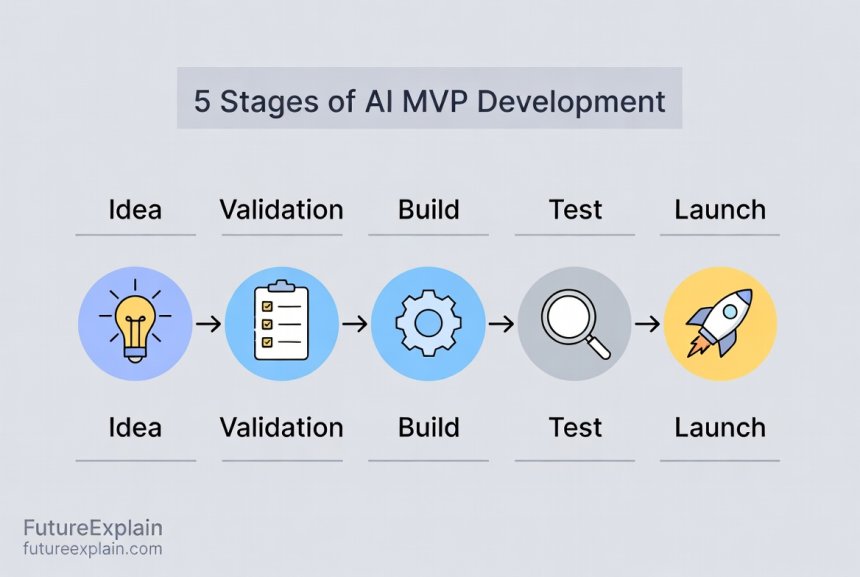
Stage 2: Validation – Testing If Your Idea Has Merit
This is the most skipped step in side projects, and it's why most fail. Before you write a single line of code, you need to validate that people actually want what you're building. Here's how:
The One-Sentence Test
Can you describe what your AI does in one simple sentence? If not, it's probably too complex for an MVP. Example: "My AI automatically removes backgrounds from product photos" is clear. "My AI does e-commerce optimization with multiple machine learning models" is vague.
Manual Feasibility Check
Before building anything automated, try doing the task manually. If you're building an AI that writes social media posts, try writing 20 posts yourself first. This helps you understand the problem space and might reveal that the task is easier (or harder) than you thought.
Talk to Potential Users
Find 5-10 people who might use your AI and ask them:
- Do you experience this problem?
- How do you currently solve it?
- What would a solution be worth to you?
- What's the most important feature?
Don't ask leading questions like "Would you use an AI that does X?" Instead, focus on understanding their current pain points and workflows.
Check Existing Solutions
Research what already exists. Don't be discouraged if there are competitors – this validates there's a market. Instead, look for gaps in their offerings or opportunities to do something simpler/cheaper/better for a specific niche.
Create a Landing Page
Build a simple one-page website describing your AI solution with a "Sign up for early access" button. Don't actually build the AI yet – just see if people are interested enough to give you their email. This technique, popularized by the Lean Startup methodology, helps gauge interest without building anything.
Stage 3: Defining Your AI MVP
Now we get to the heart of the matter: defining what "minimal" means for your AI project. An MVP should have the absolute minimum features needed to test your core value proposition. For AI projects, this often means:
Focus on One Core AI Capability
Your MVP should do one AI-powered thing well, not many things poorly. If you're building an AI writing assistant, maybe it just helps with email subject lines initially, not full articles. If it's an image generator, maybe it creates icons in one specific style.
Accept Imperfections
AI doesn't need to be perfect in your MVP – it needs to be good enough to demonstrate value. An 80% accurate solution that people can use today is better than a 95% accurate solution that takes six more months to build.
Consider the Human-in-the-Loop Approach
For your MVP, you might combine AI with human judgment. For example, your AI could make suggestions that a human approves or edits. This reduces the accuracy burden on your AI while still providing value.
Define Success Metrics
How will you know if your MVP is successful? Common metrics for AI MVPs include:
- Accuracy/quality metrics (for the AI itself)
- User engagement (how often people use it)
- Task completion rate (can users accomplish what they came for?)
- Qualitative feedback (what do users say about it?)
Stage 4: Choosing Your Technical Approach
This is where many people get stuck. The good news: you have more options than ever for building AI projects. Here's a breakdown of approaches from simplest to most complex:
Option 1: No-Code AI Platforms (Beginner-Friendly)
If you don't have coding experience, start here. Platforms like:
- Bubble: For building web apps with AI integrations
- Glide: Turns spreadsheets into apps with AI features
- Zapier + AI APIs: Connect existing services with AI capabilities
- Make (formerly Integromat): Similar to Zapier with visual workflows
These let you create functional AI tools by connecting pre-built components. You're limited to what the platform supports, but you can build surprisingly sophisticated tools. For example, you could create an AI content calendar that uses OpenAI's API to generate post ideas, all without writing code.
Option 2: Low-Code with Pre-trained Models (Intermediate)
If you have basic technical skills (like understanding APIs), you can use services that provide pre-trained AI models through simple interfaces:
- Google AI Studio: Access Google's models with a visual interface
- Hugging Face Spaces: Deploy AI models with minimal code
- Replicate: Run open-source models with API calls
- Firebase + ML Kit: Add AI to mobile/web apps
This approach gives you more flexibility than no-code platforms while still avoiding the complexity of training your own models from scratch.
Option 3: Custom Development with AI APIs (Technical)
For developers comfortable with coding, combining traditional development with AI APIs offers the best balance of control and simplicity:
- OpenAI API: For text generation, analysis, and more
- Anthropic Claude API: Alternative to OpenAI with different strengths
- Stability AI API: For image generation and manipulation
- AssemblyAI: For audio transcription and analysis
You write the application code and call these APIs when you need AI capabilities. This is often the sweet spot for MVPs because you get professional-grade AI without the infrastructure complexity.
Option 4: Full Custom AI Development (Advanced)
Only choose this path if:
- No existing API does what you need
- You have specific data/privacy requirements
- You're researching novel AI approaches
- Cost at scale makes APIs prohibitive
This involves training or fine-tuning your own models using frameworks like TensorFlow or PyTorch. It's the most flexible but also the most complex and resource-intensive approach.
For most AI MVPs, we recommend starting with Option 2 or 3. They give you enough flexibility to build something unique while keeping development time reasonable.
Stage 5: Building Your AI MVP – Step by Step
Let's walk through the actual building process with a concrete example. Suppose we're building "CaptionAI" – an AI tool that suggests social media captions for photos.
Step 1: Setup Your Development Environment
If you're coding, start with a simple setup. For web-based AI tools, a common stack is:
- Frontend: HTML/CSS/JavaScript (or React/Vue if you're comfortable)
- Backend: Python with Flask/FastAPI or Node.js with Express
- Database: SQLite (simplest) or PostgreSQL
- Hosting: Vercel, Netlify, or Railway for easy deployment
If you're using no-code platforms, this step is about setting up your account and familiarizing yourself with the interface.
Step 2: Implement the Core AI Functionality
For CaptionAI, we might use the OpenAI API for caption generation. The core logic would be:
- User uploads a photo
- We use an image analysis API (like Google Vision or Clarifai) to describe the photo
- We send that description to OpenAI with a prompt like "Generate 3 social media captions for a photo showing: [description]"
- We display the results to the user
Start by getting this basic flow working before adding any other features.
Step 3: Create the Minimum User Interface
Your UI should be functional, not beautiful. Focus on:
- Clear instructions
- Obvious ways to perform the core action
- Displaying results clearly
- A way to give feedback
For CaptionAI, this might be a single page with: file upload area, a "Generate Captions" button, and a results section.
Step 4: Handle Basic Error Cases
Your MVP should handle common failures gracefully:
- What if the AI API is down?
- What if the user uploads an unsupported file type?
- What if the AI returns inappropriate content?
Don't build comprehensive error handling – just handle the most critical cases that would prevent users from testing your core value.
Step 5: Add Analytics
Before launching, add basic tracking so you can learn from usage. At minimum, track:
- Number of users
- How many use the core feature
- Where users drop off
- Any errors that occur
Simple tools like Google Analytics or Plausible work well for this.
Stage 6: Testing and Iterating
Once you have a working MVP, it's time to test with real users. Don't skip this step!
Alpha Testing (You and Friends)
Use the tool yourself for real tasks. Then share with 5-10 friends or colleagues who match your target user profile. Give them specific tasks to complete and observe what works and what doesn't.
Collect Structured Feedback
Don't just ask "What do you think?" Ask specific questions:
- Was the output useful?
- What was confusing?
- What would make you use this regularly?
- What's missing?
Measure Against Your Success Metrics
Check the metrics you defined earlier. Is the AI accurate enough? Are users completing tasks? Be prepared to discover that your initial assumptions were wrong – this is valuable learning, not failure.
Iterate Quickly
Based on feedback, make small improvements. Focus on changes that:
- Fix critical bugs or confusion points
- Improve the core user experience
- Address the most common feedback
Avoid adding new features during this phase. The goal is to make your existing MVP work better, not to expand its scope.
Stage 7: Launching Your AI MVP
Now it's time to share your creation with the world. Here's how to launch effectively:
Choose Your Launch Platform
Where will you share your AI MVP? Options include:
- Product Hunt: Great for tech-savvy audiences
- Indie Hackers: For the bootstrapped community
- Relevant subreddits or Facebook groups
- Twitter/LinkedIn (if you have an audience there)
- Direct outreach to people who expressed interest
Prepare Your Launch Materials
Create clear, simple explanations of:
- What your AI does (in one sentence)
- Who it's for
- How to use it
- What makes it different
Include screenshots or a short video showing the tool in action.
Set Expectations
Be transparent that this is an MVP. Phrases like "early beta," "experimental," or "proof of concept" help set appropriate expectations. This reduces frustration if things aren't perfect and encourages constructive feedback.
Plan for Support
You'll likely get questions and bug reports after launch. Have a simple system for tracking these, even if it's just a spreadsheet or a dedicated email folder. Responding quickly to early users builds goodwill and provides valuable feedback.
Cost Considerations for AI MVPs
One of the biggest concerns with AI projects is cost. Here's a realistic breakdown:
Development Costs
- No-code platforms: $20-100/month for premium features
- AI API costs: Typically pay-per-use. OpenAI's GPT-4 starts at ~$0.03 per 1K tokens for input
- Hosting: $5-50/month for basic cloud hosting
- Domain: $10-15/year
Managing AI API Costs
AI API costs can add up quickly if you're not careful. Strategies for keeping costs manageable:
- Use lower-cost models when possible (GPT-3.5-turbo instead of GPT-4 for some tasks)
- Implement caching so identical requests don't hit the API repeatedly
- Set usage limits per user
- Monitor costs daily in the beginning
Free Options and Credits
Many AI platforms offer free tiers or startup credits:
- OpenAI: $5-18 in free credits for new users (varies by promotion)
- Google Cloud: $300 in credits for new accounts
- Azure: $200 in credits for new accounts
- Many startups have free tiers for low-volume usage
Total MVP Budget Range
For most AI MVPs, you can expect to spend:
- Minimal: $0-50 (using only free tiers and credits)
- Typical: $50-200/month during active development and testing
- Scaled: $200+/month once you have regular users
The key is to start small and only increase spending as you validate that people want what you're building.
Common AI MVP Pitfalls and How to Avoid Them
Based on analysis of failed AI projects, here are the most common mistakes:
Pitfall 1: Over-Engineering the AI
Problem: Trying to build the perfect, most accurate AI system before launching.
Solution: Accept that your first version will be imperfect. Focus on whether it provides value, not whether it's state-of-the-art.
Pitfall 2: Underestimating Data Requirements
Problem: Assuming you can easily get the data needed to train or run your AI.
Solution: Before building, identify your data sources. If you need labeled training data, explore synthetic data options or start with a smaller, manually created dataset.
Pitfall 3: Ignoring Ethical Considerations
Problem: Building AI without considering bias, privacy, or potential misuse.
Solution: Even for an MVP, implement basic safeguards. For text generation, add content filters. For image analysis, be transparent about what data you collect. Our article on Ethical AI Explained covers these considerations in detail.
Pitfall 4: Building in Isolation
Problem: Working on your AI project alone without user feedback until it's "ready."
Solution: Share early and often. Even a broken prototype is better than a perfect product no one wants.
Pitfall 5: Choosing the Wrong Technical Approach
Problem: Using overly complex technology because it's "cool" rather than appropriate.
Solution: Match the technology to your skills and the problem. If a simple rule-based system would work 80% as well as a neural network, start with the simpler approach.
When to Pivot, Persevere, or Abandon Your AI MVP
After launching, you'll face a decision: what next? Here's a framework for deciding:
Signs You Should Pivot (Change Direction)
- Users like your product but use it differently than you expected
- A subset of features gets all the usage
- You discover a related problem that's more pressing
- Technical constraints make your original approach infeasible
Signs You Should Persevere (Keep Improving)
- Users are consistently using the core feature
- You're getting positive feedback and feature requests
- The core technology works, just needs refinement
- You're learning useful things with each iteration
Signs You Should Abandon (Move On)
- No one uses it despite multiple attempts to improve
- The problem isn't painful enough for people to seek solutions
- Costs are prohibitive relative to the value provided
- You've lost interest and are no longer learning
Remember: abandoning a project isn't failure if you've learned something valuable. Many successful AI entrepreneurs have several "failed" projects in their past.
From MVP to Sustainable Project
If your MVP shows promise, here's how to think about next steps:
Scaling Considerations
As you grow, you'll face new challenges:
- Performance: More users means more load on your AI systems
- Cost Management: API costs scale with usage
- Reliability: Users expect uptime and consistent performance
- Support: More users means more questions and issues
Monetization Options
If you want to turn your side project into income, consider:
- Freemium: Basic features free, advanced features paid
- Subscription: Monthly access fee
- Pay-per-use: Charge based on usage volume
- One-time purchase: For downloadable tools
Our guide on Monetizing AI Skills explores these options in more detail.
Technical Debt and Refactoring
MVPs are built quickly, which often means cutting corners. As your project grows, you'll need to:
- Rewrite messy code
- Improve error handling and logging
- Add tests
- Optimize performance
Plan to spend 20-30% of your development time on maintenance and improvement, not just new features.
Real AI MVP Examples to Inspire You
To make this concrete, here are real projects (some famous, some small) that started as simple MVPs:
Example 1: Grammarly (Early Version)
Initial MVP: A simple browser extension that checked for basic grammar errors using rule-based systems, not AI
Key insight: People wanted help writing better, not just fixing errors
Evolution: Gradually added more sophisticated AI for style suggestions, tone detection, etc.
Example 2: ChatGPT (as a Product)
Initial MVP: The ChatGPT web interface itself was an MVP built on top of OpenAI's existing GPT models
Key insight: Conversational interface made AI more accessible than API-based approaches
Evolution: Added plugins, file uploads, different model versions
Example 3: Lensa AI (Image Generation)
Initial MVP: Used existing Stable Diffusion models with specific fine-tuning for portraits
Key insight: People wanted easy avatar creation, not general image generation
Evolution: Built mobile apps, optimized for specific use cases
Example 4: Small Side Project: "Resume Worded"
Initial MVP: Simple website that analyzed resume text against job descriptions using basic keyword matching
Key insight: Job seekers wanted specific, actionable feedback
Evolution: Added more sophisticated NLP, ATS simulation, and industry-specific advice
Notice the pattern: start simple, learn what users actually value, then build toward that.
Getting Started: Your 30-Day AI MVP Plan
Ready to begin? Here's a concrete plan for your first month:
Week 1: Ideation and Validation
- Day 1-2: Brainstorm 10-20 AI project ideas
- Day 3: Pick your top 3 ideas
- Day 4-5: Talk to potential users about each idea
- Day 6-7: Choose one idea and define the MVP scope
Week 2: Technical Exploration and Prototyping
- Day 8-9: Research technical approaches and tools
- Day 10-12: Build a basic prototype (even if it's fake/mocked)
- Day 13-14: Test the prototype with 2-3 people
Week 3: Building the Real MVP
- Day 15-19: Build the actual working version
- Day 20-21: Test internally and fix critical bugs
Week 4: Launch and Learn
- Day 22-23: Prepare launch materials
- Day 24: Launch to a small group (10-20 people)
- Day 25-28: Collect feedback and make improvements
- Day 29-30: Decide: pivot, persevere, or abandon?
This aggressive timeline keeps you moving and prevents overthinking. Remember: done is better than perfect.
Tools and Resources for Your AI MVP Journey
Here are specific tools mentioned throughout this guide, organized by category:
No-Code/Low-Code Platforms
- Bubble (web apps)
- Glide (spreadsheet-based apps)
- Zapier/Make (automation)
- Retool (internal tools)
AI APIs and Services
- OpenAI (GPT, DALL-E, Whisper)
- Anthropic (Claude)
- Google AI (PaLM, Gemini)
- Stability AI (Stable Diffusion)
- Hugging Face (open model hosting)
Development and Hosting
- Vercel/Netlify (frontend hosting)
- Railway/Render (full-stack hosting)
- GitHub Codespaces (development environment)
- Replit (quick prototyping)
Learning Resources
- How to Start Learning AI Without a Technical Background
- Building a Simple AI Chatbot Without Coding
- Fast.ai (practical deep learning)
- Coursera's AI for Everyone (non-technical overview)
Conclusion: Your AI Journey Starts Here
Launching an AI side project through the MVP approach is one of the best ways to learn about AI, solve real problems, and potentially build something meaningful. The key insights to remember:
- Start with validation, not code
- "Minimal" means doing one thing well enough to test
- Choose technical approaches that match your skills
- Launch early to learn what actually matters to users
- Be prepared to pivot based on what you learn
The world needs more people building practical AI solutions. Not every project needs to be groundbreaking – sometimes the most valuable tools are simple solutions to everyday problems. Your unique perspective and experiences mean you might see AI opportunities that others miss.
What will you build? The most important step is the first one. Pick an idea, validate it simply, and start building. Even if your first AI MVP doesn't change the world, you'll learn invaluable skills and join the community of creators shaping our AI-powered future.
Remember: every major AI product today started as someone's side project. What starts as your MVP today could grow into something much bigger tomorrow – or at the very least, teach you lessons that prepare you for your next project. The only wrong move is not starting.
Further Reading
Continue your AI project journey with these related guides:
- No-Code AI Product Ideas You Can Build This Month – Concrete ideas for your next project
- Monetizing AI Skills: Services, Courses, and SaaS – How to turn your AI knowledge into income
- Evaluating AI Vendors: Questions to Ask – How to choose the right AI tools and services for your projects
Share
What's Your Reaction?
 Like
1543
Like
1543
 Dislike
12
Dislike
12
 Love
287
Love
287
 Funny
45
Funny
45
 Angry
8
Angry
8
 Sad
3
Sad
3
 Wow
189
Wow
189


















The comparison between no-code vs custom development frameworks is exactly what I needed. Decided to start with no-code to validate, then rebuild with custom code if needed.
Update: I took the advice about focusing on one core capability. My AI tool now does one thing really well instead of three things poorly. User retention improved immediately.
How important is the tech stack choice for an MVP? Should I learn new technologies or stick with what I know?
Stick with what you know for the MVP. Learning new tech while also figuring out product-market fit is too much cognitive load. Optimize for speed, not perfect architecture.
The cost breakdown gave me confidence to start. Knowing I could begin for under $50 removed the financial anxiety holding me back.
What's the best way to find test users for niche AI tools? My MVP helps with academic citation formatting - not exactly mass market appeal.
For niche tools: 1) Find relevant online communities (Reddit, Discord, forums), 2) Contact university departments if academic, 3) Offer free access in exchange for detailed feedback, 4) Partner with influencers in that niche. Quality over quantity for feedback.
The "Signs You Should Abandon" framework helped me kill a project that wasn't working. Felt like failure at first, but now I'm applying those lessons to a better idea.