
What Is Artificial Intelligence? A Complete Beginner’s Guide
This beginner-friendly guide explains artificial intelligence (AI) in clear, non-technical language. It defines AI, shows how AI relates to machine learning and deep learning, and walks through practical, everyday examples — from search and recommendations to voice assistants and image editing. The article separates myths from facts, explains different AI types (narrow, general), and outlines common ethical concerns like bias and privacy. Readers will find a simple roadmap for learning — practical next steps, free tools to try, and responsible-use tips for individuals and small businesses. The guide includes two helpful in-article image placeholders and links to related FutureExplain articles for further reading.


What Is Artificial Intelligence? A Complete Beginner’s Guide
Artificial intelligence — or AI — is one of the most widely talked-about technologies today. Yet for many beginners the phrase still raises more questions than answers: what exactly is AI, how does it work, and why does it matter for everyday users and small businesses? This guide explains AI clearly and calmly, with practical examples and no hype.
1. A simple definition
At its core, artificial intelligence refers to techniques that let computers perform tasks that normally require human-like problem solving or perception. That includes recognizing images, understanding spoken language, making recommendations, or predicting future trends from data. AI is not a single thing but a collection of methods and tools that enable these capabilities.
2. AI, machine learning, and deep learning — the relationship
The words AI, machine learning (ML), and deep learning are often used together. Here is a simple way to think about them:
- AI — the broad field concerned with making machines perform intelligent tasks.
- Machine learning — a subfield of AI that focuses on systems that learn from data rather than relying on fixed rules.
- Deep learning — a subset of ML using layered neural networks (many layers) that are particularly powerful for images, audio, and large-scale patterns.
In practice most modern AI applications — from chat assistants to photo editing — use machine learning and often deep learning models trained on large datasets.
3. How does AI actually work? A non-technical overview
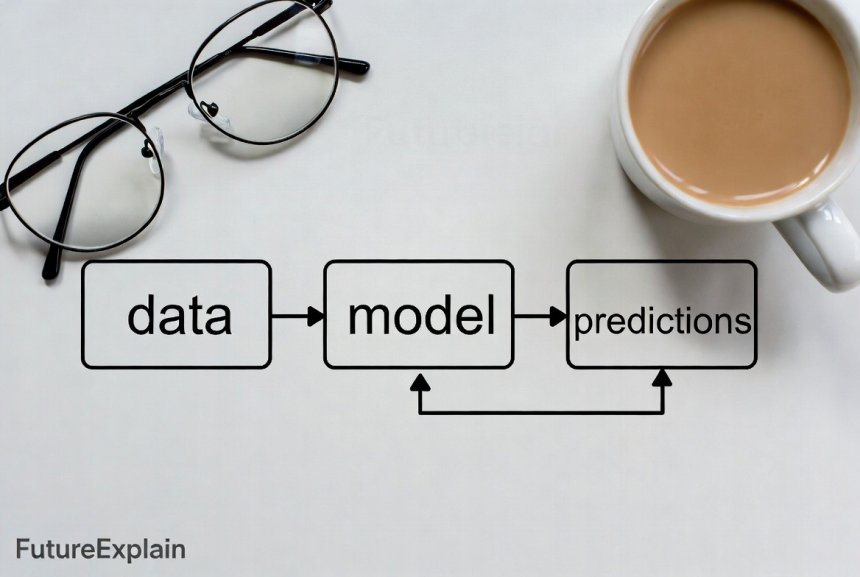
At a high level, most AI systems follow the same pattern:
- Collect data: Examples such as images, text, or logs.
- Train a model: Use data to teach a mathematical model to map inputs to outputs (for example, images to labels).
- Evaluate & improve: Test the model on new data, then adjust.
- Deploy: Put the model into an app, website, or device where it makes predictions or assists users.
Training typically requires computing power and careful data preparation. Once trained, a model can often run quickly on modest hardware or through cloud APIs.
4. Types of AI you should know
There are several practical ways to classify AI:
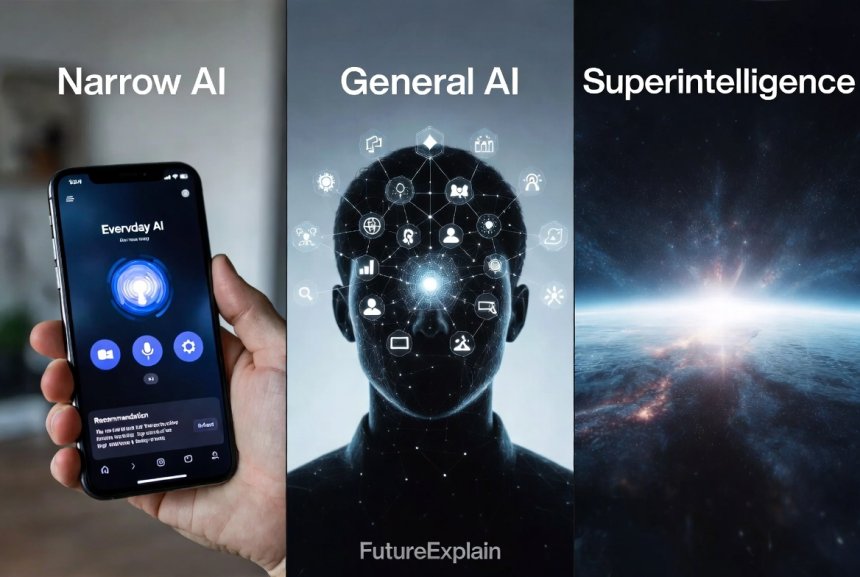
- Narrow (or weak) AI: Systems built for a specific task (e.g., translating text, recognizing faces). This is the type most people encounter daily.
- General AI (AGI): A theoretical system that could perform any intellectual task a human can. AGI remains speculative and is not available today.
- Rule-based vs. learning-based: Older AI used explicit rules; modern AI mostly uses learning from examples.
5. Everyday examples of AI
AI is already embedded in many simple, useful ways:
- Search engines: Ranking, query understanding, and suggested results.
- Recommendations: Product and video suggestions on shopping sites and streaming platforms.
- Voice assistants: Speech recognition and simple conversational responses.
- Photo tools: Background removal, upscaling, and style transfer.
- Customer support chatbots: Automated first-line help and ticket routing.
These examples are based on practical combinations of data, models, and application logic.
6. Common myths — and what’s actually true
Beginners often encounter myths. Here are a few common ones:
- Myth: AI can think like a human. Reality: Most AI systems are tools for narrow tasks and do not possess general understanding or consciousness.
- Myth: AI will immediately replace all jobs. Reality: AI automates tasks — many jobs will change rather than vanish. New roles in oversight, data preparation, and AI-assisted work are emerging. See also how-ai-is-changing-jobs-and-which-jobs-are-safe for a deeper look.
- Myth: AI is magically accurate. Reality: Models can make mistakes, be biased, or fail on data they weren’t trained for.
7. Key ethical and safety concerns
As AI spreads, these issues deserve attention:
- Bias: If training data reflects social biases, models can reproduce them.
- Privacy: Models trained on sensitive data may expose private information if not handled properly.
- Transparency: Complex models can be difficult to interpret; businesses often need explanations for decisions they make using AI.
- Misuse: Generative tools can be used to produce misleading media or spam.
Responsible use involves choosing appropriate safeguards, documenting data sources, and applying human review where decisions matter. For a practical safety checklist see AI Ethics & Safety (category page).
8. How to try AI safely — practical tips
If you want to experiment without risk:
- Start with free, reputable tools (cloud providers and academic demos) rather than unknown apps.
- Use small, public or synthetic datasets when learning; avoid placing private customer data into unfamiliar services.
- Test outputs carefully; validate results before automating important decisions.
9. A simple learning roadmap (for non-technical beginners)
Follow these steps to get comfortable with AI concepts and practical tools:
- Step 1 — Learn the basics: Read approachable primers and watch short videos on what AI, ML, and deep learning are.
- Step 2 — Try visual, no-code tools: Use web apps that let you label images or build simple workflows without coding.
- Step 3 — Use APIs: Try cloud APIs for text, speech, and images — many providers offer free tiers and simple examples.
- Step 4 — Build a small project: Automate a repetitive task at work or create a simple content helper — practical use cements learning.
For hands-on beginners, check related practical articles like top-ai-tools-for-beginners-to-boost-productivity and building-a-simple-ai-chatbot-without-coding.

10. How businesses use AI (simple examples)
Small businesses can benefit from AI in gradual, low-risk steps:
- Customer support: Triage emails or suggest replies to agents.
- Marketing: Generate draft copy, analyze which messages perform best.
- Operations: Automate simple workflows and detect anomalies in invoices or logs.
11. What AI cannot (reliably) do yet
Realistic limits to keep in mind:
- Understand context as humans do across long, real-world tasks.
- Generalize perfectly from small amounts of data without guidance.
- Be fully transparent about why a complex model made a specific decision, unless special explainability tools are used.
12. Choosing the right approach
When deciding whether to use AI for a task, ask:
- Is there enough good data to train a reliable model?
- Are the potential benefits worth the operational cost and maintenance?
- What are the ethical risks, and how will you mitigate them?
13. Quick glossary — plain meanings
- Model: The trained program that makes predictions (e.g., classifier).
- Training data: Examples used to teach the model.
- Inference: The model’s prediction when given new input.
- Overfitting: When a model learns noise instead of the underlying pattern.
14. Final practical tips and resources
Keep your approach pragmatic:
- Start small, measure results, and scale where value appears.
- Document data sources and testing steps — this prevents surprises later.
- Combine human judgment with AI suggestions for important decisions.
If you want a short hands-on path: pick a small, repetitive task at work; try a free API or no-code tool; evaluate results; iterate. Many beginners find that doing one small project is the fastest way to learn.
Further reading
Share
What's Your Reaction?
 Like
1620
Like
1620
 Dislike
42
Dislike
42
 Love
380
Love
380
 Funny
90
Funny
90
 Angry
9
Angry
9
 Sad
18
Sad
18
 Wow
290
Wow
290

















Thank you — this makes AI accessible and non-threatening.
Solid primer. The practical project suggestions are useful.
I appreciate the further reading links — good roadmap.
Good for non-technical readers. The example list was especially helpful.
Practical and trustworthy — thanks.
Useful content. I'll use this for an intro session.