
Vector Databases Explained: From Embeddings to Search
This comprehensive guide explains vector databases in simple terms, starting with the fundamentals of embeddings and how they transform data into mathematical representations. You'll learn how vector databases enable similarity search, powering applications like semantic search, recommendation systems, and AI assistants. We cover the architecture behind vector databases, compare popular solutions (Pinecone, Weaviate, Qdrant, Chroma), and provide practical implementation guidance. The article includes real-world use cases, cost considerations, and future trends, making it accessible for both technical and non-technical readers interested in modern search technology.

Vector Databases Explained: From Embeddings to Search
In the world of artificial intelligence and modern applications, how we search and retrieve information is undergoing a fundamental transformation. Traditional databases, which have served us well for decades, are being complemented by a new type of database designed specifically for the AI age: vector databases. These specialized databases don't just store data—they understand relationships, similarities, and meanings in ways that were previously impossible.
Imagine searching for "comfortable running shoes for long distances" and getting results that understand you want cushioned marathon trainers, not just shoes containing those keywords. Or picture a music app that finds songs with similar emotional tones, not just the same genre. This is the power of vector databases—they enable semantic understanding rather than just keyword matching.
In this comprehensive guide, we'll demystify vector databases from the ground up. We'll start with the fundamental concept of embeddings—the mathematical magic that makes all this possible—and gradually build up to understanding how vector databases work, why they're revolutionizing search, and how you can start using them in your own projects. Whether you're a developer, business owner, or simply curious about modern technology, this guide will give you a clear understanding of this transformative technology.
What Are Vector Databases? The Big Picture
At their core, vector databases are specialized storage systems designed to efficiently store, index, and search through high-dimensional vectors. But what does that actually mean in practical terms? Let's break it down with an analogy.
Think of a traditional database as a highly organized filing cabinet. Each document has a specific label, and you can find documents by looking up their labels. If you want documents about "dogs," you get all documents with the word "dog" in them. This works well for exact matches but fails when you want documents about "canines" or "pets" or "animal companions."
Now imagine a different kind of filing system where documents are placed in a vast multidimensional space based on their meaning. Documents about dogs are clustered together, but so are documents about wolves, pets, and animals. When you search for "canine companions," the system doesn't look for those exact words—it finds the spot in this conceptual space that represents that idea and retrieves the documents closest to that point. This is essentially what vector databases do.
The Evolution of Search Technology
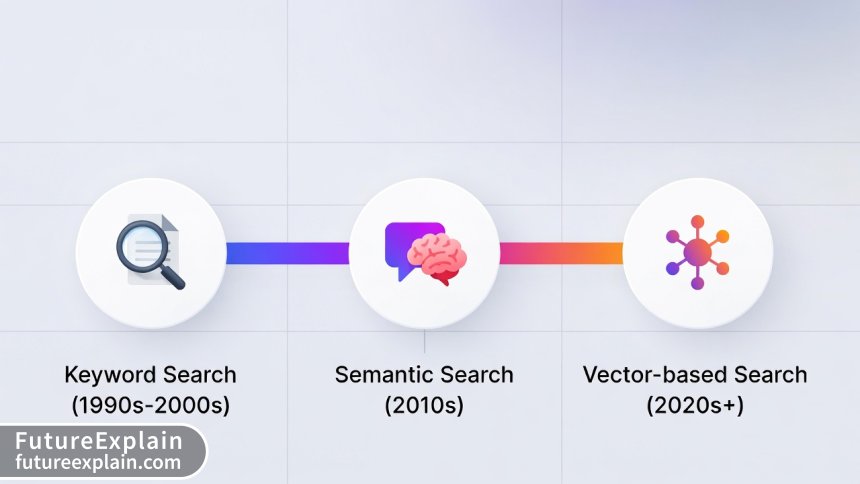
To understand why vector databases matter, it helps to see how search technology has evolved:
- Keyword Search (1980s-2000s): Exact word matching, Boolean operators, basic relevance scoring
- Statistical Search (2000s-2010s): TF-IDF, PageRank, understanding document importance
- Semantic Search (2010s-present): Understanding meaning, context, synonyms
- Vector Search (Present-future): Mathematical understanding of concepts and relationships
Vector databases represent the latest stage in this evolution, enabling applications that truly understand content rather than just processing text.
The Magic of Embeddings: Turning Everything into Numbers
Before we can understand vector databases, we need to grasp their fundamental building block: embeddings. Embeddings are the mathematical representations that make semantic understanding possible.
What Are Embeddings?
Embeddings are numerical representations of data in a high-dimensional space. The key insight is that similar items end up close together in this mathematical space. This applies to words, sentences, images, audio—virtually any type of data.
Consider these sentences:
- "The cat sat on the mat"
- "The feline rested on the rug"
- "Dogs chase balls in the park"
To a keyword-based system, these have almost no overlap. But to an embedding model, the first two sentences would be very close together in vector space (similar meaning), while the third would be farther away (different topic).
How Embeddings Are Created
Modern embedding models use neural networks trained on massive amounts of data. The training process teaches the model to position similar concepts near each other. For example:
- Word Embeddings (Word2Vec, GloVe): Train on text corpora to learn word relationships
- Sentence Embeddings (Sentence-BERT, Universal Sentence Encoder): Understand whole sentences and paragraphs
- Image Embeddings (CLIP, ResNet): Convert images to vectors that capture visual features
- Multimodal Embeddings: Combine different data types into unified vector spaces
The resulting vectors typically have hundreds or thousands of dimensions (commonly 384, 768, or 1536 dimensions), each dimension representing some learned feature of the data.

Practical Examples of Embeddings
Let's look at some concrete examples of what embeddings capture:
- Semantic Relationships: The vector for "king" minus "man" plus "woman" equals a vector very close to "queen"
- Contextual Understanding: "Apple" as a fruit vs. "Apple" as a company get different vectors based on context
- Cross-modal Understanding: The embedding for a picture of a beach is close to the embedding for the text "sandy shore"
- Emotional Tone: Sentences with similar emotional content cluster together regardless of exact words
This ability to capture meaning and relationships is what makes embeddings so powerful—and what creates the need for specialized databases to work with them efficiently.
How Vector Databases Work: Architecture and Components
Now that we understand embeddings, let's explore how vector databases are built to handle them efficiently. A typical vector database consists of several key components working together.
Core Architecture Components
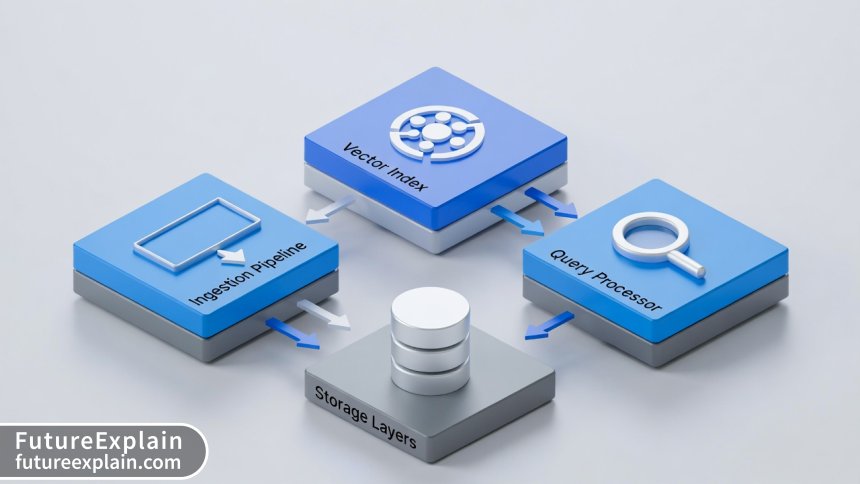
Most vector databases share a similar architecture with these essential components:
- Ingestion Pipeline: Converts raw data (text, images, etc.) into vector embeddings using embedding models
- Vector Index: Specialized data structure for efficient similarity search (we'll explore this in detail)
- Storage Layer: Stores both vectors and their associated metadata
- Query Processor: Handles search queries, including filtering and ranking
- API Layer: Provides interfaces for applications to interact with the database
The Heart of Vector Databases: Indexing Algorithms
The most critical component of any vector database is its indexing algorithm. Searching through millions or billions of high-dimensional vectors to find the closest matches is computationally expensive if done naively (comparing the query vector to every stored vector). Indexing algorithms solve this problem by creating data structures that allow for approximate nearest neighbor (ANN) search.
Here are the most common indexing algorithms used in vector databases:
- HNSW (Hierarchical Navigable Small World): Creates a hierarchical graph structure allowing efficient navigation through vector space
- IVF (Inverted File Index): Clusters vectors and searches only relevant clusters
- PQ (Product Quantization): Compresses vectors for faster comparison with minimal accuracy loss
- LSH (Locality-Sensitive Hashing): Hashes similar vectors to same buckets for fast retrieval
Most production vector databases use combinations of these algorithms to balance speed, accuracy, and memory usage.
Metadata Filtering: The Unsung Hero
While the vector search gets most attention, practical applications almost always need to combine similarity search with traditional filtering. For example: "Find shoes similar to these, but only in size 9 and under $100." This requires hybrid search capabilities where vector similarity and metadata filtering work together efficiently.
Modern vector databases implement sophisticated filtering strategies:
- Pre-filtering: Filter by metadata first, then do vector search on the subset
- Post-filtering: Do vector search first, then filter results
- Single-stage filtering: Integrate filtering directly into the vector search algorithm
The choice depends on your data distribution and query patterns—another reason why different vector databases excel in different scenarios.
Types of Vector Search: Understanding the Trade-offs
Not all vector searches are created equal. Different applications require different approaches, each with its own trade-offs between accuracy, speed, and resource usage.
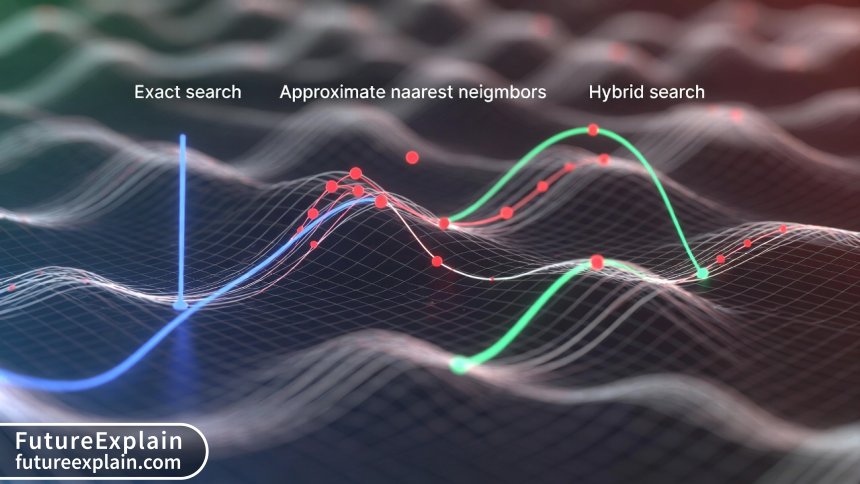
Exact vs. Approximate Search
The fundamental choice in vector search is between exact and approximate methods:
- Exact Nearest Neighbor (ENN): Guarantees perfect accuracy by comparing query to every vector
- Approximate Nearest Neighbor (ANN): Sacrifices some accuracy for massive speed improvements
For most real-world applications, ANN is the practical choice. The accuracy loss is typically minimal (95-99% recall compared to exact), while speed improvements can be orders of magnitude faster.
Distance Metrics: How "Closeness" Is Measured
Different applications use different mathematical definitions of "closeness" in vector space:
- Cosine Similarity: Measures angle between vectors, ignores magnitude (best for text)
- Euclidean Distance (L2): Straight-line distance in vector space
- Inner Product (Dot Product): Useful for certain embedding types
- Manhattan Distance (L1): Sum of absolute differences
The choice of distance metric depends on your embedding model and application requirements. Most embedding models are trained with a specific distance metric in mind.
Search Quality Metrics
When evaluating vector search performance, several metrics matter:
- Recall@K: Percentage of true nearest neighbors found in top K results
- Precision@K: Percentage of top K results that are truly relevant
- Latency: Time from query to first result
- Throughput: Queries per second the system can handle
- Memory Usage: RAM required for indexes
Different applications prioritize different metrics. E-commerce might prioritize recall (don't miss relevant products), while chat applications might prioritize latency (fast responses).
Popular Vector Database Solutions Compared
The vector database landscape has evolved rapidly, with multiple solutions offering different approaches. Here's a practical comparison of the most popular options.
Managed Cloud Services
These are fully managed services that handle infrastructure, scaling, and maintenance:
- Pinecone: Pioneering managed vector database, excellent documentation, strong performance
- Weaviate Cloud: Combines vector search with traditional filtering in innovative ways
- Google Vertex AI Matching Engine: Tight Google Cloud integration, massive scale capabilities
- Azure AI Search Vector Search: Good for Microsoft ecosystem integration
- AWS OpenSearch with k-NN: Familiar for AWS users, gradual migration path
Open-Source Solutions
Self-hosted options that give you full control:
- Qdrant: Rust-based, excellent performance, good Rust/Python APIs
- Milvus: Feature-rich, scalable, complex to operate
- Chroma: Python-native, simple API, great for prototyping
- Vespa: Yahoo's solution, battle-tested at scale
- FAISS (Facebook AI Similarity Search): Library rather than full database, integrates with other systems
Choosing the Right Solution: Decision Framework
Selecting a vector database depends on several factors:
- Team Size & Expertise: Small teams might prefer managed services
- Scale Requirements: Billions of vectors need different solutions than millions
- Existing Infrastructure: Cloud provider preferences matter
- Budget: Managed services cost more but reduce operational burden
- Feature Needs: Specific requirements like real-time updates or hybrid search
Real-World Applications and Use Cases
Vector databases aren't just theoretical—they're powering real applications today. Let's explore some practical implementations.
Semantic Search and Recommendation Systems
The most common application is enhancing search beyond keywords. Examples include:
- E-commerce: "Show me furniture that would go with this rustic dining table"
- Content Platforms: "Find articles discussing similar concepts to this one"
- Enterprise Search: Searching internal documents by meaning rather than exact phrases
Retrieval-Augmented Generation (RAG)
RAG has become a killer application for vector databases. By retrieving relevant information before generating responses, LLMs can provide accurate, up-to-date answers without hallucination. The typical RAG workflow:
- Chunk documents and create vector embeddings
- Store embeddings in vector database
- Convert user question to embedding
- Find most relevant document chunks
- Feed chunks plus question to LLM for answer generation
This approach is revolutionizing customer support, knowledge management, and research assistance.
Multimodal Search Applications
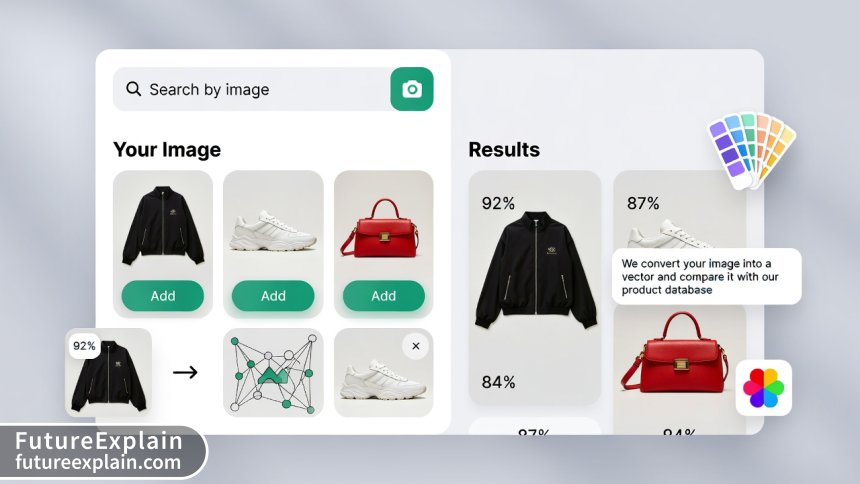
Vector databases excel at cross-modal search where you can search across different data types:
- Image-to-Image: "Find products that look similar to this photo"
- Text-to-Image: "Show me images matching this description"
- Audio-to-Text: "Find transcripts discussing similar topics to this audio clip"
Companies like Pinterest and Instagram use these capabilities for visual discovery, while media companies use them for content management.
Anomaly Detection and Security
By representing normal patterns as vectors, vector databases can identify anomalies:
- Cybersecurity: Detecting unusual network traffic patterns
- Financial Fraud: Identifying transactions that don't match normal customer behavior
- Quality Control: Spotting manufacturing defects in visual inspections
Implementation Guide: From Prototype to Production
Now that we understand what vector databases are and what they can do, let's walk through a practical implementation journey.
Step 1: Defining Your Requirements
Before choosing any technology, clarify your needs:
- Data Volume: How many vectors will you store initially? Growth projections?
- Query Patterns: Read-heavy vs. write-heavy? Real-time requirements?
- Accuracy Needs: How critical is perfect recall vs. speed?
- Team Skills: What programming languages and infrastructure is your team familiar with?
- Budget: Both initial development and ongoing operational costs
Step 2: Choosing Embedding Models
The embedding model determines your vector quality. Consider:
- Task-Specific vs. General Models: Specialized models often perform better for specific domains
- Model Size vs. Accuracy: Larger models are more accurate but slower
- Multilingual Support: If you need to handle multiple languages
- Update Frequency: How often the model is updated with new training data
Popular choices include OpenAI's embeddings, Sentence Transformers, and Cohere's embedding models.
Step 3: Data Preparation and Chunking Strategy
How you prepare your data significantly impacts search quality:
- Chunk Size: Balance between context preservation and search precision
- Overlap Strategy: Overlapping chunks prevent missing information at boundaries
- Metadata Design: What filtering fields will you need?
- Update Strategy: How will you handle updates to source data?
Step 4: Implementation Patterns
Common architectural patterns for vector database implementations:
- Standalone Vector Database: Dedicated vector database for search applications
- Vector Extension to Existing Database: Adding vector capabilities to PostgreSQL or Redis
- Hybrid Approach: Vector database for similarity, traditional database for transactions
- Embedded Solution: Vector search libraries within application code
The choice depends on your existing infrastructure and specific requirements.
Performance Optimization and Best Practices
Implementing a vector database is one thing—optimizing it for production is another. Here are key considerations for performance.
Index Tuning Strategies
Different indexing parameters affect performance:
- HNSW Parameters: M (connections per layer) and efConstruction (construction quality)
- IVF Parameters: Number of clusters (nlist) and probes per query (nprobe)
- Quantization Settings: Balance between compression and accuracy loss
There's no one-size-fits-all configuration. You'll need to experiment with your specific data and query patterns.
Hardware Considerations
Vector databases have specific hardware needs:
- Memory: Most indexes are memory-resident for performance
- CPU: Vector operations benefit from SIMD instructions
- Storage: SSDs recommended for persistent storage
- GPU: Can accelerate certain operations but not always necessary
Monitoring and Maintenance
Production vector databases need ongoing attention:
- Query Performance Monitoring: Track latency, throughput, recall metrics
- Index Health: Monitor index size, memory usage, fragmentation
- Data Quality: Periodically validate embedding quality hasn't degraded
- Capacity Planning: Plan for growth in data volume and query load
Cost Considerations and ROI Analysis
Vector databases involve both development and operational costs. Understanding these helps make informed decisions.
Cost Components
Total cost of ownership includes:
- Infrastructure Costs: Servers, storage, networking for self-hosted solutions
- Managed Service Fees: Subscription costs for cloud services
- Embedding Model Costs: API calls for generating embeddings (if using external APIs)
- Development Costs: Engineering time for implementation and maintenance
- Training Costs: Upskilling team on new technology
ROI Calculation Framework
To justify investment, consider both quantitative and qualitative benefits:
- Increased Conversion Rates: Better search leads to more purchases
- Reduced Support Costs: Self-service through improved knowledge bases
- Increased Productivity: Employees finding information faster
- Competitive Advantage: Better user experience than competitors
- Innovation Enablement: New features and capabilities
Cost Optimization Strategies
Practical ways to manage costs:
- Right-sizing Infrastructure: Start small, scale as needed
- Caching Strategies: Cache frequent queries and results
- Query Optimization: Reduce unnecessary vector operations
- Data Lifecycle Management: Archive or delete old, unused vectors
- Multi-tenancy: Share infrastructure across applications where possible
Future Trends and Evolution
The vector database space is evolving rapidly. Understanding emerging trends helps future-proof your decisions.
Emerging Technical Trends
Several technical developments are shaping the future:
- Specialized Hardware: Chips designed specifically for vector operations
- Federated Learning Integration: Updating embeddings without centralized data collection
- Automated Index Management: Self-tuning indexes based on workload patterns
- Unified Query Languages: Standardized ways to query across different vector databases
- Edge Deployments: Smaller, optimized vector databases for edge devices
Market and Adoption Trends
The broader ecosystem is also evolving:
- Consolidation: Larger database vendors adding vector capabilities
- Specialization: Domain-specific vector databases for healthcare, finance, etc.
- Democratization: Tools making vector databases accessible to non-experts
- Regulatory Considerations: Privacy-preserving vector search techniques
Preparing for the Future
To stay ahead of the curve:
- Avoid Vendor Lock-in: Use abstraction layers where possible
- Design for Evolution: Assume your vector database choice will change
- Invest in Fundamentals: Focus on understanding core concepts rather than specific tools
- Participate in Communities: Engage with open-source projects and user groups
Common Pitfalls and How to Avoid Them
Based on real-world implementations, here are common mistakes and how to avoid them.
Technical Implementation Pitfalls
- Poor Chunking Strategy: Results in irrelevant search results. Solution: Test different chunk sizes with real queries.
- Ignoring Metadata Design: Limits filtering capabilities. Solution: Plan metadata schema early.
- Underestimating Memory Requirements: Causes performance issues. Solution: Monitor memory usage and plan for growth.
- Wrong Distance Metric: Reduces search quality. Solution: Match metric to embedding model design.
Organizational and Process Pitfalls
- Starting Too Big: Overwhelming complexity. Solution: Start with a focused pilot project.
- Neglecting Data Quality: Garbage in, garbage out. Solution: Clean and validate source data.
- Isolated Implementation: Creates silos. Solution: Integrate with existing data infrastructure.
- Ignoring Operational Aspects: Leads to production issues. Solution: Include operations team from the start.
Getting Started: Practical First Steps
Ready to explore vector databases? Here's a practical roadmap to get started.
For Developers: Hands-on Learning Path
- Experiment with Embeddings: Use Sentence Transformers to create embeddings for sample text
- Try a Local Vector Database: Install Chroma or Qdrant locally and load sample data
- Build a Simple RAG Application: Create a Q&A system using your documents
- Experiment with Different Models: Compare embedding quality across different models
- Measure Performance: Test with realistic query loads and datasets
For Decision Makers: Evaluation Framework
- Identify Use Cases: Document specific problems vector databases could solve
- Calculate Potential ROI: Estimate benefits vs. costs for your scenarios
- Run a Proof of Concept: Test with a small, well-defined project
- Evaluate Team Readiness: Assess skills and identify training needs
- Develop Migration Strategy: Plan how to integrate with existing systems
For Business Users: No-Code Exploration
Even without technical skills, you can:
- Use Existing Tools: Many SaaS products now incorporate vector search
- Define Requirements: Clearly articulate what problems you need to solve
- Evaluate Vendors: Compare different solutions based on your needs
- Start Small: Begin with a limited pilot before full implementation
Conclusion: The Vector Database Revolution
Vector databases represent a fundamental shift in how we store, search, and understand information. By moving beyond keyword matching to semantic understanding, they enable applications that were previously impossible or impractical. From enhanced search experiences to intelligent assistants to cross-modal discovery, vector databases are becoming essential infrastructure for modern applications.
The journey from embeddings to search might seem complex initially, but the core concepts are accessible once you understand the basic principles. Start with a clear understanding of your requirements, choose appropriate tools for your scale and expertise level, and implement incrementally with continuous learning and optimization.
As AI continues to advance, vector databases will likely become as ubiquitous as relational databases are today. By understanding them now, you're preparing for the future of data management and application development.
Key Takeaways
- Vector databases enable similarity search based on meaning rather than exact matches
- Embeddings transform diverse data types into mathematical representations
- Different applications require different trade-offs between accuracy, speed, and cost
- The vector database landscape offers both managed services and open-source options
- Successful implementation requires careful planning around data preparation, indexing, and monitoring
- Vector databases are powering next-generation applications across industries
Visuals Produced by AI
Further Reading
To continue your learning journey about vector databases and related technologies, explore these articles:
- Retrieval-Augmented Generation (RAG) — Advanced Practical Guide - Learn how vector databases power accurate AI responses
- Embeddings and Vector Databases: A Beginner Guide - Foundational concepts for understanding vector representations
- Using LangChain & Tooling for Real Apps: Practical Recipes - Practical implementation patterns for AI applications
Share
What's Your Reaction?
 Like
15210
Like
15210
 Dislike
43
Dislike
43
 Love
1854
Love
1854
 Funny
326
Funny
326
 Angry
12
Angry
12
 Sad
8
Sad
8
 Wow
1023
Wow
1023


















The article mentions different embedding models but doesn't discuss how to evaluate which model is best for your specific use case. This is a critical decision point.
Evaluating embedding models typically involves testing on a representative sample of your data with labeled relevance judgments. Also consider model size (affects speed and cost) and domain specificity (general vs. specialized models).
We've been using vector search for six months now. The initial implementation was challenging but the benefits have been substantial - better search results and new feature possibilities.
The section on common pitfalls saved us from several potential mistakes. We almost made the error of poor metadata design mentioned in the article.
As a business analyst, I appreciated the ROI framework. It helped me build a compelling business case for investing in vector search technology.
The future trends discussion about edge deployments is exciting. We're working on privacy-preserving search applications where data can't leave the device.
The practical first steps section gave our team a clear action plan. We've completed steps 1-3 and are already seeing promising results in our prototype.