
Building a Simple AI Chatbot Without Coding
This comprehensive guide teaches you how to build a functional AI chatbot without any programming knowledge. We'll explore the top no-code platforms available in 2024, compare their features and pricing, and walk you through creating your first chatbot from start to finish. Learn how to train your AI with custom knowledge, deploy it to websites and messaging apps, and optimize it for real business use cases. Whether you're a small business owner, marketer, or entrepreneur, this guide provides everything you need to create intelligent conversational assistants that save time and improve customer engagement.



Building a Simple AI Chatbot Without Coding: Your Complete 2024 Guide
Imagine having a virtual assistant that answers customer questions 24/7, helps users navigate your website, or even schedules appointments—all without writing a single line of code. Thanks to the explosion of no-code AI platforms, building intelligent chatbots has become accessible to everyone. In this comprehensive guide, we'll walk you through every step of creating your own AI chatbot, from choosing the right platform to deploying it live on your website.
According to recent industry analysis, the global chatbot market is expected to reach $10.5 billion by 2026, with no-code platforms driving much of this growth among small and medium businesses. These tools have democratized AI development, allowing non-technical users to create sophisticated conversational interfaces that were once only possible for large corporations with dedicated development teams.
Why Build an AI Chatbot Without Coding?
Before we dive into the how-to, let's explore why no-code AI chatbots have become so popular. Traditional chatbot development required programming skills in languages like Python or JavaScript, understanding of natural language processing (NLP), and significant development time. No-code platforms have changed this completely by providing:
- Visual builders that let you design conversations with drag-and-drop interfaces
- Pre-trained AI models that understand human language out of the box
- Integration templates for popular platforms like websites, Slack, and Facebook Messenger
- Affordable pricing with many platforms offering free tiers to get started
Whether you're a small business owner wanting to provide better customer service, a marketer looking to generate leads, or an educator creating interactive learning tools, no-code AI chatbots offer practical solutions without the technical barrier.
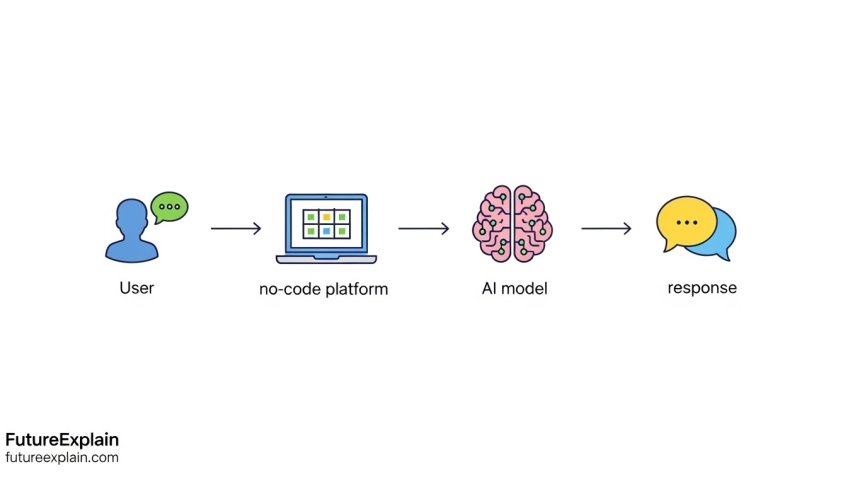
Understanding How No-Code AI Chatbots Work
To build effective chatbots, it helps to understand what's happening behind the scenes. Most no-code platforms follow a similar architecture:
The Three-Layer Structure
1. Conversation Design Layer: This is where you define how your chatbot should respond. Using visual flowcharts, you can map out different conversation paths, create decision trees, and set up conditional logic.
2. AI/NLP Layer: This layer handles understanding user input. Platforms typically use either rule-based matching or machine learning models (often powered by OpenAI's GPT or similar technology) to interpret what users are asking.
3. Integration Layer: Once your chatbot is built, this layer handles connecting it to different channels like your website, mobile app, or messaging platforms.
Most modern platforms combine these layers into a single intuitive interface, making the technical complexity invisible to the user.
Top No-Code AI Chatbot Platforms Compared
Choosing the right platform is the most important decision you'll make. Here's a detailed comparison of the top 5 no-code AI chatbot builders available in 2024:
1. Voiceflow: The Professional Choice
Voiceflow started as a voice app design tool but has evolved into a comprehensive conversational AI platform. It's particularly strong for:
- Multi-turn conversations with complex logic
- Voice and text chatbot creation in one platform
- Team collaboration features
- Advanced AI training with custom knowledge bases
Pricing: Free tier available (2 projects, 50K API calls/month), paid plans start at $50/month for unlimited projects.
2. Botpress: Open Source Flexibility
Botpress offers an open-source core with a cloud platform option. This makes it ideal for:
- Users who want self-hosting options
- Advanced customization needs
- Enterprises with specific compliance requirements
- Integration with existing systems via webhooks
Pricing: Open-source version is free, cloud plans start at $99/month for the starter tier.
3. Landbot: Website Chat Specialist
Landbot focuses specifically on website chatbots with beautiful visual design. Key features include:
- Stunning, customizable chat widget designs
- Excellent lead capture and qualification features
- Simple drag-and-drop interface
- Good integration with marketing tools
Pricing: Free plan with limited features, paid plans from $30/month.
4. ManyChat: Social Media Focus
ManyChat excels at creating chatbots for Facebook Messenger, Instagram, and WhatsApp. It's perfect for:
- Social media marketing automation
- E-commerce businesses
- Broadcast messaging to subscribers
- Simple AI-enhanced responses
Pricing: Free plan available, Pro plans start at $15/month.
5. Tars: Conversion-Optimized Chatbots
Tars specializes in creating chatbots that drive conversions. Its strengths include:
- Pre-built templates for specific industries
- A/B testing capabilities
- Analytics focused on conversion metrics
- Easy integration with CRM systems
Pricing: 14-day free trial, plans start at $99/month.
Step-by-Step: Building Your First AI Chatbot with Voiceflow
Let's walk through creating a practical customer support chatbot for a fictional coffee shop. We'll use Voiceflow's free tier for this tutorial, but the principles apply to most platforms.
Step 1: Setting Up Your Account and Project
1. Sign up for a free Voiceflow account at voiceflow.com
2. Click "Create New Project" and select "Assistant"
3. Choose "Blank Template" to start from scratch
4. Name your project "Coffee Shop Assistant"
Step 2: Designing the Welcome Experience
1. In the canvas, you'll see a Start block. Click on it to edit the welcome message.
2. Add a "Speak" block with the message: "Hello! Welcome to Brew & Bean Coffee. How can I help you today? You can ask about our hours, menu, locations, or place an order."
3. Add a "Choice" block below with buttons for: Hours, Menu, Locations, Place Order, Contact Us
Step 3: Creating Conversation Paths
Now we'll create different paths for each user option:
For Hours:
- Drag a new "Speak" block and connect it from the Hours button
- Enter: "We're open Monday-Friday 6am-8pm, Saturday 7am-9pm, and Sunday 7am-6pm."
- Add a follow-up: "Would you like to know about our holiday hours or return to the main menu?"
For Menu:
- Create a "Speak" block with our menu items
- Consider adding images using the "Image" component
- Include prices and popular items
Step 4: Adding AI Intelligence
This is where we make our chatbot truly smart:
1. Add an "AI Step" block to handle unstructured questions
2. Connect it to capture any questions not handled by our buttons
3. In the AI Step settings, enable "Knowledge Base"
4. Upload a document with frequently asked questions (or enter them manually)
5. Train the AI on your specific content about the coffee shop
Step 5: Testing Your Chatbot
1. Click the "Test" button in the top right corner
2. Try different conversation paths
3. Ask unexpected questions to see how the AI handles them
4. Refine responses based on test results
Step 6: Deploying to Your Website
1. Go to the "Integrations" section
2. Select "Website Chat"
3. Customize the chat widget appearance to match your brand
4. Copy the embed code
5. Paste it into your website's HTML (usually in the header or before the closing body tag)
Advanced Techniques: Training Your AI with Custom Knowledge
While basic chatbots can answer predefined questions, truly powerful AI chatbots understand your specific business context. Here's how to train your chatbot with custom knowledge:
Method 1: Document Upload
Most platforms allow you to upload documents (PDFs, Word docs, text files) that the AI will read and learn from. For our coffee shop example, you could upload:
- Employee handbook with policies
- Detailed menu with ingredients and preparation methods
- Company history and values
- Event calendars and special promotions
Method 2: Website Crawling
Some platforms can automatically scan your website and learn from its content. This ensures your chatbot knows everything that's publicly available on your site.
Method 3: Manual Q&A Pairs
For highly specific knowledge, manually creating question-answer pairs ensures accuracy. Format these as:
Q: What's your return policy on coffee beans?
A: We accept returns on unopened coffee beans within 30 days of purchase with receipt.
Method 4: API Integration for Live Data
For dynamic information like inventory, orders, or appointment availability, connect your chatbot to live data sources via APIs. Many no-code platforms offer visual API connectors that don't require coding.
Deployment Options: Where Your Chatbot Can Live
Once your chatbot is built, you have multiple deployment options:
1. Website Embed (Most Common)
Embed a chat widget on your website. This typically involves adding a small JavaScript code snippet to your site.
2. Facebook Messenger
Connect your chatbot to Facebook Messenger to automate customer interactions on your business page.
3. Mobile Apps
Some platforms offer SDKs for integrating chatbots into iOS and Android apps.
4. Internal Tools (Slack, Teams)
Deploy chatbots internally to help employees with HR questions, IT support, or process guidance.
5. Voice Interfaces
Platforms like Voiceflow can export to Amazon Alexa or Google Assistant for voice interactions.
Real Business Use Cases and Templates
Here are three practical chatbot templates you can adapt for your business:
Use Case 1: E-commerce Customer Support
Purpose: Handle 80% of routine customer inquiries
Key Flows:
- Order status checking (integrated with shipping APIs)
- Return/refund policy explanations
- Product recommendations based on customer needs
- Escalation to human agent when needed
Estimated time savings: 15-20 hours per week for small businesses
Use Case 2: Appointment Scheduling Assistant
Purpose: Automate appointment booking for service businesses
Key Flows:
- Service selection and description
- Availability checking (calendar integration)
- Client information collection
- Confirmation and reminder setup
Estimated conversion increase: 30-40% compared to traditional contact forms
Use Case 3: Employee Onboarding Assistant
Purpose: Guide new employees through onboarding
Key Flows:
- Company policies and handbook access
- IT setup instructions and troubleshooting
- Team introductions and org structure
- Training schedule and resource access
Estimated HR time reduction: 50% for routine onboarding tasks
Cost Considerations and Scaling
Understanding the true cost of running an AI chatbot is crucial for planning:
Free Tiers and Limitations
Most platforms offer free tiers with limitations like:
- Monthly message caps (typically 100-1000 messages)
- Limited AI model access
- Basic features only
- Platform branding on the chat widget
Paid Plan Considerations
When evaluating paid plans, consider:
- Per message costs: AI API calls can add up quickly
- User seat costs: Team collaboration features
- Advanced AI model access: GPT-4 costs more than GPT-3.5
- Integration costs: Premium connectors may cost extra
Typical Cost Progression
For a small business:
- Months 1-3 (Testing): Free tier or $0-50/month
- Months 4-6 (Growth): $50-150/month
- Ongoing (Established): $150-500/month depending on volume
Common Challenges and Solutions
Even with no-code platforms, you might encounter challenges. Here are solutions to common issues:
Challenge 1: AI Giving Wrong Answers
Solution: Improve your training data. Add more specific examples, exclude irrelevant information, and use the platform's feedback mechanism to correct mistakes.
Challenge 2: Conversations Feeling Robotic
Solution: Add personality to your responses. Use casual language, include emojis where appropriate, and create multiple response variations for common questions.
Challenge 3: Handling Complex Queries
Solution: Implement a graceful handoff to human agents. Set clear escalation triggers and ensure smooth transition with context preservation.
Challenge 4: Maintaining Over Time
Solution: Schedule regular reviews (monthly or quarterly). Analyze conversation logs to identify gaps in knowledge and update your training data accordingly.
Measuring Success: Key Metrics to Track
To ensure your chatbot investment pays off, track these key metrics:
- Resolution Rate: Percentage of conversations resolved without human intervention
- User Satisfaction: Post-conversation ratings (thumbs up/down)
- Conversation Volume: Number of conversations handled
- Cost Per Conversation: Platform costs divided by conversations
- Escalation Rate: Percentage of conversations needing human help
- Business Metrics: Lead generation, appointment booking, sales attributed to chatbot
Future Trends in No-Code AI Chatbots
The no-code AI chatbot space is evolving rapidly. Here's what to expect:
- Multimodal AI: Chatbots that can process images, documents, and voice in addition to text
- Better Personalization: AI that remembers user preferences and context across sessions
- Industry-Specific Solutions: Pre-built templates for healthcare, legal, education, etc.
- Improved Analytics: Deeper insights into conversation quality and business impact
- Lower Costs: As AI technology matures, expect more capabilities at lower price points
Getting Started: Your Action Plan
Ready to build your first AI chatbot? Follow this 30-day action plan:
Week 1: Research and Planning
- Identify your primary use case
- Choose 2-3 platforms to test
- Map out key conversation flows on paper
Week 2: Platform Testing
- Sign up for free trials
- Build a simple prototype for each platform
- Compare ease of use and features
Week 3: Development
- Select your preferred platform
- Build your complete chatbot
- Gather training materials and documents
Week 4: Testing and Launch
- Conduct internal testing with your team
- Make refinements based on feedback
- Deploy to a limited audience first
- Monitor performance and adjust
Remember: Start simple. Your first chatbot doesn't need to handle every possible question. Begin with the most common inquiries and expand from there.
Conclusion
Building an AI chatbot without coding is not just possible—it's practical and accessible for businesses of all sizes. With the right platform and approach, you can create intelligent conversational interfaces that save time, improve customer experience, and even generate revenue. The key is to start with a clear purpose, choose the right tool for your needs, and iterate based on real user interactions.
The democratization of AI through no-code platforms represents one of the most significant shifts in technology accessibility. What once required teams of engineers and data scientists can now be accomplished by anyone with a clear understanding of their business needs and a willingness to learn these intuitive platforms.
Further Reading
Share
What's Your Reaction?
 Like
1851
Like
1851
 Dislike
12
Dislike
12
 Love
421
Love
421
 Funny
86
Funny
86
 Angry
8
Angry
8
 Sad
5
Sad
5
 Wow
310
Wow
310

















Final thoughts: Started with ManyChat (free), grew to Voiceflow ($50), now considering custom development as needs evolved. The no-code start was crucial - proved the value before investing more.
Multi-channel insight: Website users ask product questions, Facebook users ask about promotions, Instagram users ask about aesthetics. Tailoring responses per channel increased satisfaction.
Budgeting tip: Track your message volume carefully. I accidentally went over my plan's limit during a promotion - unexpected $200 charge! Now I monitor daily.
Tars conversion tracking: 12% of chatbot conversations lead to property viewings scheduled. That's higher than our website contact form (8%). Chatbot qualification works better!
The document upload feature is powerful. Uploaded our 50-page product manual. Chatbot now answers detailed technical questions I didn't even know customers had!
Complex scenarios update: Breaking them into sub-flows works! Example: "I need to return a damaged item bought last month" now triggers: 1) authentication 2) order lookup 3) damage assessment 4) solution options. Much better!