
Future of Automation in Offices and Businesses
A practical, beginner-friendly guide to how automation is changing offices and businesses. Learn benefits, real-world examples, implementation steps, tools, measurement, and how to prepare teams for change.



Future of Automation in Offices and Businesses
Introduction
Automation is no longer confined to factory floors. It has moved into offices and knowledge work, where software, rules, and AI can handle routine tasks, speed up processes, and free humans to focus on higher-value work. This article explains how automation works in modern businesses, what to expect in the near future, and — most importantly — how to adopt automation responsibly and practically.
What we mean by "automation" in an office context
Automation in offices covers a spectrum of technologies and practices designed to reduce manual effort:
- Rule-based automation: Simple scripts or macros that follow explicit rules (e.g., auto-formatting spreadsheets).
- Robotic Process Automation (RPA): Software 'bots' that interact with existing applications (clicking, copying, pasting) to perform repetitive tasks.
- No-code/low-code workflows: Visual tools that connect apps and automate cross-application processes (e.g., when a new form is submitted, create a task and notify a team).
- AI-assisted automation: Models that read and understand text, images, or voice to handle classification, summarization, or recommendations — for example, generating first-draft emails or routing tickets.
Why businesses automate office tasks
Organisations automate for several connected reasons:
- Time savings: Reduce repetitive manual effort so staff can focus on higher-value tasks.
- Accuracy and compliance: Reduce human error in routine processing and maintain consistent audit trails.
- Scalability: Handle more volume without linear increases in headcount.
- Faster decision cycles: Provide near-real-time data and actions for managers and customers.
Common office automation use cases
1. Finance and accounting
Invoicing, reconciliation, expense approval, and report generation are ideal for automation. RPA and accounting integrations reduce manual copying between systems and speed month-end close processes.
2. Customer support and help desks
Automating ticket categorization, first-line responses, and routing improves response time. See how chatbots and AI are used in customer support in our article ai-in-customer-support-how-chatbots-really-work.
3. HR and onboarding
Employee onboarding involves many repetitive steps — account creation, access requests, form collection. Workflow tools automate these sequences and notify stakeholders automatically.
4. Sales and marketing
Lead scoring, follow-up reminders, and personalized email drafts are often automated. Integration between a lead capture form and CRM reduces lost leads and improves conversion.
5. IT and operations
Automated incident triage, log monitoring, and scheduled maintenance tasks help IT teams respond faster and focus on critical problems.
Realistic benefits and measurable outcomes
When done well, office automation yields measurable results:
- Reduced manual hours: 30–60% time savings on well-chosen tasks in many pilots.
- Fewer errors: Lower error rates in data transfer and form processing.
- Faster processing: Shorter cycle times for approvals and customer responses.
- Higher employee satisfaction: Reduced drudgery and more meaningful work.
But benefits are not automatic. They depend on selecting the right processes, measuring correct KPIs, and preparing people for change.
Common pitfalls and limitations
Automation projects fail when they ignore organisational realities. Typical issues include:
- Poor process selection: Automating a broken or rarely used process wastes effort.
- Underestimating exceptions: Edge cases and rare exceptions cause bots to fail if not planned for.
- Lack of governance: Uncontrolled automations can introduce security or compliance risks.
- Neglecting people: Failing to reskill or involve employees leads to resistance and poor outcomes.
How to choose the right processes to automate
Use a simple prioritisation rubric:
- Volume: High-frequency tasks often deliver faster ROI.
- Rule clarity: Processes with clear, consistent rules are easier to automate.
- Impact: Automating tasks that unblock customer experience or critical workflows yields higher value.
- Exception rate: Low exception rates are better for early pilots.
Step-by-step roadmap to implement office automation
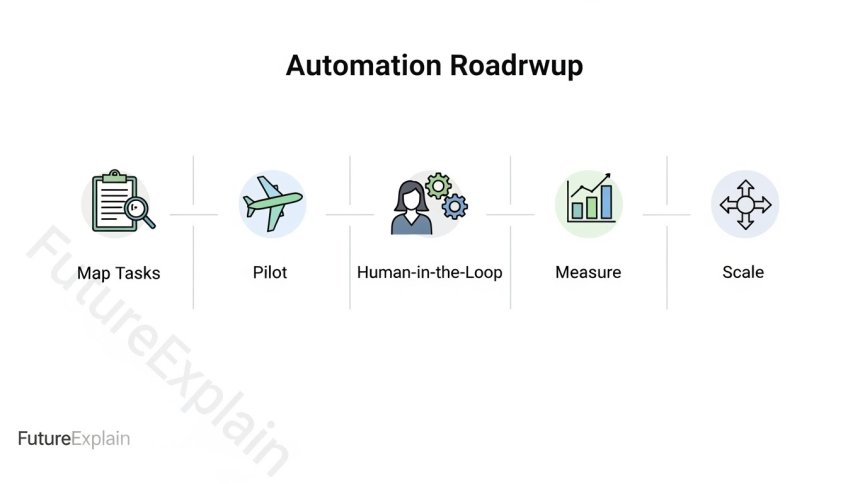
Step 1 — Map tasks and workflows
Break jobs into tasks and document how work flows today. This task-level view helps identify targets for automation. For background on task vs job distinctions, review will-ai-replace-humans-a-realistic-explanation.
Step 2 — Start small with pilot projects
Choose one or two high-value, low-risk processes. Run a pilot in "shadow mode" where automation runs alongside humans to collect data without changing outcomes. This reduces risk and produces valuable logs to compare performance.
Step 3 — Human-in-the-loop design
Design automations where AI or bots handle routine work but humans review uncertain or high-impact decisions. Human-in-the-loop reduces errors from over-trusting automation.
Step 4 — Measure the right KPIs
Good KPIs connect automation to business outcomes:
- Time saved per task
- Error rate changes
- Customer satisfaction or NPS
- Employee time on higher-value work
Step 5 — Governance and compliance
Define who owns automations, how they are documented, and how changes are audited. Include security checks and data handling rules early, not as an afterthought.
Step 6 — Scale and iterate
Scale successful pilots methodically, incorporate feedback loops, and allocate resources for maintenance and monitoring.
Automation technologies and tool categories
No-code/low-code platforms
These platforms (e.g., Zapier, Make/Integromat, Power Automate) connect apps and build workflows visually. They are ideal for rapid prototyping and for teams without engineering support.
Robotic Process Automation (RPA)
RPA tools (e.g., UiPath, Automation Anywhere) mimic user interactions and are useful when systems lack APIs. RPA is strong for legacy systems but must be maintained carefully.
AI services and automation
AI adds value where content understanding or classification is required — for example, automating document reading, routing support tickets, or extracting information from invoices.
Integrated SaaS automation
Modern SaaS products increasingly include automation features built-in (e.g., CRM automation rules, email workflows). These features are easiest to adopt because they live in the tools teams already use.
Real-world examples and short case studies
Example: A small finance team
A small company automated invoice matching using a combination of OCR + rules. The automation reduced manual reconciliation time by 45% and reduced late payment errors. They started with a pilot for the supplier with the highest invoice volume and expanded after three months.
Example: Customer support
A mid-size software company used AI to auto-suggest responses for common queries. Agents accepted suggested responses 60% of the time, reducing average response time and freeing agents to handle complex tickets.
Example: HR onboarding
Automating account setup and equipment requests reduced first-week admin tasks by 70%, and new hire satisfaction improved because access was ready on day one.
Measuring ROI and business impact
Measure both direct and indirect effects:
- Direct: Labour hours saved, cost per transaction, reduction in errors.
- Indirect: Employee engagement, speed to market, improved customer retention.
Use before-and-after measurements and compare pilot vs control groups when feasible. Remember to measure ongoing maintenance costs for automations — unattended bots can accrue technical debt.
People and change management
Automation is as much about people as technology. Best practices include:
- Transparent communication: Explain goals and expected changes; focus on how automation reduces tedious work.
- Reskilling: Invest in training so staff can work with new tools and take on higher-value tasks. For recommended skills, see skills-you-should-learn-to-stay-relevant-in-the-ai-era.
- Participatory design: Involve the people who do the work in designing automations to capture tacit knowledge and exceptions.
- Reward learning: Recognise employees who contribute to automation improvements.
Security, privacy, and ethical considerations
Automations often process personal or sensitive data. Ensure you:
- Follow data minimisation and legal requirements for data handling.
- Use role-based access control for automation configurations.
- Document decisions and create audit logs for sensitive processes.
- Assess fairness and bias for AI models that affect people, e.g., hiring or lending.
How to design resilient automation
Resilience means handling exceptions and change. Design tactics include:
- Clear fallback paths when automation fails (e.g., escalate to a human).
- Monitoring and alerts for failures or performance drops.
- Versioning and rollback plans for workflow updates.
- Regular audits and retraining for AI models to avoid data drift.
Scaling automation across an organisation
Scaling requires a mix of central coordination and local autonomy:
- Centre of excellence (CoE): A small cross-functional team that sets standards, provides templates, and shares best practices.
- Local champions: Teams that own domain-specific automations and feed learnings back to the CoE.
- Governance: Policies for approvals, risk classification, and operational ownership.
What the next 3–5 years may look like
Expect gradual evolution rather than abrupt replacement:
- Smarter AI tools embedded inside common office software will make automation accessible to more teams.
- No-code + AI combos will reduce the barrier to building helpful automations without deep engineering skills.
- More human-in-the-loop designs will emerge for sensitive workflows.
- Regulatory attention will increase, especially where automation affects personal outcomes like hiring or lending; see ethical-ai-explained-why-fairness-and-bias-matter.
Checklist to get started this quarter
- Map top 10 recurring tasks in a department.
- Choose 1–2 candidate processes for a 6–8 week pilot.
- Define success metrics (time saved, errors reduced, satisfaction).
- Assign an owner and brief a small human-in-the-loop team.
- Document governance, data rules, and fallback paths.
Further reading and learning paths
To understand the broader field of AI that often complements automation, read what-is-artificial-intelligence-a-complete-beginners-guide and intelligent-automation-explained-ai-and-automation. For skills and career guidance see how-to-start-learning-ai-without-a-technical-background and ai-careers-explained-beginner-friendly-career-paths.
Conclusion — a practical stance on automation
Automation in offices is a powerful way to improve efficiency and reduce repetitive tasks, but the value depends on careful selection, measurement, and attention to people. Thoughtful pilots, human-in-the-loop designs, and clear governance let organisations capture benefits while managing risks. The future is one where humans and software work together: machines take routine load, and humans focus on judgement, creativity, and relationships.
Share
What's Your Reaction?
 Like
1200
Like
1200
 Dislike
10
Dislike
10
 Love
180
Love
180
 Funny
15
Funny
15
 Angry
2
Angry
2
 Sad
1
Sad
1
 Wow
60
Wow
60


















Praise: Calm, educational, and full of practical steps — highly recommended.
Short opinion: Great primer for any business leader exploring automation.
Experience: Measuring indirect benefits helped secure ongoing funding for automation.
Praise: The article is a practical manual rather than speculation — thank you.
Short opinion: Ready-to-use checklist is valuable for small teams.
Experience: A CoE plus local champions worked well for our rollout.