
How to Start Learning AI Without a Technical Background
A practical, step-by-step guide for beginners to start learning AI without a technical background. Learn which skills to prioritise, how to build portfolio projects, and realistic pathways into AI roles.


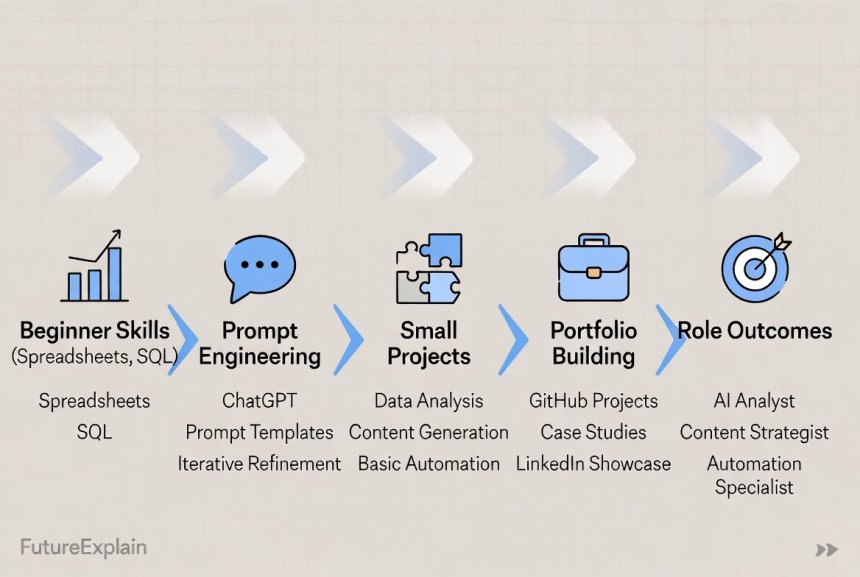

How to Start Learning AI Without a Technical Background
Introduction
Artificial intelligence is often portrayed as something only for programmers and researchers. In reality, many valuable AI roles do not require a deep computer science degree. This article provides a clear, practical path for non-technical people to begin working with AI tools, contribute to AI projects, and develop career-ready skills without becoming an expert in model internals.
Who this guide is for
This guide is aimed at:
- Professionals in domains such as marketing, HR, product, or operations who want to add AI skills to their toolkit.
- Students and career-changers who are curious about AI but intimidated by programming.
- Managers who need to understand AI enough to run projects and evaluate vendors.
High-level approach — three principles
Start with three simple principles:
- Use applied projects: Small, practical projects show employers you can add value.
- Prioritise high-leverage skills: Learn the parts of AI that give the biggest return (data literacy, evaluation, prompt design, and communication).
- Be ethical and measured: Learn basic safety and bias considerations; irresponsible use of AI causes real harm. See how-to-use-ai-responsibly-beginner-safety-guide for more on safety and best practices.
Understand the roles you can target
Before learning, decide what kind of role you want. Common, accessible AI-adjacent roles include:
- Data Analyst: Focus on spreadsheets, SQL, and dashboards. Employers often hire for measurable reporting skills.
- Prompt Engineer/AI Specialist: Work with large language models (LLMs) to create prompts, fine-tuned workflows, and content tools.
- AI Product Coordinator / Manager: Bridge business needs and technical teams; focus on metrics and user value.
- AI Operations / MLOps Support (entry level): Assist in running pipelines, monitoring, and simple automation tasks.
- AI Ethics / Policy Assistant: Help with guidelines, audits, and user-facing safety steps.
For role comparisons and detail, refer to ai-careers-explained-beginner-friendly-career-paths and skills-you-should-learn-to-stay-relevant-in-the-ai-era.
Core skills for non-technical learners
These practical skills will help you contribute to AI projects quickly.
- Data literacy: Understand tables, basic statistics (mean, median, %), and how to read a dataset.
- Spreadsheets: Excel or Google Sheets for quick analysis and presentation.
- SQL (basic): SELECT, WHERE, GROUP BY — enough to extract simple slices of data for analysis.
- Prompt design & evaluation: How to write instructions for LLMs and check outputs for accuracy and safety.
- Data visualization: Build actionable dashboards (Tableau, Power BI, or Google Data Studio).
- Domain knowledge: Apply AI to real problems in your field (e.g., customer support, marketing, QA).
- Communication & storytelling: Translate data findings into clear recommendations.
Tools that are friendly for beginners
You don''t need to set up complex environments to start:
- Spreadsheets (Excel / Google Sheets)
- No-code automation platforms (Zapier, Make)
- Visualization tools (Google Data Studio, Tableau Public)
- LLM playgrounds (OpenAI Playground, other provider dashboards) for prompt testing
- Simple Python notebooks online (Google Colab) once you want to try small model experiments
A step-by-step 1–6 month learning plan
Below are realistic learning roadmaps depending on how much time you can invest.
1-month starter plan (5–7 hours/week)
- Week 1: Learn spreadsheet basics and a short project — clean a CSV and summarise insights.
- Week 2: Learn basic data storytelling; turn your results into a 1-page dashboard.
- Week 3: Experiment with an LLM playground for summarisation and simple automations.
- Week 4: Create a short portfolio page describing your project and impact.
3-month plan (5–8 hours/week)
- Month 1: Complete 1-month plan.
- Month 2: Learn basic SQL and build an automated weekly report pulling data and updating a dashboard.
- Month 3: Do an LLM-focused project (e.g., build a prompt-driven email summariser) and document evaluation metrics.
6-month plan (6–10 hours/week)
- Months 1–3: Finish 3-month plan.
- Months 4–6: Learn basics of Python (optional), practice automations, and create a polished portfolio with 2–3 projects showing measurable outcomes.
Project ideas that show impact
Employers care about results. Use projects that solve real problems and measure outcomes.
- Weekly automation: Automate a manual report and measure time saved.
- Customer support summariser: Use an LLM to summarise tickets into short action items and track reduction in response time.
- Data dashboard: Build a dashboard showing a key metric and the business impact after an operational change.
- Prompt library: Curate prompts for common tasks (summarisation, draft emails) and show before/after quality comparisons.
How to present your portfolio
Keep it concise and outcome-focused:
- A short title and one-sentence problem statement.
- Tools used and steps taken.
- Results in measurable terms (time saved, % improvement, number of users helped).
- Link to a short demo or screenshots (no private data).
How to learn prompt engineering without coding
Prompt engineering rewards domain knowledge, clarity, and testing. To start:
- Experiment in an LLM playground with simple tasks (summaries, classification, rewriting).
- Keep prompt versions and record outputs to compare quality.
- Design simple evaluation metrics (accuracy, factuality, helpfulness) — even manual scoring by you is useful.
- Document edge cases and safety checks. For example, add a fallback for uncertain answers.
Practical non-technical machine learning concepts to know
Even if you won''t code models, learn these ideas:
- Training vs inference: Models are trained on data and later used to make predictions.
- Overfitting and generalisation: Models that only memorise training data perform poorly on new data.
- Precision and recall: Basic metrics that describe model behaviour.
- Bias and fairness: How data can reflect unfair patterns and what to watch for.
How to evaluate LLM outputs
Simple evaluation strategies:
- Define expected behaviour and a small test set of inputs.
- Score outputs on accuracy, relevance, and hallucinations (fabricated details).
- Use human review and, when possible, automatic checks (e.g., fact checks or regex patterns).
Networking and community
Join beginner-friendly communities and share your projects. Practical steps:
- Share short writeups on LinkedIn or a personal blog.
- Participate in meetups or online study groups.
- Contribute to small volunteer projects in local organisations to build experience.
Job search tactics for non-technical candidates
- Target roles with keywords like "analyst", "operations", "AI tools specialist", or "prompt specialist".
- Use your portfolio to match job requirements — highlight directly relevant projects.
- Be explicit about impact: explain how your project saved time or improved a metric.
- Consider internships or contract roles for initial experience.
Interview preparation
Practice small, practical tasks:
- Explain a project: goal, steps, outcome, and what you would improve.
- For analyst roles: practice simple SQL queries and reading charts.
- For prompt roles: present examples of prompts and evaluation results.
Staying ethical and avoiding common pitfalls
Non-technical users must still consider ethics. Common pitfalls:
- Using models to generate factual claims without verification.
- Applying models to sensitive personal data without consent or safeguards.
- Over-relying on automation without human oversight.
Always include a human-in-the-loop for higher-risk tasks and document limitations. See ethical-ai-explained-why-fairness-and-bias-matter for more depth.
How this article connects to other guides in the series
Use this article together with practical and foundational content:
- Start with the basics in what-is-artificial-intelligence-a-complete-beginners-guide.
- Understand machine learning concepts in how-does-machine-learning-work-explained-simply.
- Explore tool recommendations in top-ai-tools-for-beginners-to-boost-productivity and find no-code options in best-automation-tools-for-non-technical-users.
- Plan career development using ai-careers-explained-beginner-friendly-career-paths.
Checklist — first 30 days
- Complete a simple dataset cleaning and summary project in a spreadsheet.
- Create one dashboard or a one-page project summary.
- Try two LLM prompts and record results and improvements.
- Prepare a one-page portfolio entry with measurable outcomes.
Conclusion
Starting AI without a technical background is realistic and valuable. Focus on application, measurable projects, and ethical practice. Small, consistent steps — a short project each month — will build a portfolio that demonstrates impact and opens doors to roles such as analyst, prompt specialist, product coordinator, or ethics assistant. For practical next steps, read this guide alongside related posts like skills-you-should-learn-to-stay-relevant-in-the-ai-era and how-to-use-ai-responsibly-beginner-safety-guide.
Share
What's Your Reaction?
 Like
1400
Like
1400
 Dislike
10
Dislike
10
 Love
210
Love
210
 Funny
30
Funny
30
 Angry
3
Angry
3
 Sad
2
Sad
2
 Wow
75
Wow
75

















Question: How do I demonstrate ethical considerations in a portfolio?
Hi liamstewart — include a short section on limitations, potential biases, and steps taken to mitigate harms (data checks, human review), even a paragraph is useful.
Short opinion: Solid, practical advice.
Experience: Focusing on impact helped my transition.
Praise: Encouraging roadmap for absolute beginners.
Question: Is it okay to show a project that used a paid AI API in a portfolio?
Hi lucasparker — yes, show the workflow and describe the tools used; focus on the problem solved and measurable outcome, not vendor details.
Short opinion: Very clear and non-intimidating.