
Vector Search vs. Keyword Search: When to Use Each
This comprehensive guide explains the fundamental differences between vector search and traditional keyword search, two distinct approaches to finding information. You'll learn how vector search uses AI-powered semantic understanding to find conceptually similar content, while keyword search relies on exact word matching. We cover practical use cases for each technology, from e-commerce product discovery to legal document retrieval. The article includes a clear decision framework to help you choose the right approach for your specific needs, explores hybrid solutions that combine both methods, and provides implementation considerations for businesses of all sizes. Whether you're building a website search, developing an AI application, or optimizing enterprise search, this guide gives you the knowledge to make informed decisions about search technology.


Understanding the Search Revolution: From Keywords to Concepts
In today's digital world, finding information quickly and accurately is more important than ever. Whether you're searching for products on an e-commerce site, looking up information in a knowledge base, or trying to find specific documents in a large database, the technology behind search matters. For decades, keyword search has been the dominant approach, but recently, vector search has emerged as a powerful alternative that understands meaning rather than just matching words.
This article will guide you through both technologies, helping you understand when to use each approach. We'll start with the basics, explore how each technology works, compare their strengths and weaknesses, and provide practical guidance for choosing the right approach for your specific needs. By the end, you'll have a clear understanding of both vector and keyword search, and you'll know exactly when to use each one.
What is Keyword Search? The Traditional Approach
Keyword search, also known as traditional or lexical search, is the search technology most people are familiar with. When you type words into Google, Amazon, or most website search boxes, you're using keyword search. This approach looks for exact matches or partial matches of the words you enter.
The fundamental principle behind keyword search is simple: it treats documents as collections of words and searches for documents containing the specific words you entered. Most keyword search systems use an inverted index - a data structure that maps each word to the documents containing it. When you search for "best running shoes," the system looks up each word in its index and returns documents containing these words.
How Keyword Search Works: The Technical Basics
Keyword search systems typically follow these steps:
- Tokenization: Breaking text into individual words or tokens
- Normalization: Converting text to lowercase, removing punctuation
- Stemming/Lemmatization: Reducing words to their root form (e.g., "running" becomes "run")
- Indexing: Creating an inverted index mapping words to documents
- Query Processing: Processing the search query using the same tokenization and normalization
- Ranking: Scoring and ranking results based on relevance algorithms
Advanced keyword search systems include features like:
- Boolean operators (AND, OR, NOT) for precise control
- Phrase matching for exact phrase searches
- Wildcard searching for partial word matches
- Proximity search for words near each other
- Field-specific searching for searching in specific document fields
Popular keyword search technologies include Elasticsearch, Apache Solr, and traditional SQL database full-text search. These systems have been refined over decades and power most of the search functionality on the web today.
What is Vector Search? The AI-Powered Approach
Vector search, also known as semantic search or neural search, represents a fundamental shift in how computers understand and search for information. Instead of looking for exact word matches, vector search understands the meaning behind words and finds conceptually similar content.
At its core, vector search converts text, images, or other data into mathematical representations called vectors or embeddings. These vectors capture the semantic meaning of the content in a high-dimensional space. Similar content produces similar vectors, and the system finds matches by looking for vectors that are close to each other in this mathematical space.
How Vector Search Works: The Magic of Embeddings
Vector search involves several key steps:
- Embedding Generation: Using AI models to convert content into numerical vectors
- Vector Storage: Storing these vectors in specialized vector databases
- Similarity Calculation: Using mathematical formulas to find similar vectors
- Result Retrieval: Returning the most similar content based on vector proximity
The magic happens in the embedding generation. Modern AI models like BERT, GPT, and specialized embedding models can understand that "car," "automobile," and "vehicle" are similar concepts, even though they're different words. They also understand that "apple" can refer to a fruit or a technology company based on context.
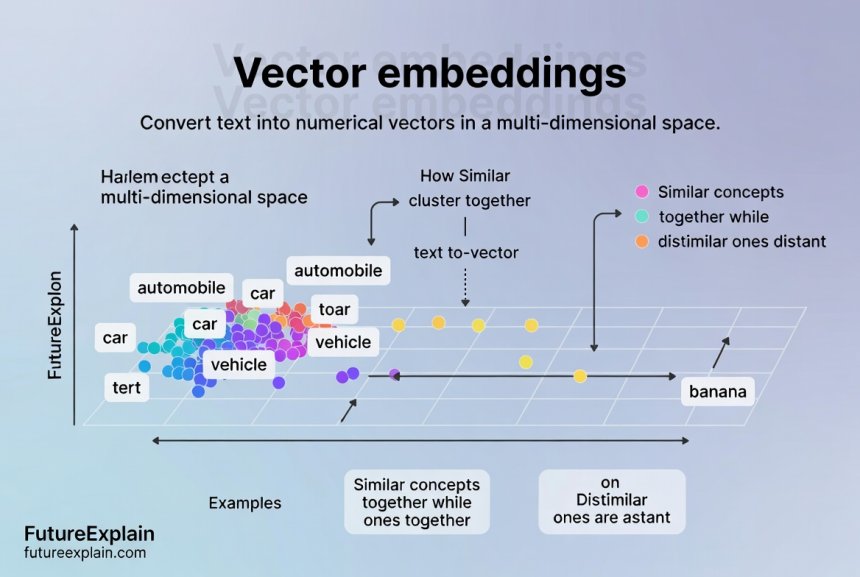
Vector search excels at understanding:
- Synonyms and related terms: Finding "car" when searching for "automobile"
- Conceptual similarity: Finding articles about "sustainable energy" when searching for "green power"
- Multilingual content: Finding Spanish documents when searching in English
- Contextual meaning: Distinguishing between different meanings of the same word
Popular vector search technologies include Pinecone, Weaviate, Qdrant, and vector search extensions for traditional databases like PostgreSQL with pgvector.
Key Differences: Vector Search vs Keyword Search
Understanding the fundamental differences between these two approaches is crucial for making the right choice. Here's a detailed comparison:
1. Understanding vs Matching
Keyword Search matches words. If you search for "cloud computing," it finds documents containing those exact words. It doesn't understand that "cloud services," "AWS," or "Microsoft Azure" might be relevant unless those exact words appear in the document.
Vector Search understands concepts. It can find documents about cloud computing even if they use different terminology. It understands the relationship between concepts and can find relevant content that doesn't contain your exact search terms.
2. Handling Synonyms and Related Terms
Traditional keyword search requires explicit synonym configuration. You need to tell the system that "car" and "automobile" are synonyms, or that "PC" and "computer" refer to similar things. This requires manual maintenance and doesn't scale well.
Vector search automatically understands these relationships through its training on massive amounts of text. The AI models have learned these semantic relationships from their training data.
3. Multilingual Capabilities
Keyword search typically requires separate indexes for each language or complex translation systems. Searching for "car" won't find documents containing "auto" (German) or "coche" (Spanish) unless specifically configured.
Vector search can work across languages because the embedding models are often trained on multilingual data. The vector for "car" in English is similar to the vector for "auto" in German in the embedding space.
4. Typo and Spelling Variation Handling
Keyword search can handle typos through techniques like fuzzy matching, but this is often computationally expensive and can return unexpected results. Searching for "recieve" might find "receive" with fuzzy matching, but it might also find unrelated words.
Vector search handles spelling variations naturally if the embedding model has encountered those variations during training. The vectors for "color" and "colour" (American vs British spelling) are very close in the embedding space.
5. Performance Characteristics
Keyword Search is extremely fast for exact matches and scales well to billions of documents. It's optimized for the specific task of finding word matches and has decades of optimization behind it.
Vector Search involves more computational overhead because it needs to calculate distances between high-dimensional vectors. However, specialized vector databases and approximate nearest neighbor algorithms have made vector search practical for real-time applications.
6. Implementation Complexity
Keyword search systems are mature, well-documented, and have large communities. Implementing a basic keyword search system is relatively straightforward with tools like Elasticsearch or database full-text search.
Vector search requires more specialized knowledge. You need to choose appropriate embedding models, set up vector databases, and tune similarity metrics. The technology is newer and evolving rapidly.
When to Use Keyword Search: Traditional Strengths
Despite the advances in vector search, keyword search remains the best choice for many applications. Here are the situations where keyword search excels:
1. Exact Match Requirements
When you need to find exact matches for specific terms, keyword search is unbeatable. This is crucial for:
- Legal and regulatory compliance: Finding documents containing specific legal terms or clauses
- Code search: Finding specific function names, variable names, or API calls
- Product SKU or part number search: Finding exact product identifiers
- Medical records: Finding specific diagnosis codes or medication names
For example, if you're searching for a specific law reference like "GDPR Article 17," you want exact matches, not conceptually similar content about data privacy in general.
2. Structured Data Search
Keyword search works exceptionally well with structured data where fields are well-defined:
- E-commerce with clear attributes: Color: red, Size: medium, Brand: Nike
- Database records: Customer ID, invoice number, transaction date
- Catalog search: ISBN numbers, patent numbers, serial numbers
The precision of keyword search for field-based queries is hard to beat with vector search.
3. Performance-Critical Applications
When you need sub-millisecond response times at massive scale, keyword search systems are highly optimized:
- High-traffic website search: E-commerce sites with thousands of searches per second
- Log analysis: Searching through terabytes of log data
- Real-time monitoring systems: Alerting based on specific keyword patterns
4. Budget and Resource Constraints
Keyword search solutions are often more cost-effective:
- Lower computational requirements: No need for GPU inference for embeddings
- Mature open-source options: Elasticsearch and Solr are free to use
- Easier to find expertise: More developers know traditional search technologies
- Simpler infrastructure: Can run on standard hardware without special accelerators
5. Regulatory and Compliance Scenarios
In regulated industries, the predictability and transparency of keyword search can be advantages:
- Audit trails: Easy to explain why specific documents were returned
- Consistency
- Control: Complete control over what gets indexed and how it's searched
When to Use Vector Search: Modern Advantages
Vector search shines in applications where understanding meaning is more important than matching exact words. Here are the best use cases for vector search:
1. Natural Language Queries
When users search using natural language questions or descriptions:
- "Find me a romantic comedy set in Paris" (movie search)
- "I need help with my phone not charging properly" (support knowledge base)
- "Articles about the impact of climate change on coastal cities" (research database)
Vector search understands the intent behind these queries and finds relevant content even if it uses different terminology.
2. Content Discovery and Recommendations
Vector search excels at finding similar content:
- "More like this" recommendations for articles, products, or media
- Content clustering: Grouping similar documents automatically
- Serendipitous discovery: Finding related content users might not have searched for directly
This is particularly valuable for media platforms, news sites, and e-commerce stores wanting to increase engagement.
3. Multilingual and Cross-Lingual Search
When you need to search across content in multiple languages:
- Global knowledge bases: Employees searching in English finding documents in Spanish
- International e-commerce: Customers finding products regardless of language differences
- Research databases: Scholars finding relevant papers in any language
4. Handling Ambiguity and Context
Vector search understands context better than keyword search:
- Disambiguating "apple" (fruit vs company) based on surrounding context
- Understanding technical jargon in different domains (e.g., "mouse" in computing vs biology)
- Regional variations: Understanding that "lift" and "elevator" refer to the same thing
5. Image, Audio, and Multimodal Search
Vector search isn't limited to text. The same principles work for other types of data:
- Reverse image search: Finding similar images
- Audio similarity: Finding music with similar characteristics
- Video content analysis: Finding video scenes with similar visual themes
- Product search by image: "Find products that look like this"
Hybrid Search: The Best of Both Worlds
For many applications, the best approach is combining both vector and keyword search. This hybrid approach can overcome the limitations of each method while leveraging their strengths.
How Hybrid Search Works
Hybrid search typically works in one of these patterns:
- Reciprocal Rank Fusion (RRF): Run both searches separately, then combine and re-rank the results
- Vector-first with keyword filtering: Use vector search for broad relevance, then apply keyword filters for precision
- Keyword-first with vector refinement: Use keyword search for exact matches, then use vector search to find similar content
- Weighted combination: Assign scores from both systems and combine them with configurable weights
When to Use Hybrid Search
Consider hybrid search when:
- You need both precision and recall: Exact matches matter, but so does finding conceptually similar content
- Your data is heterogeneous: Some fields benefit from exact matching (SKUs, codes), others from semantic understanding (descriptions, content)
- You're transitioning between systems: Gradually moving from keyword to vector search
- Different users have different needs: Technical users want exact matches, while casual users want natural language search
Implementing Hybrid Search
Modern search platforms are increasingly offering hybrid capabilities:
- Elasticsearch 8.0+: Native vector search alongside traditional search
- OpenSearch: Vector search capabilities in the AWS ecosystem
- Weaviate: Built-in hybrid search combining vector and keyword approaches
- Custom implementations: Using multiple search systems and combining results programmatically
A practical example of hybrid search in action: An e-commerce site might use keyword search for exact product matches (SKU, brand name, specific model numbers) while using vector search for product descriptions and natural language queries like "comfortable running shoes for flat feet." The system could prioritize exact matches from keyword search while also returning semantically relevant results from vector search.
Implementation Considerations: What You Need to Know
Choosing between vector and keyword search isn't just about technical capabilities. You need to consider practical implementation factors:
1. Infrastructure Requirements
Keyword Search:
- Standard servers are usually sufficient
- Memory and disk I/O are typically the bottlenecks
- Can run on CPU-only infrastructure
- Well-understood scaling patterns
Vector Search:
- May require GPUs for efficient embedding generation
- Vector databases have different memory requirements (often more RAM-intensive)
- Similarity calculations can be computationally expensive
- Less established scaling patterns
2. Development and Maintenance Effort
Keyword Search:
- Mature tools with extensive documentation
- Large community support
- Well-understood debugging and optimization techniques
- Stable APIs that don't change frequently
Vector Search:
- Rapidly evolving technology landscape
- Smaller community (though growing quickly)
- More experimental - may require more trial and error
- Embedding models may need periodic retraining or updating
3. Cost Implications
The total cost of ownership differs significantly:
- Keyword search costs are primarily infrastructure and developer time
- Vector search adds costs for embedding models (API calls or self-hosted model inference)
- Vector databases may have different licensing models
- Development costs are typically higher for vector search implementations
- Maintenance costs may be higher for vector search due to evolving technology
4. Skill Requirements
Your team's existing skills should influence your choice:
- Keyword search: Database skills, understanding of indexing, query optimization
- Vector search: Machine learning basics, understanding of embeddings, vector math concepts
- Hybrid search: Both skill sets, plus integration expertise
Decision Framework: Choosing the Right Approach
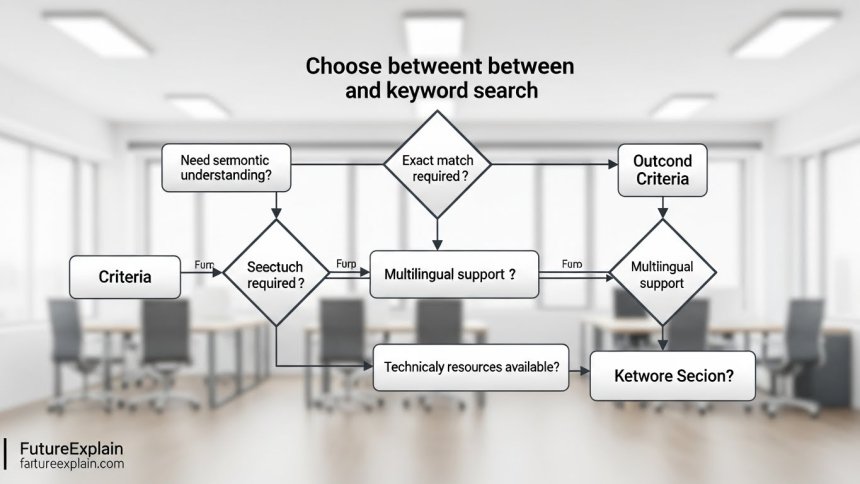
Use this decision framework to choose between keyword search, vector search, or hybrid approach:
Step 1: Analyze Your Data
- Is your data primarily structured or unstructured?
- Do you have exact identifiers (codes, SKUs, part numbers)?
- Is the content primarily natural language?
- Do you have multimedia content (images, audio, video)?
Step 2: Understand User Needs
- Do users search with specific terms or natural language questions?
- Is precision (exact matches) or recall (finding all relevant content) more important?
- Do you need multilingual support?
- Is content discovery (finding similar items) a key requirement?
Step 3: Evaluate Technical Constraints
- What are your performance requirements (latency, throughput)?
- What infrastructure do you have available?
- What skills does your team have?
- What is your budget for implementation and ongoing costs?
Step 4: Consider Future Needs
- Will your search needs evolve toward more natural language queries?
- Do you anticipate needing multimodal search (text + images + etc.)?
- Will you expand to new languages or regions?
- Are there upcoming features that might require different search capabilities?
Real-World Examples and Case Studies
E-commerce: When Each Approach Works Best
Keyword Search Dominates: When customers know exactly what they want - specific brand names, model numbers, or exact product titles. For example, searching for "Nike Air Max 270" should show that exact product first.
Vector Search Excels: When customers describe what they want in natural language - "comfortable walking shoes for travel" or "red dress for summer wedding." Vector search can understand these concepts and find relevant products even if the descriptions don't match the search terms exactly.
Hybrid Approach in Practice: Many successful e-commerce sites use keyword search for faceted filtering (color, size, brand) and vector search for product discovery and recommendations. This combines the precision of keyword search with the discovery power of vector search.
Enterprise Knowledge Management
Keyword Search Essential: For finding specific policy documents, procedure codes, or regulatory references where exact wording matters. Employees need to find "HR Policy 7.2.1" not "documents about vacation time."
Vector Search Valuable: For finding information when you don't know the exact terminology. "How do I request time off?" should find vacation policy documents, time-off request forms, and related FAQs even if they don't contain that exact phrase.
Content Platforms and Media
Vector Search Shines: For content discovery - "Find articles similar to this one" or "Show me more movies like The Avengers." Vector search understands genre, themes, and style similarities that keyword search misses.
Keyword Search Still Needed: For finding content by specific authors, publication dates, or exact titles.
Getting Started: Practical Implementation Steps
If you're ready to implement search for your application, here's a practical approach:
For Keyword Search Implementation:
- Choose a search engine (Elasticsearch, Solr, or database full-text search)
- Design your index schema based on your data structure
- Implement indexing pipeline to populate your search index
- Design search queries based on user needs
- Implement relevance tuning and result ranking
- Add features like faceted search, autocomplete, and spell correction
For Vector Search Implementation:
- Choose an embedding model suitable for your domain
- Select a vector database (Pinecone, Weaviate, Qdrant, or pgvector)
- Create embedding generation pipeline for your content
- Store embeddings in your vector database
- Implement query embedding and similarity search
- Tune similarity thresholds and result ranking
For Hybrid Search Implementation:
- Implement both keyword and vector search systems
- Create a unification layer to combine results
- Implement ranking fusion algorithm (like RRF)
- Tune weights between keyword and vector results
- Implement A/B testing to measure improvement over single approach
The Future of Search Technology
Search technology continues to evolve rapidly. Here are some trends to watch:
- Increasing hybridization: More platforms offering built-in hybrid capabilities
- Specialized embedding models: Models trained for specific domains (legal, medical, technical)
- Multimodal becoming mainstream
- Real-time personalization: Search results adapting to individual user context and behavior
Conversational search interfaces: Moving from single queries to multi-turn search conversations
The line between keyword and vector search will continue to blur as both technologies evolve and learn from each other. The most successful implementations will likely be those that can leverage the strengths of both approaches while mitigating their weaknesses.
Conclusion: Making the Right Choice for Your Needs
Choosing between vector search and keyword search isn't about finding the "best" technology - it's about finding the right tool for your specific needs. Both approaches have their place in modern applications, and understanding their strengths and limitations is key to making an informed decision.
Remember these key takeaways:
- Use keyword search when you need exact matches, have structured data, or have strict performance or budget constraints
- Use vector search when you need to understand meaning, handle natural language queries, or work with multilingual or multimodal content
- Consider hybrid search when you need both precision and recall, or when different parts of your application have different search needs
- Evaluate your specific context - your data, your users, your technical constraints, and your future needs
The search technology landscape is richer than ever, with options to meet virtually any need. By understanding both vector and keyword search, you can build search experiences that truly meet your users' needs, whether they're looking for exact matches or exploring related concepts.
Further Reading
If you found this guide helpful, you might want to explore these related topics:
- Embeddings and Vector Databases: A Beginner Guide - Dive deeper into how vector embeddings work
- Retrieval-Augmented Generation (RAG) Explained Simply - Learn how vector search powers modern AI applications
- How AI Personalization Works (Netflix, YouTube, Amazon) - See how similar technology powers content recommendations
Share
What's Your Reaction?
 Like
342
Like
342
 Dislike
3
Dislike
3
 Love
89
Love
89
 Funny
12
Funny
12
 Angry
2
Angry
2
 Sad
1
Sad
1
 Wow
67
Wow
67


















The comparison table in the "Key Differences" section was incredibly helpful. I printed it out for our team discussion.
As a teacher, I'm thinking about how this applies to educational content search. Vector search could help students find conceptually related materials even if they don't know the right terminology.
This should be required reading for anyone building search functionality. Clear, comprehensive, and practical.
The cost implications section was brutally honest. We calculated that vector search would triple our infrastructure costs. We'll phase it in gradually for high-value use cases only.
How does this apply to voice search? We're building a voice assistant and need to understand the best search approach.
Arthur, voice search is almost always better with vector/semantic approaches because people speak in natural language, not keywords. But you might still want keyword for specific commands or entities.
The regulatory compliance angle was something I hadn't considered. In healthcare, we need predictable, auditable search results. Hybrid seems like the way to go.