
Embeddings and Vector Databases: A Beginner Guide
This beginner's guide explains embeddings and vector databases in simple language. You'll learn how AI converts text, images, and other data into numerical vectors (embeddings) that capture meaning and relationships. Discover how vector databases store and retrieve these embeddings efficiently, enabling semantic search, recommendation systems, and AI applications. We cover practical use cases, popular tools like Pinecone and Weaviate, and when to choose vector databases over traditional options. Perfect for non-technical readers exploring modern AI infrastructure.


Embeddings and Vector Databases: A Beginner Guide
If you've been exploring artificial intelligence, you've probably heard terms like "embeddings" and "vector databases" floating around. These concepts form the backbone of many modern AI applications, from smart search engines to personalized recommendations. But what exactly are they, and why should you care?
In this comprehensive guide, we'll break down these complex topics into simple, understandable concepts. You don't need a technical background to follow along—we'll use everyday analogies and clear examples to help you grasp these powerful ideas that are transforming how computers understand and work with information.
What Are Embeddings? The AI Language of Meaning
Let's start with a simple analogy. Imagine you're trying to explain the concept of "apple" to someone who has never seen one. You might describe it as: round, red, sweet, fruit, grows on trees. Each of these descriptions captures a different aspect of what an apple is.
Embeddings work similarly for computers. They're numerical representations that capture the meaning and relationships of words, sentences, images, or any other data. Unlike traditional computer storage that treats "apple" as just the letters A-P-P-L-E, embeddings convert it into a list of numbers (a vector) that captures its semantic meaning.
For example, in an embedding system:
- "Apple" (the fruit) might be represented as: [0.2, 0.8, -0.1, 0.5, ...]
- "Orange" might be: [0.3, 0.7, -0.2, 0.4, ...]
- "Computer" (Apple the company) might be: [0.9, 0.1, 0.8, -0.3, ...]
Notice how the fruit "apple" and "orange" have similar number patterns because they're both fruits, while "Apple" the company has a different pattern. This is the magic of embeddings—they capture relationships in the numbers themselves.
How Embeddings Are Created
Embeddings are generated by AI models, particularly ones trained on massive amounts of text or data. The most common approach uses neural networks that learn to predict words from their context. Through this training, the model learns to place similar words close together in a high-dimensional space.
Think of it like learning a new language. When you learn that "happy" and "joyful" are similar, you're creating mental connections. AI models do this mathematically, assigning positions in a virtual space where similar concepts cluster together.
Real-World Examples of Embeddings
You encounter embeddings every day without realizing it:
- Google Search: When you search for "best Italian restaurants near me," Google uses embeddings to understand that "Italian" relates to pasta, pizza, and cuisine, not just the country.
- Netflix Recommendations: Movies and shows are converted to embeddings based on their themes, genres, and viewing patterns, allowing Netflix to suggest similar content.
- Spam Filters: Email services use embeddings to detect phishing attempts by understanding the semantic meaning of suspicious phrases.
- Voice Assistants: When you ask Siri or Alexa a question, they convert your speech to text, then to embeddings to understand your intent.
Enter Vector Databases: The Specialized Storage for Embeddings
Now that we understand embeddings, we face a practical problem: how do we store and search through millions or billions of these numerical vectors efficiently? This is where vector databases come in.
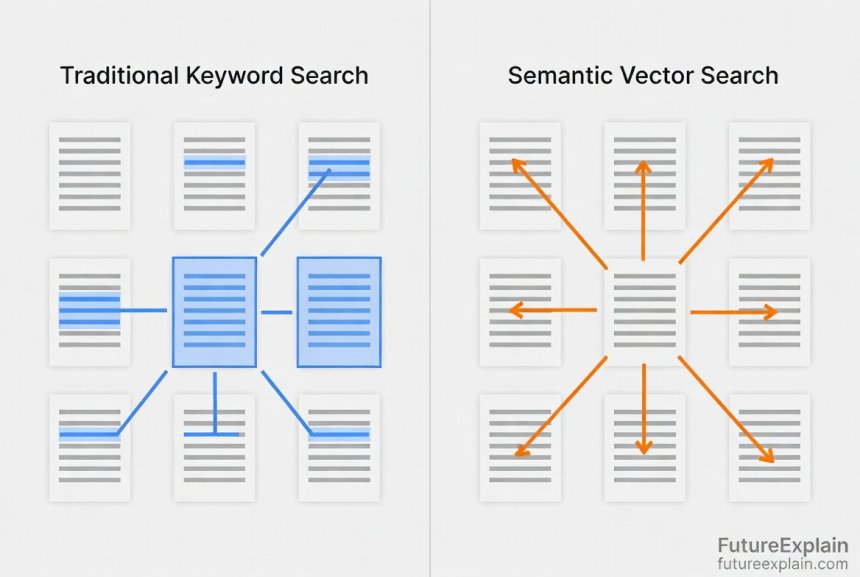
A vector database is a specialized database designed to store, index, and search through high-dimensional vectors (embeddings). Unlike traditional databases that excel at exact matches ("find user with ID 123"), vector databases excel at similarity searches ("find images most similar to this one").
The Key Difference: Traditional vs. Vector Databases
Let's compare how different databases approach the same problem:
- Traditional Database (SQL): "Find products with 'red' in the description" → looks for exact text matches
- Vector Database: "Find products similar to this red dress" → finds items with similar colors, styles, and patterns even if 'red' isn't mentioned
The fundamental difference is in how they measure similarity. Traditional databases use exact matches or simple patterns. Vector databases use mathematical distance measurements in high-dimensional space.
How Vector Databases Work: The Technical Magic Made Simple
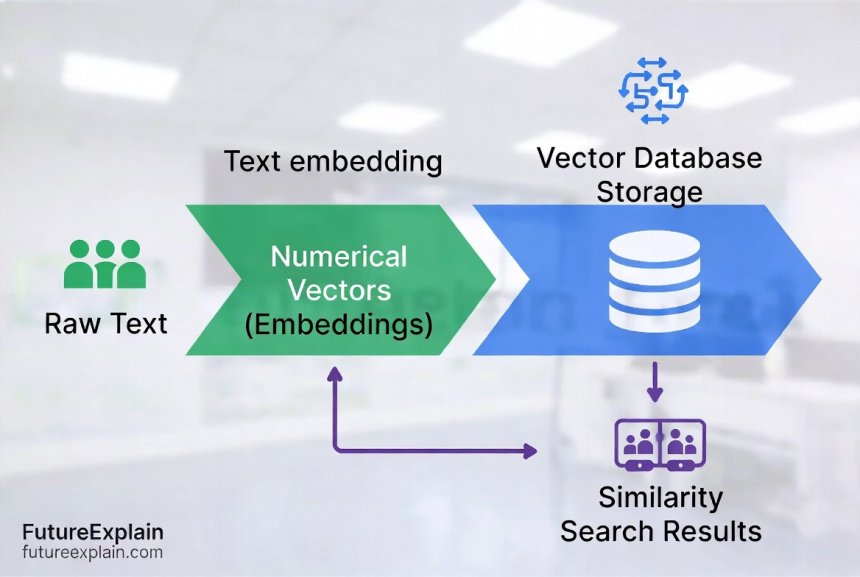
When you store data in a vector database, here's what happens:
- Embedding Generation: Your text, image, or other data is converted into a vector using an embedding model
- Indexing: The vector is stored in a specialized index that organizes vectors for fast similarity searches
- Query Processing: When you search, your query is also converted to a vector, and the database finds the closest matches
- Result Retrieval: The database returns the most similar items, ranked by similarity score
The "closeness" is measured using distance metrics like:
- Cosine Similarity: Measures the angle between vectors (most common for text)
- Euclidean Distance: Measures straight-line distance (common for images)
- Dot Product: Measures projection of one vector onto another
Popular Vector Databases in 2024
Several vector databases have gained popularity, each with different strengths:
1. Pinecone
A fully-managed vector database service that's easy to start with. Perfect for beginners and production applications that need reliability without infrastructure management. Pinecone handles all the scaling and maintenance, letting you focus on your application.
2. Weaviate
An open-source vector database that can run on your own servers. Weaviate includes built-in modules for generating embeddings and supports hybrid search (combining vector and keyword search). Great for developers who want control and flexibility.
3. Qdrant
Another open-source option written in Rust, known for its speed and efficiency. Qdrant offers cloud and self-hosted options with a focus on performance and rich filtering capabilities.
4. Chroma
Specifically designed for AI applications, Chroma integrates seamlessly with popular AI frameworks. It's lightweight and perfect for prototyping and small to medium applications.
5. FAISS (Facebook AI Similarity Search)
Not exactly a database but a library for efficient similarity search. FAISS is often used as the search engine behind other vector databases. It's highly optimized for speed but requires more technical knowledge to implement.
When Should You Use a Vector Database?
Vector databases shine in specific scenarios:
Perfect Use Cases
- Semantic Search: When you want search that understands meaning, not just keywords
- Recommendation Systems: Finding similar products, content, or users
- Image/Video Search: Finding visually similar media
- Anomaly Detection: Identifying unusual patterns in data
- Chatbots with Memory: Remembering similar past conversations
- Document Clustering: Organizing large document collections by topic
When NOT to Use Vector Databases
- Simple Exact Matches: If you only need to find records by exact ID or name
- Transaction Processing: For banking or e-commerce transactions requiring ACID compliance
- Small Datasets: If you have less than 10,000 items, simpler solutions might suffice
- Budget Constraints: Vector databases can be more expensive than traditional options
Practical Example: Building a Simple Book Recommendation System
Let's walk through a concrete example to see how embeddings and vector databases work together:
- Step 1: We have 10,000 book descriptions
- Step 2: Convert each description to embeddings using a model like OpenAI's text-embedding-ada-002
- Step 3: Store all embeddings in a vector database (like Pinecone)
- Step 4: When a user likes "The Great Gatsby," we convert that title to an embedding
- Step 5: Search the vector database for books with similar embeddings
- Step 6: Return recommendations like "The Sun Also Rises" and "To Kill a Mockingbird"
The magic happens in step 5—the vector database finds books with similar themes, writing styles, and emotional tones, not just books with overlapping keywords.
The Cost Factor: Understanding Vector Database Economics
One important consideration for beginners is cost. Vector databases typically charge based on:
- Storage: How many vectors you store (usually per million vectors)
- Operations: How many searches and updates you perform
- Infrastructure: Compute resources needed for indexing and querying
For a small application with 100,000 vectors and moderate usage, costs might range from $50-300/month. Larger applications with millions of vectors can cost thousands per month. Open-source options eliminate licensing fees but require your own infrastructure and expertise.
Getting Started: Your First Vector Database Project
Ready to experiment? Here's a simple roadmap:
Phase 1: Learning and Experimentation
- Sign up for a free tier of Pinecone or try Chroma locally
- Follow a basic tutorial to store and search simple text embeddings
- Experiment with different embedding models (OpenAI, Cohere, Hugging Face)
Phase 2: Building a Small Project
- Create a personal document search for your notes or bookmarks
- Build a simple recommendation system for movies or books you like
- Try clustering news articles by topic
Phase 3: Production Considerations
- Plan for scaling—how will your system handle 10x more data?
- Implement monitoring for query performance and costs
- Consider hybrid approaches combining vector and traditional search
Common Challenges and Solutions
As you work with embeddings and vector databases, you'll encounter certain challenges:
Challenge 1: Dimensionality
Embeddings can have hundreds or thousands of dimensions, making them complex to work with. Solution: Start with pre-trained models and use dimensionality reduction techniques like UMAP or t-SNE for visualization.
Challenge 2: Choosing the Right Embedding Model
Different models work better for different tasks. Solution: Test multiple models on your specific data and use case before committing.
Challenge 3: Performance vs. Accuracy Trade-offs
Faster search sometimes means less accurate results. Solution: Understand approximate nearest neighbor (ANN) algorithms and tune parameters based on your accuracy requirements.
Challenge 4: Data Freshness
Embeddings might become outdated as language evolves. Solution: Implement periodic re-embedding schedules and version your embedding models.
The Future of Embeddings and Vector Databases
As AI continues to evolve, we can expect several trends:
- Multimodal Embeddings: Single embeddings that combine text, image, and audio information
- Specialized Databases: Vector databases optimized for specific industries like healthcare or finance
- Edge Computing: Smaller, faster embedding models that run on mobile devices
- Standardization: Common formats and protocols for exchanging embeddings
- Automated Tuning: AI that automatically optimizes vector database performance
Key Takeaways for Beginners
To summarize what we've covered:
- Embeddings are numerical representations that capture meaning and relationships in data
- Vector databases specialize in storing and searching these embeddings efficiently
- Similarity search is the superpower that enables semantic understanding
- Start simple with managed services before tackling complex deployments
- Consider costs carefully—both financial and computational
- Choose tools based on your specific needs, not just popularity
Embracing embeddings and vector databases opens up new possibilities for creating intelligent applications that understand context and meaning. Whether you're building a smart search engine, personalized recommendations, or any AI-enhanced application, these technologies provide the foundation for working with data the way humans do—by understanding relationships and similarity.
Further Reading
If you found this guide helpful, you might want to explore these related topics:
- Retrieval-Augmented Generation (RAG) Explained Simply - Learn how vector databases power advanced AI systems
- Vector Search vs. Keyword Search: When to Use Each - Practical comparison of different search approaches
- Using LangChain and Tooling for Real Apps (Beginner) - Discover frameworks that work with vector databases
Remember: The journey into embeddings and vector databases starts with understanding the basic concepts. Don't be intimidated by the mathematics—focus on the practical applications and gradually build your knowledge. Every expert was once a beginner who took that first step into the world of vectors and similarity search.
Share
What's Your Reaction?
 Like
1420
Like
1420
 Dislike
12
Dislike
12
 Love
380
Love
380
 Funny
45
Funny
45
 Angry
8
Angry
8
 Sad
3
Sad
3
 Wow
210
Wow
210
















This article keeps coming up in our team meetings. We've referenced it at least 5 times while planning our vector search implementation. Thank you!
What's the community support like for different vector databases? Which have the most active development and user communities?
How do embeddings handle different languages with different character sets? Chinese vs English, for example.
Modern embedding models handle multiple languages well! They typically use subword tokenization (like WordPiece or SentencePiece) that works across character sets. For best results: 1) Use multilingual models specifically trained on diverse languages, 2) Be aware that performance may vary by language (often better for languages with more training data), 3) Test with your specific language pairs.
What's the licensing situation for different vector databases? Open source vs proprietary - any gotchas?
How do you handle cold starts? If you have a new system with no user data, how do you bootstrap recommendations?
Cold start problem! Strategies: 1) Use content-based recommendations initially (embed item descriptions), 2) Use popularity-based fallbacks, 3) Ask for explicit preferences, 4) Use transfer learning from similar domains. The key is having a graceful degradation plan - vector search gets better with more data, but you need something to start with.
What's the difference between approximate nearest neighbor (ANN) and exact nearest neighbor? When does the approximation matter?