
AI-Assisted Customer Support Workflows: From Bots to Humans
This comprehensive guide explores AI-assisted customer support workflows that blend automation with human expertise. Learn how chatbots handle initial inquiries, intelligent routing directs complex issues to appropriate agents, and AI tools enhance human performance. Discover practical implementation strategies, real-world examples, and best practices for creating seamless customer experiences that maintain the human touch while leveraging AI efficiency. Perfect for beginners and business owners looking to modernize their customer service operations.


AI-Assisted Customer Support Workflows: From Bots to Humans
Customer support has undergone a remarkable transformation in recent years, moving from purely human-operated systems to intelligent workflows that blend artificial intelligence with human expertise. This evolution represents not a replacement of human agents, but rather an enhancement of their capabilities through smart automation. AI-assisted customer support workflows create a seamless bridge between automated responses and human intervention, ensuring customers receive timely, accurate, and empathetic service regardless of their query's complexity.
The modern approach to customer service recognizes that different problems require different solutions. Simple, repetitive questions benefit from instant automated responses, while complex, emotionally sensitive, or highly technical issues need human judgment and empathy. AI-assisted workflows intelligently route inquiries to the most appropriate resolution method, creating a support system that's both efficient and genuinely helpful. This guide will walk you through how these systems work, their benefits, implementation strategies, and best practices for maintaining the human touch in an increasingly automated world.
Understanding the Modern Customer Support Landscape
Before diving into AI-assisted workflows, it's essential to understand why traditional support methods struggle in today's digital environment. Traditional customer support typically followed linear paths: customers would call, email, or submit tickets, and these would queue up for human agents to address in order. This approach created several challenges, including long wait times, inconsistent responses, agent burnout from repetitive questions, and difficulty scaling during peak periods.
The digital age has dramatically increased customer expectations. Today's consumers expect 24/7 availability, instant responses to simple questions, and personalized service that remembers their history and preferences. According to recent industry research, 64% of customers now expect real-time assistance regardless of the time of day, and 75% are more likely to make repeat purchases if their customer service experience was positive. These expectations create pressure that purely human teams cannot realistically meet without technological assistance.
AI-assisted support addresses these challenges by creating layered systems that match solution methods to problem types. The most effective systems don't aim to eliminate human agents but rather to augment their capabilities and free them to focus on what humans do best: complex problem-solving, emotional intelligence, and creative thinking. This approach recognizes that automation and human expertise are complementary rather than competitive forces in customer service.
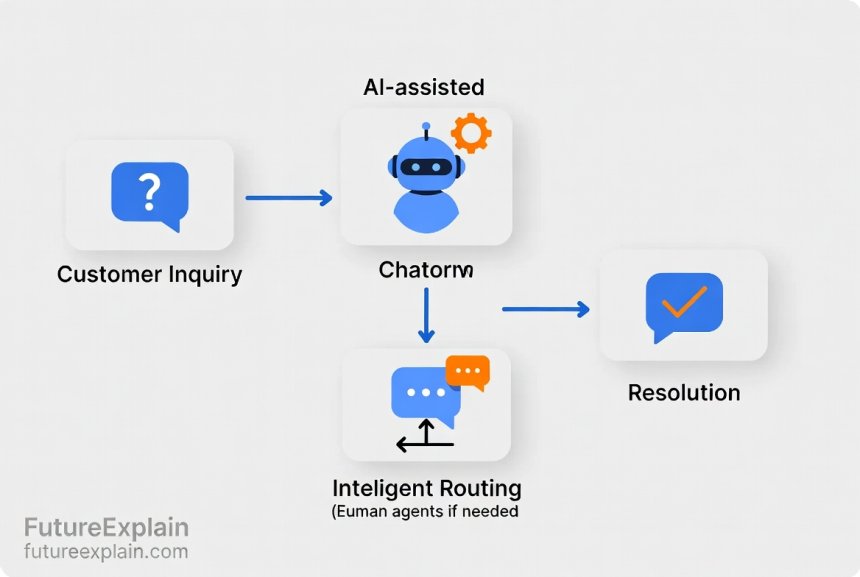
The Components of AI-Assisted Support Workflows
AI-assisted customer support systems consist of several interconnected components that work together to create seamless experiences. Understanding each component helps demystify how these systems operate and how they differ from traditional automation.
1. Intelligent Chatbots and Virtual Assistants
The most visible component of AI-assisted support is the chatbot or virtual assistant that handles initial customer interactions. Modern chatbots have evolved far beyond simple scripted responders. Today's intelligent chatbots use natural language processing (NLP) to understand customer queries, machine learning to improve their responses over time, and integration with knowledge bases to provide accurate information.
These chatbots serve as the first line of defense, capable of handling common questions about business hours, return policies, account status, and basic troubleshooting. What makes them "intelligent" is their ability to understand context, remember conversation history, and recognize when a query exceeds their capabilities. When they encounter such limitations, they smoothly transfer the conversation to a human agent while providing all the collected context, saving customers from having to repeat themselves.
2. Intelligent Ticket Routing and Prioritization
When a query requires human attention, AI-assisted systems don't simply add it to a generic queue. Instead, they analyze the ticket content, customer history, urgency indicators, and agent availability to route it to the most appropriate agent. This intelligent routing considers factors like:
- Agent expertise and skill match
- Current workload and availability
- Customer priority or value tier
- Issue complexity and estimated resolution time
- Language preferences and time zone alignment
This smart routing ensures that customers get connected to agents who are most likely to resolve their issue quickly and effectively, while also balancing workloads across the support team to prevent burnout.
3. Agent Assistance Tools
AI doesn't just help before human agents get involved—it continues to assist during human-agent interactions. Agent assistance tools provide real-time suggestions, automated research, and response drafting to help agents resolve issues more efficiently. These tools might:
- Suggest knowledge base articles based on the conversation
- Auto-draft responses that agents can review and personalize
- Highlight relevant customer history and previous interactions
- Provide sentiment analysis to help agents gauge customer emotions
- Offer troubleshooting steps for common technical issues
These tools don't replace agent judgment but rather enhance it, much like spell-check enhances writing without controlling the content.
4. Analytics and Continuous Improvement Systems
The final component is the analytics engine that monitors all interactions, identifies patterns, and suggests improvements. These systems track metrics like resolution time, customer satisfaction scores, chatbot deflection rates, and common inquiry themes. They use this data to:
- Identify knowledge gaps that need addressing
- Suggest chatbot training improvements
- Highlight agent training opportunities
- Predict future support demand based on patterns
- Measure the ROI of different support channels and methods
This continuous improvement loop ensures that AI-assisted systems get better over time, learning from both successes and failures.
The Customer Journey Through AI-Assisted Support
To understand how these components work together, let's follow a typical customer journey through an AI-assisted support system. This journey illustrates the seamless handoffs between automated and human assistance that characterizes modern support workflows.
Step 1: Initial Contact and Automated Triage
When a customer first contacts support—whether through a website chat widget, messaging app, email, or social media—they're initially greeted by an intelligent chatbot. This chatbot doesn't just say "hello" and wait for a human; it immediately begins diagnosing the issue. Using natural language understanding, it categorizes the inquiry, checks for simple solutions, and determines whether it can resolve the issue autonomously.
For straightforward questions like "What are your store hours?" or "How do I reset my password?" the chatbot provides immediate answers, often with helpful links or step-by-step instructions. According to industry data, 40-60% of routine customer inquiries can be fully resolved at this stage without human intervention, dramatically reducing wait times for both simple and complex issues.
Step 2: Context Gathering and Escalation Preparation
If the chatbot determines that human assistance is needed, it doesn't simply transfer the customer to a queue. Instead, it continues the conversation to gather all relevant context. It might ask clarifying questions, collect error codes, verify account information, or document the troubleshooting steps already attempted.
This context gathering serves two important purposes: First, it provides the human agent with a complete picture of the issue, eliminating the frustrating "can you tell me what happened?" conversation that customers dread. Second, it helps the routing system match the customer with the most appropriate agent based on the gathered information.
Step 3: Intelligent Routing and Human Connection
With context gathered, the system routes the inquiry to a specific human agent based on multiple factors. The routing algorithm considers which agents have successfully resolved similar issues, who has current capacity, and which agents have skills matching the inquiry type. The system might also prioritize the ticket based on customer value or issue urgency.
When the agent receives the ticket, they see not just the customer's initial message but the entire conversation history with the chatbot, including all gathered context. This comprehensive view allows them to jump straight into problem-solving rather than starting from scratch.
Step 4: AI-Assisted Resolution
During the human-agent interaction, AI continues to play a supportive role. As the agent types responses, the system might suggest relevant knowledge base articles or previous successful resolutions to similar issues. If the issue requires technical steps, the system can provide standardized troubleshooting procedures. For billing or account issues, it might automatically pull up relevant records and calculations.
The agent maintains full control and judgment but benefits from AI reducing their cognitive load on routine aspects of problem-solving. This allows them to focus on the uniquely human aspects of customer service: empathy, creative problem-solving, and relationship building.
Step 5: Post-Resolution Learning and Improvement
After resolution, the system doesn't just close the ticket and move on. It analyzes the interaction to improve future performance. If the agent discovered a solution that wasn't in the knowledge base, the system might flag this for addition. If the chatbot failed to recognize a common question pattern, the system notes this for training improvement. Customer satisfaction scores are correlated with resolution methods to identify best practices.
This continuous learning loop is what makes AI-assisted systems improve over time, becoming more accurate, efficient, and helpful with each interaction.

Real-World Examples of Successful Implementation
Understanding theoretical workflows is helpful, but real-world examples bring these concepts to life. Several companies across different industries have successfully implemented AI-assisted support systems with measurable benefits.
Example 1: E-commerce Customer Support
A mid-sized online retailer implemented an AI-assisted support system to handle their growing volume of customer inquiries. Their previous system relied entirely on human agents, resulting in 48-hour response times during peak seasons and inconsistent answers to common questions.
After implementation, their chatbot now handles 55% of all initial inquiries without human intervention. The most common automated resolutions include order status checks, return policy explanations, and basic product questions. When issues escalate to humans, agents receive full context including order history, previous interactions, and the chatbot's attempted solutions.
The results were dramatic: Average response time dropped to under 2 minutes for automated responses and 30 minutes for human responses (down from 48 hours). Customer satisfaction scores increased by 40%, and agent satisfaction improved as they spent less time on repetitive questions and more time on genuinely challenging problems that required human judgment.
Example 2: Software Technical Support
A software company with a complex technical product implemented AI-assisted support to help users with troubleshooting. Their system begins with a chatbot that asks diagnostic questions and suggests initial troubleshooting steps based on error codes and user descriptions.
If the issue persists, the system automatically gathers system logs, configuration details, and step-by-step documentation of what was tried. This packet of information is then routed to a specialized technical agent based on the specific software module involved. During the human interaction, the AI suggests relevant documentation, known solutions to similar issues, and can even run automated diagnostic scripts with the user's permission.
This approach reduced average resolution time by 65% and increased first-contact resolution rates from 45% to 78%. Technical agents reported higher job satisfaction as they spent more time solving interesting technical challenges and less time gathering basic information.
Example 3: Financial Services Support
A financial services company implemented AI-assisted support with particular attention to security and compliance. Their chatbot handles routine inquiries about account balances, transaction histories, and branch hours while automatically verifying customer identity through secure methods.
For more sensitive issues like fraudulent activity detection or complex financial advice, the system routes customers to specialized human agents with the appropriate certifications and authority levels. Throughout these interactions, the AI monitors for compliance requirements, suggests required disclosures, and automatically documents the conversation for regulatory purposes.
This implementation maintained strict security and compliance standards while improving customer experience. Resolution times for routine inquiries dropped to near-instant, while complex issues reached appropriately qualified agents 80% faster than previous manual routing systems.
Benefits of AI-Assisted Support Workflows
The transition to AI-assisted support workflows offers numerous benefits for businesses, customers, and support agents alike. These benefits explain why more companies are adopting these systems despite the initial implementation investment.
For Customers
- Faster resolutions: Simple issues get instant answers, while complex issues reach specialized agents quicker
- 24/7 availability: Basic support is always available, even outside business hours
- Consistent information: Automated responses provide standardized, accurate answers to common questions
- Reduced repetition: Context preservation means customers don't repeat themselves when transferred
- Personalized experience: Systems remember customer history and preferences across interactions
For Businesses
- Scalability: Handle increasing volumes without proportionally increasing staff
- Cost efficiency: Automate routine inquiries while focusing human labor on high-value interactions
- Improved metrics: Better first-contact resolution, shorter handle times, higher satisfaction scores
- Data insights: Analytics reveal customer pain points, product issues, and improvement opportunities
- Competitive advantage: Modern support experiences differentiate brands in crowded markets
For Support Agents
- Reduced burnout: Less repetitive work and more engaging problem-solving
- Better tools: AI assistance reduces research time and administrative tasks
- Skill development: Focus on complex issues builds more valuable expertise
- Workload balancing: Intelligent routing prevents overload and ensures fair distribution
- Career growth: Opportunities to specialize in areas where human judgment adds most value
Implementation Strategies and Best Practices
Implementing AI-assisted support requires careful planning and execution. Rushing implementation or focusing solely on technology without considering human factors leads to disappointing results. Here are proven strategies for successful implementation.
1. Start with Clear Objectives and Metrics
Before selecting technology or designing workflows, define what success looks like. Common objectives include reducing response times, increasing customer satisfaction scores, decreasing costs per resolution, or improving agent satisfaction. Establish baseline metrics before implementation so you can measure improvement accurately.
Set realistic expectations: AI-assisted systems typically improve gradually as they learn from interactions. Initial performance might be modest, with significant improvements appearing after several months of operation and training.
2. Map Existing Customer Journeys and Pain Points
Understand your current support processes completely before automating them. Document common customer journeys, identify pain points, and analyze which inquiries are truly routine versus those requiring human judgment. This mapping exercise reveals where automation will provide the most value and where human touch must be preserved.
Pay particular attention to emotional moments in the customer journey—times when customers feel frustrated, confused, or anxious. These moments often require human empathy even if the underlying issue seems technically simple.
3. Choose the Right Technology Stack
Selecting appropriate technology is crucial but challenging given the rapidly evolving market. Key considerations include:
- Integration capabilities: How well does it connect with existing CRM, ticketing, and communication systems?
- Customization options: Can you tailor it to your specific business processes and terminology?
- Scalability: Will it handle your current volume and projected growth?
- Vendor support and roadmap: Does the vendor provide adequate support and continued development?
- Total cost of ownership: Consider implementation, training, maintenance, and scaling costs
Many businesses benefit from starting with a focused pilot project addressing a specific use case before expanding to full implementation.
4. Involve Human Agents from the Beginning
Agent buy-in is critical for successful implementation. Involve experienced agents in designing workflows, training the AI, and testing the system. Their frontline experience provides invaluable insights into what works in real customer interactions and what doesn't.
Address agent concerns about job security transparently. Emphasize that AI assistance aims to eliminate tedious work, not eliminate jobs, and creates opportunities for more meaningful, higher-skilled work. Provide training to help agents transition to their enhanced roles.
5. Design Thoughtful Handoff Protocols
The transition from AI to human assistance is a critical moment in customer experience. Design handoff protocols that feel seamless to customers. Best practices include:
- The chatbot clearly explains why human assistance is needed
- All gathered context transfers completely to the human agent
- Customers receive realistic expectations about wait times
- Human agents acknowledge the previous chatbot interaction naturally
- The handoff maintains conversation continuity rather than restarting it
Test handoff protocols extensively with real customers before full deployment to identify and fix friction points.
6. Implement Continuous Training and Improvement
AI-assisted systems require ongoing maintenance and training. Establish processes for:
- Regularly reviewing chatbot conversations to identify misunderstandings
- Updating knowledge bases based on new issues and solutions
- Training agents on new AI tools and features
- Analyzing metrics to identify areas for workflow optimization
- Gathering feedback from both customers and agents about system performance
Treat implementation as the beginning of an ongoing improvement journey rather than a one-time project.
Common Challenges and Solutions
Despite the benefits, implementing AI-assisted support presents challenges. Understanding these challenges in advance helps you prepare effective solutions.
Challenge 1: Maintaining the Human Touch
One of the biggest concerns is that automation makes support feel cold and impersonal. Customers still value human connection, especially for complex or emotional issues.
Solution: Design workflows that preserve human interaction where it matters most. Use AI to handle routine transactions but ensure human agents are available for relationship-building moments. Train agents to use the time saved from administrative tasks to provide more personalized, empathetic service. Design chatbot personalities that are helpful but clearly artificial, making human connection feel special rather than routine.
Challenge 2: Handling Complex or Ambiguous Queries
AI systems struggle with queries that are poorly phrased, highly nuanced, or require understanding context beyond the immediate conversation.
Solution: Implement clear escalation paths and train chatbots to recognize their limitations. Use confidence scoring—when the system's confidence in its understanding falls below a threshold, it should escalate to humans. Provide agents with tools to give feedback on escalations, helping the AI learn boundary cases over time.
Challenge 3: Integration with Existing Systems
Many businesses have legacy support systems that don't easily integrate with modern AI solutions.
Solution: Consider phased integration rather than complete replacement. Start with a new front-end chatbot that feeds into existing ticketing systems, then gradually enhance backend integration. Many AI platforms offer pre-built connectors for common systems, and custom integration APIs are increasingly available. Prioritize integration points based on where data flow creates the most customer value.
Challenge 4: Data Privacy and Security
Customer support interactions often contain sensitive personal information that must be protected.
Solution: Choose vendors with strong security certifications and transparent data handling policies. Implement data minimization—only collect and retain necessary information. Use anonymization for training data when possible. Ensure compliance with relevant regulations like GDPR, CCPA, or industry-specific requirements. Conduct regular security audits and provide transparency to customers about how their data is used.
Challenge 5: Measuring ROI and Success
It can be difficult to quantify the benefits of AI-assisted support, especially softer benefits like improved customer loyalty or agent satisfaction.
Solution: Establish comprehensive metrics before implementation, including both hard metrics (resolution time, cost per ticket) and soft metrics (customer satisfaction, agent retention). Use control groups if possible—comparing performance between teams using AI assistance and those using traditional methods. Track metrics over sufficient timeframes to account for learning curves and seasonal variations.
The Future of AI-Assisted Customer Support
AI-assisted support continues to evolve with emerging technologies and changing customer expectations. Several trends are shaping the future of this field.
Multimodal Interaction Support
Future systems will seamlessly handle transitions between text, voice, and even video interactions. A customer might start with text chat, switch to voice for clarification, share screenshots or video of their issue, and return to text for reference documentation—all within a single continuous conversation with consistent context preservation.
Predictive and Proactive Support
Advanced analytics will enable systems to predict issues before customers report them. For example, monitoring product usage patterns might identify when a customer is likely to encounter a known issue, allowing support to reach out with solutions before frustration occurs. Similarly, analyzing support patterns might predict incoming inquiry volumes, allowing optimal staffing allocation.
Emotionally Intelligent Interfaces
Advances in sentiment analysis and emotional AI will create systems that better recognize and respond to customer emotions. These systems might adjust their communication style based on detected frustration or anxiety, or flag highly emotional situations for immediate human attention even if the technical issue seems simple.
Personalized Learning and Adaptation
Future systems will learn individual customer preferences and communication styles, adapting their approach accordingly. A customer who prefers concise technical explanations will receive different responses than one who needs step-by-step guidance. Systems will remember past interactions and build relationships over time, much like human agents do.
Integration with Broader Business Intelligence
Support systems will increasingly integrate with product development, marketing, and sales systems. Insights from support interactions will directly inform product improvements, identify upsell opportunities, and reveal unmet customer needs. This creates a closed-loop system where customer feedback drives continuous business improvement beyond just support operations.
Getting Started with Your AI-Assisted Support Journey
If you're considering implementing AI-assisted support, here's a practical roadmap to begin your journey:
Phase 1: Assessment and Planning (Weeks 1-4)
- Analyze current support metrics and identify pain points
- Catalog common inquiry types and resolution paths
- Define success metrics and ROI expectations
- Research available technology options within your budget
- Form a cross-functional team including support agents, IT, and management
Phase 2: Pilot Implementation (Weeks 5-12)
- Select a focused use case for initial implementation
- Configure and test technology with a small agent group
- Train the AI system with historical data and agent knowledge
- Run limited pilot with actual customers, monitoring closely
- Gather feedback and make adjustments based on real-world performance
Phase 3: Gradual Expansion (Months 4-9)
- Expand to additional use cases and agent groups
- Integrate with more systems as confidence grows
- Develop comprehensive training for all agents
- Establish ongoing maintenance and improvement processes
- Begin tracking ROI against your predefined metrics
Phase 4: Optimization and Scaling (Months 10+)
- Analyze performance data to identify optimization opportunities
- Scale successful implementations across the organization
- Explore advanced features and integrations
- Share learnings and best practices across teams
- Plan for future technology evolutions and customer expectation changes
Remember that successful implementation is as much about change management as it is about technology. Support your team through the transition, celebrate early wins, and maintain a continuous improvement mindset throughout the journey.
Conclusion: The Human-AI Partnership in Customer Support
AI-assisted customer support workflows represent a powerful partnership between human intelligence and artificial intelligence. When implemented thoughtfully, these systems don't replace human agents but rather elevate their roles, freeing them from repetitive tasks to focus on what humans do best: building relationships, exercising judgment, showing empathy, and solving complex problems.
The most effective customer support organizations of the future won't be entirely automated or entirely human-operated. They'll be intelligently blended systems that match each customer need with the most appropriate resolution method, whether that's instant automated response, AI-assisted human intervention, or direct human-to-human connection for the most complex or sensitive situations.
As you explore AI-assisted support for your organization, keep the customer experience at the center of your decisions. Technology should serve to enhance human connection, not replace it. The goal isn't to eliminate human agents from customer support but to create systems where humans and AI work together to deliver service that's faster, more accurate, and more personally satisfying than either could achieve alone.
By embracing AI-assisted workflows, you're not abandoning the human touch in customer service—you're creating the infrastructure that allows human agents to deliver it more effectively, more consistently, and at greater scale than ever before.
Further Reading
Share
What's Your Reaction?
 Like
2850
Like
2850
 Dislike
45
Dislike
45
 Love
620
Love
620
 Funny
120
Funny
120
 Angry
30
Angry
30
 Sad
25
Sad
25
 Wow
410
Wow
410















After reading this, I'm convinced we need to reevaluate our support strategy. We've been using basic chatbots but missing the intelligent routing and agent assistance components. Time for phase 2!
The article mentions emotional moments needing human touch. We flag certain keywords (like 'frustrated', 'urgent', 'disappointed') for immediate human escalation regardless of issue complexity.
For seasonal businesses like ours, AI helps handle holiday spikes without hiring temporary staff. The scalability section speaks directly to this challenge.
The handoff protocol design is an art. We scripted our chatbot to say 'I'm connecting you with [agent name] who specializes in [issue type]. They'll see everything we've discussed.' Customers appreciate the transparency.
We're in the planning phase for AI support implementation. The assessment and planning timeline gives us a realistic framework. Too many vendors promise overnight transformation.
The ROI measurement advice is crucial. We track both quantitative metrics (resolution time, cost) and qualitative (customer feedback, agent satisfaction). The full picture shows value beyond just efficiency gains.