
AI Agents for Small Business: Automations That Save Time
This guide demystifies AI agents for small business owners and operators. It moves beyond the hype to provide a clear, practical explanation of what AI agents are and how they fundamentally differ from simple chatbots. You'll discover a range of specific, time-saving automations applicable to marketing, customer service, and operations, illustrated with concrete examples. The article provides a responsible, step-by-step framework for identifying opportunities, selecting tools, and implementing your first agent with built-in safeguards. It also addresses critical governance, cost, and ethical considerations to ensure your automation projects are sustainable, secure, and effective, helping you harness this emerging technology to enhance—not replace—human-led work.


AI Agents for Small Business: Automations That Save Time
For a small business owner, time is the ultimate currency. Between managing daily operations, serving customers, and planning for growth, there never seem to be enough hours. You've likely heard the buzz about "AI agents" and how they're poised to revolutionize work. But beyond the headlines, a critical question remains: what can this technology actually do for a small or medium-sized business right now?
This guide cuts through the hype. We'll explain what AI agents are in simple terms, highlight practical automations that can save you real time today, and provide a responsible, step-by-step framework for getting started. The goal isn't to replace your team but to empower it, automating repetitive digital tasks so you can focus on the human-centric work that drives your business forward.
Beyond the Buzzword: What is an AI Agent?
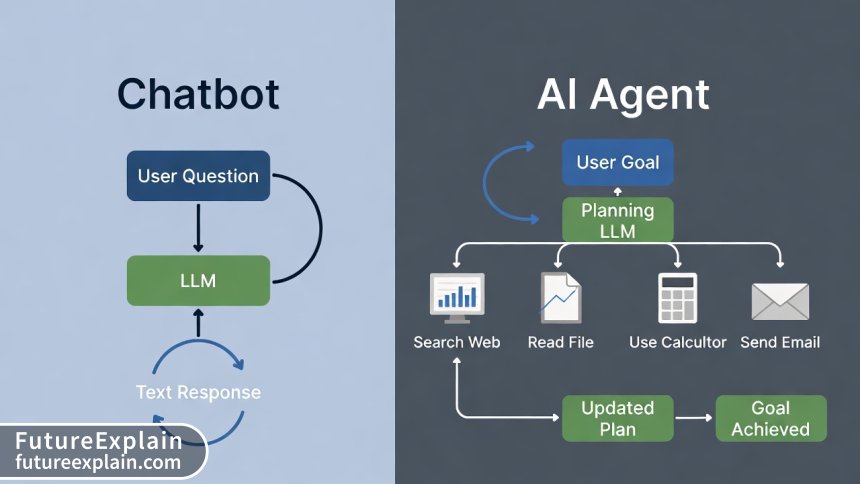
Let's start with a clear definition. An AI agent is a software system built on a large language model (like those behind ChatGPT or Claude) that can autonomously plan and execute a multi-step task to achieve a user-defined goal[citation:6]. Unlike a standard chatbot that simply responds to a prompt with text, an agent can use tools.
Think of it this way: a chatbot is a brilliant consultant you ask for advice. An AI agent is that consultant who also has the keys to your software, the password to your email, and the ability to follow a complex checklist you've outlined—all while reporting back to you at every major step.
This shift from generating text to taking action is the fundamental leap. In 2025, this concept moved from theory to practical infrastructure, thanks in part to standardized protocols that allow AI models to connect securely to external tools and APIs[citation:6].
How Does an AI Agent Actually Work? The Simple Breakdown
The process typically follows a loop:
- Goal Input: You give the agent a goal (e.g., "Summarize the key points from last week's sales meeting notes and email them to the team").
- Plan Creation: The underlying AI model breaks the goal down into a logical sequence of sub-tasks.
- Action & Tool Use: The agent executes the first sub-task, which might involve using a tool—like reading a document from your cloud storage, performing a web search, or querying a database.
- Observation & Re-planning: It observes the result ("I found five meeting notes from last week"). Based on this new information, it adjusts its plan if necessary and moves to the next step ("Now I will analyze each document for key action items").
- Loop Completion: This cycle of planning, acting, and observing continues until the agent determines the goal is achieved, at which point it delivers the final output.
Visuals Produced by AI
This capacity for autonomous, tool-using action is why experts predicted 2025 would see AI agents begin to "join the workforce," handling tasks that require coordination across multiple digital environments[citation:3].
Practical Time-Savers: AI Agent Use Cases for Small Business
The most effective AI agents solve specific, repetitive problems. Here are tangible use cases categorized by business function.
Marketing & Customer Outreach
- Personalized Follow-Up Engine: An agent can monitor for new customer sign-ups or completed purchases, then trigger a personalized email sequence. It can pull customer data (e.g., purchased product) to customize the message, schedule the emails, and log the actions in your CRM.
- Social Media Content Assistant: Provide an agent with a blog post or product announcement. It can be tasked with creating multiple platform-specific posts (short text for Twitter/X, a carousel description for Instagram, a longer post for LinkedIn), generate relevant hashtags by researching trends, and even schedule them via your social media management tool's API.
- Lead Research & Enrichment: When a new lead comes in, an agent can search publicly available information (company website, news, LinkedIn) to create a brief profile, noting company size, recent announcements, or potential needs, and attach this summary to the lead record in your system.
Customer Service & Support
- Tier-1 Support Triage Agent: This agent can monitor a shared support inbox, categorize incoming requests (e.g., "billing," "technical bug," "feature request"), answer simple, frequently asked questions by pulling from a knowledge base, and escalate only complex, unique issues to a human agent with full context.
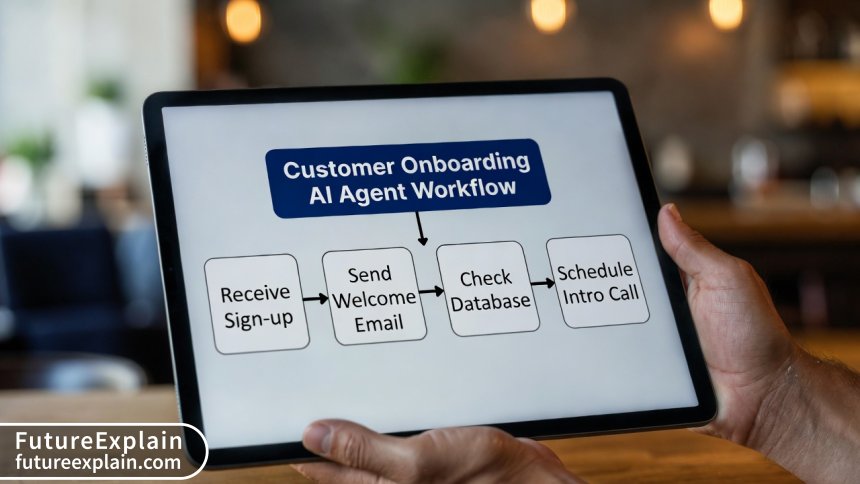
- Onboarding Coordinator: After a new customer signs up, an agent can manage the entire onboarding sequence: send a welcome email with resources, check if they've completed the initial setup tutorial, schedule a check-in call with an account manager, and send a satisfaction survey after the first week.
Operations & Internal Productivity
- Meeting Synthesis Agent: Connected to your video conferencing and cloud storage, the agent can attend meetings (as a listener), transcribe the conversation, identify key decisions, action items (and who owns them), and unanswered questions, then format this into a summary and send it to attendees.
- Data Reporting Assistant: An agent can be scheduled to run weekly. It logs into your analytics dashboard, extracts key performance metrics (website traffic, conversion rates, social engagement), compares them to previous periods, creates a simple visual report, and emails it to management.
- Procurement & Expense Monitor: For businesses with recurring subscriptions, an agent can track renewal dates, analyze usage reports to flag underutilized (and costly) software, and even initiate the cancellation process for approved services.
Getting Started: A Step-by-Step Implementation Plan
Implementing an AI agent doesn't require a team of PhDs. A methodical, cautious approach is key to success.
Visuals Produced by AI
Step 1: Identify the Right Opportunity (Start Small)
Don't boil the ocean. Look for a "perfect agent task" with these characteristics:
- Repetitive and Rule-Based: The task follows a predictable pattern (e.g., "every time X happens, do Y and Z").
- Digital and Tool-Centric: It involves moving information between software tools you already use (email, CRM, calendar, docs).
- High-Volume, Low-Stakes: It consumes significant human time but has a tolerable error cost. Avoid starting with tasks involving sensitive financial transactions or critical customer decisions.
- Clear Success Metrics: You can easily measure success (e.g., "Reduce time spent on weekly reporting from 3 hours to 30 minutes").
Step 2: Map the Current Workflow in Detail
Before automating, you must understand the manual process. Document every single step, decision point, and tool used. This exercise often reveals inefficiencies you can fix before any code is written.
Step 3: Choose Your Building Platform
You have several paths, depending on technical comfort:
- No-Code/Low-Code Platforms: Tools like Zapier, Make, or n8n have added AI agent capabilities. They offer visual builders to create workflows where an AI model can make decisions between steps (e.g., "analyze the email sentiment, then route it to the appropriate department"). This is the most accessible starting point[citation:6].
- AI-Native Workflow Builders: Emerging platforms are designed specifically for building agents. They provide templates, easy connections to common APIs, and built-in safeguards.
- Custom Development (For Larger SMBs): Using frameworks and APIs from providers like OpenAI, Anthropic, or Google. This offers maximum flexibility but requires software development resources.
Step 4: Build, Test, and Refine with a "Human-in-the-Loop"
Begin by building the agent to handle a subset of the task. Crucially, implement a human-in-the-loop (HITL) checkpoint. This means the agent's final output or key decisions require human approval before action. For example, a draft social media post is sent for review before publishing, or a support ticket summary is verified before being logged. This is a non-negotiable best practice for safety and quality control[citation:9].
Step 5: Monitor, Measure, and Iterate
Once live, track its performance against your success metrics. Monitor for errors or "hallucinations" (the AI making things up). Be prepared to refine the agent's instructions or workflow. Treat it like a new employee who needs clear guidance and supervision.
The Essential Governance and Safety Checklist
As AI agents gain the ability to act, governance shifts from an ethical afterthought to a core operational requirement[citation:5].
- Data Privacy & Security: Never give an agent unrestricted access to sensitive data. Use platform-specific access controls and consider privacy-preserving techniques. Be acutely aware of what data you send to third-party AI models via their APIs[citation:1].
- Clear Boundaries: Explicitly define what the agent is not allowed to do. This includes financial limits (e.g., "cannot approve purchases over $100"), communication boundaries (e.g., "cannot send external emails without HITL approval"), and data access limits.
- Transparency & Audit Trails: Ensure the agent logs its actions, decisions, and the reasoning behind them. You need a complete audit trail to debug errors, understand outcomes, and maintain accountability.
- Bias & Fairness Review: If your agent makes decisions affecting people (e.g., triaging support tickets, scoring leads), regularly review its outputs for unintended bias. Ensure training data and instructions are fair and representative.
- Cost Management: Agentic workflows can make many AI model calls. Monitor your usage and costs closely. Optimize by using smaller, specialized models for specific tasks where possible[citation:6].
Realistic Expectations: The Current Limits of AI Agents
While promising, the technology is not magic. As 2025 has shown, early predictions of fully autonomous agents seamlessly taking over complex jobs were premature[citation:3]. Be aware of key limitations:
- Struggle with Unstructured Environments: Agents excel in controlled, digital environments with clear APIs. They often falter with tasks requiring real-world visual understanding or navigating poorly designed, non-standard websites where humans use intuition and pattern recognition[citation:3].
- Hallucination & Error Amplification: The underlying LLMs can still make up information. In a multi-step agentic process, a single small error or hallucination early on can derail the entire task, leading to nonsensical or harmful outcomes[citation:3].
- Lack of True Reasoning: They operate on statistical patterns, not human-like understanding of cause and effect. They may struggle with tasks requiring deep, abstract reasoning about time, physical constraints, or social dynamics[citation:3].
- Workforce Impact is Nuanced: Current data suggests AI adoption is more likely to change the nature of jobs than cause mass layoffs in the short term. The focus is on augmentation—handling tedious parts of a job to allow humans to focus on higher-value work[citation:9].
Conclusion: Your Partner in Productivity
AI agents represent a powerful new tool for small business automation. The key is to approach them practically: start with a well-defined, time-consuming task, build with robust human oversight, and scale cautiously. By following the framework outlined here, you can harness this technology to reclaim valuable hours, reduce operational friction, and enhance your team's capabilities.
The most successful small businesses won't be those that replace people with agents, but those that most effectively combine human creativity, strategy, and empathy with the relentless, scalable efficiency of intelligent automation.
Further Reading
To deepen your understanding of AI and automation, explore these related guides:
- What Is Automation? A Beginner’s Guide - Build your foundational knowledge.
- AI for Small Businesses: Practical Use Cases - Explore a broader range of AI applications.
- Intelligent Automation Explained (AI + Automation Together) - Understand the broader concept this technology fits into.
Share
What's Your Reaction?
 Like
1520
Like
1520
 Dislike
12
Dislike
12
 Love
410
Love
410
 Funny
85
Funny
85
 Angry
8
Angry
8
 Sad
5
Sad
5
 Wow
310
Wow
310
















As a solopreneur, time is everything. I implemented a simple version of the social media assistant using Make. It's not fully autonomous, but it drafts posts from my blog RSS feed. Probably saves me 2-3 hours a week. A win!
The cost management warning is real. We built a marketing agent that scrapes news for relevant topics. It was brilliant but our API bill skyrocketed! We're now looking at smaller, cheaper models for the scraping part, as the article suggests.
This article manages expectations well. I was disappointed last year when the "agent revolution" didn't happen for my consulting firm. Now I see it's about focused tool-use, not a magical employee. The meeting synthesis agent is my next project.
The governance checklist is so important! We trialed a basic customer service agent and didn't set clear boundaries. It once tried to issue a refund based on a poorly phrased customer complaint! Human-in-the-loop is mandatory.
Hannah, that's a scary example! Thanks for sharing. It really drives home the point about starting with low-stakes tasks. Did you manage to fix it with better instructions?
The step-by-step plan is exactly what I needed. Most articles are just hype. Question: for the no-code option, which platform would you recommend for a complete beginner with no tech background?
Great question, Marcos. For a true beginner, I'd suggest starting with a platform like Zapier's new AI features or Make. They have extensive templates and guides. The key is to pick one and follow a simple tutorial to build a micro-automation first (e.g., "save email attachments to Google Drive") to learn the concepts before tackling an agentic workflow.
As a small retail shop owner, I've been overwhelmed by admin. The section on the onboarding coordinator agent is a lightbulb moment. I spend hours each week on welcome emails and follow-ups. This seems like a perfect place to start.