
Video Generation Tools: Practical Guide for Marketers
This guide moves beyond simple tool lists to provide marketers with a practical framework for integrating AI video generation into their 2025 workflow. You will learn a structured method to evaluate tools based on your specific marketing needs—be it rapid social clips, polished product demos, or personalized ads. We cover the complete production lifecycle, from creative ideation and effective prompting to seamless editing, publishing, and performance measurement. The article also addresses crucial practical considerations like brand consistency, cost management, and ethical use, empowering you to leverage AI video not as a novelty, but as a scalable, results-driven component of your marketing strategy.

For today's marketer, video is not just important—it's essential. But between concept, scripting, filming, editing, and distribution, producing high-quality video can be a bottleneck, draining resources and slowing down campaigns. This is where AI video generation tools step in, not as a replacement for creativity, but as a powerful force multiplier. Imagine rapidly prototyping a social ad concept in minutes, creating personalized video variations for different audience segments, or producing compelling product explainers without a film crew. This is the practical reality for marketers in 2025.
This guide is designed for marketing professionals, content strategists, and small business owners who want to move beyond the hype and integrate AI video into their real-world workflow. We won't just list tools; we'll provide a practical framework for choosing the right one, using it effectively, and measuring its impact on your goals. Whether you're looking to boost engagement on social media, improve conversion rates with product videos, or simply produce more content with your existing team, this guide will show you how.
Beyond the Hype: What AI Video Tools Actually Do for Marketers
At their core, AI video generation tools use machine learning models to create moving visual content from text descriptions (prompts), images, or existing video clips. For marketers, this technology translates into tangible capabilities:
- Rapid Prototyping and Ideation: Quickly generate multiple visual concepts for a campaign to align your team and stakeholders before investing in full production.
- Scalable Content Creation: Produce a high volume of short-form videos for platforms like TikTok, Instagram Reels, and YouTube Shorts, which demand consistent output.
- Personalization at Scale: Modify core video assets with different text, voiceovers, or imagery to cater to different demographics, regions, or customer lifecycle stages.
- Overcoming Production Limitations: Create visually appealing content when you lack access to filming locations, actors, or specialized equipment (e.g., creating a video about space exploration or historical events).
- Enhancing and Repurposing: Use AI to upscale old footage, edit videos using text transcripts, translate and dub content, or generate B-roll to supplement your primary shots.
The key is to view these tools as part of your creative suite. The most successful implementations combine AI's speed and scale with human strategic direction and editorial polish.
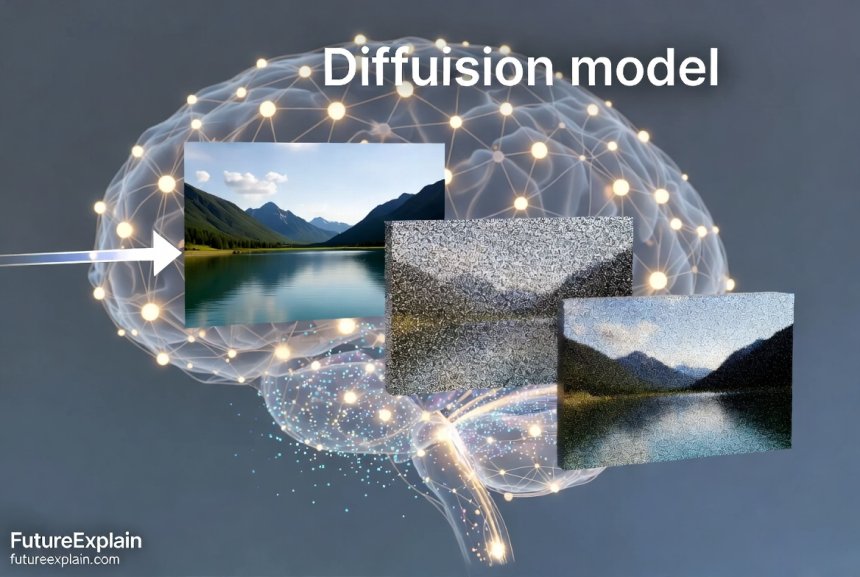
Visuals Produced by AI
How to Choose Your AI Video Tool: A Marketer's Evaluation Framework
With new tools and model updates emerging frequently, choosing can be overwhelming. Instead of chasing the "best" tool in a vacuum, evaluate them based on how they fit your specific marketing needs. Consider this framework:
1. Define Your Primary Use Case
Your choice will vary dramatically depending on your goal. A tool perfect for whimsical social clips may fail for a polished product demo.
- Social Media & Short-Form Content: You need speed, trendy styles, and easy resizing for different platform aspect ratios (9:16, 1:1, 16:9). Tools that offer quick templates or are integrated into platforms like Canva can be ideal[citation:10].
- Product Demos & Explainer Videos: Focus on tools that offer high realism, accurate object representation, and smooth motion. The ability to integrate with screen recordings or 3D product models is a plus.
- Advertising & Commercials: Prioritize brand consistency, high production value, and precise control over visuals and messaging. Tools that allow extensive fine-tuning and offer commercial licensing security are crucial.
- Personalized & Direct Marketing: Look for tools with strong API access or automation features that let you plug in customer data (like names or companies) to generate customized video variants automatically.
2. Evaluate Key Tool Capabilities
Once you know your use case, assess tools against these practical criteria:
- Output Quality & Style: Does it produce the visual aesthetic you need—photorealistic, animated, 3D, etc.? Review sample galleries critically. As seen in comparative tests, models like GPT-4o are praised for ease of use and adherence to prompts, while others like Midjourney (for images) are noted for artistic quality[citation:4][citation:7].
- Ease of Use & Learning Curve: Is the interface intuitive for a non-technical marketer? Some tools work via simple chat (e.g., ChatGPT), while others might use Discord or have complex parameter settings[citation:7].
- Control & Customization: Can you guide the output with detailed prompts, upload reference images (img2vid), or control camera motion? Tools like FLUX and Reve are highlighted for offering greater customization and control[citation:7].
- Editing & Post-Production Features: Does the platform allow you to edit within it? Look for features like trimming, adding text overlays, soundtracks, and voiceovers. Integration with familiar editors is a major benefit.
- Integration & Workflow Fit: Does it connect to your existing stack? Can you generate videos directly in your design platform (like Canva Magic Design)[citation:10] or social media scheduler? Seamless integration saves immense time.
3. Consider Practical Business Factors
- Cost Structure: Is it credit-based, subscription-based, or pay-per-second? Calculate the estimated cost per video for your volume. A free tier is great for testing, but understand the limits.
- Licensing & Commercial Use: Always verify the license. Can you use the generated videos in paid ads, on your website, and for client work? Some tools, like Adobe Firefly, are trained on licensed content for commercial safety[citation:4][citation:10].
- Speed & Generation Time: For social media trends, speed is critical. Note that some of the highest-quality models can be slower[citation:7].
This structured evaluation moves you away from feature-list overwhelm and towards a tool that genuinely fits your team's process and goals.
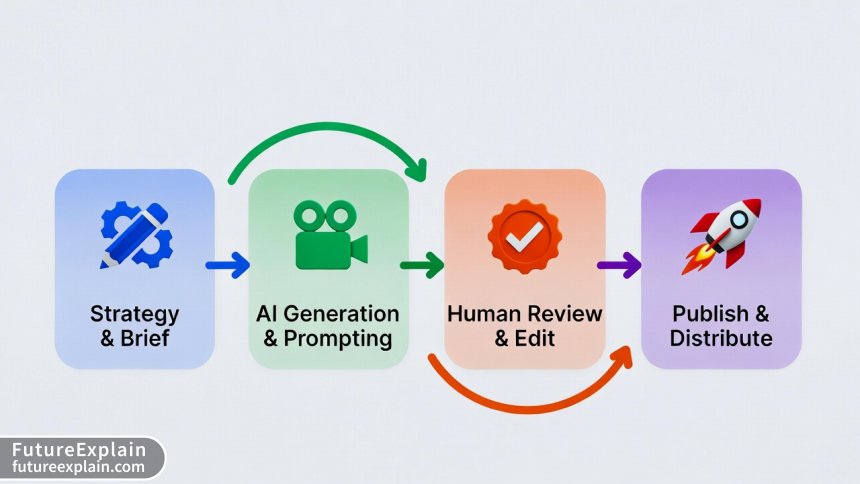
The Marketer's Creative Process: From Brief to AI-Generated Video
Using AI in your video creation isn't about typing one magical sentence. It's about adapting your creative process. Here's a practical workflow:
Phase 1: Strategy and Briefing (The Human Edge)
This is the most important phase. The AI can only execute on what you conceive.
- Define the Goal: Increase brand awareness? Drive website clicks? Explain a feature?
- Know Your Audience: Their preferences will guide the style, tone, and platform.
- Create a Detailed Creative Brief: Write this as if for a human producer. Include core message, key visual elements, desired emotion, call-to-action, and brand style guidelines (colors, fonts).
Phase 2: Prompt Engineering for Video
Your creative brief now needs to be translated into an effective AI prompt. Think of it as a creative collaboration.
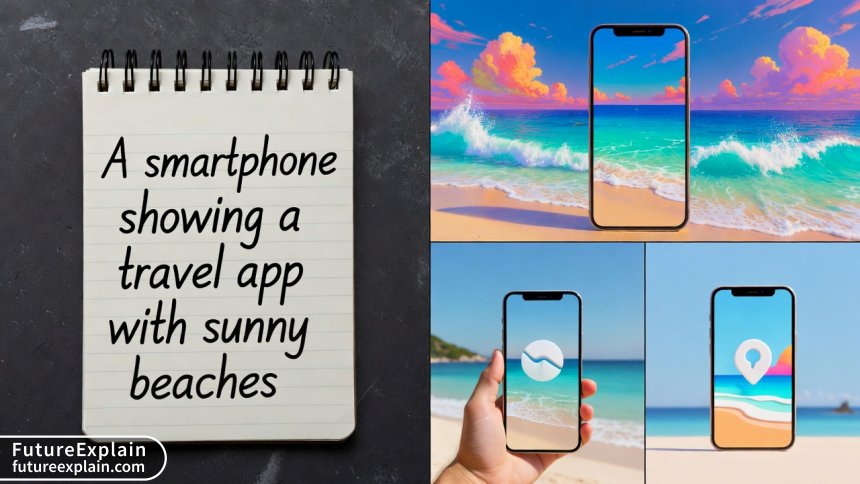
- Be Specific and Descriptive: Instead of "a person using a phone," try "A young professional in a cozy cafe smiling while easily booking a weekend trip on a smartphone app, screen visible showing sunny beach destinations."
- Specify Style and Medium: Use terms like "cinematic," "3D animation," "claymation style," "vintage VHS effect," "bright and minimalist."
- Direct the Composition and Motion: "Slow zoom in on the phone screen," "smooth pan across a futuristic cityscape," "dynamic quick cuts."
- Iterate and Refine: Your first result is a starting point. Use follow-up prompts to adjust: "Make the colors more vibrant," "change the person to be older," "focus more on the product."
Visuals Produced by AI
Phase 3: The Human-in-the-Loop Edit
AI generates a raw clip; a marketer makes it campaign-ready.
- Review and Select: Most tools generate multiple options. Choose the best base clip.
- Edit and Assemble: Use your standard video editor (like CapCut, Premiere Pro, or even Canva) to trim the clip, combine multiple AI generations, add your logo, and insert text graphics.
- Add Sound Design: Lay in a licensed music track, sound effects, and a professional voiceover if needed. This step alone drastically elevates AI output.
- Ensure Brand Consistency: Apply your brand color grade, use correct fonts in overlays, and end with your standard CTA slide.
Integrating AI Video into Your 2025 Marketing Stack
For AI video to be sustainable, it must connect to your other tools. Here are practical integration points:
- Content Planning & SEO: Use AI writing assistants (like Claude or ChatGPT) in your initial phase to brainstorm video topics, write script outlines, and generate SEO-friendly titles and descriptions[citation:3].
- Design Consistency: Use AI image generators (like Midjourney or DALL-E 3) to create consistent thumbnail images, supporting graphics, or storyboard frames that match your video's aesthetic[citation:4][citation:7].
- Automation & Distribution: Use no-code platforms (like Zapier or Make.com) to create workflows. For example: "When a new AI video is rendered and approved in Tool X, automatically upload it to our YouTube channel and schedule a post in our social media management tool."
- Analytics & Optimization: The final video must feed into your analytics dashboard. Track performance metrics (views, completion rate, engagement) just like any other asset, and use those insights to inform your next round of AI prompts. Did a vibrant, animated style outperform a realistic one? Let data guide your creativity.
This connected approach turns AI from a siloed experiment into a powered-up component of your entire content engine.
Navigating Practical Challenges and Ethical Considerations
Adopting any new technology comes with hurdles. Being prepared is key.
Managing Costs and ROI
AI video costs can scale with usage. To manage them:
- Start with a Clear Pilot: Allocate a test budget for a single campaign. Track the time and money saved versus traditional methods, and measure the performance lift.
- Optimize Prompt Efficiency: Well-crafted prompts reduce the number of generations needed to get a usable asset.
- Calculate Cost Per Asset: Factor in the subscription/credit cost plus the human editing time. Does it still provide value?
Ensuring Brand Safety and Authenticity
- Hallucinations and Inaccuracies: AI can generate implausible or incorrect elements (mismatched logos, weird text). A human must review every frame before publishing.
- Brand Voice and Messaging: The AI doesn't understand your brand strategy. You must rigidly enforce messaging and tone in the script and final edit.
- Deepfakes and Ethical Use: Never use AI to misrepresent real people or create deceptive content. Establish clear internal guidelines. Use tools that have built-in safeguards.
Copyright and Licensing
This is a critical, evolving area. Always:
- Use tools that clearly grant you commercial license to the outputs.
- Be cautious when prompting in the style of a living artist or using specific brand names, as this can raise legal issues[citation:7].
- Understand the tool's training data policy if working in highly sensitive industries.
The Future of AI Video for Marketers: Trends to Watch
The technology is advancing rapidly. Here's what's on the horizon for marketing applications:
- Real-Time and Interactive Video: Imagine generating personalized video sales pitches in real-time during a website chat, or creating interactive video ads where viewers can change elements on the fly.
- Hyper-Personalization Powered by Data: Tools will more easily connect to your CRM, pulling in customer-specific data to generate videos that feel one-to-one, not one-to-many.
- Improved Consistency and Longer Narratives: Models will get better at maintaining character consistency, scene coherence, and logical storytelling over longer durations, opening the door to serialized brand content.
- Tighter Ecosystem Integration: AI video features will become native buttons within the marketing platforms you already use, from email service providers to ad networks, making the technology even more accessible.
Embracing AI video generation is less about mastering a specific tool and more about adopting a new, hybrid creative mindset. It combines your marketing expertise and strategic vision with the scale and speed of artificial intelligence. By following the practical framework outlined here—choosing the right tool for your needs, mastering the creative workflow, integrating it into your stack, and navigating the challenges thoughtfully—you can unlock a new tier of video content capability. Start with a small, well-defined project, learn from the results, and scale what works. The future of video marketing is intelligent, agile, and already here.
Further Reading
- Top Image-Generation Tools in 2024: A Practical Guide – Build complementary visual assets for your campaigns.
- AI for Content Creators: From Idea to Publish Workflow – Expand your AI-powered content strategy beyond video.
- AI in Marketing: Personalization, Privacy, and ROI – Dive deeper into the strategic and ethical use of AI across marketing.
Share
What's Your Reaction?
 Like
12540
Like
12540
 Dislike
95
Dislike
95
 Love
3200
Love
3200
 Funny
450
Funny
450
 Angry
110
Angry
110
 Sad
40
Sad
40
 Wow
1815
Wow
1815
















Any recommendations for tools that are strong for creating animated motion graphics (lower thirds, icons, data visualization) rather than photorealistic scenes? That's a bigger need for my B2B content.
As a former video producer now in marketing, this is the balanced perspective I try to give my colleagues. AI is a powerful new tool in the kit, but it doesn't replace the need for a good story and strategic eye. This article nails that.
The point about sound design cannot be overstated. I generated a beautiful, sleek tech explainer video, but with the default robotic voiceover and no music, it felt dead. Spent $50 on a music license and used a better TTS tool, and the quality perception skyrocketed.
This article convinced me to propose a pilot program. Used the "Phase 1: Strategy" section to build my proposal deck for leadership. The focus on workflow integration and ROI helped sell it as a productivity tool, not just a shiny toy.
I'd love to see a follow-up deep dive on prompt engineering specifically for video. Getting consistent characters across multiple scenes is my current biggest struggle.
Solid, no-nonsense guide. Cut through the hype. Bookmarked for when my team starts asking about this next quarter.