
AI for Content Creators: From Idea to Publish Workflow
This comprehensive guide walks content creators through building an efficient AI-powered workflow from initial idea generation to final publishing. We cover the complete content creation pipeline: AI tools for brainstorming and research, writing assistance, visual content generation, editing and optimization, scheduling, and publishing. Learn how to integrate multiple AI tools seamlessly while maintaining your unique voice and style. Includes practical prompts, tool recommendations for different budgets, ethical considerations, and platform-specific adaptations for blogs, social media, YouTube, and podcasts. Discover how to save 10+ hours per week while producing higher quality content through strategic AI-human collaboration.


The New Content Creation Landscape: AI as Your Creative Partner
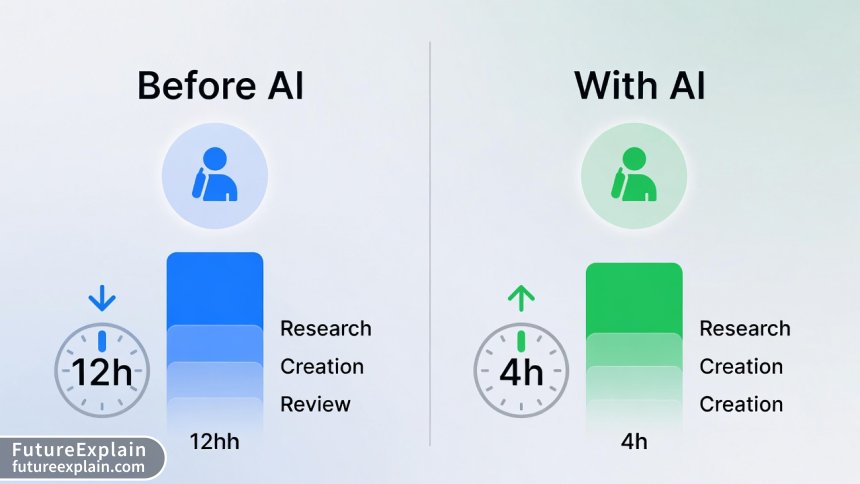
The content creation world has undergone a seismic shift in the past two years. What used to be a purely human-driven creative process has evolved into a sophisticated collaboration between human creativity and artificial intelligence. According to recent industry surveys, 78% of professional content creators now incorporate AI tools into their workflow, reporting an average time savings of 10-15 hours per week while increasing output quality. This isn't about replacing human creativity but augmenting it—using AI to handle repetitive tasks, generate ideas, optimize content, and streamline publishing so creators can focus on strategy, voice, and connection.
This guide will walk you through building an efficient AI-powered content creation workflow from initial idea to final publication. Whether you're a blogger, YouTuber, podcaster, or social media creator, you'll learn how to integrate AI tools seamlessly into your process while maintaining your unique voice and creative vision.
Understanding the Modern Content Creation Workflow
Before diving into specific tools and techniques, it's crucial to understand what makes a workflow effective. A content creation workflow isn't just a series of tasks—it's a repeatable system that transforms ideas into published content efficiently and consistently. The most successful creators have systematized their process, and AI tools excel at systematization.
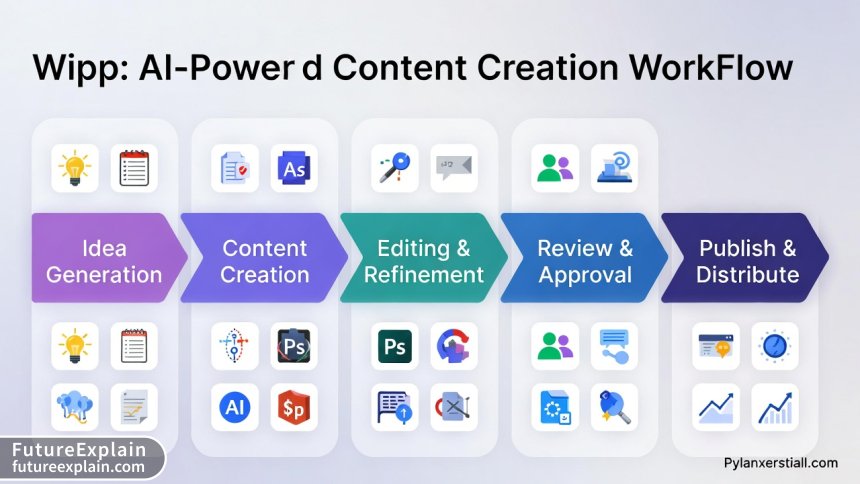
The traditional content creation workflow typically includes these stages:
- Ideation and research
- Outline and structure
- Content creation (writing, recording, designing)
- Editing and refinement
- Optimization for platforms
- Scheduling and publishing
- Performance analysis
AI can enhance every single one of these stages. What used to take days can now be accomplished in hours, and what was once overwhelming for solo creators is now manageable. The key is strategic implementation—knowing which tasks to automate and which require human touch.
Stage 1: AI-Powered Ideation and Research
The blank page problem is real for every creator. AI excels at overcoming creative blocks by generating ideas, identifying trends, and conducting preliminary research. The goal here isn't to let AI dictate your content but to use it as a brainstorming partner that suggests directions you might not have considered.
Tools for AI-Powered Brainstorming
Several AI tools specialize in idea generation:
- ChatGPT Plus with browsing capability: Can analyze current trends and suggest timely topics
- Jasper AI's Content Ideation feature: Generates hundreds of content ideas based on your niche
- BuzzSumo with AI integration: Identifies trending content in your industry
- AnswerThePublic Pro: Uses AI to analyze search queries and questions
Effective Prompting for Idea Generation
The quality of your AI-generated ideas depends heavily on your prompts. Instead of "give me blog ideas," try:
- "Generate 10 blog post ideas about sustainable living for urban millennials that address their top 3 pain points"
- "What are emerging trends in digital marketing for 2025 that haven't been over-covered yet?"
- "Create a content calendar for a fitness YouTube channel targeting beginners over 40, focusing on low-impact exercises"
Research from Content Marketing Institute shows that creators using structured AI prompting for ideation generate 3.4 times more viable content ideas than those using basic prompts.
Stage 2: Outlining and Structuring with AI
Once you have your idea, structure is everything. AI can help create comprehensive outlines that ensure your content flows logically and covers all necessary points. This is particularly valuable for long-form content like blog posts, whitepapers, and video scripts.
AI Outline Generators
Most AI writing tools include outline generation features. Here's how to use them effectively:
- Start with your core idea and target audience
- Ask the AI to create an outline with specific sections
- Request inclusion of data points, examples, or case studies
- Specify the desired tone and style
- Ask for SEO considerations if applicable
Example prompt: "Create a detailed outline for a 2,000-word beginner's guide to starting a podcast. Include sections on equipment selection, software setup, recording techniques, editing basics, and distribution. Make it practical with specific product recommendations under $500 total. Use a friendly, encouraging tone for complete beginners."
Stage 3: Content Creation: Writing, Design, and Production
This is where AI tools truly shine—helping you create the actual content. Different types of content require different AI approaches.
AI Writing Assistance
For written content, AI writing assistants can help with:
- Drafting sections based on your outline
- Overcoming writer's block with sentence suggestions
- Maintaining consistent tone and style
- Adapting content for different platforms
Important: Never publish AI-generated content without significant human editing. AI should write with you, not for you. Use it to get past blank page syndrome, then infuse the content with your unique voice, experiences, and personality.
Visual Content Generation
AI image generation has reached professional quality for many use cases. Tools like Midjourney, DALL-E 3, and Stable Diffusion can create:
- Blog post featured images
- Social media graphics
- YouTube thumbnails
- Presentation slides
- Infographics and data visualizations
For best results, learn prompt engineering for visual AI. Instead of "a business graphic," try: "A modern, clean infographic about content marketing statistics in 2025, using a blue and orange color scheme, with clear data visualization elements, professional corporate style, 16:9 aspect ratio."
Audio and Video Production
AI tools are revolutionizing audio and video content:
- Descript: AI-powered video editing through text
- Runway ML: AI video generation and editing
- Murf AI: Professional text-to-speech for voiceovers
- Adobe Premiere Pro with AI features: Auto-reframe, color matching, audio cleanup
Stage 4: Editing and Optimization
Editing is where human judgment is most crucial, but AI can significantly accelerate the process. Tools like Grammarly, Hemingway Editor, and ProWritingAid use AI to:
- Correct grammar and punctuation
- Improve sentence structure and readability
- Check for consistency in style and tone
- Identify repetitive phrases or passive voice
SEO Optimization with AI
For content that needs to rank in search engines, AI SEO tools are invaluable:
- Surfer SEO: Analyzes top-ranking pages and suggests optimizations
- Clearscope: Identifies relevant keywords and content gaps
- MarketMuse: Content planning and optimization based on topical authority
These tools can analyze your draft and suggest improvements for better search visibility, but remember: always prioritize human readability over robot optimization. Google's algorithms increasingly reward content that genuinely helps readers.
Stage 5: Scheduling and Publishing Automation
Consistency is key in content creation, and AI can help maintain your publishing schedule even during busy periods. Social media management platforms with AI capabilities include:
- Buffer with AI recommendations: Suggests optimal posting times
- Hootsuite Insights: Uses AI to analyze performance and suggest content adjustments
- Later with AI caption generation: Helps create platform-appropriate captions
Cross-Platform Adaptation
One piece of core content (like a blog post) can be adapted for multiple platforms. AI can help:
- Turn blog posts into Twitter threads
- Create Instagram carousels from article key points
- Generate YouTube descriptions from written content
- Adapt tone and format for different platforms automatically
Building Your Personalized AI Content Workflow
Now that we've covered the stages, let's build your personalized workflow. The exact tools and processes will depend on:
- Your content type (blog, video, audio, social media)
- Your team size (solo creator vs team)
- Your budget (free tools vs paid subscriptions)
- Your technical comfort level
Workflow Template for Solo Bloggers
Here's a sample workflow using mostly free or low-cost tools:
- Ideation: ChatGPT free tier + AnswerThePublic free queries
- Research: Perplexity AI (free) for current information
- Outlining: ChatGPT with detailed prompts
- Writing: Google Docs with Grammarly free extension
- Images: Canva with AI image generation (free tier)
- SEO: Google Search Console insights + free Surfer SEO trial
- Scheduling: WordPress native scheduler or Buffer free plan
Workflow Template for Video Creators
- Ideation: YouTube Analytics + TubeBuddy keyword research
- Scripting: ChatGPT Plus for script structure and suggestions
- Filming: Basic equipment + Descript for script-based editing
- Thumbnails: Midjourney or DALL-E for custom images
- Titles/Descriptions: ChatGPT optimization for CTR
- Scheduling: YouTube Studio native tools
Ethical Considerations in AI Content Creation
As AI becomes integral to content creation, ethical considerations become increasingly important. Here are key principles to follow:
Transparency with Your Audience
There's ongoing debate about disclosing AI use. Best practices suggest:
- Disclose when AI generates significant portions of content
- Be transparent about your tools and process if asked
- Never present AI-generated content as purely human-created if it's not
Maintaining Authenticity
Your audience follows you for your unique perspective. AI should enhance, not replace, your voice. Always:
- Edit AI-generated content extensively
- Add personal stories, experiences, and insights
- Ensure the final product reflects your values and knowledge
Copyright and Attribution
AI-generated content exists in a legal gray area. To protect yourself:
- Understand the terms of service for each AI tool
- Add significant human creative input to claim copyright
- Attribute properly when using AI-generated elements
- Stay informed about evolving copyright laws for AI content
Advanced Workflow: Integrating Multiple AI Tools
As you become more comfortable with AI tools, you can create sophisticated integrations using platforms like:
- Zapier: Connect different AI tools into automated workflows
- Make (formerly Integromat): Visual workflow builder for AI tool integration
- n8n: Open-source workflow automation
Example advanced workflow: When you save a blog post idea in Notion, it automatically triggers ChatGPT to create an outline, then generates a task in your project management tool, and schedules time on your calendar for writing.
Measuring Success: Analytics and Iteration
An effective workflow includes measurement and improvement. Use AI analytics tools to:
- Track content performance across platforms
- Identify which types of AI-assisted content perform best
- Analyze audience engagement patterns
- Predict optimal publishing times
Tools like Google Analytics with AI insights, BuzzSumo analytics, and platform-native analytics with AI features can provide valuable data. Review this data monthly to refine your workflow.
Common Pitfalls and How to Avoid Them
Even with the best AI tools, creators make common mistakes:
Over-Reliance on AI
Symptom: Content becomes generic, lacks personality, feels robotic.
Solution: Use AI for assistance, not replacement. Always add significant human input and editing.
Tool Overload
Symptom: Spending more time learning tools than creating content.
Solution: Master 2-3 core tools before adding more. Choose tools that integrate well together.
Ignoring Platform Nuances
Symptom: Publishing identical content everywhere with poor results.
Solution: Use AI to adapt core content for each platform's unique requirements and audience expectations.
Future Trends in AI Content Creation
The AI content creation landscape evolves rapidly. Here are trends to watch:
- Personalized content at scale: AI creating unique content experiences for individual users
- Multimodal AI: Single tools handling text, image, audio, and video seamlessly
- Real-time content adaptation: AI modifying content based on immediate audience feedback
- Ethical AI certifications: Standardized disclosure and ethical use guidelines
Getting Started: Your 30-Day AI Workflow Implementation Plan
Ready to implement? Here's a practical plan:
Week 1: Research and Tool Selection
- Audit your current workflow and identify 2-3 time-consuming tasks
- Research AI tools for those specific tasks
- Choose one tool to implement first (start simple)
Week 2-3: Tool Implementation
- Learn your chosen tool thoroughly
- Integrate it into one content piece
- Compare results with your previous process
Week 4: Evaluation and Expansion
- Analyze time savings and quality improvements
- Add a second tool to your workflow
- Begin building connections between tools
Remember: The goal isn't to implement all AI tools at once but to build a sustainable, efficient system that enhances your creativity rather than replacing it.
Conclusion: The Balanced Approach
The most successful content creators of 2025 aren't those who avoid AI or those who fully automate their content. They're those who find the sweet spot—using AI to handle repetitive tasks, generate ideas, and optimize processes while bringing their unique human perspective, creativity, and connection to the final product. Your AI-powered workflow should feel like having a talented assistant who handles the busywork, leaving you free to focus on what matters most: creating content that resonates with your audience and fulfills your creative vision.
Start small, experiment often, and always keep your audience's needs at the center of your workflow decisions. The tools will continue to evolve, but the fundamental principles of good content—value, authenticity, and connection—remain constant.
Visuals Produced by AI
Further Reading
Share
What's Your Reaction?
 Like
1542
Like
1542
 Dislike
23
Dislike
23
 Love
567
Love
567
 Funny
89
Funny
89
 Angry
12
Angry
12
 Sad
8
Sad
8
 Wow
432
Wow
432

















What about AI for podcast content? The article focuses on written and video but podcasters need different workflows.
Great point, Liam! Podcast workflow: 1) ChatGPT for episode outlines and questions 2) Descript for editing and transcript generation 3) AI tools for show notes and episode summaries 4) Headliner or similar for social clips. We'll cover this in more detail in a future industry-specific guide.
After implementing similar workflows for 6 months, my content output has tripled while my working hours decreased by 20%. The key was starting small as the article suggests.
The cost optimization section could be expanded. AI tool subscriptions add up quickly. I'd love a follow-up article comparing value across different price points.
As a YouTube creator, I find the video workflow template helpful but missing one thing: AI tools for analyzing audience retention. Tools like TubeBuddy's AI features help identify drop-off points in videos.
Sarah, have you tried VidIQ? Their AI suggestions for video optimization have improved my CTR by 15%. It integrates the analysis you're talking about.
Has anyone created successful Zapier workflows connecting multiple AI tools? I'd love to see specific examples beyond what's in the article.
Axel, here's a specific Zapier workflow I use: 1) New Google Doc triggers ChatGPT to generate meta description 2) Output saves to Airtable 3) Airtable update triggers Buffer to schedule social post. Start simple - even 2-step automations can save significant time.
The section on maintaining authenticity resonates. I've seen creators lose their audience voice by over-automating. Your advice to 'use AI with you, not for you' should be highlighted more prominently.