
AI-Powered UX: Designing with Intelligent Features (Practical)
This comprehensive guide explores practical approaches to designing AI-powered user experiences. We cover fundamental principles of intelligent interface design, implementation patterns for common AI UX features, ethical considerations, and real-world case studies. You'll learn how to balance automation with user control, design for AI uncertainty, create effective feedback loops, and measure the success of intelligent features. The article includes specific implementation examples, design system components, and a complete workflow from concept to deployment, making it valuable for both designers and developers working on AI-enhanced interfaces.


AI-Powered UX: Designing with Intelligent Features (Practical)
As artificial intelligence becomes increasingly integrated into our digital experiences, the role of UX design is evolving from creating static interfaces to designing adaptive, intelligent systems. AI-powered UX represents a fundamental shift in how we think about user interaction—moving from predetermined flows to dynamic, context-aware experiences that learn and adapt over time. This practical guide will walk you through the principles, patterns, and implementation strategies for creating effective AI-enhanced user experiences that feel intuitive, helpful, and respectful of user autonomy.
Unlike traditional UX design where interactions are largely predictable, AI-powered interfaces introduce elements of uncertainty, personalization, and adaptation. This requires new design thinking, new patterns, and new ways of collaborating across design and engineering teams. In this comprehensive article, we'll explore practical approaches to designing with intelligence, covering everything from fundamental principles to implementation details and ethical considerations.
Understanding the AI UX Design Paradigm Shift
The integration of AI into user experience design represents more than just adding smart features—it's a fundamental paradigm shift. Traditional UX design operates on principles of consistency, predictability, and user control. AI-powered UX, while still valuing these principles, must also accommodate adaptation, personalization, and sometimes, appropriate levels of automation.
At its core, AI-powered UX is about creating interfaces that can:
- Learn from user behavior and adapt accordingly
- Predict user needs and offer proactive assistance
- Personalize experiences at scale while maintaining privacy
- Handle complexity on behalf of the user
- Provide intelligent defaults and smart suggestions
This shift requires designers to think in terms of probabilities rather than certainties, to design for multiple possible paths rather than fixed flows, and to create interfaces that can gracefully handle when the AI's understanding is incomplete or incorrect.
Core Principles of AI-Powered UX Design
Before diving into implementation, it's crucial to establish foundational principles that guide effective AI UX design. These principles help ensure that intelligent features enhance rather than complicate the user experience.
1. User Control and Transparency
One of the most critical principles in AI UX is maintaining user control. Intelligent features should feel empowering, not controlling. Users should always understand:
- What the AI is doing or suggesting
- Why it's making particular recommendations
- How they can override or customize the behavior
- What data is being used to inform decisions
Transparency doesn't mean overwhelming users with technical details. Instead, it means providing just enough information at the right time to build trust and understanding. For example, when a smart sorting algorithm reorganizes a list, a subtle indicator explaining "Sorted by relevance based on your recent activity" with an option to revert to the previous sort order maintains both intelligence and user agency.
2. Progressive Disclosure of Intelligence
AI features should reveal their capabilities gradually based on user needs and comfort levels. Starting with subtle, low-risk intelligent behaviors allows users to build trust before encountering more advanced features. This principle helps prevent the "uncanny valley" of AI interaction where features feel too automated or intrusive too quickly.
A practical implementation might involve:
- Basic suggestions that are easy to ignore or dismiss
- Optional automation that users can enable when ready
- Gradual introduction of more advanced features as users demonstrate familiarity
- Clear onboarding for intelligent features
3. Designing for Uncertainty and Fallibility
Unlike traditional interfaces where behavior is deterministic, AI systems introduce uncertainty. Good AI UX design acknowledges this uncertainty and provides graceful degradation when the system is unsure or makes mistakes. This includes:
- Designing clear loading and processing states
- Creating fallback patterns for when AI features fail or are unavailable
- Providing easy correction paths when the system misunderstands user intent
- Setting appropriate user expectations about system capabilities
4. Contextual Intelligence
The most effective AI UX features are deeply contextual. They consider not just explicit user actions but also situational factors like time of day, device type, location (when appropriate and with permission), recent activity patterns, and even emotional cues when detectable through appropriate and ethical means.
Contextual intelligence means the system understands that a user searching for "restaurants" at 11 AM might want lunch options with quick service, while the same search at 7 PM might prioritize dinner spots with reservations available. This contextual understanding should inform both what information is presented and how it's presented.
Common AI-Powered UX Patterns and Implementation
Let's explore practical implementation patterns for common AI UX features. Each pattern includes design considerations, implementation approaches, and real-world examples.
Intelligent Search and Discovery
AI-enhanced search goes beyond keyword matching to understand intent, context, and semantic meaning. Implementation typically involves:
- Vector search engines for semantic understanding
- Query understanding models that parse natural language
- Personalized ranking algorithms based on user history and preferences
- Faceted discovery with intelligent facet generation
Implementation Workflow Example: When implementing intelligent search, start with user research to identify common search failures and pain points. Prototype with mock AI responses to test user reactions before building the full system. Implement progressive enhancement—start with basic keyword search, add synonyms and stemming, then introduce semantic understanding. Use A/B testing to measure improvements in search success rates and user satisfaction.
Predictive Assistance and Smart Suggestions
These features anticipate user needs and offer relevant suggestions before explicit requests. Common implementations include:
- Next-action prediction in workflows
- Content recommendations based on behavior patterns
- Form autocomplete with contextual intelligence
- Task automation suggestions
Key design consideration: Suggestions should be clearly distinguished from user-generated content and easy to accept or dismiss. Visual design should differentiate suggestions while maintaining aesthetic harmony with the rest of the interface.
Adaptive Interfaces
Adaptive interfaces change their layout, content, or functionality based on user behavior, preferences, or context. Implementation patterns include:
- Dynamic information density (simplified vs. detailed views)
- Context-aware feature prioritization
- Personalized navigation and menu structures
- Adaptive help and guidance systems
One effective approach is to create "personality profiles" for different usage patterns rather than purely individual adaptation. This balances personalization with maintainability and avoids the "filter bubble" effect where interfaces become overly tailored to individual quirks.
Intelligent Content Curation and Generation
AI can help curate, summarize, or even generate content. Design considerations for these features include:
- Clear labeling of AI-generated or AI-assisted content
- User control over generation parameters and styles
- Easy editing and refinement of generated content
- Transparency about sources and limitations
Design System Components for AI Features
Creating a consistent design language for AI features helps users understand and trust intelligent behaviors. Here are key components to include in your AI UX design system:
1. AI Status Indicators
Subtle visual cues that indicate when AI is processing, when features are AI-powered, or when content is AI-generated. These should be:
- Consistent across the application
- Unobtrusive but discoverable
- Informative without being distracting
- Accessible with proper ARIA labels and descriptions
2. Suggestion and Recommendation Components
Standardized components for displaying AI suggestions, including:
- Visual treatment that distinguishes suggestions from user content
- Clear acceptance and dismissal mechanisms
- Explanation affordances (why this suggestion was made)
- Consistent interaction patterns across suggestion types
3. Confidence and Uncertainty Visualizations
When AI systems express confidence levels, design appropriate visual representations. These might include:
- Confidence bars or scores for recommendations
- Visual treatments for high vs. low confidence predictions
- Fallback states for low-confidence scenarios
- Alternative suggestions when primary recommendations are uncertain
4. Correction and Feedback Components
Easy paths for users to correct AI misunderstandings or provide feedback on intelligent features. These should be:
- Contextually available when AI features are active
- Simple and frictionless to use
- Tied to specific features or decisions
- Designed to collect actionable feedback for model improvement
Technical Implementation Architecture
Successful AI UX requires thoughtful technical architecture. Here's a practical approach to structuring AI-powered features:
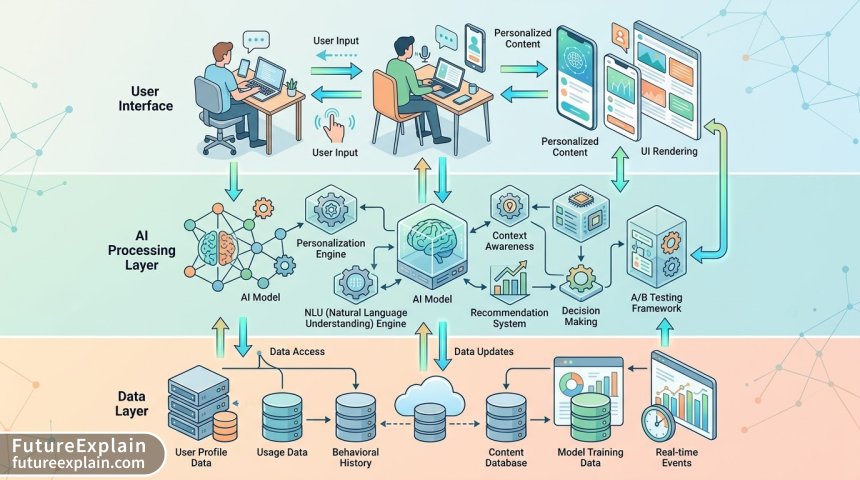
Frontend AI UX Layer
This layer handles the presentation and interaction of AI features. Key components include:
- AI-aware UI components that can show loading states, confidence indicators, and fallbacks
- Client-side prediction models for immediate responsiveness when appropriate
- User interaction tracking (with proper consent) for model improvement
- Progressive enhancement logic that gracefully degrades when AI features are unavailable
AI Service Layer
Middleware that handles AI processing and decision-making:
- Model inference services for predictions and recommendations
- Personalization engines that tailor experiences based on user data
- Context aggregation services that compile relevant signals for AI decisions
- Orchestration logic that coordinates multiple AI models when needed
Data and Model Layer
The foundation that powers intelligent features:
- Feature stores for consistent feature calculation and serving
- Model repositories for versioning and deploying AI models
- Feedback loops that collect user corrections and improve models
- Privacy-preserving data pipelines that respect user consent and data minimization principles
Ethical Implementation Framework
AI-powered UX carries significant ethical considerations. Here's a practical framework for ethical implementation:
1. Privacy by Design
Build privacy into every layer of your AI UX implementation:
- Minimize data collection to what's necessary for specific features
- Implement differential privacy techniques when appropriate
- Provide clear privacy controls and explanations
- Consider on-device processing for sensitive features
2. Bias Mitigation Strategies
Proactively address potential biases in AI features:
- Diverse training data and testing with diverse user groups
- Regular bias audits of AI models and their outputs
- User-controlled preference settings that can override algorithmic defaults
- Transparency about limitations and potential biases
3. User Consent and Control
Empower users with meaningful control over AI features:
- Granular opt-in/opt-out for different intelligent features
- Clear explanations of benefits and trade-offs
- Easy reset options for personalization profiles
- Data export and deletion capabilities
Practical Ethical Checklist for AI UX Implementation:
- ✓ Have we conducted bias testing with diverse user groups?
- ✓ Are privacy controls easily accessible and understandable?
- ✓ Can users easily correct AI mistakes and provide feedback?
- ✓ Do we have fallback modes for when AI features fail?
- ✓ Are we transparent about what's AI-powered vs. human-curated?
- ✓ Have we minimized data collection to only what's necessary?
- ✓ Can users export or delete their personalization data?
- ✓ Do we have human oversight for high-stakes AI decisions?
Collaboration Between Design and Engineering Teams
AI-powered UX requires close collaboration between design and engineering teams. Here are practical strategies for effective cross-functional work:

Shared Understanding and Language
Create a shared vocabulary for discussing AI features. This might include:
- Glossary of AI/ML terms relevant to your product
- Shared prototypes that demonstrate both design intent and technical feasibility
- Regular "AI concept reviews" where designers present concepts and engineers provide technical feedback
- Documentation of AI capabilities and limitations for the entire team
Iterative Prototyping Approach
Use a multi-stage prototyping process:
- Concept prototypes (Figma/Sketch) to explore design ideas
- Wizard-of-Oz prototypes where humans simulate AI behavior to test user reactions
- Technical spike prototypes to test feasibility of AI approaches
- Integrated prototypes with real but limited AI functionality
- Pilot implementations with small user groups before full rollout
Design-Development Handoff for AI Features
AI features require more detailed handoff documentation, including:
- Expected behavior under different confidence levels
- Fallback states and error handling requirements
- Performance expectations (latency, accuracy thresholds)
- User feedback collection mechanisms
- Data requirements and privacy considerations
Measuring Success of AI-Powered UX
Traditional UX metrics may not fully capture the value of intelligent features. Consider these additional metrics:
User-Centric AI Metrics
- AI feature adoption rate: Percentage of users who enable or regularly use AI features
- Suggestion acceptance rate: How often users accept AI suggestions
- Correction frequency: How often users need to correct AI behavior
- Trust indicators
- Time to value: How quickly users derive value from intelligent features
Business and Technical Metrics
- Task completion improvement: Impact on key user journeys
- Error rate reduction: Decrease in user errors with AI assistance
- Model performance metrics: Accuracy, precision, recall of AI models
- System performance: Latency, reliability, scalability of AI services
- Cost-effectiveness: ROI of AI features considering development and operational costs
Common Pitfalls and How to Avoid Them
Based on industry experience, here are common mistakes in AI UX design and how to avoid them:
1. The "Black Box" Problem
Problem: Users don't understand why the AI is making certain decisions, leading to distrust.
Solution: Implement appropriate levels of explainability. This doesn't mean exposing model internals, but providing human-understandable reasons like "Based on your past purchases" or "Because you frequently search for Italian food."
2. Over-Automation
Problem: Automating too much too quickly, removing user agency.
Solution: Implement progressive automation. Start with suggestions, move to semi-automation with confirmation, and only implement full automation for low-risk, high-value scenarios where users have opt-out control.
3. Ignoring Failure States
Problem: Designing only for when AI works perfectly.
Solution: Design comprehensive failure modes. What happens when confidence is low? When the model returns no results? When network connectivity is poor? Plan for these scenarios from the beginning.
4. Privacy Overlooks
Problem: Collecting more data than necessary or not properly securing it.
Solution: Implement privacy by design principles from the start. Conduct privacy impact assessments for all AI features. Provide clear privacy controls and explanations.
Future Trends in AI-Powered UX
As AI technology evolves, so too will AI UX patterns. Here are emerging trends to watch:
1. Multimodal Interaction
Combining voice, gesture, gaze, and traditional input methods for more natural interactions. Design systems will need to accommodate fluid transitions between modalities.
2. Real-time Adaptation
Interfaces that adapt not just between sessions but within a single session based on changing context and user state. This requires new patterns for communicating changes without causing disorientation.
3. Collaborative AI
AI that works alongside users as a collaborator rather than just an assistant. This shifts the interaction paradigm from command-response to cooperative problem-solving.
4. Emotion-Aware Interfaces
When implemented ethically and with proper consent, interfaces that can detect and respond to emotional cues. This requires careful design to avoid manipulation and respect emotional privacy.
Getting Started: A Practical Implementation Roadmap
If you're new to AI-powered UX, here's a practical roadmap to get started:
- Start Small: Identify one high-impact, low-risk area to add intelligence (e.g., search, recommendations, auto-complete).
- Prototype First: Create Wizard-of-Oz prototypes to test concepts before building.
- Implement Progressive Enhancement: Build the non-AI version first, then layer on intelligence.
- Measure Rigorously: Establish baseline metrics and track improvements from AI features.
- Iterate Based on Feedback: Use user feedback to refine both the AI models and the UX patterns.
- Scale Gradually: Apply learnings from initial implementations to more complex features.
AI-powered UX represents an exciting frontier in digital product design. By combining thoughtful design principles with practical implementation strategies and strong ethical foundations, we can create interfaces that are not just intelligent, but genuinely helpful, trustworthy, and empowering for users. The key is to remember that intelligence should serve usability—not complicate it—and that the best AI features often feel so natural that users don't even notice they're interacting with artificial intelligence at all.
Visuals Produced by AI
Further Reading
Share
What's Your Reaction?
 Like
1427
Like
1427
 Dislike
23
Dislike
23
 Love
456
Love
456
 Funny
89
Funny
89
 Angry
12
Angry
12
 Sad
8
Sad
8
 Wow
312
Wow
312
















How do you handle the tension between personalization and user privacy? Our legal team is pushing for minimal data collection, but our product team wants rich personalization.
Kenji, this is a common challenge. We recommend: 1) Start with explicit opt-in personalization, 2) Use privacy-preserving techniques like federated learning or differential privacy where possible, 3) Consider on-device personalization models that don't send data to servers, and 4) Be transparent about the privacy-personalization trade-off—let users choose their preferred balance. Sometimes less data with clear user control creates more trust and engagement than extensive but creepy personalization.
The "Common Pitfalls" section should be required reading for anyone starting with AI UX. We made every single one of those mistakes in our first AI feature rollout.
What tools do you recommend for prototyping AI UX? We're using Figma but struggling to convey the adaptive, non-linear nature of AI interactions.
Tomas, we use a combination of tools: Figma for static mocks, Protopie for more complex interactions, and sometimes even simple web prototypes with mock APIs. For truly adaptive flows, we create "decision trees" in diagrams alongside the prototypes to show how the system might branch.
The performance metrics section is underrated. We almost killed a useful AI feature because we were only measuring accuracy, not actual user adoption and satisfaction. Switching to the metrics suggested here showed it was actually valuable once we improved the UX.
I'm concerned about the "emotion-aware interfaces" trend mentioned. How can we implement these ethically without crossing into manipulation or privacy invasion?
Lena, we've implemented basic emotion detection (just positive/neutral/negative from text sentiment). Key principles: 1) Always get explicit opt-in, 2) Be transparent about what's being detected and why, 3) Never use emotion data for manipulation, only for adaptation (like offering help when frustration is detected), and 4) Allow users to review and delete their emotion data. It's a minefield that requires careful navigation.
The collaboration section resonates. As an engineer, I've seen projects fail because designers and AI researchers weren't speaking the same language. Regular "AI concept reviews" as suggested here would prevent so many misunderstandings.