Automating Workflows with Low-Code AI Platforms (Deep Dive)
This comprehensive guide explores how to leverage low-code AI platforms for automating complex business workflows. We'll dive deep into practical implementation strategies, comparing leading platforms like Power Automate, Zapier, and Make. You'll learn how to integrate AI services for document processing, customer service automation, data analysis, and decision support systems. The article covers architecture patterns, cost optimization, error handling, and performance monitoring. With real-world case studies and step-by-step examples, you'll discover how to build sophisticated AI-powered automations without writing code, making advanced AI accessible to business users and non-technical teams.


In today's fast-paced business environment, automation has evolved from simple rule-based tasks to intelligent, AI-powered workflows. What was once the domain of specialized developers is now accessible to business users, analysts, and process owners through low-code AI platforms. These platforms combine visual development interfaces with pre-built AI capabilities, enabling organizations to automate complex processes without extensive coding knowledge.
Low-code AI platforms represent a significant shift in how businesses approach automation. According to Gartner, by 2026, developers outside formal IT departments will account for at least 80% of the user base for low-code development tools, up from 60% in 2023. This democratization of AI automation is transforming how organizations optimize processes, reduce costs, and improve decision-making.
Understanding Low-Code AI Platforms
Low-code AI platforms are development environments that allow users to create applications and automate workflows using visual interfaces with minimal hand-coding. These platforms integrate AI capabilities either through built-in AI services or connections to external AI APIs. The "low-code" aspect refers to the reduced amount of traditional programming required, while the AI component enables intelligent decision-making, pattern recognition, and predictive capabilities within automated workflows.
The architecture of modern low-code AI platforms typically includes several key components:
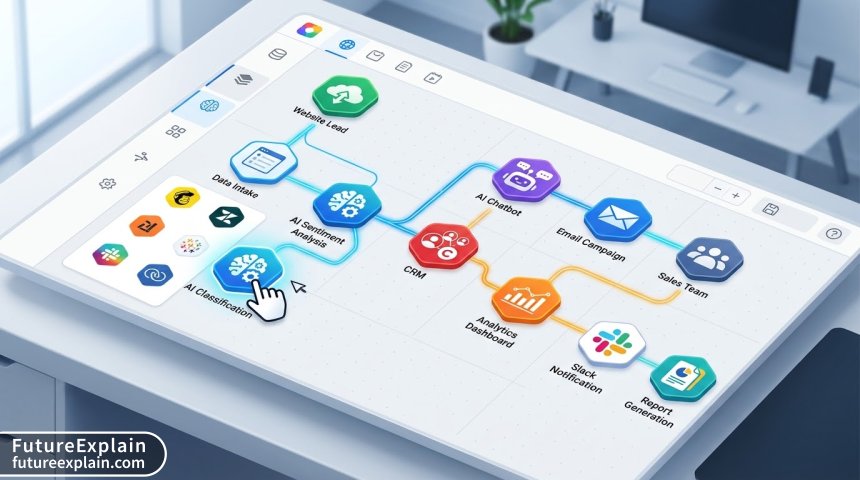
- Visual Workflow Designer: Drag-and-drop interface for building process flows
- AI Service Connectors: Pre-built integrations with AI services (OCR, NLP, computer vision, etc.)
- Data Connectors: Connections to databases, APIs, and enterprise systems
- Trigger Management: Event-based initiation of workflows
- Action Library: Pre-defined actions for common business operations
- Testing and Debugging Tools: Environment for validating workflows before deployment
The Evolution from Traditional to AI-Powered Automation
Traditional automation focused primarily on repetitive, rule-based tasks. Robotic Process Automation (RPA) tools excelled at mimicking human actions in digital systems but lacked cognitive capabilities. AI-powered automation introduces intelligence into these workflows, enabling systems to:
- Understand unstructured data (documents, emails, images)
- Make predictions based on historical patterns
- Learn and adapt from outcomes
- Handle exceptions intelligently
- Provide recommendations for process optimization
The integration of AI transforms automation from simple task execution to intelligent process management. For instance, where traditional automation might automatically route invoices based on vendor names, AI-powered automation can extract relevant data from various invoice formats, validate information against purchase orders, flag discrepancies, and even predict payment dates based on historical patterns.
Key Low-Code AI Platforms Comparison
Several platforms dominate the low-code AI automation space, each with distinct strengths and use cases:
Microsoft Power Automate with AI Builder
Microsoft's Power Platform combines Power Automate for workflow automation with AI Builder for adding intelligence. AI Builder provides pre-built AI models for common business scenarios including form processing, object detection, text classification, and prediction. The platform integrates seamlessly with Microsoft 365, Dynamics 365, and Azure services.
Strengths: Deep integration with Microsoft ecosystem, enterprise-grade security, extensive connector library (600+), strong compliance certifications.
AI Capabilities: Pre-trained models for document processing, sentiment analysis, category classification, and custom model training through a no-code interface.
Best For: Organizations heavily invested in Microsoft technologies, enterprise automation with compliance requirements, complex business process automation.
Zapier with Built-in AI Actions
Zapier has evolved from simple app connections to incorporating AI capabilities through partnerships and built-in AI actions. The platform now offers AI-powered formatting, content generation, data extraction, and decision-making within workflows.
Strengths: Massive app ecosystem (5,000+), extremely user-friendly interface, quick setup, affordable pricing for small to medium workflows.
AI Capabilities: Integration with OpenAI, AI-powered formatters, intelligent routing based on content analysis, natural language processing for email and document handling.
Best For: Small to medium businesses, marketing and sales automation, quick automation of common SaaS app workflows.
Make (formerly Integromat)
Make offers a visual automation platform with advanced routing, error handling, and data transformation capabilities. While its native AI features are less extensive than some competitors, it excels at complex workflow orchestration and integrates with various AI services through API connections.
Strengths: Advanced routing scenarios, excellent error handling, sophisticated data transformation tools, detailed execution history for debugging.
AI Capabilities: API connections to major AI services, built-in functions for data manipulation that support AI preprocessing, scenario optimization features.
Best For: Complex multi-step automations, technical users who need granular control, scenarios requiring sophisticated error handling and data transformation.
UiPath with AI Center
UiPath, traditionally an RPA platform, has expanded into AI-powered automation through its AI Center. This allows users to incorporate machine learning models into automation workflows, either using pre-built models or deploying custom models.
Strengths: Strong document understanding capabilities, computer vision for desktop automation, enterprise-scale deployment, extensive governance features.
AI Capabilities: Document AI, computer vision, conversational AI, process mining with AI insights, custom ML model deployment.
Best For: Large-scale enterprise automation, document-intensive processes, desktop application automation, regulated industries.
Architecting AI-Powered Workflows
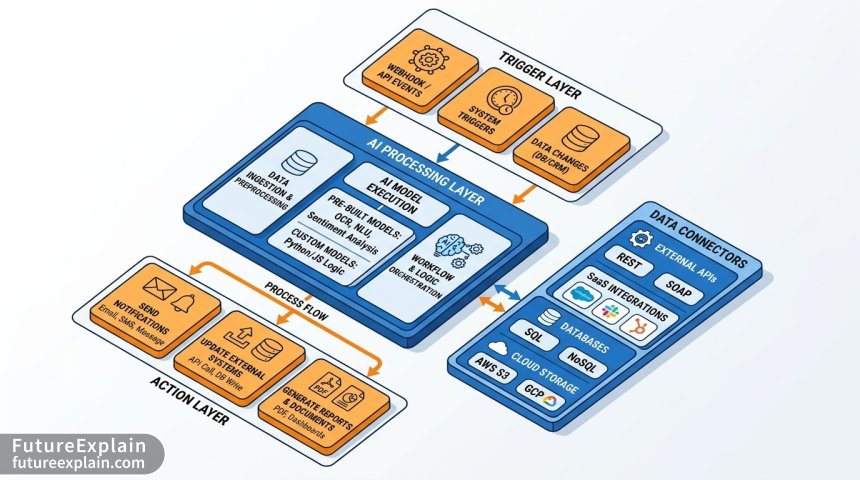
Designing effective AI-powered workflows requires understanding both the automation logic and the AI capabilities being integrated. A well-architected workflow typically follows this pattern:
1. Trigger Layer
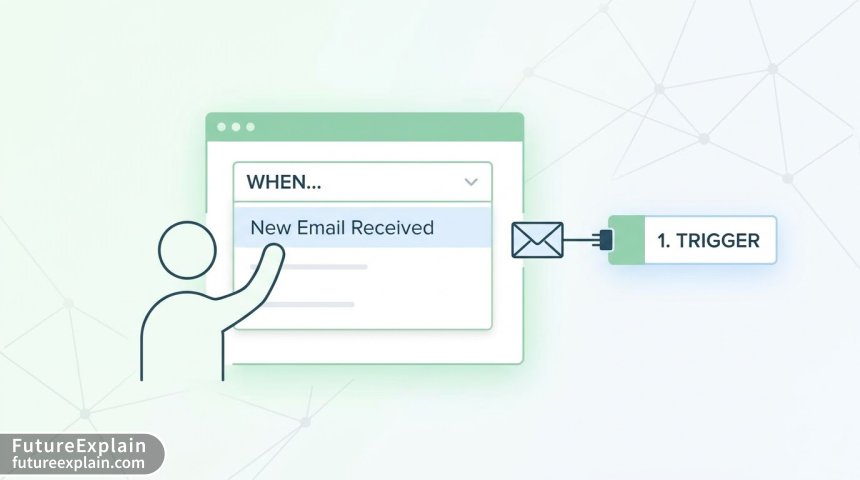
The trigger initiates the workflow. Common triggers include:
- Schedule-based: Run daily, weekly, or at specific times
- Event-based: New email arrives, form submission, database update
- File-based: New file in cloud storage or network location
- API-based: Webhook call from another system
- Manual: User-initiated from dashboard or mobile app
When designing triggers for AI workflows, consider the data requirements of your AI components. Some AI services require specific data formats or preprocessing before analysis.
2. Data Collection and Preparation
Before AI processing, data often needs collection from multiple sources and preparation in a suitable format. This stage might involve:
- Extracting data from emails, forms, or documents
- Combining data from multiple systems (CRM, ERP, databases)
- Cleaning and formatting data (removing duplicates, standardizing formats)
- Enriching data with additional context from reference sources
Data quality significantly impacts AI performance. According to IBM research, poor data quality costs the US economy around $3.1 trillion yearly. In AI workflows, garbage in truly means garbage out.
3. AI Processing Layer
This is where intelligent processing occurs. Common AI capabilities in workflow automation include:
- Natural Language Processing (NLP): Text classification, sentiment analysis, entity extraction
- Optical Character Recognition (OCR): Extracting text from images and documents
- Computer Vision: Image classification, object detection, quality inspection
- Predictive Analytics: Forecasting, anomaly detection, recommendation systems
- Decision Engines: Rule-based systems enhanced with machine learning
When implementing AI processing, consider:
- Latency requirements (real-time vs. batch processing)
- Cost per transaction for AI API calls
- Fallback mechanisms for when AI services are unavailable
- Confidence thresholds for automated decisions vs. human review
4. Decision and Routing Logic
Based on AI processing results, workflows make decisions about next steps. This might involve:
- Routing items to different teams or individuals
- Triggering specific actions based on classifications
- Escalating exceptions for human review
- Initiating follow-up processes
Decision logic should include confidence scoring - when AI predictions fall below a certain confidence threshold, items should be routed for human verification rather than automated action.
5. Action Layer
The final stage executes business actions based on decisions. Common actions include:
- Updating records in business systems (CRM, ERP)
- Sending notifications (email, Slack, Teams)
- Generating documents or reports
- Creating tasks or tickets in project management tools
- Initiating financial transactions or approvals
Real-World Implementation Examples
Case Study 1: Intelligent Invoice Processing
A manufacturing company processes 500+ invoices monthly from various suppliers in different formats (PDF, scanned images, Word documents). Their manual process involved data entry clerks extracting information, which took 15 minutes per invoice on average with a 5% error rate.
AI-Powered Solution:
- Trigger: New file in "Invoices-To-Process" SharePoint folder
- AI Processing: OCR to extract text, NLP to identify vendor, date, amounts, line items
- Validation: Cross-reference with purchase orders in ERP system
- Decision: If matches PO within tolerance → route to approval; if discrepancies → route to accounts payable specialist
- Action: Create approval task in financial system, send notification to approver
Results: Processing time reduced to 2 minutes per invoice, error rate dropped to 0.5%, accounts payable team redirected to exception handling and vendor relationship management.
Case Study 2: Customer Support Ticket Triage
A software company receives 200+ support tickets daily across email, web forms, and chat. Previously, a support manager manually categorized and assigned tickets, which created bottlenecks during peak hours.
AI-Powered Solution:
- Trigger: New ticket in Zendesk (or email to support address)
- AI Processing: Sentiment analysis, topic classification, urgency detection
- Routing Logic: High-urgency + negative sentiment → immediate escalation; Feature request → product team; Billing question → finance team
- Action: Auto-assign to appropriate team, set priority flags, send acknowledgment with estimated response time
Results: 90% of tickets automatically categorized and routed correctly, average first response time reduced from 4 hours to 30 minutes, support manager capacity freed for complex escalations.
Advanced Patterns and Best Practices
Pattern 1: Human-in-the-Loop Design
Not all decisions should be fully automated. Human-in-the-loop patterns maintain human oversight for critical decisions or low-confidence AI predictions. Implement this by:
- Setting confidence thresholds for automated actions
- Creating review queues for borderline cases
- Implementing feedback loops where human corrections train the AI system
- Designing intuitive interfaces for human reviewers to quickly validate or correct AI outputs
Pattern 2: Progressive Automation
Start with human-executed processes, then incrementally automate components as confidence grows:
- Phase 1: AI provides recommendations, humans make decisions
- Phase 2: AI makes decisions for high-confidence cases, humans handle exceptions
- Phase 3: Full automation with human oversight only for system monitoring
This approach reduces risk and allows for gradual optimization based on real-world performance data.
Pattern 3: Multi-Model Validation
For critical decisions, use multiple AI models or approaches and compare results:
- Run both rule-based and ML-based classification
- Use ensemble methods combining multiple model outputs
- Implement consensus mechanisms where multiple AI services must agree
- Track model performance metrics to identify when retraining is needed
Cost Optimization Strategies
AI API calls can become expensive at scale. Implement these strategies to optimize costs:
1. Intelligent Batching
Instead of processing items individually, batch similar items to reduce API calls:
- Collect documents over a period (hourly, daily) and process in batches
- Use bulk operations where supported by AI services
- Implement request queuing to maximize batch sizes
2. Caching and Reuse
Avoid reprocessing identical or similar content:
- Cache AI results for identical inputs
- Implement similarity detection to reuse results for slightly varied inputs
- Store processed results in a database for future reference
3. Tiered Processing
Use simpler, cheaper methods first, escalating to more advanced (and expensive) AI only when needed:
- Start with rule-based filtering (eliminate obvious cases)
- Use lightweight models for initial classification
- Apply complex, expensive AI only to cases that pass through initial filters
4. Monitoring and Alerting
Implement cost monitoring to identify inefficiencies:
- Track cost per workflow execution
- Set alerts for unusual cost spikes
- Analyze which AI services contribute most to costs
- Regularly review and optimize expensive workflows
Security and Compliance Considerations
AI automation introduces unique security and compliance challenges:
Data Privacy and Protection
- Data Minimization: Only send necessary data to AI services
- Anonymization: Remove personally identifiable information before processing
- Encryption: Ensure data in transit and at rest is encrypted
- Data Residency: Consider where AI processing occurs geographically
Model Security
- Input Validation: Protect against adversarial attacks designed to trick AI models
- Output Verification: Validate AI outputs before taking actions
- Access Controls: Restrict who can modify AI models and workflows
- Audit Logging: Maintain detailed logs of AI decisions and actions
Regulatory Compliance
Different industries have specific regulations affecting AI automation:
- Financial Services: SOX, Basel III, anti-money laundering requirements
- Healthcare: HIPAA compliance for patient data
- Retail: PCI DSS for payment information
- General: GDPR, CCPA for personal data protection
Performance Monitoring and Optimization
Continuous monitoring is essential for maintaining effective AI-powered workflows. Key performance indicators to track include:
Operational Metrics
- Throughput: Number of items processed per time period
- Latency: Time from trigger to completion
- Success Rate: Percentage of items processed without errors
- Cost per Transaction: Total cost divided by number of items
AI Performance Metrics
- Accuracy: Percentage of correct classifications or predictions
- Precision and Recall: For classification tasks (especially important for imbalanced datasets)
- Confidence Scores: Distribution of confidence levels in predictions
- Drift Detection: Monitoring for changes in input data distribution that may degrade model performance
Business Impact Metrics
- Time Savings: Reduction in manual processing time
- Error Reduction: Decrease in mistakes compared to manual processes
- ROI: Financial return on automation investment
- User Satisfaction: Feedback from employees and customers affected by automated processes
Common Pitfalls and How to Avoid Them
Pitfall 1: Over-Automation
Symptom: Automating processes that are better handled by humans, leading to poor customer experiences or frequent exceptions.
Solution: Conduct thorough process analysis before automation. Identify which steps truly benefit from automation and which require human judgment. Implement gradual automation with clear off-ramps to human handling.
Pitfall 2: Insufficient Error Handling
Symptom: Workflows fail silently or cascade failures through connected systems.
Solution: Design comprehensive error handling from the start. Include retry logic with exponential backoff, failure notifications, and graceful degradation when services are unavailable. Implement circuit breaker patterns to prevent cascading failures.
Pitfall 3: Neglecting Maintenance
Symptom: Automated workflows degrade over time as business processes change or AI models drift.
Solution: Establish regular review cycles for automated workflows. Monitor performance metrics and set up alerts for degradation. Budget time and resources for ongoing maintenance and optimization.
Pitfall 4: Security Oversights
Symptom: Sensitive data exposed through AI APIs or automation platforms.
Solution: Implement data classification and handling policies. Use platform security features appropriately. Conduct regular security reviews of automated workflows, especially those handling sensitive data.
Future Trends in Low-Code AI Automation
The low-code AI automation space continues to evolve rapidly. Key trends to watch include:
1. Generative AI Integration
Platforms are increasingly incorporating generative AI capabilities for content creation, code generation, and natural language interfaces. Expect to see:
- Natural language to workflow conversion (describe a process in English, get an automated workflow)
- AI-assisted debugging and optimization suggestions
- Intelligent documentation generation from workflow designs
- Conversational interfaces for building and managing automations
2. Autonomous Optimization
AI systems that not only execute workflows but also optimize them:
- Automatic identification of bottlenecks and inefficiencies
- Suggestions for workflow improvements based on execution data
- Self-healing workflows that adapt to changes in connected systems
- Predictive scaling based on workload patterns
3. Enhanced Governance and Compliance
As AI automation becomes more prevalent, governance features will evolve:
- Automated compliance checking for regulatory requirements
- Explainable AI features for audit trails
- Fine-grained access controls and approval workflows
- Ethical AI monitoring and bias detection
4. Edge AI Integration
Combining cloud-based low-code platforms with edge AI capabilities:
- Workflows that incorporate on-device AI processing for latency-sensitive applications
- Hybrid architectures combining cloud and edge intelligence
- IoT integration with real-time AI decision making
Getting Started with Your First AI-Powered Workflow
Ready to build your first AI-powered automation? Follow this practical approach:
Step 1: Identify a Suitable Process
Start with a process that:
- Is repetitive and time-consuming
- Involves structured or semi-structured data
- Has clear success criteria
- Isn't mission-critical (for your first attempt)
- Has available examples or training data
Good starter projects: email sorting and categorization, document data extraction, social media monitoring, lead scoring from form submissions.
Step 2: Choose the Right Platform
Consider these factors when selecting a platform:
- Integration needs: What systems do you need to connect?
- AI capabilities: What specific AI services do you need?
- Team skills: What's your team's technical comfort level?
- Budget: Both platform costs and AI API costs
- Scalability: Will this need to handle higher volumes later?
Step 3: Start Small and Iterate
Build a minimum viable workflow first:
- Create the basic trigger and action without AI
- Add simple AI processing for one aspect
- Test thoroughly with sample data
- Add more sophisticated AI components gradually
- Implement error handling and monitoring
Step 4: Measure and Optimize
Once your workflow is running:
- Track key metrics from the beginning
- Solicit feedback from users affected by the automation
- Look for optimization opportunities
- Document lessons learned for future projects
Conclusion
Low-code AI platforms have fundamentally changed who can build intelligent automations and what kinds of processes can be automated. By combining visual development interfaces with powerful AI capabilities, these platforms make sophisticated automation accessible to business users, analysts, and process experts.
The key to success lies in thoughtful design: understanding when to automate versus when human judgment is needed, implementing robust error handling, optimizing for cost and performance, and maintaining security and compliance. As these platforms continue to evolve with generative AI, autonomous optimization, and edge computing capabilities, the possibilities for intelligent automation will only expand.
Remember that the goal isn't automation for its own sake, but creating systems that augment human capabilities, reduce errors, save time, and ultimately deliver better business outcomes. Start with a well-defined use case, choose the right platform for your needs, and take an iterative approach to building and refining your AI-powered workflows.
Visuals Produced by AI