Human-plus-AI Collaboration: Redesigning Workflows for Productivity (Update)
This comprehensive 2025 update explores how to redesign workflows for optimal human-AI collaboration. We provide a practical 5-step framework for analyzing, redesigning, and implementing AI-enhanced workflows across different business functions. Learn how to identify automation opportunities, select the right AI tools, create effective collaboration patterns, measure productivity gains, and manage organizational change. Includes real-world examples from marketing, customer service, content creation, and operations, plus a complete implementation checklist and ROI measurement guide.


Introduction: The Evolution of Human-AI Collaboration
When we first explored human-plus-AI collaboration in 2024, the landscape was dominated by experimentation and isolated tool adoption. Today, in 2025, we've moved beyond simple automation to sophisticated collaboration systems that fundamentally redesign how work gets done. The most productive organizations aren't just using AI tools—they're redesigning entire workflows around human-AI partnership.
This update reflects the significant advancements in AI capabilities and our understanding of how to integrate them effectively. According to recent research from Stanford's Human-Centered AI Institute, organizations that systematically redesign workflows for AI collaboration achieve 42% higher productivity gains compared to those that simply add AI tools to existing processes. The difference lies in intentional design.
In this comprehensive guide, we'll explore a practical framework for redesigning workflows that maximizes the strengths of both humans and AI systems. We'll move beyond theoretical concepts to provide actionable steps, real-world examples, and implementation strategies you can apply immediately.
Why Workflow Redesign Matters More Than Tool Selection
Many organizations make the mistake of focusing exclusively on which AI tools to purchase, overlooking the more critical question: How should our work processes change to leverage these tools effectively? This distinction is crucial because the same AI tool can produce dramatically different results depending on how it's integrated into workflows.
Consider the example of AI writing assistants. When simply added to existing content creation processes, they might save 20-30% of writing time. But when content workflows are redesigned around AI capabilities—with humans focusing on strategy, editing, and personalization while AI handles research, drafting, and optimization—productivity can increase by 150-200% while improving quality.
The fundamental shift is moving from automation (replacing human tasks) to augmentation (enhancing human capabilities) and finally to collaboration (creating new ways of working that didn't exist before). This evolution requires rethinking not just individual tasks but entire workflow architectures.
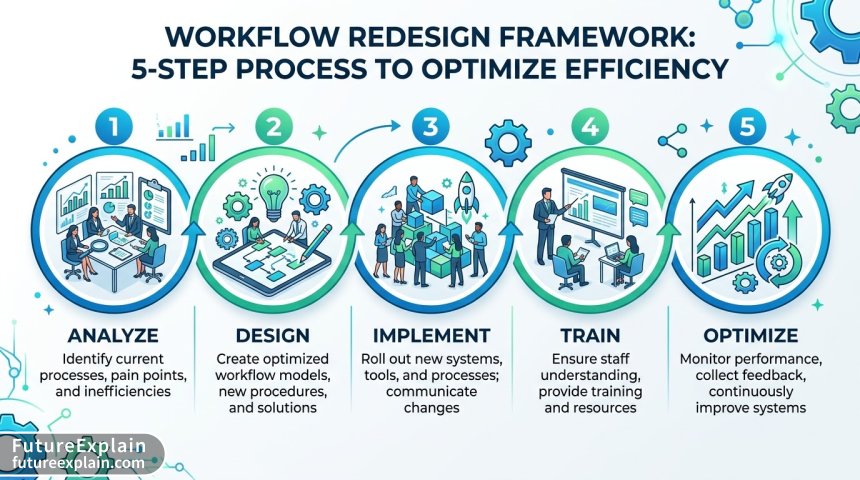
The 5-Step Framework for Workflow Redesign
Based on analysis of successful implementations across industries, we've developed a practical 5-step framework for redesigning workflows for human-AI collaboration:
Step 1: Workflow Analysis and Opportunity Mapping
Before introducing any AI tools, you must thoroughly understand your current workflows. This involves:
- Process Mapping: Document every step in your current workflow, including inputs, outputs, decision points, and handoffs
- Pain Point Identification: Where are the bottlenecks, quality issues, or resource drains?
- AI Opportunity Assessment: For each step, evaluate whether AI could:
- Automate repetitive elements
- Enhance decision-making with data analysis
- Generate content or analysis faster
- Provide quality assurance or validation
- Enable personalization at scale
Use tools like process mining software or even simple flowcharting tools to visualize workflows. The key insight from 2025 implementations is that the most valuable AI applications often appear at workflow intersections—points where information or tasks hand off between people or systems.
Step 2: Human-AI Role Design
This critical step defines what humans and AI will do in the redesigned workflow. The goal is to allocate tasks according to respective strengths:
Visuals Produced by AI
Human strengths to leverage:
- Strategic thinking and goal setting
- Creative problem-solving and innovation
- Emotional intelligence and relationship building
- Ethical judgment and contextual understanding
- Quality oversight and final decision-making
AI strengths to leverage:
- Processing large volumes of data quickly
- Identifying patterns humans might miss
- Generating multiple options or drafts
- Providing 24/7 availability for routine tasks
- Maintaining consistency in repetitive work
A practical framework from recent implementations is the "70-20-10 Rule": In redesigned workflows, humans should spend approximately 70% of their time on high-value cognitive work, 20% on overseeing and guiding AI systems, and 10% on tasks that haven't been (or can't be) effectively automated.
Step 3: Tool Selection and Integration Design
Only after understanding the workflow and role allocation should you select AI tools. Consider these 2025-specific factors:
- Interoperability: How well do tools work together? Can they share data and trigger each other?
- Explainability: Can the AI explain its reasoning? This is crucial for human oversight
- Customization: Can the tool be fine-tuned for your specific workflows?
- Scalability: Will the solution work as your needs grow?
Increasingly, organizations are moving toward AI tool stacks rather than single solutions. For example, a content creation workflow might use one AI tool for research, another for drafting, a third for SEO optimization, and a fourth for performance analytics—all integrated through automation platforms like Zapier or Make.
Step 4: Implementation and Change Management
Workflow redesign inevitably faces resistance. Effective implementation requires:
- Phased Rollouts: Start with pilot teams or processes before scaling
- Training Programs: Don't just train on tools—train on new ways of working
- Feedback Loops: Create channels for continuous improvement based on user experience
- Success Measurement: Define clear metrics for productivity, quality, and employee satisfaction
A key insight from 2025 implementations is that the most successful organizations treat AI integration as a change management initiative rather than a technology deployment. This means addressing fears, building new skills, and creating incentives for adoption.
Step 5: Continuous Optimization
Human-AI workflows are not "set and forget." They require ongoing refinement based on:
- Performance data
- User feedback
- Evolving AI capabilities
- Changing business needs
Establish regular review cycles (quarterly is recommended) to assess what's working and what needs adjustment. The most adaptive organizations create "AI workflow labs" where cross-functional teams experiment with new collaboration patterns.
Real-World Examples: Workflow Redesign in Action
Example 1: Marketing Content Creation (Before and After)
Traditional Workflow (2023):
- Strategy meeting (human)
- Manual research (human)
- Outline creation (human)
- Draft writing (human)
- Editing rounds (human)
- SEO optimization (human)
- Publication and distribution (human)
- Performance analysis (human)
Redesigned AI-Enhanced Workflow (2025):
- Strategy meeting (human) → AI records and generates meeting notes
- AI conducts research across 50+ sources in minutes
- AI generates 3 content outlines based on strategy and research
- Human selects and refines best outline
- AI writes first draft based on outline and brand guidelines
- Human edits for voice, nuance, and strategic alignment
- AI optimizes for SEO and suggests improvements
- AI schedules publication across channels
- AI provides real-time performance analytics with insights
- Human makes strategic adjustments based on insights
Results Reported: 3x more content produced, 40% higher engagement rates, human team focuses on strategy and creative direction rather than mechanical tasks.
Example 2: Customer Service Operations
Traditional: Tiered support with Level 1 agents handling basic queries, escalating to specialists for complex issues.
Redesigned: AI handles 70% of initial queries, with sophisticated routing to: - AI resolution for routine issues - Human specialists for complex problems - Hybrid resolution where AI provides research and suggestions to human agents in real-time
The AI also monitors customer sentiment, predicts potential issues, and provides agents with personalized response suggestions based on customer history and current issue.

Visuals Produced by AI
Measuring Success: Beyond Productivity Metrics
While productivity gains are important, truly successful human-AI collaboration requires broader measurement:
- Quality Metrics: Error rates, customer satisfaction, content engagement
- Employee Experience: Job satisfaction, skill development, reduction in burnout
- Innovation Indicators: New ideas generated, process improvements suggested
- Business Outcomes: Revenue impact, cost savings, market responsiveness
A balanced scorecard approach works best. For example, a financial services company redesigned their loan processing workflow with AI and tracked: - Processing time (reduced from 5 days to 2 hours) - Error rate (reduced by 87%) - Employee satisfaction with the new process (increased by 32%) - Customer satisfaction (increased by 41%) - Loan approval accuracy (improved by 23%)
Common Pitfalls and How to Avoid Them
Based on analysis of failed implementations, here are key pitfalls to avoid:
Pitfall 1: Over-Automation
Problem: Automating tasks that require human judgment or relationship-building. Solution: Use the "human in the loop" principle for critical decisions and customer-facing interactions.
Pitfall 2: Underestimating Change Management
Problem: Focusing on technology while ignoring people and process changes. Solution: Allocate equal resources to technology implementation and organizational change.
Pitfall 3: Tool Fragmentation
Problem: Using multiple disconnected AI tools that create new inefficiencies. Solution: Design integrated tool stacks with clear data flows between components.
Pitfall 4: Neglecting AI Training and Maintenance
Problem: Assuming AI systems work perfectly out of the box. Solution: Budget for ongoing training, monitoring, and refinement of AI systems.
The Future: Adaptive Workflows and AI Teammates
Looking beyond 2025, we see several emerging trends in human-AI collaboration:
Adaptive Workflows: AI systems that continuously optimize workflows based on real-time performance data, changing priorities, and team preferences. These systems learn which collaboration patterns work best for specific types of tasks and team compositions.
AI Teammates with Specialized Roles: Rather than general-purpose AI assistants, organizations will deploy specialized AI teammates—an AI research assistant, an AI design collaborator, an AI data analyst—each optimized for specific functions but able to collaborate with humans and other AIs.
Human-AI Skill Development: As AI capabilities grow, the most valuable human skills will shift. Future training programs will focus on "collaboration literacy"—the ability to work effectively with AI systems, including prompt engineering, AI oversight, and hybrid problem-solving.
Implementation Checklist: Getting Started
To begin redesigning your workflows for human-AI collaboration:
- Select one workflow for initial pilot (choose one with clear pain points and measurable outcomes)
- Map the current process in detail, involving the people who actually do the work
- Identify 3-5 key pain points or opportunities for improvement
- Brainstorm AI applications for each step, focusing on augmentation rather than replacement
- Design the new workflow with clear human and AI roles
- Select and test AI tools with a small pilot group
- Develop training materials focused on new ways of working
- Implement with support and regular check-ins
- Measure results against baseline metrics
- Refine and scale based on learnings
Conclusion: The Collaboration Imperative
The organizations thriving in 2025 aren't those with the most advanced AI technology, but those that have most effectively redesigned their workflows around human-AI collaboration. This requires moving beyond tool-centric thinking to process-centric redesign.
The key insight from two years of implementation experience is this: The greatest productivity gains come not from AI doing human work, but from humans and AI doing new kinds of work together that weren't possible before. This requires intentional design, ongoing optimization, and a focus on developing new collaboration skills.
As you consider your own workflow redesign initiatives, remember that the goal isn't to replace humans with AI, but to create synergistic partnerships where the whole becomes greater than the sum of its parts. The most successful organizations of the coming decade will be those that master this collaborative alchemy.