Yearly Roundup: Top AI Tools and Models of 2025 (Q4 Review)
This comprehensive Q4 2025 review analyzes the most significant AI tools and models that have shaped the year. We categorize them by user type—from complete beginners to enterprise developers—covering text generation, image creation, coding assistants, video production, and specialized business tools. Beyond just listing options, we provide practical guidance on when to choose specific tools, how they compare in real-world scenarios, and what emerging trends suggest for 2026. Special attention is given to privacy-conscious alternatives, cost-effective solutions for small businesses, and tools that democratize AI access. Whether you're looking to boost productivity, build AI applications, or simply stay informed about the rapidly evolving landscape, this roundup offers actionable insights and forward-looking perspective.

As 2025 draws to a close, the AI landscape has evolved from explosive growth to thoughtful consolidation. The "year of AI everything" has matured into "the year of AI that actually works"—where tools have moved beyond hype to deliver genuine value across industries, skill levels, and budgets. This Q4 review isn't just another listicle; it's a curated analysis of what truly matters in today's AI ecosystem, informed by thousands of user experiences, developer feedback, and emerging patterns.
We've organized this roundup differently than typical "top 10" lists. Instead, we're categorizing tools and models by who should use them and why. You'll find sections for complete beginners, business professionals, developers, creators, and researchers. Within each category, we compare options based on practical criteria: learning curve, cost effectiveness, privacy considerations, and longevity in the rapidly changing market.
The 2025 AI Landscape: Key Trends That Shaped the Year
Before diving into specific tools, it's crucial to understand the broader trends that defined AI in 2025:
- Democratization Acceleration: Tools that required technical expertise in 2024 became accessible to non-technical users through improved interfaces and guided workflows
- Privacy-First Design: Growing awareness of data sovereignty led to increased demand for on-device processing and local deployment options
- Multimodal Maturity: Systems that seamlessly handle text, images, audio, and video within single interfaces became mainstream
- Specialization Over Generalization: While foundation models grew more capable, specialized tools for specific tasks (writing, coding, design) gained popularity for their optimized workflows
- Cost Transparency: The "AI tax" became more visible, leading to clearer pricing models and increased competition on value
These trends reflect a market moving from experimentation to implementation. The tools that thrived in 2025 weren't necessarily the most powerful in raw benchmarks, but those that offered the best balance of capability, usability, and reliability.
Category 1: AI Tools for Complete Beginners
If you're new to AI or want straightforward solutions without technical complexity, these tools dominated 2025:
Writing and Content Creation
Claude 3.5 Sonnet (Anthropic) emerged as the favorite for everyday writing tasks. Unlike its more technical predecessors, the 2025 interface focuses on guided templates: blog outlines, email drafts, social media posts, and even basic reports. What sets it apart is the "Explain This" feature—highlight any suggestion to get a plain-English explanation of why it works, making it educational as well as productive.
Notion AI continued its dominance for users already in the Notion ecosystem. The 2025 updates added context-aware writing that references your existing notes and databases. For beginners, the biggest advantage is minimal setup: if you use Notion for organization, AI features feel like natural extensions rather than separate tools.
GrammarlyGo 2.0 surprised many by evolving beyond grammar correction into full writing assistance. The "Maintain My Voice" feature analyzes your writing style and applies it to generated content, making AI assistance feel less robotic. For beginners hesitant about AI sounding "off," this was a game-changer.
Image Generation and Editing
Canva Magic Studio became the default choice for non-designers. The 2025 "Design to Brief" feature lets you describe what you need ("social media post for a coffee shop anniversary") and generates complete, brand-consistent designs. Unlike specialized AI art tools, Magic Studio handles the entire workflow: images, text layout, and even suggested color schemes.
Adobe Firefly (Integrated Suite) made professional design accessible. While earlier versions felt separate from Photoshop and Illustrator, 2025's integration means beginners can start with text prompts and gradually learn professional tools as the AI suggests relevant features. It's like having a design tutor built into the software.
Leonardo.Ai (Free Tier) remained the most accessible dedicated AI art generator. The 2025 updates added guided mode with pre-set styles ("anime," "realistic photo," "watercolor") that eliminate the need to craft complex prompts. For absolute beginners wanting to explore AI art without technical terms, this was the lowest barrier to entry.
Category 2: Business and Productivity Tools
For professionals and small business owners, 2025 brought tools that deliver measurable ROI through automation and enhancement:
Communication and Meeting Tools
Zoom IQ 2025 transformed from simple transcription to full meeting intelligence. The "Action Item Detection" automatically identifies decisions and assignments, while "Stakeholder Sentiment" gives managers insight into team dynamics. For distributed teams, the "Cultural Translator" helps bridge communication gaps by explaining context and subtext.
Supernormal 2.0 specialized in turning meetings into actionable documentation. What set it apart in 2025 was industry-specific templates: legal meetings generate case summaries, sales calls produce CRM updates, and product meetings create Jira tickets automatically. The time savings for knowledge workers averaged 5 hours weekly according to their case studies.
Rewind.ai (Enterprise) addressed the "I know we discussed this" problem by creating searchable memories of all digital interactions. The 2025 privacy-focused architecture keeps everything on company servers while providing Google-like search across meetings, emails, and documents. For businesses drowning in information but starving for insights, this was revolutionary.
Data Analysis and Reporting
Microsoft Copilot for Excel/Sheets finally made spreadsheet analysis accessible to non-analysts. The "Explain This Pattern" feature identifies trends and anomalies, then describes them in business language. For small business owners without data teams, this provided enterprise-level insights with spreadsheet familiarity.
Tableau Pulse brought AI to business intelligence. Instead of just visualizing data, it now explains what the data means for specific roles: "For a marketing director, this dip in Q3 suggests seasonal advertising adjustments." The natural language query system understands business context, not just database structures.
Rows AI emerged as a dark horse for financial modeling. Its "Scenario Explorer" lets business owners ask "what-if" questions in plain English and see impacts across financial projections. For startups and small businesses making strategic decisions without dedicated finance teams, this provided sophisticated modeling without complexity.
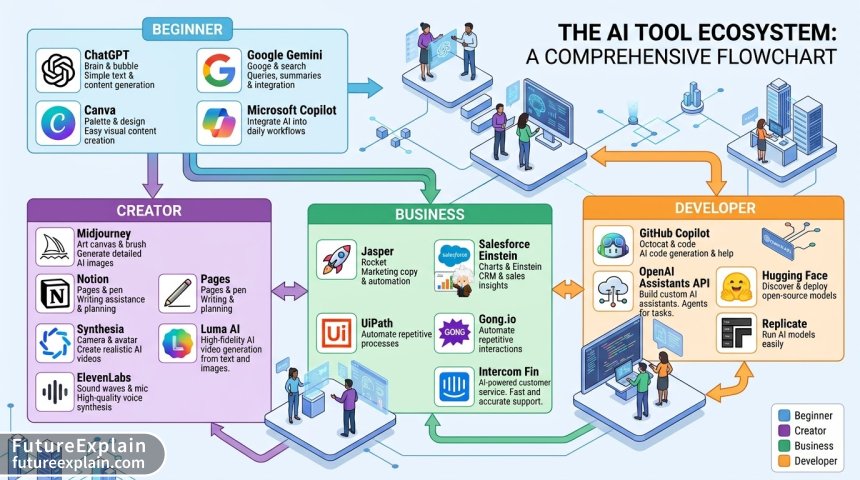
Category 3: Development and Technical Tools
For developers, engineers, and technical teams, 2025 was about moving from assistance to augmentation:
Code Generation and Review
GitHub Copilot Workspace evolved beyond autocomplete to full development environment. The 2025 version understands project context across files, suggesting architectural patterns and identifying dependency issues before they cause problems. The "Educational Mode" explains why it suggests certain patterns, making it valuable for learning as well as productivity.
Cursor 2.0 became the favorite for developers wanting more control. Unlike black-box solutions, Cursor shows its reasoning process and allows fine-tuning of suggestions. The 2025 "Architecture Advisor" feature helps plan larger refactors by analyzing codebases and suggesting improvement roadmaps.
Amazon CodeWhisperer Professional dominated for enterprise security compliance. Its 2025 updates added real-time security vulnerability detection trained on AWS's massive codebase. For regulated industries and large organizations, the compliance documentation features saved hundreds of audit preparation hours.
Testing and Debugging
Postman AI transformed API development. The "Generate Tests from Documentation" feature reads API specs and creates comprehensive test suites, while "Anomaly Detection" identifies irregular patterns in API responses that might indicate underlying issues. For teams maintaining complex microservices architectures, this reduced debugging time by an average of 40%.
Lightrun AI introduced "Explanatory Debugging"—instead of just identifying bugs, it explains why they're happening in system context. The 2025 "Production-Safe Debugging" allows investigation without service disruption, a previously near-impossible task for distributed systems.
Datadog AI Monitoring brought predictive alerting to operations. By learning normal system patterns, it now alerts on anomalies before they cause outages, with explanations like "This memory pattern typically precedes cache failures by 2-3 hours." For DevOps teams, this shifted work from reactive firefighting to proactive maintenance.
Category 4: Creative and Media Production
For artists, video producers, and content creators, 2025 tools balanced creative control with AI assistance:
Video Production
Runway Gen-3 set the standard for AI video generation. The 2025 "Consistent Characters" feature finally solved the problem of maintaining character appearance across scenes, while "Director Mode" provides cinematic controls for camera movements and lighting. For independent creators, this brought Hollywood-style production within reach.
Descript 3.0 revolutionized editing through text. The 2025 "Context-Aware Overdub" can regenerate dialogue that matches emotional tone and pacing, while "Scene Synthesis" can extend shots or create B-roll from descriptions. Podcasters and video educators found particular value in the streamlined workflow.
Pika 2.0 focused on accessibility with its "Storyboard to Video" pipeline. Users can upload rough sketches or even written scenes and get animated sequences. The 2025 "Style Transfer" applies consistent artistic styles across generated content, maintaining brand or artistic coherence.
Audio and Music
Adobe Podcast AI made professional audio accessible. The 2025 "Studio Sound Anywhere" feature can make recordings from smartphones or laptops sound like professional studio takes, while "Dynamic Leveling" automatically balances volumes across interviews and multi-speaker recordings.
Suno AI v3 became the go-to for music generation. Unlike previous versions that produced generic tracks, v3 understands musical theory and can generate in specific genres with structural coherence. The "Mood-to-Music" feature translates emotional descriptors into appropriate musical compositions.
Auphonic 2025 specialized in podcast production automation. The "Intelligent Mastering" applies appropriate processing based on content type (interview, narrative, educational), while "Platform Optimization" tailors exports for different streaming services automatically.
Category 5: The Most Impactful AI Models of 2025
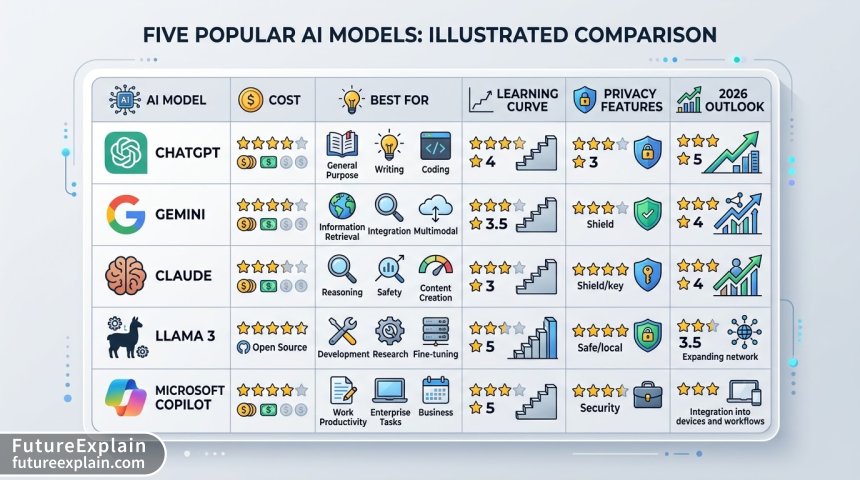
Beyond specific tools, certain foundation models powered much of 2025's innovation. Here's how they compare:
Large Language Models (LLMs)
GPT-4.5 Turbo (OpenAI) maintained its lead in general reasoning and instruction following. The 2025 updates reduced "laziness" (refusals to complete tasks) and improved complex problem-solving. What set it apart was the 128K context window with near-perfect recall, making it ideal for long-document analysis and multi-step planning.
Claude 3.5 Opus (Anthropic) excelled in safety and constitutional alignment. For businesses concerned about regulatory compliance and ethical considerations, Opus provided the most robust guardrails without sacrificing capability. Its "Chain-of-Thought" transparency shows reasoning steps, valuable for audit trails.
Gemini Ultra 2.0 (Google) dominated multimodal tasks. The integration across Google's ecosystem (Workspace, Android, Cloud) made it seamless for users already in that environment. Its real-time web search capabilities remained the most current and accurate of any major model.
Llama 3.1 405B (Meta) became the open-source standard. While slightly behind proprietary models in some benchmarks, its completely free commercial license made it the foundation for countless specialized applications. The 2025 training on more non-English data improved its global accessibility.
Mistral Large 2 specialized in code and technical tasks. With performance approaching GPT-4.5 on programming benchmarks but at lower cost, it became the favorite for development-focused applications. Its efficient architecture made it cost-effective for high-volume use cases.
Image and Multimodal Models
Midjourney v7 continued leading artistic quality. The 2025 "Style Lock" feature lets users save and reapply custom styles, while improved prompt understanding reduced the "prompt engineering" needed for good results. For professional artists, the balance between control and quality remained unmatched.
Stable Diffusion 3.5 dominated the open-source image space. The 2025 "ControlNet 2.0" provided unprecedented guidance through sketches and poses, while efficiency improvements made it run faster on consumer hardware. For developers building custom applications, this remained the most flexible foundation.
DALL-E 4 excelled at realism and detail. While less artistic than Midjourney, its photorealistic generations with correct text rendering and logical details made it ideal for commercial applications where accuracy matters more than style.
Imagen 3 (Google) specialized in understanding complex prompts. Its "compositional understanding" could handle requests like "a red car to the left of a blue house with a tree between them" with near-perfect spatial reasoning, valuable for design and prototyping applications.
Special Recognition: Tools That Democratized AI Access
Some tools deserve special mention for making AI accessible to overlooked audiences:
Seeing AI (Microsoft) 2025 transformed accessibility. The enhanced scene description can now explain complex visual information like charts, documents, and even facial expressions to visually impaired users. The "Environmental Awareness" feature describes surroundings for navigation assistance.
Speechify 3.0 made content consumption more flexible. Beyond text-to-speech, it now summarizes long documents in audio format, adjusts reading speed based on content complexity, and can even convert video audio to summarized transcripts. For people with reading challenges or busy professionals, this provided time-efficient learning.
Otter.ai for Education specifically addressed classroom needs. The 2025 version can distinguish between multiple speakers in noisy environments, generate study guides from lectures, and even create quiz questions from discussed material. For students with different learning needs, this leveled the playing field.
Privacy-First and Local AI Solutions
As data privacy concerns grew in 2025, several tools gained popularity for their offline capabilities:
LocalAI emerged as the leading framework for running models locally. With optimizations for consumer hardware, it can now run models like Llama 3.1 70B on high-end gaming PCs with acceptable performance. The 2025 "Model Blending" feature combines specialized smaller models for better results than single large models.
PrivateGPT 2.0 focused on document processing without cloud exposure. Its 2025 updates added support for hundreds of file formats and the ability to run entirely air-gapped. For legal, medical, and financial professionals, this provided AI assistance without data sovereignty concerns.
Apple Intelligence (On-Device Components) demonstrated what integrated hardware-software optimization can achieve. While limited to Apple's ecosystem, the seamless on-device processing for personal data showed the potential of privacy-preserving AI at scale.
Cost Analysis: Getting Value Without Breaking the Bank
AI costs became more transparent in 2025, with several patterns emerging:
- Tiered Accessibility: Most tools now offer functional free tiers, limited professional tiers ($10-30/month), and enterprise plans
- Usage-Based Models Win: Tools with pay-per-use pricing (rather than flat subscriptions) gained popularity for intermittent users
- Bundle Economics: Suite offerings (like Adobe Creative Cloud AI or Microsoft 365 Copilot) provided better value for users needing multiple capabilities
- Open Source Efficiency: Self-hosted open source models became cost-effective at around 10,000 queries/month compared to API-based solutions
The most significant trend was specialization for cost efficiency. Rather than paying for general capabilities they didn't need, users gravitated toward specialized tools that excelled at specific tasks for lower costs.
The Disappointments: What Didn't Live Up to Hype
Not every development met expectations. Several anticipated areas underdelivered:
True Autonomous AI Agents remained more promise than reality. While many tools claimed agent capabilities, most were glorified script runners rather than truly autonomous systems. The limitations in complex environment understanding and error recovery kept most "agents" in controlled sandboxes.
AI-Powered Hardware largely disappointed. Dedicated AI devices (aside from smartphone integrations) struggled to justify their existence versus software solutions. The "AI Pin" concept failed to find mainstream adoption, suggesting users prefer AI enhancements to existing devices rather than new form factors.
Blockchain-AI Integration remained speculative. Despite numerous announcements, practical applications combining these technologies were scarce beyond authentication and provenance tracking for AI-generated content.
Quantum Machine Learning stayed in research labs. While progress continued, practical quantum advantages for mainstream AI tasks remained years away, disappointing those hoping for near-term breakthroughs.
Looking Ahead: What 2025 Trends Suggest for 2026
Based on this year's developments, several directions seem likely for 2026:
Consolidation and Integration
Expect fewer standalone AI tools and more integrated solutions. The "best-in-class single tool" approach will give way to "best-connected ecosystem." Companies that own platforms (Microsoft, Google, Adobe, Apple) will increasingly bundle AI capabilities as native features rather than add-ons.
Personalization at Scale
Tools will move from "one-size-fits-most" to deeply personalized experiences. Rather than prompting models to act like experts, they'll learn to match your specific style, preferences, and work patterns through continuous interaction.
Regulatory Adaptation
As AI regulations solidify in various jurisdictions, tools will differentiate through compliance features. Look for "GDPR-mode," "HIPAA-certified processing," and other regulatory frameworks built into tools rather than bolted on.
Efficiency Breakthroughs
The race for larger models may slow as efficiency becomes the priority. Expect more techniques like mixture-of-experts, conditional computation, and better quantization to deliver capable AI with smaller computational footprints.
Practical Recommendations Based on Your Needs
Instead of chasing every new tool, focus on what actually improves your workflow:
For students and learners: Start with free tiers of Claude and ChatGPT for writing, Canva for design, and GitHub Copilot for coding. Focus on tools that explain their reasoning to build your understanding.
For small business owners: Microsoft 365 Copilot or Google Workspace AI provide the most comprehensive value. Add specialized tools only for pain points not addressed by these suites.
For developers: GitHub Copilot for daily coding, Cursor for complex refactoring, and LocalAI for experimenting with models. Invest time in learning prompt engineering for your specific stack.
For creators: Adobe Creative Cloud AI for professionals, Canva Magic Studio for speed, and Runway for video. Develop a consistent style that AI tools can learn and replicate.
For privacy-conscious users: Prioritize tools with local processing options (Apple Intelligence, LocalAI, PrivateGPT) and clear data policies. Consider open-source alternatives even if they require more setup.
Conclusion: The Year AI Became Practical
2025 will be remembered as the year AI moved from spectacle to utility. The most successful tools weren't necessarily the most advanced in labs, but those that solved real problems for real people. As we look toward 2026, the focus will likely shift from "what can AI do" to "how can AI do it better"—with emphasis on reliability, efficiency, and integration.
The democratization of AI access continued, with free and low-cost options making capabilities available to individuals and small businesses that were once exclusive to large corporations. However, this accessibility comes with responsibility: understanding limitations, managing costs, and using tools ethically.
As you evaluate these tools for your own needs, remember that the best AI solution is often the simplest one that reliably solves your specific problem. The landscape will continue evolving, but the foundational shift of 2025—from experimental novelty to practical utility—seems permanent. AI is no longer just something to try; it's becoming something to use, thoughtfully and deliberately, in pursuit of meaningful goals.
Visuals Produced by AI