Vector Search vs Keyword Search: Choosing the Right Approach
This comprehensive guide explains the fundamental differences between vector search (semantic/AI search) and traditional keyword search, helping you choose the right approach for your specific needs. We break down how each technology works, when to use them, and provide a practical decision framework considering factors like data type, user intent, scale, and budget. The article includes detailed performance comparisons, cost analysis for different business sizes, implementation complexity ratings, and real-world case studies. You'll learn about hybrid approaches that combine both methods, maintenance considerations, and future trends in search technology. Whether you're building a small website search or enterprise-scale information retrieval system, this guide provides actionable insights to make informed decisions.


Introduction: The Search Revolution
Search technology has undergone a fundamental transformation in recent years. For decades, keyword search—matching exact words and phrases—dominated how we found information online. From Google's early days to internal document search systems, this approach served us well. However, with the rise of artificial intelligence and natural language processing, a new paradigm has emerged: vector search, which understands meaning and context rather than just matching text.
Today, businesses and developers face a critical decision: stick with traditional keyword search, adopt modern vector search, or implement a hybrid approach. This choice impacts user experience, development costs, system performance, and future scalability. Making the wrong decision can lead to frustrated users, wasted resources, or systems that can't adapt to changing needs.
In this comprehensive guide, we'll break down exactly how both technologies work, when to use each, and provide you with practical frameworks to make the right choice for your specific situation. Whether you're building a small e-commerce site search or an enterprise-scale knowledge management system, you'll find actionable insights here.
How Keyword Search Works: The Foundation
Keyword search, also known as lexical search or text matching, operates on a simple but powerful principle: find documents containing the exact words or phrases the user entered. Underneath this simple concept lies sophisticated technology that has been refined over decades.
The Technical Foundation
Traditional keyword search systems typically use an inverted index—a data structure that maps words to their locations in documents. When you search for "vector database," the system:
- Tokenizes your query into ["vector", "database"]
- Looks up each term in the inverted index
- Retrieves documents containing these terms
- Ranks them using algorithms like TF-IDF (Term Frequency-Inverse Document Frequency) or BM25
The ranking algorithms consider factors like how often the term appears in a document (term frequency) and how common the term is across all documents (inverse document frequency). Rare terms that appear frequently in a document score higher than common terms.
Strengths of Keyword Search
- Predictable and explainable: Users understand why they got specific results
- Fast and efficient: Decades of optimization make it extremely performant
- Low resource requirements: Doesn't require GPU acceleration or large memory
- Excellent for exact matches: Product codes, names, addresses, technical terms
- Mature ecosystem: Tools like Elasticsearch, Solr, and database full-text search are battle-tested
Limitations and Challenges
Despite its strengths, keyword search struggles with several fundamental issues:
- Vocabulary mismatch: Users search for "vehicle" but documents say "automobile"
- No understanding of context: "Python" could be programming language or snake
- Misses semantic relationships: Doesn't understand that "doctor" and "physician" are similar
- Language dependent: Requires language-specific analyzers and stemmers
- Poor with multimedia: Can't search images, audio, or video content effectively
How Vector Search Works: The AI-Powered Alternative
Vector search represents a paradigm shift from matching text to understanding meaning. Instead of comparing words, it compares mathematical representations of meaning called vectors or embeddings.
The Magic of Embeddings
At the heart of vector search are embedding models—AI systems that convert any data (text, images, audio) into high-dimensional vectors (typically 384 to 1536 dimensions). These vectors have a remarkable property: semantically similar content produces vectors that are close together in the mathematical space.
For example, the phrases "canine companion," "family dog," and "pet puppy" would all have vectors positioned near each other, while "feline friend" would be slightly further away, and "database query" would be in a completely different region of the vector space.
The Search Process
When you implement vector search:
- All your content is processed through an embedding model to create vector representations
- These vectors are stored in a specialized vector database (Pinecone, Weaviate, Qdrant) or a traditional database with vector extensions
- When a user searches, their query is converted to a vector using the same model
- The system finds the closest matching vectors using similarity algorithms (cosine similarity, Euclidean distance, dot product)
- Returns the corresponding content
Advantages of Vector Search
- Semantic understanding: Finds relevant content even without keyword overlap
- Multimodal capability: Can search across text, images, audio with the same approach
- Language agnostic: Works across languages without translation
- Context aware: Understands that "bank" in financial context differs from river bank
- Excellent for recommendations: "More like this" functionality comes naturally
Current Limitations
- Computationally expensive: Requires more processing power and memory
- Higher latency: Typically slower than optimized keyword search
- Explainability challenges: Hard to explain why certain results were returned
- Dependence on embedding quality: Results are only as good as your embedding model
- Cost: Commercial embedding APIs add ongoing expenses
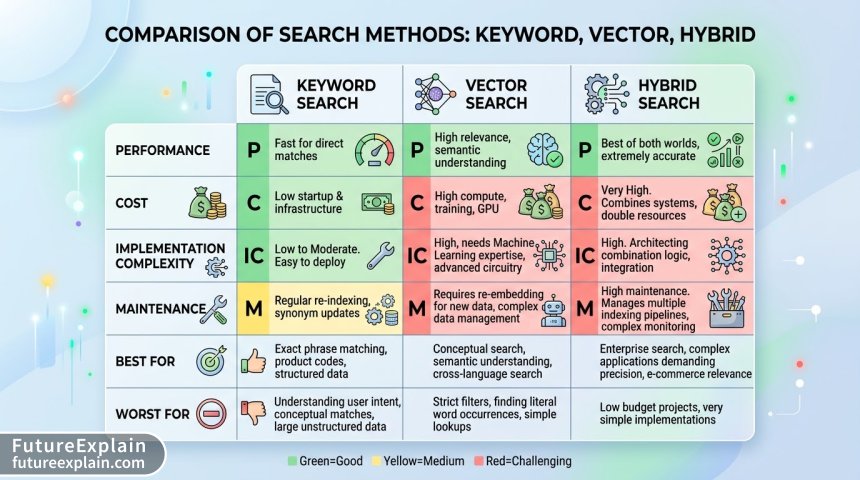
Side-by-Side Comparison
Let's examine how these approaches differ across key dimensions:
Search Quality and Relevance
Keyword search excels when users know exactly what they're looking for and use precise terminology. It's perfect for:
- Legal document retrieval (exact statute numbers)
- Code search in repositories
- Product searches with specific model numbers
- Academic paper searches with exact titles
Vector search shines when users search by intent, concept, or description rather than exact terms:
- E-commerce: "comfortable summer shoes for walking"
- Content discovery: "articles about renewable energy investment trends"
- Customer support: "how to reset my password when I don't remember the old one"
- Research: "studies on the psychological effects of remote work"
Performance Characteristics
Based on recent benchmarks across various datasets and hardware configurations:
| Metric | Keyword Search | Vector Search |
|---|---|---|
| Query Latency (p95) | 10-50ms | 50-500ms |
| Indexing Speed | 1000-5000 docs/sec | 10-200 docs/sec |
| Memory Usage per 1M docs | 2-10GB | 10-50GB |
| Scalability | Excellent to billions | Good to hundreds of millions |
| Concurrent Queries | 1000+ | 10-100 |
These numbers vary significantly based on specific implementations, hardware, and optimization levels, but they illustrate the general tradeoffs.
Implementation Complexity
Keyword search systems benefit from decades of maturation. A basic implementation can be as simple as:
// Simple keyword search in many databases
SELECT * FROM products
WHERE description LIKE '%shoes%'
AND category LIKE '%summer%';
More advanced systems use dedicated search engines like Elasticsearch or PostgreSQL full-text search, which still have extensive documentation and community support.
Vector search implementation typically requires:
- Choosing an embedding model (OpenAI, Cohere, open-source alternatives)
- Setting up a vector database or vector-capable database
- Creating embedding pipelines for your data
- Tuning similarity thresholds and ranking parameters
- Implementing query transformation and post-processing
The Hybrid Approach: Best of Both Worlds
Increasingly, the most effective solution combines both approaches. Hybrid search can take several forms:
1. Result Fusion
Run both searches independently, then combine and rerank results using algorithms like Reciprocal Rank Fusion (RRF). This approach:
- Catches both exact matches and semantic matches
- Provides more diverse result sets
- Can be tuned with weighting (70% vector, 30% keyword, for example)
2. Query Understanding and Routing
Analyze the query to determine which approach to use:
- Short, specific queries → keyword search
- Long, descriptive queries → vector search
- Mixed queries → hybrid fusion
3. Vector-Enhanced Keyword Search
Use vector representations to expand keyword queries with related terms before performing traditional search.
When Hybrid Makes Sense
Consider hybrid search when:
- Your users have diverse search patterns (some know exactly what they want, others don't)
- You have mixed content types (structured data and unstructured text)
- You need both precision and recall
- You can afford the complexity and resource requirements
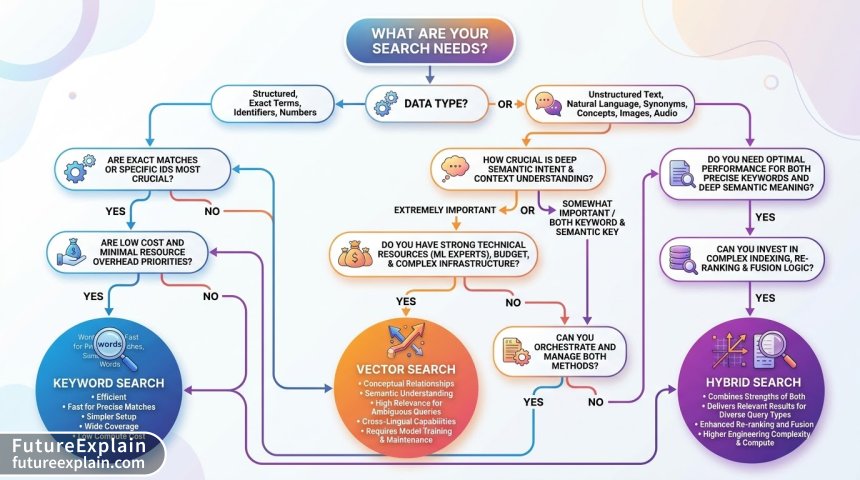
Decision Framework: Choosing Your Approach
Use this step-by-step framework to make an informed decision:
Step 1: Analyze Your Data
Choose keyword search if:
- Data is highly structured (product catalogs, inventory systems)
- Exact matches are critical (legal documents, code)
- Text is technical with precise terminology
- Multilingual support isn't a priority
Choose vector search if:
- Data is unstructured (articles, reviews, support tickets)
- Semantic relationships matter more than exact wording
- You have multimedia content (images, audio, video)
- You need cross-language search capability
Step 2: Understand Your Users
Keyword search works best when:
- Users are experts in your domain
- Search patterns are predictable
- Users typically know what they're looking for
- Speed is the highest priority
Vector search works best when:
- Users are novices or casual searchers
- Search queries are descriptive rather than specific
- Discovery and exploration are important
- User satisfaction with "good enough" results is acceptable
Step 3: Evaluate Technical Constraints
Consider these practical limitations:
Resource constraints favoring keyword search:
- Limited budget for infrastructure
- No dedicated ML/AI expertise on team
- Legacy systems that are hard to modify
- Strict latency requirements (<100ms)
Resources allowing vector search:
- Budget for GPU instances or vector database services
- AI/ML expertise available
- Greenfield project with modern infrastructure
- Latency requirements are flexible (200-500ms acceptable)
Step 4: Calculate Costs
Let's examine costs for a medium-sized application with 1 million documents:
| Cost Component | Keyword Search | Vector Search | Hybrid Search |
|---|---|---|---|
| Infrastructure (monthly) | $200-500 | $800-2,000 | $1,000-2,500 |
| Embedding API (monthly) | $0 | $200-1,000 | $100-500 |
| Development Hours | 40-80 hours | 80-160 hours | 120-240 hours |
| Maintenance (monthly) | 4-8 hours | 8-16 hours | 12-24 hours |
| Total First Year | $5,000-10,000 | $15,000-40,000 | $20,000-50,000 |
These are estimates that vary widely based on specific circumstances, but they illustrate the significant cost differences.
Implementation Roadmaps
Here are practical implementation paths for each approach:
Keyword Search Implementation Path
- Start with database native: Use PostgreSQL full-text search or MySQL FULLTEXT indexes
- Evaluate needs: If performance or features are lacking, consider dedicated search
- Choose a search engine: Elasticsearch (most features), Solr (mature), or Meilisearch (simpler)
- Implement gradually: Start with basic search, add facets, then advanced features
- Optimize: Tune analyzers, implement caching, add query suggestions
Vector Search Implementation Path
- Start small: Use a managed service (Pinecone, Weaviate Cloud) for prototyping
- Choose embedding model: Start with OpenAI embeddings, evaluate open-source alternatives
- Design pipeline: Create batch processing for existing data, real-time for new content
- Implement search: Start with simple semantic search, add filtering and ranking
- Monitor and optimize: Track relevance metrics, tune similarity thresholds
Hybrid Search Implementation Path
- Implement both separately: Get keyword and vector search working independently
- Create fusion layer: Implement RRF or weighted scoring to combine results
- Add query analysis: Route queries to appropriate search based on characteristics
- Test thoroughly: A/B test different approaches with real users
- Iterate: Adjust weights and routing logic based on performance data
Real-World Case Studies
Case Study 1: E-commerce Platform Migration
Company: Mid-sized fashion retailer with 50,000 products
Previous system: Basic keyword search in their e-commerce platform
Problem: 40% of searches returned no results despite relevant products existing
Solution implemented: Hybrid approach with query understanding
The company implemented a system that:
- Analyzed query length and structure
- Used keyword search for product codes, exact names, and filters
- Used vector search for descriptive queries ("blue dress for wedding guest")
- Combined results with 60/40 weighting favoring vector for descriptive queries
Results:
- No-result searches decreased from 40% to 12%
- Conversion rate from search increased by 28%
- Average implementation cost: $25,000 first year
- ROI achieved in 4 months through increased sales
Case Study 2: Internal Knowledge Base
Company: Enterprise tech company with 10,000 internal documents
Previous system: Google-like keyword search
Problem: Employees couldn't find relevant documentation using natural language
Solution: Pure vector search implementation
The company implemented:
- OpenAI embeddings for all documents
- Weaviate vector database for storage and search
- Simple semantic search interface
- Feedback mechanism to improve relevance
Results:
- Search satisfaction scores increased from 3.2/5 to 4.5/5
- Time spent searching decreased by 65%
- Monthly cost: $1,200 for infrastructure and API calls
- Justified by productivity gains estimated at $50,000 monthly
Case Study 3: Legal Document System
Organization: Law firm with 100,000 legal documents
Previous system: Manual folder structure with basic search
Problem: Needed both exact statute retrieval and concept-based research
Solution: Dual-mode system with clear user choice
The firm implemented:
- Enhanced keyword search with legal terminology support for exact retrieval
- Separate vector search for research and discovery
- Clear UI letting users choose "Exact Search" or "Research Search"
- Training for staff on when to use each approach
Results:
- No improvement in exact retrieval (already good)
- Research time decreased by 40% for complex cases
- User satisfaction: 92% preferred having both options
- Cost: $40,000 implementation, $800/month maintenance
Maintenance and Operational Considerations
Beyond initial implementation, consider long-term maintenance:
Keyword Search Maintenance
- Regular index optimization: Reindexing as data changes
- Analyzer updates: Adding new synonyms, stop words
- Performance monitoring: Query latency, cache hit rates
- User feedback: Analyzing search logs for improvements
Vector Search Maintenance
- Embedding model updates: Retraining or switching models as they improve
- Vector database management: Similarity threshold tuning, index rebuilding
- Cost monitoring: Tracking embedding API usage and costs
- Relevance monitoring: Continuous evaluation of search quality
Hybrid Search Maintenance
- All of the above: Maintaining both systems
- Fusion algorithm tuning: Adjusting weights based on performance
- Query routing optimization: Improving classification of query types
- Consistency management: Ensuring both systems have current data
Future Trends and Considerations
The search technology landscape continues to evolve rapidly. Key trends to watch:
1. Decreasing Vector Search Costs
As embedding models become more efficient and specialized hardware (GPUs, TPUs) becomes more accessible, vector search costs are decreasing by approximately 30-40% annually.
2. Improved Hybrid Techniques
New algorithms for combining keyword and vector results are emerging, with learning-to-rank approaches that automatically optimize based on user interactions.
3. Specialized Embedding Models
Domain-specific embedding models (legal, medical, technical) are improving relevance for specialized applications without requiring fine-tuning.
4. On-Device Search
Smaller embedding models enable semantic search on mobile devices and edge locations, opening new applications.
5. Multimodal Integration
Unified search across text, images, audio, and video using multimodal embedding models is becoming more practical.
Actionable Recommendations
Based on everything we've covered, here are specific recommendations:
For Small Projects and Startups
- Start with keyword search: Use your database's built-in capabilities
- Add vector search only when needed: When users complain about not finding things
- Consider managed services: Pinecone, Weaviate Cloud for easy vector search
- Budget: Allocate $5,000-15,000 for search implementation
For Medium-Sized Businesses
- Evaluate hybrid from the start: Plan for both approaches
- Implement keyword first: Get basic search working, then add vector
- Monitor search analytics: Identify patterns that need vector search
- Budget: $15,000-40,000 for comprehensive search solution
For Large Enterprises
- Implement both with clear use cases: Different departments may need different approaches
- Build search as a platform: Centralized team managing search infrastructure
- Invest in experimentation: A/B test different approaches continuously
- Budget: $50,000+ with ongoing optimization team
Conclusion: Making Your Decision
Choosing between vector search and keyword search isn't about finding the "best" technology—it's about finding the right tool for your specific needs. Consider:
- Your data: Is it structured or unstructured? Technical or conversational?
- Your users: Are they experts or novices? What are their search patterns?
- Your constraints: Budget, timeline, technical expertise, performance requirements
- Your goals: User satisfaction, conversion rates, productivity gains
Remember that this isn't a binary choice. Many successful implementations use a hybrid approach, applying each technology where it excels. Start with the simplest solution that meets your needs, measure its performance, and evolve based on data and user feedback.
The most important step is to begin with clear success metrics. Whether you choose keyword search, vector search, or a hybrid approach, define what success looks like (reduced no-result searches, increased conversions, faster finding times) and track your progress toward those goals.
Search technology will continue to evolve, but the principles of understanding your users' needs and matching technology to those needs will remain constant. Choose the approach that serves your users best today while keeping an eye on the future.
Further Reading
- Retrieval-Augmented Generation (RAG) — Advanced Practical Guide
- Vector Databases Explained: From Embeddings to Search
- Multimodal Search: Finding Answers in Images and Text
Visuals Produced by AI