Top Free AI Tools You Can Use Today (Global Edition)
This comprehensive guide explores the landscape of free AI tools available globally in 2025, moving beyond basic ChatGPT alternatives to cover specialized applications across multiple domains. We examine tools for writing, image generation, coding assistance, audio processing, productivity enhancement, and business automation—all available at no cost. The article includes practical guidance on evaluating free AI tools, understanding their limitations, and implementing them safely and effectively. With a focus on accessibility and global availability, we provide detailed comparisons, use case examples, and recommendations for beginners and professionals alike, emphasizing tools that offer genuine value without hidden costs or complex subscription models.


The landscape of artificial intelligence has democratized at an astonishing pace. Just a few years ago, cutting-edge AI capabilities were accessible only to large corporations and well-funded research institutions. Today, a remarkable array of powerful AI tools is available to anyone with an internet connection—completely free. This global accessibility revolution is transforming how individuals, students, entrepreneurs, and small businesses approach creative, analytical, and productive work.
This comprehensive guide explores the most valuable free AI tools available worldwide in 2025, moving beyond the now-ubiquitous ChatGPT to uncover specialized applications across multiple domains. We'll examine tools for writing, image generation, coding assistance, audio processing, productivity enhancement, and business automation—all available without financial barriers. More importantly, we'll provide practical guidance on evaluating free AI tools, understanding their limitations, and implementing them safely and effectively in your work or personal projects.
Understanding the Free AI Ecosystem
Before diving into specific tools, it's essential to understand the different models of "free" AI offerings and what each typically provides. The free AI landscape generally falls into four categories:
- Freemium Models: These tools offer limited free access with paid tiers for advanced features, higher usage limits, or commercial rights. Examples include most popular AI writing assistants and image generators.
- Open Source Projects: Completely free tools where the source code is publicly available, often developed by communities or research institutions. These typically require more technical setup but offer greater customization.
- Research Preview Access: Tools released by companies to gather feedback before potential monetization. These often have usage limits but provide access to cutting-edge capabilities.
- Publicly Funded Initiatives: Tools developed by universities, government agencies, or non-profits with public funding, designed for educational or social benefit rather than profit.
Each model has distinct advantages and considerations. Freemium tools often provide the most polished user experience but may have restrictive limits. Open source tools offer maximum flexibility but require technical competence. Research previews provide early access to innovation but may change or disappear. Public initiatives prioritize accessibility but may lack ongoing development resources.
When evaluating free AI tools, consider these critical factors: data privacy policies (especially important for tools processing sensitive information), usage limits (daily/monthly quotas), output quality consistency, availability of customer support, export capabilities, and community/documentation quality. Tools that excel in one area may be lacking in others, so align your tool selection with your specific priorities.
Free AI Writing and Content Tools
Advanced Language Models and Writing Assistants
The writing assistant category has evolved significantly beyond basic text generation. Today's free writing tools offer sophisticated capabilities previously available only in premium software:
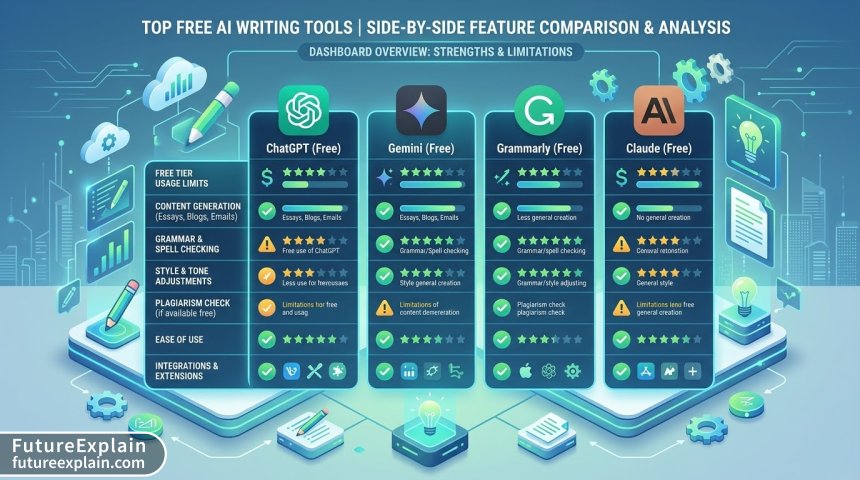
- Claude.ai Free Tier: Anthropic's Claude offers one of the most generous free tiers among major language models, with robust context windows (up to 100K tokens in some versions) and excellent reasoning capabilities. The free version includes file upload support (PDFs, Word documents, text files) and web search capabilities, making it particularly valuable for research-intensive writing tasks. Users consistently praise Claude's thoughtful, nuanced responses and strong safety features, though like all free tiers, it has usage limits during peak times.
- Google Gemini (formerly Bard): Google's free offering integrates seamlessly with Google Workspace and provides real-time web search capabilities without requiring plugins. Gemini excels at fact-based queries and offers image generation capabilities within conversations. Its integration with Google services (Drive, Docs, Gmail) provides practical workflow advantages for users already in the Google ecosystem. The tool supports multiple modalities including text, images, and soon audio, though image generation quality trails specialized tools.
- Microsoft Copilot (Bing Chat): Built on OpenAI's technology with GPT-4 access, Copilot offers free access to advanced language capabilities with web search integration. It provides three conversation styles (Creative, Balanced, Precise) and supports image generation through DALL-E integration. Being free and integrated into Windows and Edge browser, it offers exceptional accessibility, though with some usage limitations and occasional queueing during high demand periods.
When comparing these major free language models, consider their respective limitations. Claude's free tier may have slower response times during peak hours. Gemini's factuality claims should be verified through its cited sources. Copilot's image generation has daily limits. For academic or research writing, Claude often provides more nuanced analysis, while Gemini excels at current information, and Copilot offers balanced capabilities with good web integration.
Specialized Writing and SEO Tools
Beyond general-purpose language models, specialized free writing tools address specific needs:
- Hugging Face Writing Assistants: The Hugging Face platform hosts numerous free, specialized writing models fine-tuned for specific tasks—creative writing, technical documentation, marketing copy, or academic papers. These open-source models can be run directly in the browser without installation. While individual models may have narrower capabilities than comprehensive assistants, their specialization often produces higher quality results for specific tasks.
- SEO and Content Planning Tools: Several free tools bridge the gap between AI writing and practical content creation. SEMrush's Free AI Article Writer generates SEO-optimized content outlines with keyword integration. Frase offers limited free queries for content research and question analysis. These tools help structure content around search intent and competitive gaps, though their free tiers understandably limit volume.
For non-English language support, many free tools now offer robust multilingual capabilities. DeepL's free tier provides excellent translation quality with context preservation. Google's translation services integrated with Gemini offer real-time multilingual assistance. For content creators targeting global audiences, these tools significantly reduce language barriers while maintaining natural expression.
Free AI Image and Design Tools
Text-to-Image Generation
The democratization of AI image generation represents one of the most dramatic shifts in creative technology. Free tools now approach the quality of premium offerings from just two years ago:
- Bing Image Creator: Powered by DALL-E 3 and completely free through Microsoft's integration, this tool produces remarkably coherent and detailed images with strong prompt adherence. The free tier provides a generous number of boosts (fast generations) with unlimited slower generations. Its integration with Copilot chat allows iterative refinement through conversation, a significant workflow advantage. Image quality and prompt understanding have improved steadily, though artistic style consistency remains a challenge across multiple generations.
- Leonardo.ai Free Tier: While primarily known for its premium gaming and concept art features, Leonardo offers a substantial free daily allowance (approximately 150 tokens daily) with access to most of its models and features. The platform excels at specific artistic styles, character generation, and consistent character creation across images. Its community model training and sharing features provide access to specialized styles without requiring technical expertise.
- Stable Diffusion WebUI (Automatic1111): For technically inclined users, running Stable Diffusion locally via web interfaces offers completely free, unlimited image generation. The open-source nature allows extensive customization through models, LoRAs, and extensions. While requiring more setup and hardware (a decent GPU with 4GB+ VRAM), it provides unparalleled control without usage limits or content restrictions. Community support through platforms like Civitai offers thousands of free specialized models.
Choosing between cloud-based free services and local installation involves trade-offs. Cloud tools like Bing Image Creator offer convenience, consistent updates, and no hardware requirements but come with usage limits and content policies. Local installations like Stable Diffusion provide complete control, unlimited generations, and privacy but require technical setup, hardware investment, and manual updates. For most beginners, cloud services offer the gentlest introduction, while enthusiasts and professionals may eventually explore local options for specialized needs.
Image Editing and Enhancement
AI-powered image editing tools bring professional capabilities to free users:
- ClipDrop by Stability AI: This suite of free tools offers remarkable capabilities including background removal, image upscaling, object removal, and relighting. The free tier provides generous usage limits for most features. The background removal tool particularly stands out for its accuracy with complex subjects like hair or transparent materials. While some advanced features require paid credits, the free offerings address common editing needs effectively.
- Photopea with AI Extensions: The free, browser-based Photoshop alternative now integrates AI capabilities through plugins and extensions. While not as seamless as dedicated AI tools, the combination provides powerful editing without subscription costs. The learning curve is steeper than purpose-built AI editors, but the payoff is professional-grade control alongside AI assistance.
- Upscaling and Restoration: Several free tools specialize in image enhancement. Bigjpg offers limited free upscaling with good results. Let's Enhance provides free credits monthly. These tools use AI to increase resolution while maintaining details, restore old photographs, and improve low-quality images—capabilities previously requiring expensive specialized software.
Free AI Coding and Development Tools
Code Generation and Assistance
For developers and learners, free AI coding tools have become indispensable productivity multipliers:
- GitHub Copilot in VS Code (Free for Verified Students/Teachers): While Copilot generally requires payment, GitHub offers free access for verified students, teachers, and maintainers of popular open-source repositories. The tool provides context-aware code completions, function generation, and documentation assistance directly within the editor. For eligible users, it represents arguably the most powerful free coding assistant available.
- Codeium Free Tier: A fully-featured alternative to Copilot with a generous free tier for individual developers. Codeium offers intelligent completions, chat functionality, and supports numerous programming languages and IDEs. The free version includes most core features with reasonable usage limits that suffice for individual learning and projects.
- Replit AI Features: The cloud-based development environment Replit includes free AI features including code generation, explanation, and debugging assistance. The integrated nature (coding environment and AI in one platform) simplifies the workflow, especially for beginners. While the AI capabilities may not match specialized tools, the seamless integration provides educational value.
Specialized Development Tools
Beyond general code completion, specialized free tools address specific development challenges:
- Tabnine Free: This AI assistant focuses on privacy with local model options that keep code on-device. The free version offers basic completions with support for numerous languages and editors. For developers working with sensitive codebases or preferring maximum privacy, Tabnine's approach provides a unique value proposition.
- Sourcegraph Cody Free Tier: Unlike editor-based assistants, Cody focuses on codebase awareness—understanding your entire project to provide relevant suggestions, documentation, and refactoring advice. The free tier supports individual developers with basic codebase analysis capabilities, particularly valuable for navigating large or unfamiliar codebases.
- AI-Powered Documentation Tools: Mintlify and similar tools offer free tiers for automatically generating documentation from code. These tools analyze code structure and comments to create comprehensive documentation, saving significant time while improving code maintainability.
Free AI Audio and Video Tools
Audio Generation and Processing
AI audio tools have advanced rapidly, with several offering substantial free capabilities:
- ElevenLabs Free Tier: While best known for premium voice synthesis, ElevenLabs offers a free tier with monthly character limits (approximately 10,000 characters). The quality of voice generation remains excellent even in the free version, making it accessible for small projects, prototypes, or personal use. The platform supports multiple languages and offers voice cloning with consent, though advanced features require payment.
- Audio Editing and Separation: Lalal.ai provides free audio stem separation (vocals, instruments, drums) with file size limits. This capability, previously requiring expensive professional software, now helps musicians, podcasters, and content creators work with audio components independently. Similarly, Adobe's free podcast enhancement tools offer noise reduction and voice improvement through web interfaces.
- Text-to-Speech Services: Beyond ElevenLabs, Google's Text-to-Speech API provides free monthly characters within Google Cloud's always-free tier. While requiring technical setup, this provides high-quality synthesis for applications. Microsoft Azure's Cognitive Services also includes free TTS minutes monthly, accessible through various integration methods.
Video Creation and Editing
AI video tools remain more limited in free offerings, but several options provide valuable capabilities:
- RunwayML Free Tier: This comprehensive AI video platform offers limited free credits (approximately 125 seconds of generation monthly) with access to tools like text-to-video, video editing AI, and motion tracking. While limited in volume, the free tier provides hands-on experience with cutting-edge video generation technology that would otherwise be inaccessible.
- CapCut with AI Features: ByteDance's free video editor includes increasingly sophisticated AI capabilities—auto-captioning, scene detection, style transfer, and basic object removal. The mobile and desktop versions sync seamlessly, and while some advanced features require payment, the free tools address common editing needs effectively.
- Descript Free Tier: The innovative audio/video editor offers a free version with core features including transcription, text-based editing, and basic filler word removal. The unique approach of editing media through transcript text makes it particularly accessible for podcasters and interview-based content creators starting with modest needs.
Free AI Productivity and Business Tools
Personal Productivity Enhancement
AI has infiltrated productivity software, with many tools offering free tiers:
- Notion AI Free Tier: Integrated directly into the popular workspace platform, Notion AI offers limited free queries to all users. Capabilities include writing assistance, summarization, translation, and brainstorming directly within notes and documents. The contextual understanding (awareness of your existing Notion content) provides more relevant assistance than general-purpose AI tools.
- Task and Project Management: Several project management tools now include AI features in free plans. Asana's free tier includes basic smart suggestions for task assignment and scheduling. Trello's Butler automation now incorporates AI-powered suggestions for common workflows. These integrations help optimize team coordination without requiring AI expertise.
- Research and Learning Tools: For students and researchers, free AI tools provide substantial assistance. SciSpace (formerly Typeset) offers free literature reviews and paper explanations. Consensus provides free searches across scientific literature with AI summaries of findings. These tools accelerate literature review and comprehension, though with reasonable usage limits.
Business and Marketing Applications
Small businesses and entrepreneurs can leverage free AI tools for various needs:
- Canva's Free AI Features: The popular design platform integrates numerous AI tools in its free tier—Magic Write for copy generation, Magic Design for template suggestions, background removal, and image enhancement. While some advanced features require payment, the free AI capabilities substantially enhance design efficiency for basic marketing materials, social media content, and presentations.
- Chatbot Builders: Several platforms offer free chatbot creation with AI capabilities. Landbot provides a free plan with limited chats monthly. Tars offers a free tier for basic conversational flows. These tools help businesses implement automated customer service or lead qualification without coding expertise or initial investment.
- Social Media Management: Buffer's free plan includes basic AI-assisted post ideation and optimization. Hootsuite's free offering provides AI-powered best time to post recommendations. While limited compared to paid competitors, these tools help small businesses establish social media presence with AI guidance.
Global Accessibility Considerations
Regional Availability and Limitations
The "global" aspect of free AI tools requires careful consideration, as availability and functionality vary significantly by region:
- Geographic Restrictions: Some tools, particularly those from U.S.-based companies, face restrictions in certain countries due to export controls, sanctions, or local regulations. Tools like Claude and certain Google AI features may be unavailable or limited in countries like China, Russia, Iran, and others. Users in restricted regions often rely on VPNs, though this violates terms of service and may impact performance.
- Language Support Variance: While major tools increasingly support multiple languages, quality and feature parity vary dramatically. English typically receives the most development attention, followed by major European and Asian languages. Less common languages may have rudimentary support, affecting translation accuracy and contextual understanding.
- Internet Infrastructure Dependence: Many AI tools assume reliable, high-speed internet connections. Users in regions with bandwidth limitations, data caps, or intermittent connectivity face challenges with cloud-based AI services. This has spurred development of smaller, efficient models that can run on mobile devices with intermittent connectivity.
Cultural and Contextual Adaptation
Truly global AI tools must adapt to cultural contexts beyond mere language translation:
- Cultural Reference Understanding: Tools developed primarily in Western contexts often struggle with cultural references, idioms, and context from other regions. Some regional tools have emerged offering better cultural alignment—Chinese-developed models understanding Chinese literary references, Indian tools comprehending local linguistic diversity, etc.
- Local Regulation Compliance: Different regions have evolving AI regulations affecting tool availability and functionality. The EU's AI Act, China's AI governance rules, and other regional frameworks influence which features are available where. Tools must adapt their offerings regionally, sometimes creating feature disparity.
- Payment and Access Barriers: Even free tools may require payment methods for verification in some regions. Users without international credit cards or in countries with currency restrictions face additional hurdles. Some platforms address this through alternative verification methods or regional partnerships.

Maximizing Free AI Tool Effectiveness
Strategic Tool Combination
The most effective free AI usage often involves combining multiple tools rather than relying on a single solution:
- Workflow Integration: Develop workflows that leverage different tools' strengths. For example, use Claude for research and outlining, Bing Image Creator for visuals, and free editing tools for refinement. Such combinations often produce better results than any single tool while staying within free tier limits.
- Tool Specialization Awareness: Different tools excel at different tasks. Codeium might outperform general assistants for coding, while specialized writing tools handle specific formats better. Maintaining a "toolkit mentality"—selecting the right tool for each subtask—maximizes overall output quality.
- Limitation Workarounds: Creative approaches can extend free tier usefulness. For tools with daily limits, batch processing during off-peak hours might be more efficient. For tools with file size restrictions, preprocessing files to meet limits can help. Understanding each tool's specific constraints enables more effective usage patterns.
Quality Evaluation and Validation
Free tools require particularly vigilant quality assessment:
- Fact-Checking Protocols: Always verify factual claims from free AI tools, especially for important decisions. Cross-reference information across multiple sources. Use tools' citation features when available, but don't assume cited sources are accurately represented.
- Output Quality Benchmarks: Establish personal quality benchmarks for different use cases. What constitutes "good enough" for brainstorming versus final deliverables? Setting appropriate quality expectations prevents frustration and guides tool selection.
- Bias Awareness and Mitigation: Free tools may have less sophisticated bias mitigation than their paid counterparts. Be particularly alert to stereotyping, cultural insensitivity, or factual bias in outputs. When detected, such issues should inform whether to continue using a particular tool for sensitive applications.
Future Trends in Free AI Accessibility
Evolving Business Models
The free AI landscape continues evolving as companies experiment with sustainable models:
- Computational Resource Innovations: As model efficiency improves, the cost of providing free access decreases. Techniques like model distillation, quantization, and efficient architectures enable more capable free tiers. This trend likely continues, expanding what's possible within free offerings.
- Community-Supported Models: The rise of community-funded and -developed models creates alternatives to corporate offerings. Projects like OpenAssistant and various localized models demonstrate that community efforts can produce capable tools without corporate backing, though sustainability challenges remain.
- Public Infrastructure Integration: Some regions are exploring public AI infrastructure—government or university-provided tools as public services. Similar to public libraries or educational resources, these initiatives could provide high-quality AI access without commercial constraints.
Ethical and Access Considerations
The democratization of AI through free tools raises important considerations:
- Digital Divide Concerns: While free tools reduce financial barriers, they don't eliminate the digital divide. Access to devices, reliable internet, digital literacy, and time to learn new tools remain significant barriers. Truly global AI accessibility requires addressing these broader inequities.
- Sustainability Questions: The environmental impact of widespread AI use, even through free tools, warrants consideration. As users, we can adopt practices that minimize unnecessary computations—using appropriate model sizes for tasks, batching requests, and avoiding redundant generations.
- Skill Development Priority: Free tools should complement, not replace, skill development. Using AI for writing shouldn't substitute for learning to write well. Using coding assistants shouldn't replace understanding programming fundamentals. The most valuable approach views AI as augmentation rather than replacement.
Practical Implementation Guide
Getting Started Strategy
For beginners exploring free AI tools, a structured approach maximizes learning while minimizing overwhelm:
- Start with Established General Tools: Begin with widely-used free tools like Claude, Gemini, or Copilot to build familiarity with AI interaction patterns before exploring specialized tools.
- Define Specific Use Cases: Rather than exploring tools aimlessly, identify 2-3 specific tasks where AI could help (research summaries, image creation for presentations, code debugging) and seek tools addressing those needs.
- Allocate Learning Time: Schedule focused sessions to explore each tool's capabilities. Many free tools have learning curves, and initial time investment pays dividends in long-term efficiency.
- Join User Communities: Most tools have user communities (Discord servers, subreddits, forums) where experienced users share techniques, workarounds, and best practices. These communities accelerate learning.
- Document Your Workflows: As you develop effective tool combinations and processes, document them. This creates personal reference material and helps identify patterns for further optimization.
Advanced Optimization Techniques
For experienced users seeking to maximize free tool value:
- API Exploration: Many free tools offer API access with limited free quotas. Learning basic API usage enables automation and integration beyond web interfaces, though this requires technical skills.
- Local Model Experimentation: As hardware becomes more capable, running smaller models locally becomes feasible. Tools like Ollama, LM Studio, and GPT4All provide free local alternatives to cloud services, offering privacy and unlimited usage at the cost of capability trade-offs.
- Tool Contribution: For open-source tools, contributing to development (documentation, bug reports, feature suggestions) often provides deeper tool understanding and sometimes privileged access to new features.
Conclusion: The Democratized AI Future
The proliferation of free AI tools represents a remarkable democratization of technology that was, until recently, the exclusive domain of experts and large organizations. This accessibility empowers individuals worldwide to enhance their creativity, productivity, and problem-solving capabilities regardless of financial resources. The tools highlighted in this guide represent just the current snapshot of a rapidly evolving landscape—new tools emerge regularly, existing tools expand their free offerings, and community initiatives create unexpected alternatives.
As we navigate this landscape, remember that tool quality represents just one dimension of effective AI use. Equally important are thoughtful implementation, ethical consideration, skill development, and appropriate expectation setting. The most successful AI adopters don't merely use tools—they develop strategies for tool selection, combination, and validation that align with their specific needs and values.
The global nature of free AI tools presents both opportunities and challenges. While geographic, linguistic, and cultural barriers persist, the overall trend points toward increasing accessibility and capability. By staying informed, experimenting responsibly, and sharing knowledge within our communities, we can collectively shape an AI-empowered future that serves diverse global needs while respecting ethical boundaries and human values.
Visuals Produced by AI