
Low-Code vs No-Code AI Platforms: Which Is Right?
This comprehensive guide explores the evolving landscape of low-code and no-code AI platforms in 2025. We break down the fundamental differences between these two approaches to AI development, examining their respective strengths, limitations, and ideal use cases. You'll learn how to assess your own technical skills, project requirements, and business objectives to choose the right platform. The article covers practical considerations including integration capabilities, scalability, cost structures, and maintenance requirements, with real-world examples and decision frameworks to help beginners, business users, and developers make informed choices about which AI development approach best suits their needs.

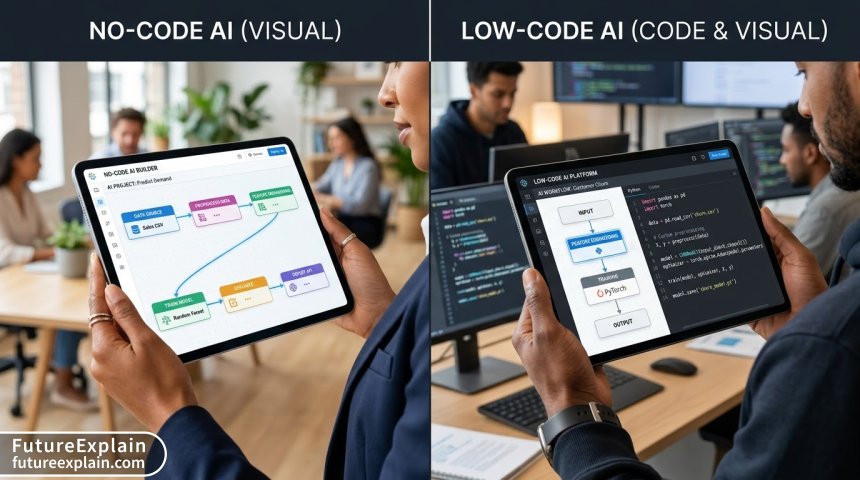
In today's rapidly evolving AI landscape, one of the most significant democratizing forces has been the emergence of accessible development platforms. For beginners, business professionals, and even experienced developers looking to accelerate their work, the choice often comes down to two main approaches: low-code and no-code AI platforms. Understanding the distinction between these two paradigms—and knowing which one is right for your specific needs—can mean the difference between successful AI implementation and frustrating dead ends.
The year 2025 has seen both approaches mature significantly, with platforms offering increasingly sophisticated capabilities that were once reserved for teams of specialized developers. According to recent industry analyses, the global low-code development platform market is projected to reach $187 billion by 2030, while no-code platforms continue to see explosive growth among non-technical users and small businesses. This growth reflects a fundamental shift in how organizations approach digital transformation and AI integration.
Understanding the Fundamentals: What Are Low-Code and No-Code Platforms?
Before diving into comparisons, let's establish clear definitions for both approaches:
No-Code AI Platforms: Democratization Through Visual Building
No-code platforms represent the ultimate in accessibility for AI development. These tools allow users to create applications, automate workflows, and implement AI capabilities without writing a single line of code. Instead, they provide:
- Visual interfaces with drag-and-drop components
- Pre-built templates for common use cases
- Configuration-based customization through forms and settings
- Integrated AI models that can be used "as-is" or with minimal tweaking
Examples of no-code AI platforms include tools like Bubble for web applications, Zapier for workflow automation, and numerous specialized platforms for chatbots, image generation, and data analysis. The primary philosophy behind no-code is complete abstraction—hiding the technical complexity so users can focus entirely on the business logic and user experience.
Low-Code AI Platforms: The Middle Ground
Low-code platforms occupy the middle ground between traditional programming and no-code solutions. They provide:
- Visual development environments for rapid prototyping
- The ability to inject custom code when needed
- More granular control over application logic and data flows
- Advanced integration capabilities with existing systems
- Better support for complex business logic and edge cases
Platforms like Microsoft Power Apps, OutSystems, and Mendix fall into this category, along with specialized AI development environments that combine visual workflows with code extensibility. The low-code approach recognizes that while visual programming accelerates development, there are times when custom code is necessary for specific requirements or optimizations.
Key Differences: A Detailed Comparison
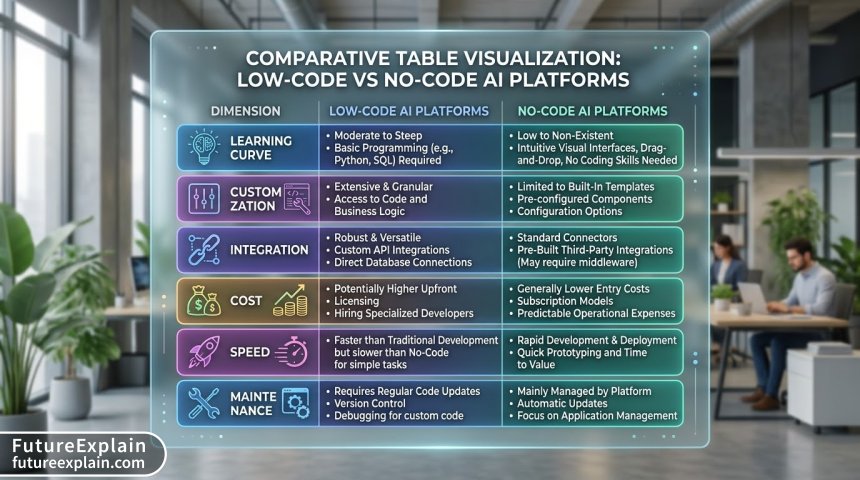
Understanding the distinctions between these approaches requires examining multiple dimensions:
1. Learning Curve and Accessibility
No-Code Platforms: These are designed specifically for non-technical users. The learning curve is typically measured in days or weeks rather than months. Users with domain expertise but no programming background can often create functional applications after completing tutorial-based training. The barrier to entry is minimal, making these platforms ideal for business analysts, marketers, operations managers, and entrepreneurs.
Low-Code Platforms: While more accessible than traditional coding, low-code platforms still require some technical understanding. Users benefit from having basic programming concepts, even if they don't write extensive code. The learning curve can range from a few weeks to several months, depending on the platform's complexity and the user's background. These platforms often appeal to "citizen developers"—business users with some technical aptitude—as well as professional developers looking to accelerate their work.
2. Customization and Flexibility
This is where the fundamental trade-off becomes most apparent:
No-Code Platforms: Customization is limited to what the platform designers have anticipated and provided configuration options for. While modern no-code platforms offer impressive flexibility through combinations of pre-built components, users eventually encounter boundaries. When a requirement falls outside the platform's capabilities, there's typically no workaround except to change the requirement or switch platforms.
Low-Code Platforms: The ability to inject custom code provides nearly unlimited customization potential. Even if a visual component doesn't support a specific requirement, developers can extend or replace it with custom code. This makes low-code platforms suitable for more complex, unique, or mission-critical applications where specific business logic or integration requirements must be precisely met.
3. Integration Capabilities
No-Code Platforms: Integration is typically achieved through pre-built connectors to popular services (like Google Workspace, Salesforce, or payment processors). While the number of available connectors has grown dramatically, integration with proprietary or legacy systems can be challenging or impossible without intermediary services.
Low-Code Platforms: These platforms typically offer both pre-built connectors and APIs/SDKs for custom integrations. The ability to write custom integration code makes it possible to connect with virtually any system that has an API or database access. This is particularly important for enterprise environments with complex technology stacks.
4. Performance and Scalability
No-Code Platforms: Performance is largely determined by the platform provider's infrastructure and optimization. While many no-code platforms handle moderate loads well, extremely high-traffic applications or computationally intensive processes may face limitations. Scalability is typically managed by the platform provider through tiered pricing plans.
Low-Code Platforms: Performance can be optimized through custom code and architectural decisions. Applications can be scaled horizontally or vertically based on specific needs, and performance bottlenecks can often be addressed through code-level optimizations. This makes low-code platforms better suited for applications with stringent performance requirements or unpredictable scaling needs.
5. Maintenance and Long-Term Viability
No-Code Platforms: The platform provider handles most maintenance, including security updates, performance improvements, and compatibility updates. However, this creates vendor lock-in—if the platform changes its pricing, features, or business model, users have limited recourse. Data portability can also be a concern.
Low-Code Platforms: While still creating some vendor dependency, low-code platforms often provide better options for migration or continued maintenance. Applications with significant custom code components have more pathways for adaptation if platform changes occur. Additionally, organizations with in-house development teams can take over more aspects of maintenance and evolution.
When to Choose No-Code AI Platforms
No-code platforms excel in specific scenarios where speed, accessibility, and simplicity are paramount:
Ideal Use Cases for No-Code
- Rapid Prototyping and MVP Development: When you need to test an idea quickly with real users, no-code platforms allow you to build functional prototypes in days rather than months.
- Internal Business Tools: Department-specific applications like approval workflows, data collection forms, or reporting dashboards that don't require complex logic or external integrations.
- Marketing and Content Automation: Chatbots, landing pages, email automation sequences, and content management systems where pre-built templates provide sufficient functionality.
- Small to Medium Business Applications: When you lack dedicated development resources and need cost-effective solutions for common business processes.
- Educational and Training Tools: Interactive learning modules, assessment systems, and knowledge bases that benefit from visual development approaches.
Success Factors for No-Code Implementation
Successful no-code projects typically share these characteristics:
- Well-defined, bounded requirements that align with platform capabilities
- Acceptance of platform constraints in exchange for development speed
- Clear understanding of data ownership and export capabilities
- Realistic expectations about scalability and performance limits
- Willingness to adapt processes to fit platform paradigms when necessary
When to Choose Low-Code AI Platforms
Low-code platforms become the better choice when projects require more flexibility, integration, or customization:
Ideal Use Cases for Low-Code
- Enterprise Application Modernization: Upgrading legacy systems with modern interfaces and workflows while preserving business logic and data integrity.
- Complex Business Process Automation: Workflows that involve multiple systems, complex decision trees, or specialized calculations that go beyond typical no-code capabilities.
- Applications with Unique Requirements: When your business processes don't fit standard patterns and require customized logic or user experiences.
- Systems Requiring Deep Integration: Applications that need to connect with proprietary, legacy, or industry-specific systems that lack standard APIs.
- Scalable Customer-Facing Applications: Public websites, mobile apps, or SaaS products where performance, customization, and brand alignment are critical.
Success Factors for Low-Code Implementation
Successful low-code projects typically require:
- Some technical expertise on the team, even if not at expert level
- Clear architecture planning to balance visual development with custom code
- Governance around code injection to prevent maintenance nightmares
- Understanding of platform limitations despite code extensibility
- Balanced team approach combining business and technical perspectives
The Blurring Boundary: Hybrid and Convergent Platforms
In 2025, the distinction between low-code and no-code is becoming increasingly blurred as platforms evolve. Several trends are shaping this convergence:
1. No-Code Platforms Adding "Pro" Modes
Many no-code platforms now offer advanced modes that allow users to add custom JavaScript, CSS, or API calls. While still marketed as no-code, these features move them closer to low-code territory. This evolution responds to user demand for "just a little more flexibility" without fully committing to a developer-centric environment.
2. Low-Code Platforms Improving Visual Design
Conversely, low-code platforms are investing heavily in improving their visual development experiences. Better drag-and-drop interfaces, more intuitive component libraries, and enhanced template systems make these platforms accessible to less technical users while retaining code extensibility for complex requirements.
3. AI-Assisted Development in Both Categories
AI is transforming both approaches through features like:
- Natural language to application generation (describe what you want, get a working prototype)
- Intelligent component suggestions based on your application context
- Automated testing and debugging assistance
- Code generation from visual designs
These AI enhancements reduce the skill gap between the two approaches, allowing less technical users to accomplish more while helping experienced developers work more efficiently.
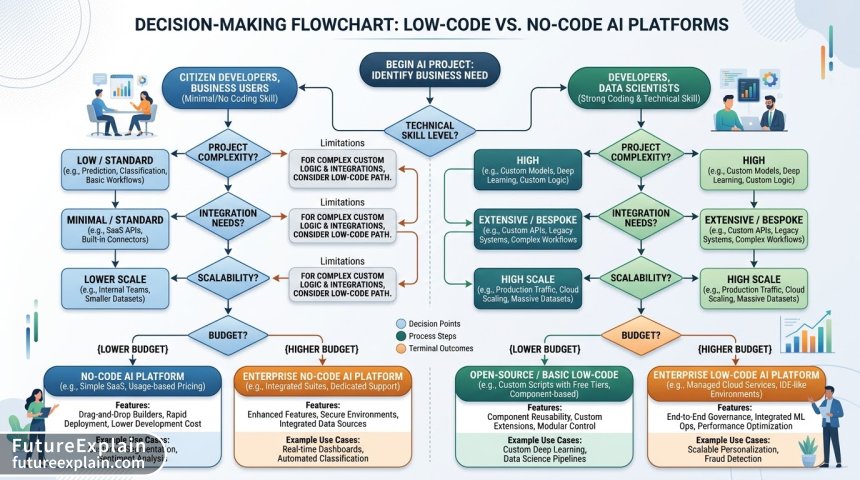
A Practical Decision Framework
Choosing between low-code and no-code requires systematic evaluation of your specific situation. Here's a step-by-step framework to guide your decision:
Step 1: Assess Your Team's Skills and Resources
Begin with an honest assessment of available expertise:
- Do you have team members with programming experience?
- What's their availability and willingness to learn a new platform?
- Do you have budget for external developers if needed?
- What's your timeline for getting team members up to speed?
If your team has absolutely no technical background and limited time for learning, no-code may be your only realistic option. If you have some technical aptitude or access to developers (even part-time), low-code becomes feasible.
Step 2: Define Your Project Requirements Clearly
Document what you need the application to do, with particular attention to:
- Core functionality - Must-have features and processes
- Integration needs - What systems must connect with
- Performance expectations - User load, response times, data volumes
- Customization requirements - Unique business logic or user experience needs
- Future evolution - How the application might need to change over time
Be specific about what "good enough" means for each requirement. Many projects fail because requirements are too vague or ambitions exceed what's actually needed.
Step 3: Evaluate Platform Capabilities Against Requirements
With clear requirements, evaluate specific platforms in both categories:
- Create a scoring matrix with your requirements as rows and platforms as columns
- Test the platforms using free trials or proofs of concept
- Pay special attention to deal-breakers - requirements that absolutely must be met
- Consider not just current capabilities but also platform roadmaps
Don't just look at marketing claims—actually build small test applications to understand the real development experience and limitations.
Step 4: Consider Long-Term Implications
Look beyond the initial development phase:
- Maintenance requirements - Who will handle updates and fixes?
- Scalability path - How will the application handle growth?
- Vendor lock-in risk - How difficult would migration be?
- Total cost of ownership - Include subscription fees, development time, and maintenance
- Team development - How will new team members learn the platform?
Many organizations focus too much on initial development speed and cost, neglecting long-term sustainability.
Step 5: Prototype and Validate
Before committing fully, build a minimal version of your application:
- Focus on core workflows rather than complete feature sets
- Involve end users early to validate usability and functionality
- Test integration points with real data and systems
- Evaluate the development experience - is it productive and sustainable?
The prototyping phase often reveals unexpected challenges or opportunities that should inform your final platform choice.
Cost Considerations: Beyond Subscription Fees
The financial implications of platform choice extend far beyond monthly subscription costs:
No-Code Cost Structure
No-code platforms typically use subscription models based on:
- Number of users (internal or external)
- Application usage (page views, API calls, processing time)
- Storage requirements
- Advanced features or premium templates
Hidden costs can include:
- Training time for business users to become proficient
- Workarounds for platform limitations (additional tools or manual processes)
- Migration costs if you outgrow the platform
- Premium support for business-critical applications
Low-Code Cost Structure
Low-code platforms often have more complex pricing:
- Platform licenses for developers
- Runtime fees for deployed applications
- Infrastructure costs (if self-hosted)
- Additional costs for premium components or integration connectors
Additional considerations include:
- Developer salaries (higher than business user time typically)
- Custom development for platform extensions
- Maintenance overhead for custom code components
- Training costs for specialized skills
Total Cost of Ownership Analysis
A comprehensive TCO analysis should consider:
- Initial development costs (time × rate)
- Ongoing maintenance (updates, fixes, enhancements)
- Platform subscription fees over expected lifespan
- Training and knowledge transfer
- Opportunity costs of delayed implementation or limited functionality
In many cases, the higher initial cost of low-code platforms is offset by lower long-term costs due to better scalability, fewer workarounds, and reduced vendor lock-in.
Case Studies: Real-World Applications
Case Study 1: No-Code Success - Small Business CRM Implementation
Situation: A boutique marketing agency with 12 employees needed a customized CRM to track client interactions, project timelines, and billing. They had no in-house technical staff and limited budget.
Solution: Using a no-code platform (specifically, a tool like Airtable or Softr), they built a tailored CRM in three weeks. The platform's visual interface allowed the agency owner and office manager to design the system themselves, with guidance from online tutorials.
Outcome: The system automated previously manual processes, reduced data entry errors by 70%, and provided better visibility into client relationships. Total cost was under $500 for the first year including platform subscription and a few premium templates.
Why No-Code Was Right: Limited technical resources, well-defined requirements that matched platform capabilities, and immediate need outweighed long-term scalability concerns.
Case Study 2: Low-Code Success - Healthcare Provider Portal
Situation: A mid-sized healthcare provider needed a patient portal that integrated with their existing electronic health record (EHR) system, supported HIPAA compliance, and provided customized communication workflows based on patient conditions.
Solution: Using a low-code platform (Microsoft Power Apps with custom connectors), a small team of developers built the portal over four months. The visual components accelerated UI development, while custom code handled the complex EHR integration and compliance requirements.
Outcome: The portal improved patient engagement, reduced administrative workload by 40%, and maintained strict compliance standards. The ability to extend the platform with custom code was essential for meeting specialized healthcare requirements.
Why Low-Code Was Right: Complex integration needs, regulatory requirements, and the need for customized workflows that exceeded typical no-code capabilities.
Case Study 3: Platform Migration - When Growth Demands Change
Situation: An e-commerce startup built their initial inventory and order management system using a no-code platform. As they scaled to thousands of daily orders, they encountered performance limitations and needed features not supported by the platform.
Transition: They gradually migrated to a low-code platform, starting with the most critical modules. The visual similarities between platforms reduced retraining time, while the ability to add custom code allowed them to implement the performance optimizations and advanced features they needed.
Lesson: Starting with no-code for validation and early growth, then transitioning to low-code for scaling, can be an effective strategy. The key is planning for potential migration from the beginning (data export capabilities, modular design).
Common Pitfalls and How to Avoid Them
Pitfall 1: Underestimating Platform Limitations
The Problem: Assuming no-code platforms can do more than they actually can, or believing low-code platforms eliminate all development complexity.
Solution: Conduct thorough proofs of concept before committing. Build a small but representative portion of your application to test edge cases and platform boundaries.
Pitfall 2: Neglecting Long-Term Maintenance
The Problem: Focusing only on initial development speed without considering who will maintain and update the application.
Solution: Document maintenance requirements as part of your platform evaluation. Consider creating a "runbook" for common maintenance tasks and ensuring knowledge is distributed across team members.
Pitfall 3: Poor Data Architecture Decisions
The Problem: Both no-code and low-code platforms can encourage quick data modeling decisions that become problematic at scale.
Solution: Invest time in proper data modeling from the beginning. Understand how each platform handles data relationships, validation, and migrations. Consider future reporting and integration needs when designing data structures.
Pitfall 4: Vendor Lock-In Without Exit Strategy
The Problem: Becoming so dependent on a platform's proprietary features that migration becomes prohibitively expensive.
Solution: Design applications with abstraction layers where possible. Maintain regular data exports. Document all business logic clearly so it could be reimplemented if needed. Consider platforms with better data portability and migration tools.
The Future of Low-Code and No-Code AI Platforms
Looking ahead to 2026 and beyond, several trends will further shape this landscape:
1. AI-Powered Development Assistance
Both categories will increasingly incorporate AI that:
- Translates natural language descriptions into application components
- Suggests optimizations based on usage patterns
- Automatically generates documentation and test cases
- Provides contextual help during development
2. Convergence with Traditional Development
The boundary between low-code and traditional IDE-based development will continue to blur. We'll see more:
- Bidirectional sync between visual designs and code
- Hybrid environments that support both visual and code-first development
- Framework-specific low-code tools (React, Vue, etc.)
3. Specialized Industry Platforms
Expect more platforms tailored to specific industries with:
- Pre-built compliance frameworks (HIPAA, GDPR, etc.)
- Industry-specific templates and components
- Integration with common industry systems
4. Improved Collaboration Features
Development will become more collaborative with:
- Real-time co-development similar to Google Docs
- Role-based permissions and review workflows
- Better version control and change management
Conclusion: Making Your Decision
Choosing between low-code and no-code AI platforms isn't about finding the objectively "best" option—it's about finding the right option for your specific context. The decision hinges on a careful balance of factors including your team's skills, project requirements, budget, timeline, and long-term vision.
As a general guideline:
Choose no-code when: You have limited technical resources, need to move quickly, your requirements align well with platform capabilities, and you can accept some limitations in exchange for speed and simplicity. No-code platforms excel at democratizing AI development and enabling rapid innovation from non-technical teams.
Choose low-code when: You need more customization, have complex integration requirements, anticipate significant scaling, or have access to some technical expertise. Low-code platforms provide the sweet spot between development speed and flexibility, making them suitable for more sophisticated applications that still benefit from visual development acceleration.
Remember that this isn't necessarily a permanent choice. Many organizations successfully start with no-code for validation and early growth, then transition to low-code as their needs become more complex. The key is to make an informed decision based on your current reality while keeping an eye on future possibilities.
Whichever path you choose, focus on learning the platform deeply, following best practices for application architecture, and maintaining clear documentation. The most successful AI implementations—whether built with no-code, low-code, or traditional development—are those that solve real problems for real users while remaining maintainable and adaptable over time.
Visuals Produced by AI