Startup Guide: Launching an AI Plugin or Extension
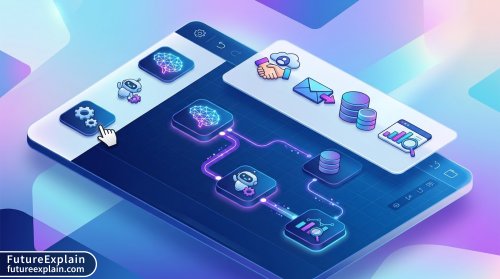
This comprehensive guide walks you through the complete process of launching an AI plugin or extension, from initial idea validation to post-launch growth. We cover market research strategies, technical architecture decisions for different platforms (ChatGPT, Claude, VS Code, browsers), development best practices, testing methodologies, launch planning, monetization models, and scaling strategies. You'll learn how to navigate platform requirements, design effective user onboarding, implement analytics, and build a sustainable business around your AI tool. Includes practical checklists, resource estimates, and real-world examples from successful AI plugin startups.

Introduction: The Rise of AI Plugins and Extensions
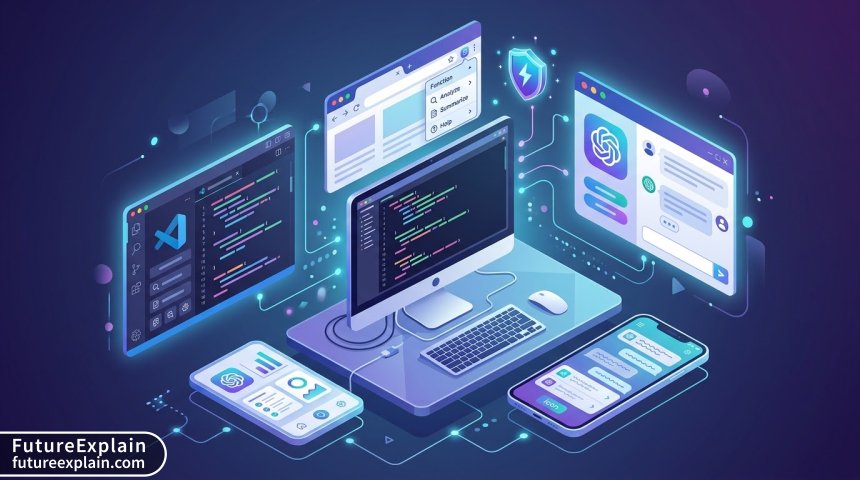
The AI ecosystem has exploded with opportunities for developers and entrepreneurs. What started as simple browser extensions has evolved into sophisticated plugin ecosystems for platforms like ChatGPT, Claude, Visual Studio Code, Google Chrome, and numerous productivity tools. Launching an AI plugin represents one of the most accessible entry points into the AI software business, requiring relatively modest upfront investment compared to traditional SaaS products.
This guide provides a comprehensive, step-by-step roadmap for taking your AI plugin or extension from concept to sustainable business. Whether you're targeting OpenAI's plugin ecosystem, building VS Code extensions that leverage AI, or creating browser tools that enhance AI platforms, you'll find actionable strategies tailored to the unique challenges and opportunities of AI-powered extensions.
Phase 1: Ideation and Market Validation
Identifying Real Problems Worth Solving
Successful AI plugins solve specific, painful problems for well-defined user groups. Begin by analyzing where friction exists in existing AI workflows. Consider these opportunity areas identified through recent market analysis:
- Workflow gaps between different AI tools (e.g., moving content from ChatGPT to Notion)
- Repetitive tasks that users perform manually with AI assistants
- Missing integrations between AI platforms and popular business tools
- Accessibility enhancements that make AI more usable for specific demographics
- Specialized functionality for niche professions or use cases
Conduct validation through multiple channels: analyze discussions in platform-specific forums (OpenAI Developer Forum, GitHub Discussions), survey potential users, and examine review patterns of existing plugins. The validation phase should answer: Is this problem frequent enough? Are users willing to pay for a solution? Does it align with platform policies?
Competitive Analysis and Differentiation
Before committing to development, thoroughly analyze existing solutions. For ChatGPT plugins alone, the marketplace contains hundreds of options across categories. Create a competitive matrix evaluating:
- Feature sets and limitations
- Pricing models and conversion rates
- User ratings and review sentiment
- Update frequency and support responsiveness
- Technical architecture and performance characteristics
Your differentiation strategy might focus on superior user experience, unique functionality combinations, better pricing, or targeting underserved user segments. Document at least 3-5 clear differentiators that will guide your development priorities.
Phase 2: Technical Architecture and Platform Selection
Choosing Your Target Platform(s)
Different platforms offer varying opportunities and constraints:
- ChatGPT/OpenAI Plugins: Highest visibility but subject to platform policy changes. Require manifest-based authentication and specific API patterns.
- Claude/Anthropic Extensions: Growing ecosystem with different technical requirements and user expectations.
- Browser Extensions (Chrome, Firefox, Edge): Broad distribution but require handling cross-browser compatibility.
- IDE Extensions (VS Code, JetBrains): Target developers with specialized needs around code generation and analysis.
- Cross-Platform Frameworks: Tools like Tauri or Electron allow building desktop apps that can integrate multiple AI services.
The platform choice significantly impacts your technical stack, distribution strategy, and monetization options. Consider starting with one primary platform to validate demand before expanding.
Architectural Decisions and Technology Stack
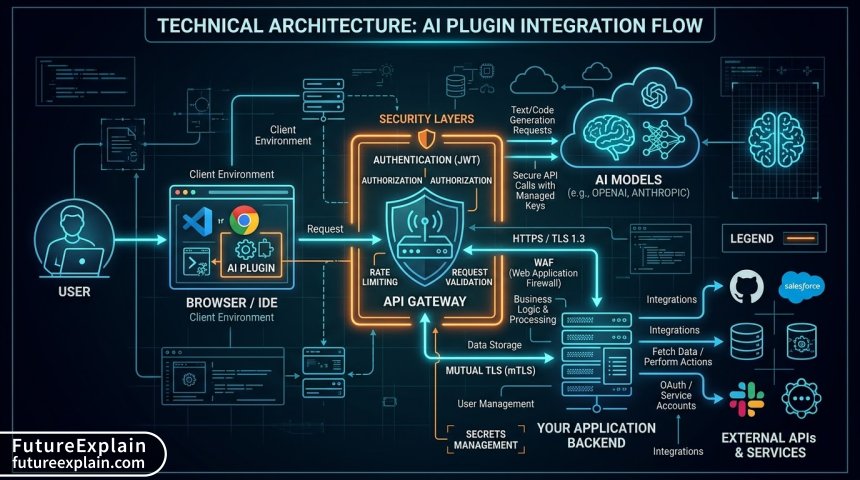
Modern AI plugins typically follow a three-tier architecture:
- Client Layer: The plugin interface users interact with, built with web technologies (HTML, CSS, JavaScript) or platform-specific SDKs.
- API Gateway/Backend: Handles authentication, rate limiting, request routing, and often contains the business logic.
- AI Integration Layer: Manages connections to AI APIs (OpenAI, Anthropic, local models) with appropriate error handling and fallback mechanisms.
For the backend, consider serverless architectures (AWS Lambda, Vercel, Netlify) for cost efficiency during early stages. Database choices should prioritize developer experience initially—Supabase, Firebase, or managed PostgreSQL services offer good tradeoffs.
Security and Privacy Considerations
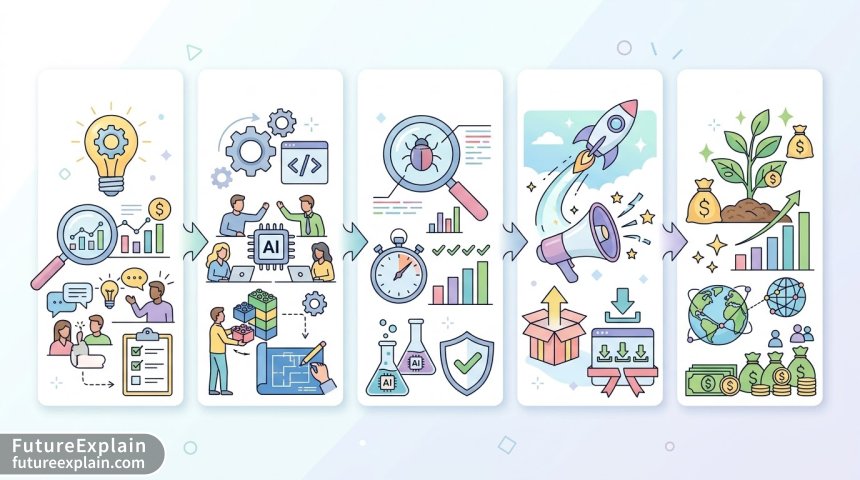
AI plugins handle sensitive data, making security non-negotiable. Implement these essential measures from day one:
- Data minimization: Only collect essential user data with clear justification
- End-to-end encryption for sensitive information in transit
- Secure authentication using OAuth 2.0 or platform-specific auth flows
- Regular security audits and dependency vulnerability scanning
- Clear privacy policy detailing data handling practices
Platform requirements vary significantly—OpenAI's plugin security requirements differ from Chrome Web Store policies. Review platform documentation thoroughly before finalizing your architecture.
Phase 3: Development Best Practices
Following Platform Guidelines and Patterns
Each platform has specific development patterns that affect user experience and approval likelihood:
- ChatGPT Plugins: Require OpenAPI specification, specific authentication methods, and clear user intent descriptions in the manifest.
- Browser Extensions: Need manifest.json configuration, content script injection patterns, and permission justification.
- VS Code Extensions: Use Activation Events, contribute points, and follow Microsoft's extension guidelines.
Study successful plugins in your target category to understand common patterns. Many platforms provide example repositories—use these as starting points rather than building from complete scratch.
User Experience Design for AI Tools
AI plugins have unique UX challenges:
- Latency management: Design interfaces that provide feedback during AI processing (skeletons, progress indicators)
- Error states: Create helpful error messages when AI services fail or produce unexpected results
- Context preservation: Maintain conversation context across plugin invocations
- Explanation interfaces: Help users understand what the plugin is doing and why
Conduct usability testing with 5-10 target users before major development milestones. Focus on task completion rates and frustration points rather than subjective preferences.
Testing Strategy
Comprehensive testing is crucial for AI plugins due to their probabilistic nature:
- Unit tests for core business logic and data transformations
- Integration tests verifying API connections and authentication flows
- AI response validation testing edge cases and prompt engineering stability
- Performance testing under simulated load to identify bottlenecks
- Cross-platform testing on different browsers, operating systems, and device types
Implement automated testing early—refactoring test suites later is significantly more difficult. Consider testing frameworks like Jest, Playwright, or platform-specific testing tools.
Phase 4: Pre-Launch Preparation
Building Your Launch Checklist
60-90 days before launch, establish a detailed preparation timeline:
| Time Before Launch | Key Activities |
| 90 days | Finalize core functionality, begin closed alpha testing |
| 60 days | Develop marketing materials, setup analytics, prepare documentation |
| 45 days | Start beta testing with 20-50 users, collect testimonials |
| 30 days | Finalize pricing, prepare support systems, submit to platforms |
| 15 days | Launch page live, early access list promotion, press kit preparation |
| 7 days | Final testing, team preparation, launch sequence scheduling |
Platform Submission Requirements
Each distribution platform has specific submission requirements:
- OpenAI Plugin Directory: Requires working demo, clear description, privacy policy, and compliance with content policies
- Chrome Web Store: Needs detailed description, screenshots/video, privacy practices disclosure
- Visual Studio Code Marketplace: Requires clear README, changelog, and icon assets
- Product Hunt: Needs compelling thumbnail, tagline, and prepared launch comments
Allocate 2-4 weeks for platform review processes—some platforms experience significant backlog during peak periods. Have contingency plans if approval takes longer than expected.
Legal and Compliance Foundations
Address these legal considerations before launch:
- Business entity formation (LLC recommended for most US-based solo founders)
- Terms of Service and Privacy Policy tailored to AI tools
- API usage compliance with OpenAI, Anthropic, or other AI provider terms
- Intellectual property considerations for training data and generated content
- GDPR/CCPA compliance if serving users in regulated regions
Consult with legal professionals specializing in software and AI—the investment prevents significantly larger issues later.
Phase 5: Launch Execution
Multi-Channel Launch Strategy
Successful launches leverage multiple channels simultaneously:
- Platform launch: Coordinate with platform review timelines to go live simultaneously across stores
- Community launches: Announce in relevant subreddits, Discord servers, and specialized forums
- Content marketing: Publish tutorial videos, blog posts, and case studies demonstrating value
- Email sequences: Notify waitlist subscribers with clear calls-to-action
- Influencer outreach: Identify niche creators who might genuinely benefit from your tool
Schedule launch activities across the first week—initial announcements, follow-up content, engagement with early users, and addressing feedback publicly.
Monitoring and Response Systems
During launch week, implement these monitoring practices:
- Real-time analytics tracking installations, activations, and feature usage
- Error monitoring with tools like Sentry or LogRocket
- Performance monitoring for API latency and success rates
- User feedback channels (in-app feedback forms, dedicated support email)
- Social media monitoring for mentions and discussions
Prepare response templates for common support questions and technical issues. The first 72 hours after launch often determine long-term trajectory through review patterns and word-of-mouth.
Phase 6: Monetization Strategies
Choosing Your Revenue Model
AI plugins support various monetization approaches:
- Freemium model: Free basic features with paid advanced functionality
- Usage-based pricing: Charges based on API calls, tokens processed, or active users
- Subscription tiers: Monthly/annual plans with feature differentiation
- One-time purchase: Less common but viable for specialized professional tools
- Commission-based: Taking percentage of transactions facilitated through the plugin
Consider your cost structure—AI API costs can be significant at scale. Implement metering and cost tracking from day one to ensure positive unit economics.
Pricing Psychology and Positioning
Effective pricing considers both psychology and market position:
- Anchor pricing: Show a higher "value" price to make actual prices seem reasonable
- Feature-based differentiation: Create clear distinctions between tiers
- Annual discount incentives: Encourage longer commitments with 20-30% discounts
- Transparent value communication: Clearly articulate what each tier delivers
Test pricing through surveys, competitor analysis, and potentially A/B testing different price points to early adopters.
Payment Integration and Tax Compliance
Implement payment processing considering:
- Platform restrictions: Some platforms have specific requirements for in-app purchases
- Global payment methods: Support credit cards, PayPal, and regional alternatives
- Tax automation: Use services like Paddle or Lemon Squeezy that handle tax compliance
- Dunning management: Systems for handling failed payments and subscription recovery
Stripe remains popular for direct integration, but consider merchant-of-record solutions that reduce compliance burden for international sales.
Phase 7: Growth and Scaling
User Acquisition Channels
Post-launch, focus on sustainable acquisition:
- Platform optimization: Improve store listings based on conversion data and search behavior
- Content ecosystem: Create tutorials, templates, and integration guides that demonstrate value
- Partnership development: Collaborate with complementary tools for cross-promotion
- Community building: Foster user communities that provide support and generate ideas
- SEO for plugin discovery: Optimize website and documentation for relevant search terms
Track customer acquisition cost (CAC) and lifetime value (LTV) by channel to optimize marketing spend. Early-stage plugins often benefit most from organic search and community engagement.
Retention and Engagement Strategies
Retaining users is more cost-effective than acquiring new ones:
- Onboarding optimization: Guide users to immediate value realization
- Feature adoption campaigns: Educate users about underutilized functionality
- Regular updates: Demonstrate ongoing development commitment
- User feedback incorporation: Publicly acknowledge and implement popular suggestions
- Educational content: Help users achieve better outcomes with your tool
Monitor activation rates (users who achieve core value), retention curves, and feature adoption patterns to identify improvement opportunities.
Technical Scaling Considerations
As user bases grow, address these scaling challenges:
- Database optimization: Indexing, query optimization, and read replica implementation
- API rate limiting: Protect backend services from excessive load
- Caching strategies: Reduce repeated computation and API calls
- Cost optimization: Monitor and optimize AI API usage patterns
- Performance monitoring: Identify and address bottlenecks before they affect users
Implement comprehensive logging and monitoring to detect scaling issues early. Consider gradual architecture evolution rather than premature optimization.
Common Pitfalls and How to Avoid Them
Technical and Business Mistakes
Learn from common plugin startup failures:
- Over-reliance on single platforms: Diversify across multiple distribution channels
- Underestimating support burden: Budget 20-30% of time for customer support initially
- Ignoring platform policy changes: Monitor platform announcements and adapt quickly
- Poor cost forecasting: Model worst-case scenario API costs before setting pricing
- Neglecting security: Implement security best practices from the beginning
Regularly review these risk areas and develop mitigation strategies. Join developer communities to learn from others' experiences.
Adapting to Platform Changes
AI platforms evolve rapidly—successful plugin developers maintain flexibility:
- Monitor API deprecations: Subscribe to platform changelogs and announcements
- Maintain abstraction layers: Isolate platform-specific code for easier migration
- Plan for breaking changes: Allocate development time for mandatory updates
- Diversify AI providers: Support multiple backends to reduce dependency risk
The most sustainable plugins solve fundamental problems that persist across platform iterations, rather than relying on temporary platform features.
Case Studies: Successful AI Plugin Launches
Analysis of Three Distinct Approaches
Examining real-world examples provides practical insights:
- ChatGPT Plugin: "WebPilot" - Grew through solving a specific pain point (web browsing within ChatGPT) with exceptional execution. Key success factors: rapid iteration based on user feedback, clear value proposition, and effective community engagement.
- VS Code Extension: "GitHub Copilot" - Though now a platform itself, its initial launch as an extension demonstrated perfect market timing and developer-focused distribution. Key lessons: seamless integration into existing workflows, clear productivity benefits, and freemium adoption strategy.
- Browser Extension: "Merlin" - Successfully cross-platform strategy with consistent experience across browsers. Growth drivers: viral referral mechanisms, tiered pricing aligning with usage, and continuous feature expansion based on usage data.
Each case study reveals different paths to success—there's no single formula, but consistent patterns around user focus and iterative development.
Resources and Next Steps
Essential Development Resources
- OpenAI Plugin Documentation: Official guidelines and examples
- Chrome Extension Developer Guide: Comprehensive browser extension resources
- VS Code Extension API: Microsoft's extension development documentation
- AI Plugin Communities: Discord servers and forums for real-time discussion
- API Cost Calculators: Tools to estimate operational expenses
Getting Started Today
Begin with these immediate actions:
- Define your specific problem statement and target users
- Create a simple prototype using platform templates
- Share with 3-5 potential users for initial feedback
- Establish development milestones for the next 90 days
- Join relevant developer communities to learn from peers
Remember that successful plugins evolve through continuous learning and adaptation. Start small, validate assumptions, and scale based on evidence rather than speculation.
Conclusion: Building Sustainable AI Plugin Businesses
Launching an AI plugin or extension represents an exciting intersection of technical innovation and entrepreneurial opportunity. The barriers to entry are relatively low, while the potential impact—and financial reward—can be significant for tools that genuinely enhance how people work with AI.
The most sustainable approach focuses on solving real problems for specific users, maintaining technical excellence, adapting to platform evolution, and building genuine relationships with your user community. While AI platforms will continue to change, the fundamental need for specialized tools that enhance productivity and creativity remains constant.
Your journey begins with that first line of code, that first user conversation, that first iteration based on feedback. The AI plugin ecosystem awaits your contribution.
Visuals Produced by AI