
Automation with No-Code AI: Build Workflows Fast
This comprehensive guide teaches you how to build powerful AI automation workflows without writing a single line of code. We cover everything from basic concepts to advanced implementations across multiple platforms including Zapier, Make (Integromat), n8n, and Microsoft Power Automate. Learn how to connect AI tools like ChatGPT, Claude, and image generators to your existing business apps, create intelligent customer service systems, automate content creation pipelines, and build data processing workflows. Includes practical templates, cost comparisons, security considerations, and maintenance tips for sustainable automation solutions that grow with your business needs.

Introduction: The No-Code AI Automation Revolution
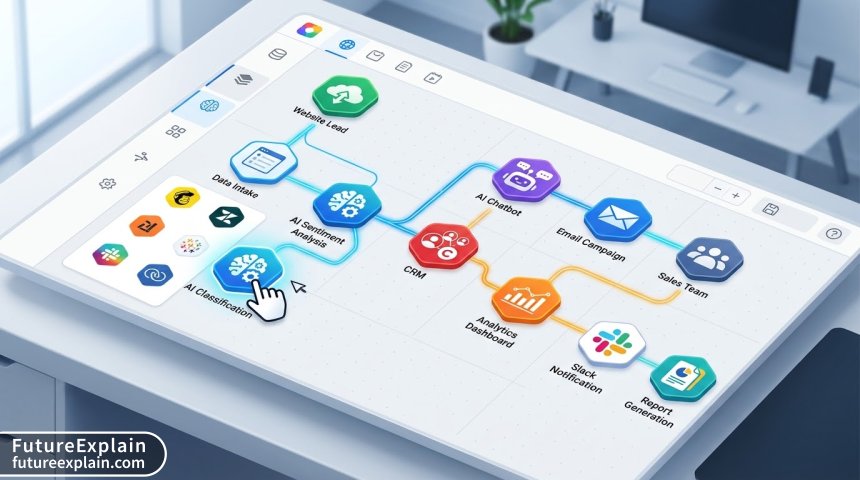
The landscape of business automation has undergone a transformative shift in recent years. What once required teams of developers and months of implementation can now be accomplished in hours or days by non-technical users. The convergence of no-code platforms with artificial intelligence has created unprecedented opportunities for businesses of all sizes to streamline operations, enhance customer experiences, and boost productivity.
No-code AI automation represents the democratization of intelligent workflow creation. These platforms provide visual interfaces where users can drag and drop components to connect AI services with their existing business applications. According to recent industry analysis, businesses adopting no-code AI automation report an average of 40% reduction in manual task time and 35% improvement in process accuracy1.
This guide will take you from complete beginner to proficient workflow builder, covering practical implementations, platform comparisons, and best practices for sustainable automation. Whether you're a small business owner, marketing professional, or operations manager, you'll find actionable strategies to implement immediately.
Understanding No-Code AI Automation Foundations
Before diving into specific platforms and implementations, it's crucial to understand the core concepts that make no-code AI automation possible. At its essence, these systems work through three fundamental components: triggers, actions, and AI processing nodes.
Triggers: Starting Your Workflow
Every automation begins with a trigger—an event that initiates the workflow. Common triggers include:
- New form submissions or website interactions
- Incoming emails or chat messages
- Database record creations or updates
- Scheduled time intervals (daily, weekly, etc.)
- File uploads to cloud storage
The beauty of modern no-code platforms is their ability to connect to hundreds of different services, meaning your trigger can come from virtually any digital source your business uses.
AI Processing: The Intelligent Middle Layer
Between trigger and action comes the AI processing layer. This is where artificial intelligence adds value by:
- Analyzing and categorizing incoming data
- Generating responses or content
- Making decisions based on predefined criteria
- Extracting insights from unstructured data
- Translating or reformatting information
When implementing AI processing, consider cost-effectiveness. Different AI services have varying pricing models—some charge per API call, others have monthly tiers, and some offer free tiers with limitations. For example, OpenAI's GPT-4 costs approximately $0.03 per 1K tokens for input and $0.06 for output, while Claude from Anthropic offers different pricing tiers based on model version and usage volume2. For most business applications, carefully monitoring and optimizing AI usage can reduce costs by 30-50% without sacrificing functionality.
Actions: Completing the Workflow
Actions represent what happens after AI processing. These can include:
- Sending emails or notifications
- Updating records in databases or CRMs
- Posting to social media or websites
- Creating tasks in project management tools
- Generating and storing documents
Comparing Top No-Code AI Automation Platforms
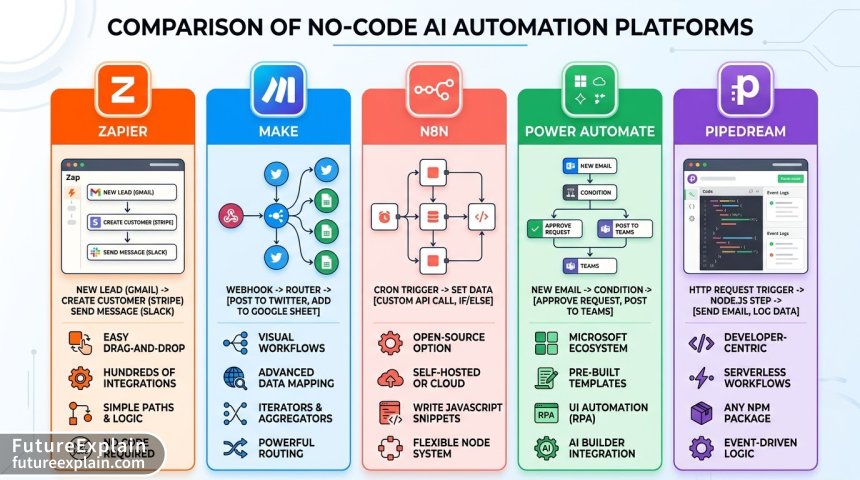
The platform you choose significantly impacts what you can build, how easily you can build it, and what it will cost. Let's examine the five leading platforms in detail.
1. Zapier: The Gateway Platform
Zapier remains the most accessible entry point for beginners, with over 5,000 app integrations. Its visual builder uses a simple "if this then that" logic that's easy to grasp. Recent AI integrations include:
- Native OpenAI integration for text generation and analysis
- AI-powered form processors
- Intelligent data routing based on content analysis
Best for: Small to medium businesses needing quick, reliable integrations with minimal learning curve.
Pricing: Starts at $29.99/month for 750 tasks, with AI features available on Professional plan ($73.50/month).
2. Make (formerly Integromat): The Power User's Choice
Make offers significantly more flexibility than Zapier, with advanced features like:
- Complex branching and routing logic
- Data transformation tools
- Custom API connections
- Visual programming with variables and functions
Their AI integration capabilities are particularly robust, allowing for sophisticated multi-step AI processing within single workflows.
Best for: Technical business users needing complex automations and data transformations.
Pricing: Free tier available; Core plan at $9/month for 10,000 operations.
3. n8n: The Open-Source Alternative
n8n stands out as a self-hostable, open-source option that provides complete control over your automation infrastructure. Key features include:
- Complete data ownership and privacy
- Unlimited workflows on self-hosted instances
- Extensive community-created nodes
- Enterprise-grade security options
AI integration requires manual API connections but offers maximum flexibility in model selection and configuration.
Best for: Organizations with technical resources and strong data privacy requirements.
Pricing: Free self-hosted option; Cloud plans from $20/month.
4. Microsoft Power Automate: The Enterprise Solution
Deeply integrated with Microsoft's ecosystem, Power Automate offers:
- Seamless Office 365 and Dynamics 365 integration
- AI Builder for custom model training
- Robotic Process Automation (RPA) capabilities
- Enterprise governance and compliance features
Their AI Builder allows training custom models without code, particularly valuable for document processing and form recognition.
Best for: Enterprises already invested in Microsoft ecosystem.
Pricing: Starts at $15/user/month; AI Builder requires premium license.
5. Pipedream: The Developer-Friendly Platform
While marketed as low-code rather than strictly no-code, Pipedream deserves mention for its unique approach:
- Workflows defined as code with visual editing
- Extensive pre-built components
- Excellent debugging and testing tools
- Generous free tier
Best for: Users comfortable with basic code concepts wanting maximum flexibility.
Pricing: Free tier generous; Team plans from $19/month.
Cost Analysis and ROI Calculation
Understanding the true cost of automation requires looking beyond platform subscription fees. Consider these additional cost factors:
| Cost Category | Zapier | Make | n8n | Power Automate | Pipedream |
|---|---|---|---|---|---|
| Base Platform Cost | $$$ | $$ | $ (self-hosted) | $$$$ | $ |
| AI API Costs | Integrated | External | External | Included/Extra | External |
| Maintenance Time | Low | Medium | High | Medium | Medium |
| Learning Curve Cost | Low | Medium | High | Medium-High | Medium |
| Scalability Cost | High | Medium | Low | Medium | Low |
To calculate ROI, consider this formula:
Monthly Savings = (Hours Saved × Hourly Rate) - (Platform Cost + AI API Costs + Maintenance Time Cost)
For example, if an automation saves 20 hours/month at $30/hour ($600 value), with $50 platform cost and $20 AI API costs, and 2 hours maintenance at $30/hour ($60), your net monthly savings would be $470. That's a 784% ROI in the first month alone.
Building Your First AI Automation: Customer Support Triage
Let's walk through creating a practical AI automation that any business can implement: an intelligent customer support ticket triage system.
Step 1: Define Your Goals and Requirements
Before building, clarify what you want to achieve:
- Automatically categorize incoming support requests
- Route urgent issues to appropriate teams
- Generate initial responses for common questions
- Extract key information for agent context
Step 2: Choose Your Platform
For this example, we'll use Make (Integromat) for its balance of power and accessibility. The same principles apply to other platforms.
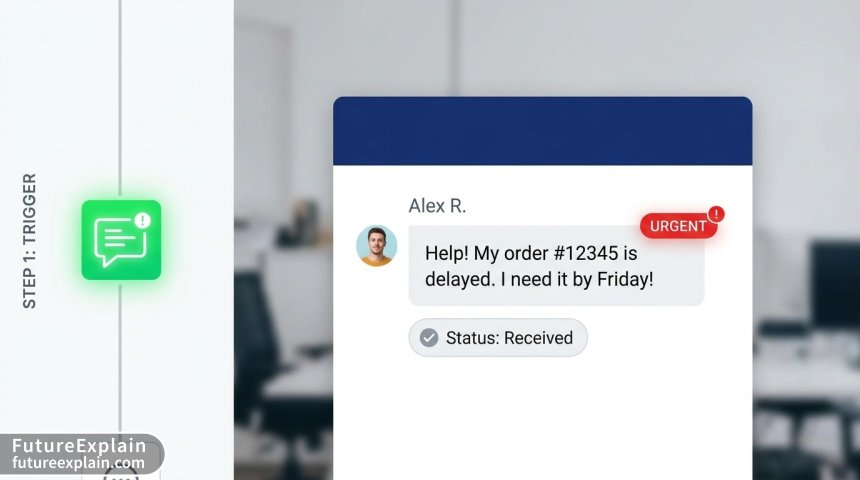
Step 3: Set Up Your Triggers
Configure triggers for incoming support channels:
- Email: Set up Gmail/Outlook module for new emails
- Web forms: Use HTTP/webhook module
- Chat: Connect to Intercom, Zendesk, or similar
Step 4: Implement AI Processing
Add an OpenAI module to analyze incoming messages:
- Extract message content and sender information
- Use GPT-4 to categorize: Urgent/Non-Urgent, Technical/Billing/General
- Extract key entities: Order numbers, account details, specific issues
- Generate sentiment analysis: Frustrated/Neutral/Satisfied
Step 5: Configure Routing Logic
Create router modules that direct tickets based on AI analysis:
- Urgent technical issues → Engineering team Slack channel + SMS alert
- Billing questions → Finance team + automated response with common solutions
- General inquiries → Support queue + AI-generated initial response
Step 6: Set Up Actions and Notifications
Configure final actions:
- Create tickets in your help desk system with AI-extracted data
- Send notifications to appropriate teams
- Store analyzed data for reporting
- Send automated acknowledgments to customers
Error Handling and Debugging Strategies
Most beginner guides overlook critical error handling, leading to broken automations in production. Implement these strategies:
1. Timeout and Retry Logic
AI API calls can fail or timeout. Configure your workflows to:
- Retry failed API calls (typically 2-3 times)
- Implement exponential backoff between retries
- Set reasonable timeout limits (15-30 seconds for AI calls)
- Log all retries for monitoring
2. Fallback Mechanisms
When AI processing fails, have fallback options:
- Route to human review instead of failing completely
- Use simpler rule-based processing as backup
- Send alert notifications for manual intervention
- Store failed items for batch retry later
3. Comprehensive Logging
Implement detailed logging at each workflow stage:
- Input data received
- AI processing requests and responses
- Routing decisions made
- Actions taken and any errors encountered
Most platforms offer built-in execution history, but consider external logging services for complex workflows.
4. Regular Testing and Monitoring
Schedule regular tests of your automation:
- Weekly: Send test inputs to verify all paths work
- Monthly: Review error logs and success rates
- Quarterly: Test with edge cases and unusual inputs
- After platform updates: Verify compatibility
Advanced AI Automation Patterns
Once comfortable with basic workflows, explore these advanced patterns:
Multi-Step AI Processing Chains
Instead of single AI calls, create chains where output from one AI process becomes input to another:
- First AI call: Extract key information from document
- Second AI call: Analyze extracted information for insights
- Third AI call: Generate report or summary based on insights
- Fourth AI call: Create actionable recommendations
This pattern is particularly powerful for complex document processing, research analysis, and strategic planning.
Human-in-the-Loop Workflows
Design workflows that seamlessly transition between AI and human processing:
- AI handles routine cases automatically
- Uncertain or complex cases route to human review
- AI provides suggested actions to human reviewers
- Human decisions train and improve the AI system
This approach balances automation efficiency with human judgment where needed.
Context-Aware Processing
Build workflows that maintain context across interactions:
- Store conversation history and reference in future interactions
- Maintain user preferences and past behavior patterns
- Adapt processing based on time, location, or other context
- Personalize responses based on accumulated knowledge
Security and Compliance Considerations
AI automation handles sensitive data, making security paramount. Implement these measures:
Data Privacy Protection
- Anonymize or pseudonymize personal data before AI processing
- Use platform features for data retention compliance (GDPR, CCPA)
- Implement data minimization—only send necessary information to AI services
- Review AI provider data processing agreements carefully
Access Control and Authentication
- Use OAuth and API keys with minimal necessary permissions
- Implement role-based access to automation configurations
- Regularly audit and rotate credentials
- Use platform audit logs to monitor access
Compliance Checklist
Before deploying AI automation in regulated industries:
- Verify AI provider compliance certifications (SOC 2, ISO 27001, etc.)
- Document data flows and processing purposes
- Implement data subject request handling procedures
- Ensure explainability of AI decisions where required
- Maintain records of AI training data sources and methodologies
Industry-Specific Automation Templates
Different industries have unique automation needs. Here are three complete templates:
1. E-commerce: Intelligent Order Processing
Trigger: New order in Shopify/WooCommerce
AI Processing:
- Analyze order for potential fraud indicators
- Check inventory levels and suggest alternatives if needed
- Generate personalized thank you message
Actions:
- Create fulfillment task in warehouse system
- Update inventory records
- Send personalized confirmation email
- Add to customer marketing segmentation
2. Healthcare: Patient Communication Management
Trigger: Patient message via portal or email
AI Processing:
- Triage urgency level (emergency/routine)
- Extract symptoms and medical history references
- Check for medication or allergy mentions
Actions:
- Route emergency messages immediately to on-call staff
- Schedule routine follow-ups in calendar
- Update patient record with message summary
- Send automated acknowledgment with expected response time
3. Education: Assignment Feedback System
Trigger: Student submits assignment
AI Processing:
- Check for plagiarism
- Analyze structure and argument coherence
- Provide grammar and style suggestions
- Generate rubric-based preliminary scoring
Actions:
- Store plagiarism report
- Create feedback document for teacher review
- Send submission confirmation to student
- Update gradebook with preliminary scores
Scaling and Maintaining Your Automations
Successful automation requires ongoing maintenance and strategic scaling:
Monitoring Performance Metrics
Track these key metrics:
- Success Rate: Percentage of workflows completing without error
- Processing Time: Average time from trigger to completion
- Cost per Execution: Total cost divided by number of executions
- Error Types and Frequency: Categorize and track errors
- User Satisfaction: For customer-facing automations
Regular Maintenance Schedule
Implement this maintenance routine:
- Daily: Check error notifications and urgent alerts
- Weekly: Review performance metrics and success rates
- Monthly: Test all workflow paths, update documentation
- Quarterly: Review and optimize costs, remove unused workflows
- Annually: Complete architecture review, consider platform changes
Scaling Strategies
As your automation needs grow:
- Start with consolidation: Combine related workflows for efficiency
- Implement error rate monitoring: Set alerts for degradation
- Create workflow templates: Standardize common patterns
- Establish governance: Define who can create/modify workflows
- Plan for platform migration: Have exit strategy if outgrowing current platform
Future Trends in No-Code AI Automation
The field continues evolving rapidly. Watch for these developments:
1. Autonomous Workflow Optimization
Emerging systems that analyze workflow performance and suggest or implement optimizations automatically, reducing maintenance burden.
2. Natural Language Workflow Creation
Describe what you want in plain English, and AI generates the complete workflow, making automation accessible to even more users.
3. Cross-Platform Intelligence
AI that works across multiple automation platforms, suggesting the best tool for each task and managing interoperability.
4. Predictive Automation
Systems that anticipate needs based on patterns and create automations proactively before you identify the requirement.
Getting Started: Your 30-Day Implementation Plan
Follow this structured approach to implement your first AI automations successfully:
Week 1: Foundation and Planning
- Day 1-2: Audit current manual processes for automation candidates
- Day 3-4: Choose your platform based on needs and budget
- Day 5-7: Set up accounts and explore template libraries
Week 2: First Implementation
- Day 8-10: Build and test your first simple automation
- Day 11-12: Document the workflow thoroughly
- Day 13-14: Train team members on monitoring and maintenance
Week 3: Expansion and Optimization
- Day 15-17: Implement second automation with lessons learned
- Day 18-21: Set up monitoring and alert systems
- Day 22-24: Review and optimize first two automations
Week 4: Scaling and Integration
- Day 25-27: Connect automations to create coordinated systems
- Day 28-29: Develop documentation and training materials
- Day 30: Review monthly performance and plan next quarter
Conclusion: The Accessible Future of Intelligent Automation
No-code AI automation represents one of the most significant productivity advancements available to modern businesses. By lowering technical barriers while maintaining powerful capabilities, these platforms enable organizations of all sizes to leverage artificial intelligence effectively.
The journey from manual processes to intelligent automation requires careful planning, continuous learning, and strategic implementation. Start small with well-defined problems, document everything, and build gradually as your confidence and expertise grow. Remember that the most successful automations often come from empowering the people closest to the problems to build their own solutions.
As you embark on your automation journey, focus on creating sustainable systems that provide clear value while remaining maintainable and adaptable. The landscape will continue evolving, but the fundamental principles of identifying repetitive tasks, implementing intelligent processing, and creating seamless integrations will remain relevant regardless of technological advances.
Visuals Produced by AI
Further Reading
Share
What's Your Reaction?
 Like
1247
Like
1247
 Dislike
23
Dislike
23
 Love
389
Love
389
 Funny
67
Funny
67
 Angry
12
Angry
12
 Sad
8
Sad
8
 Wow
245
Wow
245
















The integrated dashboard idea transformed how I work. Instead of switching between 10 tabs, I now have one dashboard showing everything from keyword research to social performance.
As an educator blogging about teaching methods, I was skeptical about AI. This guide showed me how to use it ethically while maintaining my authentic voice. Thank you!
The cross-platform distribution automation has doubled my social media engagement. Creating platform-specific content from one blog post was taking me hours – now it's automated.
Implementation question: How do you handle workflow changes when AI tools update or change pricing? I've had to switch tools twice this year already.
Lei, I maintain a "tool agnostic" workflow document that focuses on processes rather than specific tools. That way, when one tool changes, I can slot in an alternative without redesigning the entire workflow.
The predictive content strategy section opened my eyes. I was always reacting to trends. Now using AI tools to forecast what my niche will care about in 3-6 months.
I'm concerned about AI detection tools flagging my content. How do you balance AI assistance while maintaining "human" scoring in tools like Originality.ai?
Kendall, that's a valid concern. The key is using AI as an assistant rather than the primary writer. I recommend: 1) Writing your core arguments manually, 2) Using AI for expansion and clarification, 3) Always editing and adding personal anecdotes, 4) Running final content through detection tools and adjusting as needed. Most detection tools look for patterns – breaking up AI-generated sections with human-written content usually solves this.