
Building a Simple Voice Assistant with Public APIs (2025 Update)
This comprehensive guide walks you through building a custom voice assistant from scratch using freely available public APIs in 2025. We'll cover the complete process: setting up speech recognition with OpenAI Whisper or Google Speech-to-Text, processing user intent with natural language understanding via OpenAI's API or Claude, executing actions through various public APIs (weather, news, calculations), and generating natural-sounding responses with text-to-speech services like ElevenLabs or Google TTS. The tutorial includes complete Python code examples, cost optimization strategies for API usage, privacy considerations for voice data, and deployment options for your assistant. Perfect for beginners looking to create their first voice-controlled application without expensive hardware or deep machine learning knowledge.

Building Your Own Voice Assistant: A 2025 Guide Using Free Public APIs
Voice assistants have become ubiquitous in our daily lives, but did you know you can build your own customized version using freely available public APIs? In this comprehensive 2025 tutorial, we'll walk through creating a functional voice assistant from scratch that can understand your commands, process them, and respond naturally—all without requiring expensive hardware or deep machine learning expertise.
The landscape of voice AI has evolved dramatically since our original tutorial. Today's public APIs offer unprecedented accessibility, with many services providing generous free tiers perfect for personal projects and small-scale applications. We'll leverage these advancements to create an assistant that's both capable and cost-effective.
Why Build Your Own Voice Assistant in 2025?
Before diving into the technical details, let's consider why building a custom voice assistant makes sense in today's environment. Commercial assistants like Alexa, Siri, and Google Assistant are convenient but come with significant limitations: they're locked into specific ecosystems, collect extensive data about your habits, and offer limited customization options.
By building your own assistant, you gain:
- Complete Control: You decide what features to include and how they work
- Privacy: Keep your voice data local or control exactly where it goes
- Customization: Tailor responses and capabilities to your specific needs
- Learning Opportunity: Understand how modern AI systems work at a fundamental level
- Cost Efficiency: Many public APIs offer generous free tiers for personal use
The Modern Voice Assistant Architecture
At its core, every voice assistant follows a similar architecture that we can break down into four main components:
- Speech Recognition: Converting spoken words to text
- Intent Processing: Understanding what the user wants
- Action Execution: Performing the requested task
- Speech Synthesis: Converting the response back to speech
Each of these components can be implemented using various public APIs available in 2025. The key innovation in recent years has been the standardization of these services, making integration significantly easier than ever before.
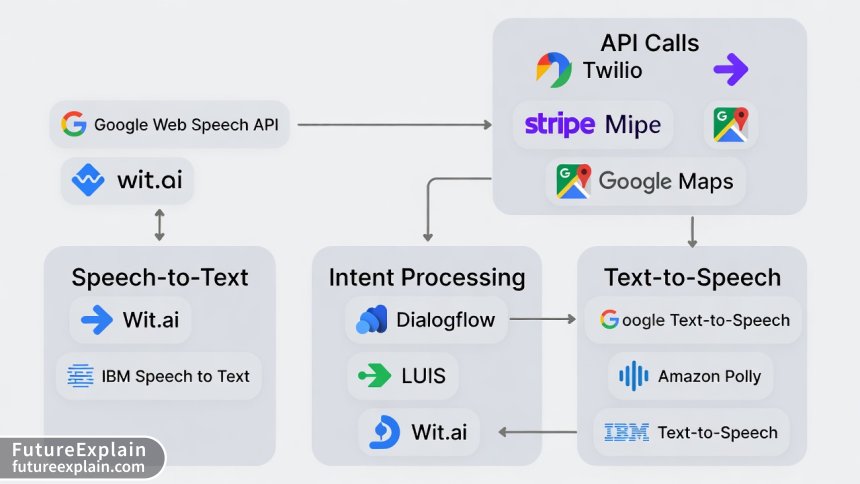
Choosing Your Public APIs: 2025 Edition
The API landscape for voice assistants has matured considerably. Here's a breakdown of the best options available for each component, along with their free tier limitations:
Speech-to-Text (STT) APIs
OpenAI Whisper API: Offers excellent accuracy across multiple languages with a generous free tier (approximately 1 million characters per month). The 2025 version includes improved real-time processing capabilities.
Google Cloud Speech-to-Text: Provides 60 minutes of free transcription monthly, with excellent accuracy for common languages. The 2025 update includes enhanced noise cancellation features.
AssemblyAI: Offers a robust free tier with real-time transcription and speaker diarization (identifying who said what in multi-speaker recordings).
Deepgram: Known for low-latency processing and excellent accuracy with technical terminology. Their free tier includes 200 hours of audio processing monthly.
Natural Language Processing (NLP) APIs
OpenAI GPT-4/GPT-4o API: The current standard for understanding and generating natural language. The free tier provides limited access, but their pricing has become more accessible for small projects.
Anthropic Claude API: Offers excellent reasoning capabilities and longer context windows. Their free tier is particularly generous for educational projects.
Google Gemini API: Provides strong multilingual capabilities and integration with Google's ecosystem. The free tier includes 60 requests per minute.
Hugging Face Inference API: Access to thousands of specialized models for specific tasks. Many models offer free inference up to certain limits.
Text-to-Speech (TTS) APIs
ElevenLabs: Industry leader in natural-sounding speech synthesis. The free tier includes 10,000 characters monthly with access to their standard voices.
Google Cloud Text-to-Speech: Offers 1 million characters free monthly with a wide variety of voices and languages.
Amazon Polly: Provides 5 million characters free in the first year, with lifelike neural voices.
OpenAI TTS: A newer entrant with surprisingly good quality and competitive pricing. Their free tier includes limited access.
Setting Up Your Development Environment
Let's start building! We'll use Python as our primary language due to its extensive library support and readability. Here's what you'll need:
# Basic setup requirements
Python 3.9 or higher
Virtual environment (recommended)
Audio recording library (PyAudio or SoundDevice)
API client libraries
Basic text editor or IDE
Start by creating a new project directory and setting up a virtual environment:
mkdir my-voice-assistant
cd my-voice-assistant
python -m venv venv
# On Windows: venv\Scripts\activate
# On Mac/Linux: source venv/bin/activate
Install the necessary packages:
pip install openai google-cloud-speech google-cloud-texttospeech
pip install pyaudio sounddevice requests python-dotenv
pip install speechrecognition  # For fallback local recognition
Implementing Speech Recognition
We'll begin with the speech-to-text component. Here's a complete implementation using multiple APIs with fallback options:
import speech_recognition as sr
import openai
import os
from google.cloud import speech_v1
from dotenv import load_dotenv

load_dotenv()  # Load API keys from .env file

class SpeechRecognizer:
    def __init__(self, primary_service="openai"):
        self.primary_service = primary_service
        self.recognizer = sr.Recognizer()

        # Initialize API clients
        if primary_service == "openai":
            openai.api_key = os.getenv("OPENAI_API_KEY")
        elif primary_service == "google":
            self.google_client = speech_v1.SpeechClient()

    def record_audio(self, duration=5):
        """Record audio from microphone"""
        with sr.Microphone() as source:
            print("Listening...")
            # Adjust for ambient noise
            self.recognizer.adjust_for_ambient_noise(source, duration=1)
            audio = self.recognizer.listen(source, timeout=duration)
            return audio

    def transcribe_with_openai(self, audio_data):
        """Transcribe using OpenAI Whisper"""
        # Save audio to temporary file
        with open("temp_audio.wav", "wb") as f:
            f.write(audio_data.get_wav_data())

        # Send to OpenAI API
        with open("temp_audio.wav", "rb") as audio_file:
            transcript = openai.Audio.transcribe(
                model="whisper-1",
                file=audio_file,
                response_format="text"
            )

        os.remove("temp_audio.wav")
        return transcript

    def transcribe_with_google(self, audio_data):
        """Transcribe using Google Speech-to-Text"""
        audio = speech_v1.RecognitionAudio(
            content=audio_data.get_wav_data()
        )

        config = speech_v1.RecognitionConfig(
            encoding=speech_v1.RecognitionConfig.AudioEncoding.LINEAR16,
            sample_rate_hertz=16000,
            language_code="en-US",
            enable_automatic_punctuation=True,
        )

        response = self.google_client.recognize(
            config=config,
            audio=audio
        )

        if response.results:
            return response.results[0].alternatives[0].transcript
        return ""

    def transcribe(self, audio=None):
        """Main transcription method with fallback"""
        if audio is None:
            audio = self.record_audio()

        try:
            if self.primary_service == "openai":
                return self.transcribe_with_openai(audio)
            elif self.primary_service == "google":
                return self.transcribe_with_google(audio)
            else:
                # Fallback to local recognition
                return self.recognizer.recognize_google(audio)
        except Exception as e:
            print(f"Transcription error: {e}")
            # Try local fallback
            try:
                return self.recognizer.recognize_google(audio)
            except:
                return ""
Processing User Intent
Once we have the transcribed text, we need to understand what the user wants. This is where natural language processing comes in. We'll create an intent processor that can handle various types of requests:
class IntentProcessor:
    def __init__(self, api_key=None):
        self.api_key = api_key or os.getenv("OPENAI_API_KEY")

    def classify_intent(self, text):
        """Classify the user's intent using GPT"""
        prompt = f"""Classify the following user request into one of these categories:
        Categories: weather, news, calculation, timer, reminder, joke, definition, translation, general_query

        Request: "{text}"

        Return only the category name."""

        try:
            response = openai.ChatCompletion.create(
                model="gpt-4o-mini",  # Cost-effective for classification
                messages=[
                    {"role": "system", "content": "You are an intent classifier."},
                    {"role": "user", "content": prompt}
                ],
                max_tokens=20,
                temperature=0.1
            )

            intent = response.choices[0].message.content.strip().lower()
            return intent
        except Exception as e:
            print(f"Intent classification failed: {e}")
            return self.fallback_intent_classification(text)

    def fallback_intent_classification(self, text):
        """Simple rule-based fallback"""
        text_lower = text.lower()

        if any(word in text_lower for word in ["weather", "temperature", "forecast"]):
            return "weather"
        elif any(word in text_lower for word in ["news", "headlines", "update"]):
            return "news"
        elif any(word in text_lower for word in ["calculate", "math", "plus", "minus", "times"]):
            return "calculation"
        elif any(word in text_lower for word in ["timer", "alarm", "remind"]):
            return "timer"
        else:
            return "general_query"

    def extract_parameters(self, text, intent):
        """Extract specific parameters from the user's request"""
        # This is a simplified version - in production, you'd want more robust extraction
        params = {}

        if intent == "weather":
            # Extract location
            locations = ["here", "home", "work"]
            for loc in locations:
                if loc in text.lower():
                    params["location"] = loc
                    break
            if "location" not in params:
                # Try to extract city name (simplified)
                words = text.split()
                for i, word in enumerate(words):
                    if word.lower() in ["in", "at", "for"] and i + 1 < len(words):
                        params["location"] = words[i + 1]
                        break

        elif intent == "calculation":
            # Extract mathematical expression
            import re
            # Simple pattern matching for basic math
            pattern = r"(\d+)\s*([\+\-\*/])\s*(\d+)"
            match = re.search(pattern, text)
            if match:
                params["expression"] = f"{match.group(1)} {match.group(2)} {match.group(3)}"

        return params
Executing Actions with Public APIs
Now that we understand what the user wants, we need to perform the actual task. Here's how to implement various actions using free public APIs:
import requests
import json
from datetime import datetime, timedelta

class ActionExecutor:
    def __init__(self):
        # Initialize any necessary API clients
        pass

    def execute_weather(self, location="here"):
        """Get weather information"""
        # Using OpenWeatherMap API (free tier available)
        api_key = os.getenv("OPENWEATHER_API_KEY")

        # If location is "here", we'd need geolocation
        # For simplicity, let's use a default city
        if location == "here":
            location = "New York"

        url = f"http://api.openweathermap.org/data/2.5/weather?q={location}&appid={api_key}&units=metric"

        try:
            response = requests.get(url)
            data = response.json()

            if response.status_code == 200:
                temp = data["main"]["temp"]
                description = data["weather"][0]["description"]
                return f"The current temperature in {location} is {temp}°C with {description}."
            else:
                return "I couldn't retrieve the weather information at the moment."
        except:
            return "Weather service is currently unavailable."

    def execute_news(self):
        """Get latest news headlines"""
        # Using NewsAPI (free tier available)
        api_key = os.getenv("NEWS_API_KEY")
        url = f"https://newsapi.org/v2/top-headlines?country=us&apiKey={api_key}"

        try:
            response = requests.get(url)
            data = response.json()

            if data["status"] == "ok" and data["articles"]:
                headlines = [article["title"] for article in data["articles"][:3]]
                return "Here are the top headlines: " + ". ".join(headlines)
            else:
                return "I couldn't fetch the latest news right now."
        except:
            return "News service is currently unavailable."

    def execute_calculation(self, expression):
        """Perform mathematical calculation"""
        try:
            # Simple evaluation (in production, use a safer method)
            # For demonstration only - use a proper math parser in real applications
            result = eval(expression)  # WARNING: Only use with trusted input
            return f"The result is {result}"
        except:
            # Fallback to Wolfram Alpha API if available
            return "I couldn't calculate that. Please try a simpler expression."

    def execute_general_query(self, query):
        """Answer general questions using GPT"""
        try:
            response = openai.ChatCompletion.create(
                model="gpt-4o-mini",
                messages=[
                    {"role": "system", "content": "You are a helpful voice assistant. Keep responses concise and natural for speech."},
                    {"role": "user", "content": query}
                ],
                max_tokens=150,
                temperature=0.7
            )

            return response.choices[0].message.content
        except Exception as e:
            return "I'm having trouble processing your question right now."

    def execute(self, intent, params=None):
        """Execute the appropriate action based on intent"""
        if params is None:
            params = {}

        if intent == "weather":
            location = params.get("location", "here")
            return self.execute_weather(location)

        elif intent == "news":
            return self.execute_news()

        elif intent == "calculation":
            expression = params.get("expression", "")
            if expression:
                return self.execute_calculation(expression)
            else:
                return "I need a mathematical expression to calculate."

        elif intent == "general_query":
            query = params.get("query", "")
            return self.execute_general_query(query)

        else:
            return "I'm not sure how to help with that request."
Implementing Text-to-Speech Response
Now that we have our response text, we need to convert it back to speech. Here's how to implement text-to-speech with multiple provider options:
from google.cloud import texttospeech
import io
import sounddevice as sd
import soundfile as sf
import numpy as np

class SpeechSynthesizer:
    def __init__(self, provider="google"):
        self.provider = provider

        if provider == "google":
            self.google_client = texttospeech.TextToSpeechClient()

    def synthesize_with_google(self, text):
        """Synthesize speech using Google TTS"""
        synthesis_input = texttospeech.SynthesisInput(text=text)

        voice = texttospeech.VoiceSelectionParams(
            language_code="en-US",
            name="en-US-Neural2-J",  # Neural voice
            ssml_gender=texttospeech.SsmlVoiceGender.MALE
        )

        audio_config = texttospeech.AudioConfig(
            audio_encoding=texttospeech.AudioEncoding.LINEAR16,
            speaking_rate=1.0,
            pitch=0.0
        )

        response = self.google_client.synthesize_speech(
            input=synthesis_input,
            voice=voice,
            audio_config=audio_config
        )

        return response.audio_content

    def synthesize_with_elevenlabs(self, text):
        """Synthesize speech using ElevenLabs API"""
        api_key = os.getenv("ELEVENLABS_API_KEY")
        voice_id = "21m00Tcm4TlvDq8ikWAM"  # Default voice

        url = f"https://api.elevenlabs.io/v1/text-to-speech/{voice_id}"

        headers = {
            "Accept": "audio/mpeg",
            "Content-Type": "application/json",
            "xi-api-key": api_key
        }

        data = {
            "text": text,
            "model_id": "eleven_monolingual_v1",
            "voice_settings": {
                "stability": 0.5,
                "similarity_boost": 0.75
            }
        }

        response = requests.post(url, json=data, headers=headers)

        if response.status_code == 200:
            return response.content
        else:
            raise Exception(f"ElevenLabs API error: {response.status_code}")

    def play_audio(self, audio_data, sample_rate=24000):
        """Play audio data"""
        # Convert audio data to numpy array
        audio_array = np.frombuffer(audio_data, dtype=np.int16)

        # Play the audio
        sd.play(audio_array, samplerate=sample_rate)
        sd.wait()  # Wait until playback is finished

    def synthesize_and_play(self, text):
        """Main method to synthesize and play speech"""
        try:
            if self.provider == "google":
                audio_data = self.synthesize_with_google(text)
                self.play_audio(audio_data, sample_rate=24000)
            elif self.provider == "elevenlabs":
                audio_data = self.synthesize_with_elevenlabs(text)
                self.play_audio(audio_data, sample_rate=24000)
            else:
                # Fallback to system TTS
                import pyttsx3
                engine = pyttsx3.init()
                engine.say(text)
                engine.runAndWait()
        except Exception as e:
            print(f"Speech synthesis failed: {e}")
            # Fallback to system TTS
            import pyttsx3
            engine = pyttsx3.init()
            engine.say(text)
            engine.runAndWait()
Putting It All Together: The Complete Voice Assistant
Now let's assemble all the components into a complete voice assistant class:
class SimpleVoiceAssistant:
    def __init__(self, config=None):
        if config is None:
            config = {
                "stt_service": "openai",
                "tts_service": "google",
                "wake_word": "assistant"
            }

        self.config = config
        self.recognizer = SpeechRecognizer(primary_service=config["stt_service"])
        self.intent_processor = IntentProcessor()
        self.action_executor = ActionExecutor()
        self.synthesizer = SpeechSynthesizer(provider=config["tts_service"])

        self.is_listening = False

    def process_command(self, text):
        """Process a single command"""
        print(f"Processing: {text}")

        # Step 1: Classify intent
        intent = self.intent_processor.classify_intent(text)
        print(f"Detected intent: {intent}")

        # Step 2: Extract parameters
        params = self.intent_processor.extract_parameters(text, intent)
        print(f"Extracted params: {params}")

        # Step 3: Execute action
        response = self.action_executor.execute(intent, params)
        print(f"Response: {response}")

        # Step 4: Speak response
        self.synthesizer.synthesize_and_play(response)

        return response

    def listen_for_wake_word(self, timeout=30):
        """Continuously listen for the wake word"""
        print(f"Listening for wake word '{self.config['wake_word']}'...")

        start_time = datetime.now()

        while (datetime.now() - start_time).seconds < timeout:
            try:
                audio = self.recognizer.record_audio(duration=3)
                text = self.recognizer.transcribe(audio)

                if text and self.config["wake_word"].lower() in text.lower():
                    print("Wake word detected!")
                    self.synthesizer.synthesize_and_play("Yes? How can I help you?")
                    return True

            except Exception as e:
                print(f"Wake word detection error: {e}")

        return False

    def run_interactive_session(self):
        """Run an interactive session with the user"""
        print("Starting voice assistant...")
        self.synthesizer.synthesize_and_play("Voice assistant initialized.")

        while True:
            try:
                # Listen for wake word
                if self.listen_for_wake_word():
                    # Listen for command
                    print("Listening for command...")
                    audio = self.recognizer.record_audio(duration=7)
                    command = self.recognizer.transcribe(audio)

                    if command and len(command.strip()) > 0:
                        self.process_command(command)
                    else:
                        self.synthesizer.synthesize_and_play("I didn't catch that. Please try again.")

            except KeyboardInterrupt:
                print("\nShutting down voice assistant...")
                self.synthesizer.synthesize_and_play("Goodbye!")
                break
            except Exception as e:
                print(f"Session error: {e}")
                # Continue running despite errors
Cost Optimization Strategies for 2025
One of the biggest concerns when using public APIs is cost management. Here are effective strategies to keep your voice assistant affordable:
1. Implement Intelligent Caching
class ResponseCache:
    def __init__(self, max_size=100, ttl_minutes=60):
        self.cache = {}
        self.max_size = max_size
        self.ttl = timedelta(minutes=ttl_minutes)

    def get(self, key):
        """Get cached response if valid"""
        if key in self.cache:
            entry = self.cache[key]
            if datetime.now() - entry["timestamp"] < self.ttl:
                return entry["response"]
            else:
                del self.cache[key]
        return None

    def set(self, key, response):
        """Cache a response"""
        if len(self.cache) >= self.max_size:
            # Remove oldest entry
            oldest_key = min(self.cache.keys(),
                           key=lambda k: self.cache[k]["timestamp"])
            del self.cache[oldest_key]

        self.cache[key] = {
            "response": response,
            "timestamp": datetime.now()
        }
2. Use Tiered API Selection
Implement a smart router that uses free services first and only falls back to paid services when necessary:
class SmartAPIRouter:
    def __init__(self):
        self.free_services = ["local_fallback", "huggingface_free"]
        self.paid_services = ["openai", "anthropic", "google_premium"]
        self.usage_tracker = {}

    def select_service(self, task_type, complexity):
        """Select the most cost-effective service for the task"""
        # For simple tasks, try free services first
        if complexity == "low":
            for service in self.free_services:
                if self.check_service_availability(service):
                    return service

        # For complex tasks, use paid services
        return self.select_paid_service(task_type)
3. Implement Usage Limits and Alerts
class UsageMonitor:
    def __init__(self, monthly_budget=10.00):  # $10 monthly budget
        self.monthly_budget = monthly_budget
        self.current_month_usage = 0.0
        self.daily_limits = {
            "openai": 100,  # requests per day
            "google_tts": 1000000,  # characters per day
            "weather_api": 100  # requests per day
        }

    def can_make_request(self, service, cost_estimate=0.01):
        """Check if request is within limits"""
        if self.current_month_usage + cost_estimate > self.monthly_budget:
            return False, "Monthly budget exceeded"

        # Check daily limits
        if service in self.daily_limits:
            daily_count = self.get_today_count(service)
            if daily_count >= self.daily_limits[service]:
                return False, "Daily limit reached"

        return True, "OK"

    def record_usage(self, service, cost):
        """Record API usage"""
        self.current_month_usage += cost
        self.increment_daily_count(service)
Privacy and Security Considerations
When building a voice assistant, privacy should be a primary concern. Here are essential practices for 2025:
1. Data Minimization
Only send to APIs what's absolutely necessary. For example:
class PrivacyFilter:
    def filter_personal_data(self, text):
        """Remove or anonymize personal data before sending to APIs"""
        # Remove names (simple pattern matching - use proper NER in production)
        import re
        text = re.sub(r'\b[A-Z][a-z]+\b', '[NAME]', text)

        # Remove email addresses
        text = re.sub(r'\S+@\S+', '[EMAIL]', text)

        # Remove phone numbers
        text = re.sub(r'\b\d{3}[-.]?\d{3}[-.]?\d{4}\b', '[PHONE]', text)

        return text
2. Local Processing Where Possible
Consider using on-device models for sensitive operations:
class LocalProcessor:
    def __init__(self):
        # Load local models
        self.local_stt = self.load_local_stt_model()
        self.local_intent = self.load_local_intent_model()

    def process_locally(self, audio_data):
        """Process sensitive data locally"""
        # Convert audio to text locally
        text = self.local_stt.transcribe(audio_data)

        # Classify intent locally
        intent = self.local_intent.classify(text)

        # Only send non-sensitive data to cloud APIs
        if self.is_sensitive(intent):
            return self.handle_locally(text, intent)
        else:
            return self.send_to_cloud(text, intent)
3. Secure API Key Management
# Never hardcode API keys
# Use environment variables or secure secret management

# .env file example:
# OPENAI_API_KEY=your_key_here
# GOOGLE_APPLICATION_CREDENTIALS=path/to/credentials.json
# ELEVENLABS_API_KEY=your_key_here
Advanced Features for Your Voice Assistant
Once you have the basic assistant working, consider adding these advanced features:
1. Context Awareness
class ConversationContext:
    def __init__(self, max_history=10):
        self.history = []
        self.max_history = max_history
        self.current_context = {}

    def add_interaction(self, user_input, assistant_response):
        """Add an interaction to history"""
        self.history.append({
            "user": user_input,
            "assistant": assistant_response,
            "timestamp": datetime.now()
        })

        # Keep only recent history
        if len(self.history) > self.max_history:
            self.history = self.history[-self.max_history:]

        # Update context
        self.update_context(user_input, assistant_response)

    def get_relevant_context(self, current_query):
        """Get relevant context for the current query"""
        relevant = []
        for interaction in self.history[-3:]:  # Last 3 interactions
            if self.is_relevant(interaction["user"], current_query):
                relevant.append(interaction)
        return relevant
2. Multi-language Support
class MultilingualAssistant:
    def detect_language(self, text):
        """Detect the language of input text"""
        # Simple word-based detection (use proper library in production)
        english_words = {"the", "and", "is", "in", "to"}
        spanish_words = {"el", "la", "y", "en", "de"}

        text_lower = text.lower()
        english_count = sum(1 for word in english_words if word in text_lower)
        spanish_count = sum(1 for word in spanish_words if word in text_lower)

        if spanish_count > english_count:
            return "es"
        else:
            return "en"

    def translate_if_needed(self, text, target_language="en"):
        """Translate text if needed"""
        detected_lang = self.detect_language(text)

        if detected_lang != target_language:
            # Use translation API
            translated = self.translate_api.translate(
                text,
                source=detected_lang,
                target=target_language
            )
            return translated
        return text
3. Voice Customization
class VoiceCustomizer:
    def __init__(self):
        self.voice_profiles = {
            "professional": {"speaking_rate": 1.0, "pitch": 0.0},
            "friendly": {"speaking_rate": 1.1, "pitch": 2.0},
            "calm": {"speaking_rate": 0.9, "pitch": -1.0}
        }
        self.current_profile = "friendly"

    def apply_profile(self, text, profile=None):
        """Apply voice profile to text"""
        if profile is None:
            profile = self.current_profile

        profile_settings = self.voice_profiles.get(profile, {})

        # In production, apply these settings to TTS API call
        return text, profile_settings
Deployment Options for 2025
Once your voice assistant is working locally, you might want to deploy it for broader use. Here are the best options for 2025:
1. Raspberry Pi Deployment
Perfect for a always-on home assistant. Requirements:
- Raspberry Pi 4 or newer (8GB RAM recommended)
- USB microphone
- Speakers or audio output
- Basic Python environment setup
2. Docker Containerization
# Dockerfile example
FROM python:3.11-slim

WORKDIR /app

# Install system dependencies
RUN apt-get update && apt-get install -y \
    portaudio19-dev \
    ffmpeg \
    && rm -rf /var/lib/apt/lists/*

# Copy requirements
COPY requirements.txt .
RUN pip install --no-cache-dir -r requirements.txt

# Copy application code
COPY . .

# Run the assistant
CMD ["python", "main.py"]
3. Cloud Deployment with Serverless
For web-accessible assistants, consider serverless deployment:
# AWS Lambda function example
import json

def lambda_handler(event, context):
    # Parse incoming request
    audio_data = event.get("audio")

    # Process through your assistant
    response = process_voice_command(audio_data)

    return {
        'statusCode': 200,
        'body': json.dumps({
            'text_response': response['text'],
            'audio_response': response['audio']  # Base64 encoded
        })
    }
Troubleshooting Common Issues
Even with the best implementation, you might encounter issues. Here are solutions for common problems:
1. Audio Recording Issues
def troubleshoot_audio():
    """Common audio troubleshooting steps"""
    import pyaudio

    p = pyaudio.PyAudio()

    # List available devices
    for i in range(p.get_device_count()):
        dev = p.get_device_info_by_index(i)
        print(f"{i}: {dev['name']} - {dev['maxInputChannels']} input channels")

    # Test recording
    import wave
    import numpy as np

    CHUNK = 1024
    FORMAT = pyaudio.paInt16
    CHANNELS = 1
    RATE = 16000

    stream = p.open(format=FORMAT,
                    channels=CHANNELS,
                    rate=RATE,
                    input=True,
                    frames_per_buffer=CHUNK)

    print("Recording test...")
    frames = []

    for _ in range(0, int(RATE / CHUNK * 3)):  # 3 seconds
        data = stream.read(CHUNK)
        frames.append(data)

    print("Recording complete")
    stream.stop_stream()
    stream.close()
    p.terminate()
2. API Rate Limiting
class RateLimitHandler:
    def __init__(self, requests_per_minute=60):
        self.requests_per_minute = requests_per_minute
        self.request_times = []

    def can_make_request(self):
        """Check if we can make a request based on rate limits"""
        now = datetime.now()

        # Remove old request times
        self.request_times = [
            t for t in self.request_times
            if (now - t).seconds < 60
        ]

        if len(self.request_times) < self.requests_per_minute:
            self.request_times.append(now)
            return True
        else:
            return False

    def wait_if_needed(self):
        """Wait if we're rate limited"""
        while not self.can_make_request():
            import time
            time.sleep(1)  # Wait 1 second and try again
Future Enhancements and Learning Path
Once you've mastered the basics, consider these advanced learning paths:
- Custom Wake Word Detection: Train a model to recognize custom wake words without saying "assistant"
- Emotion Recognition: Add emotion detection from voice tone to tailor responses
- Multi-modal Integration: Combine voice with visual input from cameras
- Home Automation Integration: Connect to smart home devices
- Offline Capabilities: Implement more features that work without internet
Conclusion
Building your own voice assistant with public APIs in 2025 is more accessible than ever. With the right combination of free-tier services and smart optimization strategies, you can create a personalized assistant that respects your privacy and meets your specific needs. The complete code examples provided in this tutorial give you a solid foundation to build upon.
Remember that voice assistant technology continues to evolve rapidly. Stay updated with API changes, explore new services as they become available, and always prioritize user privacy and data security in your implementations.
The journey from a simple command responder to a sophisticated conversational AI is incremental. Start with the basics presented here, then gradually add features as you become more comfortable with the technology stack. Happy building!
Further Reading
Share
What's Your Reaction?
 Like
1520
Like
1520
 Dislike
12
Dislike
12
 Love
345
Love
345
 Funny
45
Funny
45
 Angry
8
Angry
8
 Sad
5
Sad
5
 Wow
210
Wow
210
















This tutorial helped me land a job! I built a voice assistant prototype during my interview process and the company was impressed with the implementation.
The context awareness addition really improved the user experience. My assistant now remembers previous questions in the same conversation.
I've been running my version for two weeks now. The cost monitoring shows I've spent only $1.23 on API calls with moderate daily use. Very affordable!
Thank you for including the troubleshooting section! The audio recording issues were exactly what I was facing, and the solution worked perfectly.
The Docker deployment section saved me hours of setup time. Running it in a container made it much easier to deploy on different machines.
I adapted this for educational purposes - created a voice assistant that helps my students with math problems. The calculation execution part was perfect for this!