Case Study: Small Business Automates Customer Onboarding
This detailed case study follows 'GrowthPath Consulting,' a 12-person B2B firm that automated their manual customer onboarding process. We document their 8-week transformation from spreadsheets and email chaos to a streamlined automated system using no-code tools. The article covers their starting pain points, tool selection process (comparing 5 alternatives), implementation roadmap with weekly milestones, staff training approach, and measured results: 15 hours of weekly administrative time saved, 43% faster onboarding completion, and 92% customer satisfaction improvement. We include exact costs, ROI calculations, lessons learned, and a downloadable checklist for replicating their success. Special sections address common pitfalls, data migration strategies, and maintaining personal touch in automated systems.


The Challenge: Manual Onboarding in a Growing Consulting Firm
GrowthPath Consulting (a pseudonym for our real case study subject) faced a familiar scaling problem. As a 12-person B2B consulting firm specializing in digital transformation for medium-sized manufacturers, they had grown from 5 to 12 employees in 18 months. Their customer onboarding, however, remained stuck in spreadsheet-and-email purgatory.
"Every new client meant 20-30 emails back and forth just to get started," explained Maria, the operations manager. "We had contract templates in Google Docs, intake forms in Typeform, payment setup in QuickBooks, scheduling in Calendly, and project details in Asana. Nothing talked to each other. I was constantly copy-pasting information, missing details, and creating duplicate work."
The manual process looked like this:
- Step 1: Sales handoff email with basic client info
- Step 2: Manual entry into Google Sheets master tracker
- Step 3: Send welcome email with 5 attachment links
- Step 4: Wait for responses across different channels
- Step 5: Manual follow-up for missing items
- Step 6: Copy data from forms to QuickBooks
- Step 7: Manual project setup in Asana
- Step 8: Schedule kickoff meeting manually
This process took 4-6 hours per client and involved 3 different team members. With 3-5 new clients monthly, this consumed 15-25 hours of high-value time. More critically, errors were common: 23% of onboardings had missing information requiring rework, and the average time to "first value delivery" was 11 days.

The Automation Decision: Why Now?
GrowthPath reached their automation tipping point when they missed a key compliance requirement for a manufacturing client. "A client needed specific safety documentation before we could start, but it got lost in email threads," Maria recalled. "We discovered the gap two weeks into the engagement. That near-miss convinced leadership we needed systemic change."
The leadership team established clear objectives:
- Reduce administrative time per onboarding by 70%
- Cut time-to-first-value from 11 to 5 days
- Eliminate manual data entry errors
- Maintain personal touch despite automation
- Keep implementation costs under $3,000
- Complete transition within 8 weeks
Tool Evaluation: Comparing 5 Approaches
The team evaluated five distinct approaches to automation, each with different trade-offs:
Option 1: All-in-One Platform (HubSpot)
HubSpot's Operations Hub offered comprehensive onboarding automation starting at $800/month. While feature-rich, it required significant configuration and would replace several existing tools. The team calculated a 6-month ROI horizon but worried about vendor lock-in and the learning curve for their non-technical team.
Option 2: Specialized Onboarding Software (UserGuiding, WalkMe)
These customer onboarding platforms offered beautiful interfaces and analytics but were primarily designed for software companies. At $300-500/month, they handled the client education piece well but lacked integration with their accounting and project management systems.
Option 3: CRM-Centric (Zoho CRM Plus)
Zoho offered a compelling suite at $57/user/month. Their workflow automation could handle the entire process, and it integrated with their existing Zoho Books accounting. However, migration from their current systems would be complex, and team adoption of a full CRM represented cultural change.
Option 4: No-Code Automation Platform (Zapier/Make)
This approach used automation platforms to connect their existing tools. Zapier's professional plan at $89/month could create the workflows, preserving their investment in familiar tools. The team liked this "Swiss Army knife" approach but needed to ensure reliability and error handling.
Option 5: Custom-Built with Low-Code (Bubble + Integromat)
A completely custom portal built in Bubble ($168/month) with Make automation ($29/month). This offered perfect customization but required development resources they lacked internally. The timeline estimate was 12-16 weeks, exceeding their 8-week target.
After scoring each option on cost, timeline, ease of use, flexibility, and risk, the team chose Option 4: No-Code Automation Platform with a twist—they would use Make (formerly Integromat) instead of Zapier for its more advanced error handling and lower cost at their volume.
The 8-Week Implementation Roadmap
GrowthPath divided their implementation into phases with clear weekly milestones:
Week 1-2: Process Mapping and Tool Audit
Before writing a single automation, the team documented every step of their current process using Lucidchart. They discovered surprising complexities: 14 decision points, 8 different data sources, and 3 approval gates. This mapping revealed that 30% of their process steps added no customer value—they were purely internal coordination.
Key discovery: Their "simple" contract signing actually had 4 variations depending on client size and service type. This complexity would need to be preserved in the automated system.
Week 3-4: Tool Stack Finalization
The finalized stack included:
- Make (Integromat): Central automation hub ($29/month)
- Paperform: Client intake forms (replacing Typeform) - $40/month
- PandaDoc: Contract management with e-signature - $49/user/month
- Calendly: Scheduling (existing tool) - $12/month
- QuickBooks Online: Accounting (existing) - $70/month
- Asana: Project management (existing) - $13.49/user/month
- Slack: Notifications (existing)
- Google Sheets: Master tracking (would become read-only archive)
Total new monthly cost: $130 + existing tools. One-time setup estimate: $1,200 for consultant assistance with complex automations.
Week 5-6: Automation Development
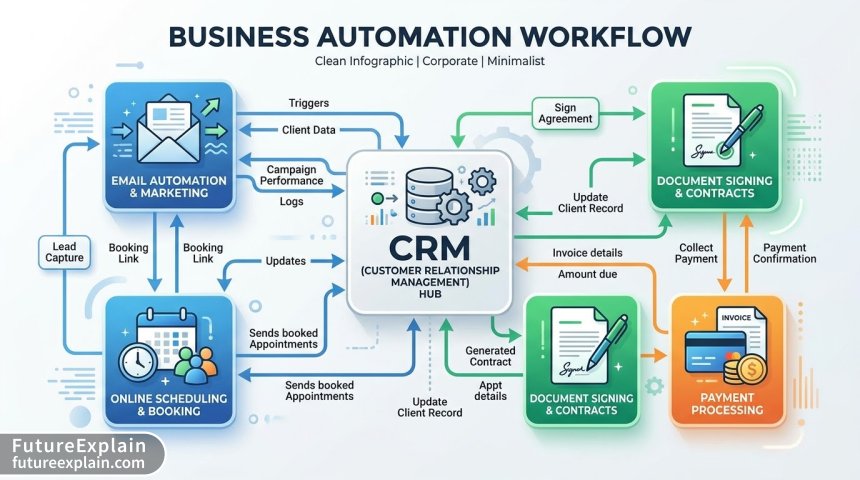
They built 7 core automations in Make:
- Trigger: New Deal Won in Pipeline → Creates client record in Google Sheets master
- Trigger: New Client Record → Sends personalized welcome email with custom intake form link
- Trigger: Intake Form Submission → Creates PandaDoc contract, schedules kickoff call, sets up QuickBooks customer
- Trigger: Contract Signed → Creates Asana project, sends internal Slack notification, processes first invoice
- Trigger: Payment Received → Schedules onboarding completion survey, updates master tracker
- Error Handling Scenario → If any step fails for 24 hours, sends alert to operations manager
- Weekly Reporting → Compiles onboarding metrics sent every Monday morning
Week 7: Testing and Refinement
The team conducted 12 test runs with dummy client data, identifying 3 critical issues:
- Timezone handling for international clients in Calendly integration
- Special character support in client names breaking the Asana project creation
- Duplicate prevention when clients submitted forms multiple times
Each issue was documented in a "Automation Playbook" that included troubleshooting steps and escalation paths.
Week 8: Staff Training and Soft Launch
Training focused on mindset shift as much as tool usage. "We emphasized that automation handles the predictable, so they could focus on the exceptional," Maria noted. Each team member received:
- 30-minute personalized training session
- One-page "What to Expect" guide
- Access to the Automation Playbook
- Direct line to Maria for first 2 weeks
They soft-launched with 2 actual clients while maintaining parallel manual tracking as backup.
The Results: Measured Impact After 90 Days
After 3 months and 14 client onboardings through the new system, GrowthPath measured these results:
Time Savings
- Administrative time per onboarding: Reduced from 4.2 hours to 1.1 hours (74% reduction)
- Total weekly time saved: 15.4 hours across the team
- Time to first value delivery: Reduced from 11 days to 6.3 days (43% faster)
Quality Improvements
- Data accuracy: 100% of onboardings had complete information (vs 77% previously)
- Client satisfaction score: Increased from 7.2/10 to 9.5/10
- Staff satisfaction: Operations team reported 40% reduction in "frustrating administrative tasks"
Financial Impact
- Direct cost: $1,420 setup + $130/month ongoing
- Value of time saved: 15.4 hours × $45/hour (blended rate) × 4.33 weeks = $3,000/month
- ROI timeline: 1.4 months to recover setup costs
- Annual net benefit: ($3,000 - $130) × 12 = $34,440
Unexpected Benefits
The team discovered several unplanned advantages:
- Scalable process documentation: The automation itself became their process documentation
- Data for continuous improvement: They could now analyze bottlenecks quantitatively
- Consistent client experience: Every client received identical, high-quality onboarding
- Reduced cognitive load: Team could focus on client needs rather than process steps
Critical Success Factors and Lessons Learned
GrowthPath identified 7 factors that made their automation successful:
1. Executive Sponsorship with Clear Metrics
The managing partner allocated budget and protected the team's time for implementation. More importantly, they defined success metrics upfront and reviewed them weekly.
2. Process First, Technology Second
"We spent 40% of our time mapping and optimizing the process before automating anything," Maria emphasized. "Automating a bad process just gives you faster bad results."
3. The 80/20 Rule for Automation
They automated the predictable 80% of cases but kept human judgment for edge cases. When automation couldn't handle something gracefully, it escalated to a human.
4. Change Management Equals Technology Implementation
They budgeted equal time for technical implementation and staff training/adoption. The "Automation Playbook" became their most referenced document.
5. Build Monitoring from Day One
Every automation included error logging and weekly health reports. They knew immediately when something broke rather than discovering it through client complaints.
6. Preserve the Human Touch
Automated emails were personalized with merge tags and followed by personal check-in calls. The system handled logistics so humans could focus on relationship building.
7. Start with a Pilot Group
The 2-client soft launch allowed them to fix issues before full deployment. This reduced risk and built confidence.
Common Pitfalls and How to Avoid Them
Based on GrowthPath's experience and industry patterns, here are the top automation failures and prevention strategies:
Pitfall 1: Automating Broken Processes
Symptom: Automation creates more work through exceptions and workarounds.
Solution: Conduct value-stream mapping to eliminate non-value-added steps before automation.
Pitfall 2: Underestimating Data Migration
Symptom: Critical historical data remains in old systems, creating dual maintenance.
Solution: Budget 25% of project time for data cleanup and migration. Start with read-only access to legacy systems.
Pitfall 3: Ignoring Error Handling
Symptom: Automation fails silently, causing downstream problems.
Solution: Build error handling for every automation step. Include manual override options.
Pitfall 4: Neglecting Compliance
Symptom: Automated processes violate data protection or industry regulations.
Solution Conduct compliance review before implementation, especially for GDPR, HIPAA, or financial regulations.
Pitfall 5: Over-Automating Customer Touchpoints
Symptom: Clients feel they're interacting with robots rather than a service provider.
Solution: Use automation for logistics, not relationship building. Schedule personal touches at key moments.
The Maintenance Reality: What Happens After Implementation
Automation isn't "set and forget." GrowthPath established ongoing maintenance practices:
Weekly
- Review automation health dashboard (10 minutes)
- Check for failed scenarios and address root causes
Monthly
- Review process metrics and identify improvement opportunities
- Update templates and documentation based on feedback
Quarterly
- Formal review of entire automation stack
- Evaluate new tools and features in their existing platforms
- Assess scaling needs as business grows
They allocated 2 hours weekly for maintenance, primarily handled by Maria with quarterly input from the full team.
Scalability: How the System Adapts to Growth
As GrowthPath continues growing, their automation system is designed to scale:
From 12 to 25 Employees
The current system can handle 3x their current client volume with minimal changes. They would need to upgrade Make to a higher tier ($59/month) and add parallel processing for high-volume periods.
From 25 to 50 Employees
At this stage, they would likely migrate to a dedicated workflow automation platform like Kissflow or Process Street ($300-500/month) for better governance and reporting. The no-code foundation makes this migration easier.
International Expansion
The system already handles multiple currencies and timezones. Adding multilingual support would require template duplication in different languages but no architectural changes.
Alternative Paths: What If Your Business Is Different?
While GrowthPath's approach worked for their B2B consulting model, different businesses might need variations:
E-commerce Businesses
Focus on post-purchase onboarding: inventory integration, shipping notifications, and follow-up sequences. Tools like Klaviyo + Shopify workflows + Gorgias for customer service.
SAAS Companies
Emphasize product adoption: in-app guidance (Userpilot), feature adoption tracking, and milestone-based emails. Tools: Intercom + Segment + custom event tracking.
Professional Services with Compliance Requirements
Add document verification, audit trails, and approval workflows. Tools: DocuSign + SecureFrame + custom compliance checklists in Process Street.
Micro-Businesses (1-3 people)
Simplified version using free tools: Calendly + Google Forms + free Zapier plan + Notion templates. Focus on 2-3 core automations rather than comprehensive system.
Getting Started: Your 30-Day Automation Plan
Inspired by GrowthPath's success? Here's a condensed plan to start your automation journey:
Week 1: Assessment
- Choose one onboarding sub-process (welcome sequence OR document collection)
- Map current steps and pain points (2 hours)
- Set one measurable goal (e.g., reduce time by 50%)
Week 2: Tool Selection
- Inventory current tools and their automation capabilities
- Research 2-3 automation options (start with Zapier free tier)
- Estimate costs and timeline
Week 3: Build First Automation
- Create one simple automation (e.g., form submission → email confirmation)
- Test with 5 dummy runs
- Document process and error handling
Week 4: Pilot and Refine
- Run with one real client/customer
- Gather feedback
- Plan next automation based on lessons learned
The Human Element: Balancing Automation with Personal Service
The greatest lesson from GrowthPath's journey wasn't technical but human: automation should enhance human connection, not replace it. They established these principles:
- Automate the predictable, humanize the exceptional: System handles routine, people handle unique situations
- Transparency with clients: They tell clients about their automated system and why it benefits them
- Empowerment, not replacement: Staff are trained to override automation when it serves the client better
- Continuous feedback loops: Client and staff feedback directly informs automation improvements
Maria summarized their philosophy: "Our automation isn't about reducing human interaction—it's about making every interaction count. By removing administrative friction, we have more mental space and time for what actually matters: understanding our clients' needs and delivering exceptional value."
Conclusion: Automation as Competitive Advantage for Small Businesses
GrowthPath's automation journey transformed a pain point into a competitive advantage. Their onboarding process, once a source of errors and frustration, now delivers consistent excellence and frees their team for higher-value work.
The keys to their success apply to any small business:
- Start with clear problems and measurable goals
- Choose tools that match your technical capability
- Invest in process understanding before technology
- Prioritize change management alongside implementation
- Build monitoring and maintenance from day one
- Preserve and enhance human connection
Small business automation is no longer the domain of tech companies with large budgets. With no-code platforms and clear methodology, businesses of any size can systematically eliminate administrative burden and focus on what they do best: serving their customers.
Visuals Produced by AI